MCP server security best practices, in the order a request meets them
OAuth gets most of the attention, but the public MCP leaks all happened after a valid sign-in. Here is the full path one request takes, and which checks your team has to add on top of the spec.
What are the MCP server security best practices that matter in 2026?#
MCP server security best practices come down to checks in a fixed order: token audience and issuer, tenant from the token, a rate limit before sign-in, an output allowlist, and writes off by default. Each one closes a door the one before it leaves open, so the order matters as much as the list.
In the NIST National Vulnerability Database on 12 October 2026, a keyword search for "Model Context Protocol" returned 23 CVE records published in 2025 and 116 published in 2026 so far.
23
2025
116
2026, to 12 October
The NVD lists 116 CVE records naming the protocol in 2026 to 12 October, against 23 in all of 2025.
| Option | CVE records, NVD keyword search for Model Context Protocol |
|---|---|
| 2025 | 23 |
| 2026, to 12 October | 116 |
Source: NIST National Vulnerability Database, queried 12 October 2026
Here is the path one request takes in a remote deployment that holds many companies' stores in one database, as in our case study. First, an Origin check refuses a browser page from another site. Then a rate limit counts the request before anyone looks at its token. Next, a verifier checks the token's signature, audience and issuer. After that, the company comes from the verified token. Then a tool-enabled check keeps the two write tools off. Finally, the result passes through a 12-field allowlist on its way out.
But the specification spells out only the token check. Its 2026-07-28 authorization page says: "MCP servers MUST NOT accept or transit any other tokens." So the rest is yours to build and test.
Checks on
6 of 6Failures reopened
0- [x] 1. OnOrigin check
- [x] 2. OnRate limit before sign-in
- [x] 3. OnToken audience and issuer
- [x] 4. OnCompany from the token
- [x] 5. OnWrite tools off
- [x] 6. OnOutput allowlist
Every check on: no failure reopened
No gapWith every check on, each request meets them in order and no failure is reopened.
Each failure comes from a primary record: the authorization specification (2026-07-28), the transports page (2025-11-25), the NVD record for CVE-2026-54052, BleepingComputer (18 June 2025) and our MCP server case study.
| Check | Stops this request | Failure it closes |
|---|---|---|
| 1. Origin check | A browser page from another site reaches the server. | The transports page says servers must validate the Origin header and answer a bad one with a 403. (MCP transports page, 2025-11-25) |
| 2. Rate limit before sign-in | Token guessing traffic with no token: the 61st request in a minute is still let through to the token check. | Failed sign-ins are never counted, the finding in our case study. (Atyantik MCP server case study) |
| 3. Token audience and issuer | A token issued for another audience or by another issuer. | The duty that "MCP servers MUST validate that access tokens were issued specifically for them as the intended audience." (MCP authorization page, 2026-07-28) |
| 4. Company from the token | A tool argument that names another company's store. | One caller reads another's data, as in the Asana leak and CVE-2026-54052, where backups "were not isolated per tenant". (BleepingComputer, 18 June 2025; NVD, CVE-2026-54052) |
| 5. Write tools off | A write the model asks for before an operator switched it on. | A write that leaves on the model's word alone. (Atyantik MCP server case study) |
| 6. Output allowlist | Notes and the sign-up IP address in a customer record. | Personal data in the model's context and in a chat log, which the first hide-list missed. (Atyantik MCP server case study) |
Where do MCP servers actually fail?#
The NIST National Vulnerability Database listed 139 CVE records naming the Model Context Protocol on 12 October 2026, 66 rated High and 24 Critical. A keyword match is not proof that every record is a bug in a server. Still, the count shows how much code now speaks the protocol.
Show data table
| Segment | Value (CVE records) | Share |
|---|---|---|
| Critical | 24 | 17.3% |
| High | 66 | 47.5% |
| Medium | 44 | 31.7% |
| Low | 5 | 3.6% |
Of the 139 records, 66 are rated High and 24 Critical.
The three cases worth a reviewer's time are isolation failures, not sign-in failures. The NVD record for CVE-2026-25536, published 4 February 2026 with a score of 7.1, describes a "cross-client response data leak" in the official TypeScript SDK. It happened when one server and transport instance was reused across several client connections, most often in stateless deployments. Then the NVD record for CVE-2026-54052, published 15 July 2026 with a score of 9.9, covers n8n-MCP in multi-tenant HTTP mode. There, backups "were not isolated per tenant", so an authenticated tenant could read other tenants' snapshots.
Finally, the third case had no CVE. BleepingComputer reported on 18 June 2025 that a logic flaw in Asana's MCP server may have exposed data from one organisation's Asana instance to users at other organisations. An Asana spokesperson told the outlet it affected roughly 1,000 customers.
If you run either package, upgrade first: the advisories list 1.26.0 as the fixed TypeScript SDK and 2.56.1 as the fixed n8n-MCP, and this summary gives no exploit steps. Read the GitHub advisory for CVE-2026-25536 and the advisory for CVE-2026-54052 for the details.
What does the MCP specification require of a server today?#
Since the 2025-06-18 revision an MCP server is an OAuth resource server, and the 2026-07-28 text says it must accept only tokens issued for it. In short, that is the core of MCP server authorization. The 2025-06-18 changelog made that change. It also added protected resource metadata, so a client can find the right authorization server. And it required clients to send resource indicators under RFC 8707, which name the resource a token is for.
The authorization server that issues those tokens is a separate choice. If you are still picking one, compare what hosted and self-hosted identity providers charge on one date and the three-year cost of self-hosted Keycloak against hosted Auth0.
The 2026-07-28 authorization page then states the duty: "MCP servers MUST validate that access tokens were issued specifically for them as the intended audience." A bad or expired token gets a 401 Unauthorized response.
| Revision | What changed for authorization | What it means in practice |
|---|---|---|
| 2025-06-18 | Servers classed as OAuth resource servers; clients must send RFC 8707 resource indicators | Publish a metadata document; check each token's audience |
| 2025-11-25 | Client ID Metadata Documents recommended; OpenID Connect discovery; 403 for a bad Origin | Refuse a bad Origin on Streamable HTTP |
| 2026-07-28 | Sessions removed; clients check iss; credentials bound to their issuer; Dynamic Client Registration "is deprecated and retained for backwards compatibility" | Never treat a session as proof of who is calling |
Source: specification changelogs for 2025-11-25 and 2026-07-28, read 12 October 2026.
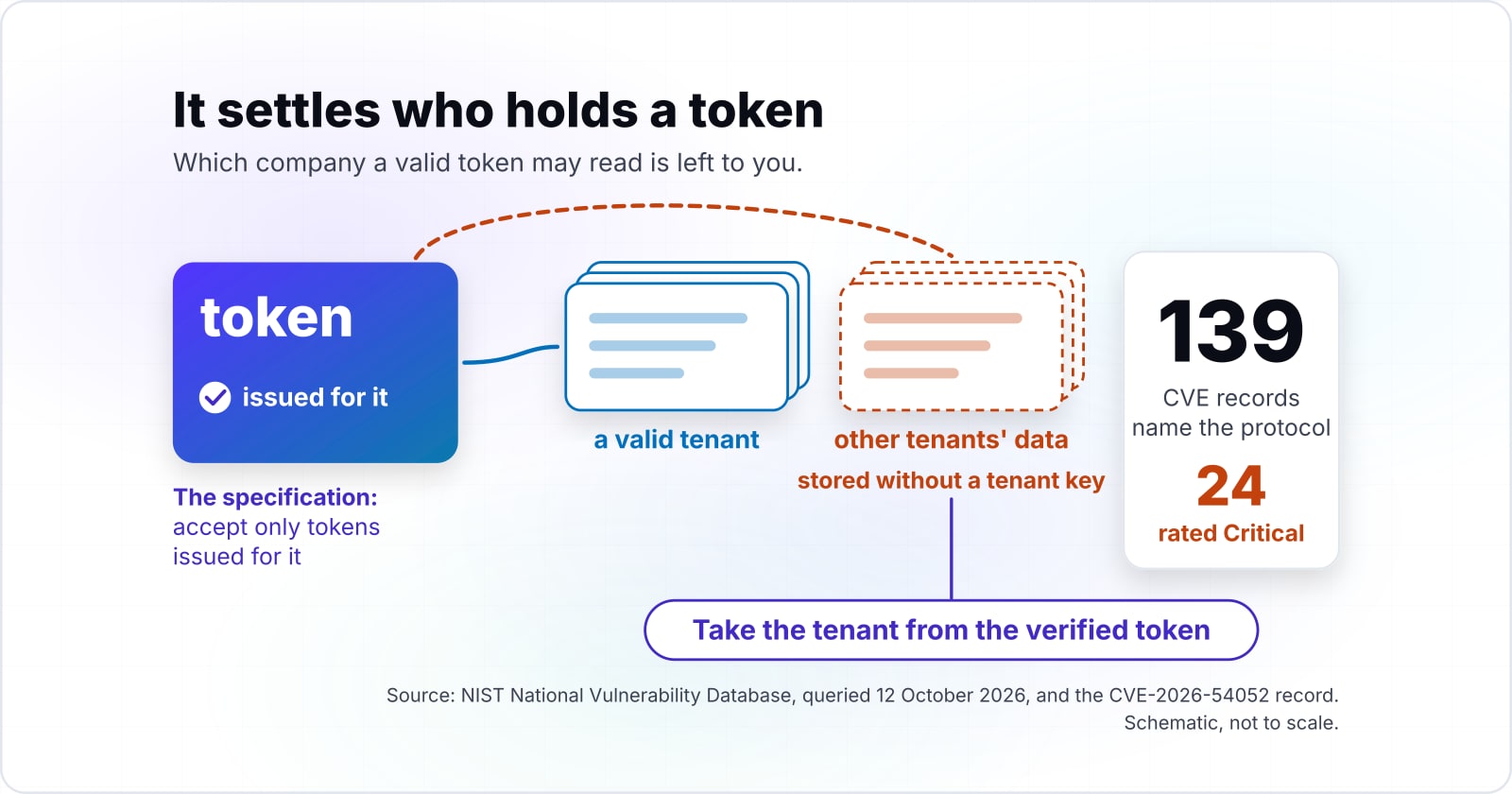
The 2025-11-25 security best practices page had already ruled out sessions as a way to authenticate a caller. However, none of these revisions says a word about tenants. Which company a valid token may read is left to you.
Where should tenant scope come from in an MCP server?#
Take the tenant from the verified token and never from a tool argument, because a model fills tool arguments and text it reads can steer what it fills. After all, a tool argument is model output. And model output is shaped by every document, ticket and web page in its context.
So every query a tool runs is scoped to the company the verified token belongs to. An argument can narrow a result inside that company, such as one store or one date range. But it can never widen the result to another company.
In our case study, the first tools accepted any store id. We scoped every tool to the caller's company before the tool set widened, and only then released the 20 read-only tools. Now a request for another company's store by its id is refused, and store lists show only the caller's own stores. Automated tests ask for another company's store and check the refusal.
Because the tool layer reuses the platform's own idea of which company owns which store, scoping follows the same rules as the platform's screens. That only works if the platform already has a clear owner for each record. If it does not, fix that model first, because no tool can scope what the platform cannot.
So the CVE-2026-54052 record shows the cost of skipping this. There, backups were stored without a tenant key, so a valid tenant reached other tenants' data.
Why should the rate limit run before authentication?#
A rate limit that runs after the token check never counts failed sign-ins, so token guessing goes unslowed; we found ours in that position and moved it ahead. In practice, the order in the code was not the order at run time.
The endpoint in our case study listed the rate limit before the token check. But the framework sorts its middleware by a fixed priority that puts authentication first. So a request without a token was refused before the limit saw it. As a result, token guessing traffic never slowed down, and the 61st request in a minute was still let through to the token check.
The fix moved the limit into its own class registered ahead of authentication. It is keyed by a hash of the token, so a raw token never sits in the limit store. Then a test sends 60 requests with no token and expects the 61st to be refused for rate. That fix is finished on a branch, to be released with a rate limit store shared across all instances.
So the lesson for a sign-off is simple. A rate limit in the config proves nothing about where it runs. Instead, ask for a test that sends traffic with no token to the real route and counts the refusals. Write that test on the first day, for every check that sits in front of a public endpoint. For the rest of the service layer behind an AI assistant, see how retries, open endpoints and real load break it in production.
How do you keep secrets, personal data and database errors out of tool results?#
Return an allowlist of named fields where a record's shape is known, redact by key where it is not, and turn database errors into one generic message. Whatever a tool returns can land in a model's context and in a chat log. Once it is there, you cannot pull it back.
First, a list of fields to hide fails open. In our case study, customer records carried the store's raw payload, and the first filter named fields to remove. It missed notes and the sign-up IP address. So we replaced the filter with an allowlist, and a customer lookup now returns only 12 named fields, with addresses dropped.
Second, some data has no fixed shape. Webhook payloads vary by platform and by topic, so an allowlist cannot be written in advance. For those, a redaction step replaces 30 known personal or secret keys at any depth in the payload. The cost is upkeep: the redaction list has to grow when a new kind of payload brings a new key.
Errors also leak. A raw database error can carry table names, column names and query text into the model's context. In practice, the handler catches it and returns one generic message, so query text never reaches the model. The full error stays in the service's own logs, where only the team can read it.
Still, the trade-off is real. A useful new field never appears until someone adds it to the allowlist. But that is the right way for a mistake to fail.
Should write tools be on by default?#
Release read-only tools first, keep write tools off until an operator switches them on, and release a sensitive value only after the backend re-checks the caller. A write or a sensitive value should go out only after a person enabled it, or after the backend checked who is asking. It should never leave on the model's word alone.
The case study exposes 24 typed tools. Its 20 read-only tools went out first. Four more are finished on a branch, including two write tools that stay off until an operator switches them on. We also mark them so a client can ask a person before calling them.
Show data table
| Item | Value |
|---|---|
| Released, read-only | 20 |
| Finished on a branch, including two write tools off by default | 4 |
The 20 read-only tools went out first; the 4 on a branch include two write tools that stay off by default.
Also, a sensitive value needs the same care as a write. In our pricing assistant case study, each company account has its own price. So the price service verifies the signature on the portal's sign-in token. Then it checks that the signed-in customer is linked to the company account and approved. Only after both checks does it ask the pricing system. We built the price tool and its sign-in check, and the client's team added the company account check after that.
There, nothing the browser sends is trusted on its own, because anything a browser sends can be edited. And the same rule holds for a model. The tool never takes the model's claim about who the customer is.
How does trust differ between STDIO and HTTP MCP servers?#
A STDIO server takes its credentials from the environment and skips the OAuth flow, so its boundary is the local machine, while an HTTP server authenticates every request. So the two need different reviews.
With STDIO, the transports page says the client launches the server as a subprocess and talks to it over standard input and output. The 2026-07-28 authorization page adds that "Implementations using an STDIO transport SHOULD NOT follow this specification" and should take credentials from the environment. So a STDIO process is trusted as its local operator. The risk sits in what gets installed. The security best practices page warns that a local process may be reachable by other processes running on the same machine. It also warns that an attacker can plant a malicious startup command in a client's configuration.
With HTTP, by contrast, nothing is trusted that was not checked on that request. Since 2026-07-28 there is no session to lean on. The transports page also says servers must validate the Origin header and answer a bad one with a 403. And when running locally, they should bind only to 127.0.0.1, not to every network interface.
In our case study, both transports are in use. Remote calls pass the rate limit and then the token check. Meanwhile, a local process is run by the platform's own operators.
| STDIO | HTTP | |
|---|---|---|
| How the client reaches it | Launches the server as a subprocess, over standard input and output | Over a network; every request is authenticated |
| Credentials | From the environment; skips the OAuth flow | A token checked on that request; no session since 2026-07-28 |
| Boundary | The local machine; trusted as its local operator | Nothing trusted that was not checked on that request |
| What to review | What gets installed: other local processes, a planted startup command | The Origin header, a 403 for a bad one, and binding only to 127.0.0.1 when local |
Which specification pages should you build the checks from?#
Build the checks from the specification in this order: RFC 9728 for the metadata document, the 2026-07-28 authorization page for token checks, then the security best practices page. Each page maps to a check above.
RFC 9728, OAuth 2.0 Protected Resource Metadata
The document at /.well-known/oauth-protected-resource that names the resource and its authorization_servers.
The 2026-07-28 authorization page
The 401 Unauthorized challenge with a WWW-Authenticate header that points to that document, the audience check under RFC 8707, and the rule against passing tokens on.
The 2025-11-25 security best practices page
Why token passthrough is forbidden, the confused deputy problem, and the session rules.
The 2025-11-25 transports page
The Origin check and the Forbidden status that answers a bad one.
Read them in this order: RFC 9728, the 2026-07-28 authorization page, the 2025-11-25 security best practices page and the 2025-11-25 transports page.
However, none of these pages covers tenant scope, rate limit order or output shape. Instead, those come from your own data model.
What is the smallest correct token check for an MCP server?#
The smallest correct check serves a metadata document, answers a missing token with a 401 Unauthorized response that points to it, and rejects any token issued for another audience. Four short steps in TypeScript cover the mandatory part. The company then comes from the verified claims in the last step.
Then the handler below uses only the standard Request and Response types, so it runs on any runtime that has them. You pass in your own verify function, which checks the token's signature and expiry against your authorization server's keys. For example, the URLs and the company_id claim name are placeholders.
const RESOURCE = "https://mcp.example.com/mcp";
const ISSUER = "https://auth.example.com";
const METADATA = "https://mcp.example.com/.well-known/oauth-protected-resource";

type Claims = { aud: string | string[]; iss: string; company_id: string };
type Verify = (token: string) => Promise<Claims | null>; // signature and expiry

export async function handle(req: Request, verify: Verify): Promise<Response> {
  // 1. Serve the protected resource metadata document (RFC 9728).
  if (new URL(req.url).pathname === "/.well-known/oauth-protected-resource") {
    return Response.json({ resource: RESOURCE, authorization_servers: [ISSUER] });
  }
  // 2. No token: a 401 Unauthorized that points the client to the metadata document.
  const [scheme, token] = (req.headers.get("Authorization") ?? "").split(" ");
  const challenge = ["Bearer", `resource_metadata="${METADATA}"`].join(" ");
  if (scheme !== "Bearer" || !token) {
    return new Response(null, { status: 401, headers: { "WWW-Authenticate": challenge } });
  }
  // 3. Wrong audience or issuer: refuse it, and never pass it on.
  const claims = await verify(token);
  const audiences = claims ? [claims.aud].flat() : [];
  if (!claims || !audiences.includes(RESOURCE) || claims.iss !== ISSUER) {
    return new Response(null, { status: 401, headers: { "WWW-Authenticate": challenge } });
  }
  // 4. The company comes from the verified claims, never from tool arguments.
  return Response.json({ company: claims.company_id });
}
In production, step 4 hands the company to every tool's query rather than returning it. Put the rate limit in front of this handler, not inside it.
When is a remote OAuth setup the wrong tool for an MCP server?#
A single operator running a server on their own machine over STDIO is the wrong case for remote OAuth, and a fixed report needs no server at all. Remote OAuth earns its cost only when callers who are not the operator reach it over a network.
First, a local tool for one person. The 2026-07-28 authorization page says a STDIO setup should not follow the OAuth flow. Instead, take credentials from the environment, and spend the review on where the binary came from.
Second, one fixed question with one answer. If one report answers what people keep asking, a scheduled report or a dashboard is cheaper than a tool layer. Our case study makes the same point.
Third, data that cannot leave your network for any AI provider. Then a local client run by your own operators is the only safe way in, and remote access should wait.
If you are still deciding whether to build one at all, our decision guide covers that choice first.
What should you read or check next?#
The case study shows how these checks were built into a live platform, and the decision guide covers whether a platform needs an MCP server at all. So if the question is how to secure an MCP server that already exists, test the checks in request order.
Our commerce platform case study shows company scoping, the rate limit fix and the allowlist in a running system. The pricing assistant case study shows a value released only after the backend checks the caller. For the API styles such a layer usually sits in front of, see API types and architectures.
If you want an outside review of these controls, our security and compliance work covers that. And if it sits on top of APIs you already run, see our API integration services. But the four specification pages, read in order, are enough to build and test every check on your own.