n8n vs building custom AI agents: when an n8n AI agent is enough
You have a process to automate and someone has said to just do it in n8n. Often that is right. The question is which single step needs judgment, and where its record has to live.
n8n vs building custom AI agents: which layer does each job?#
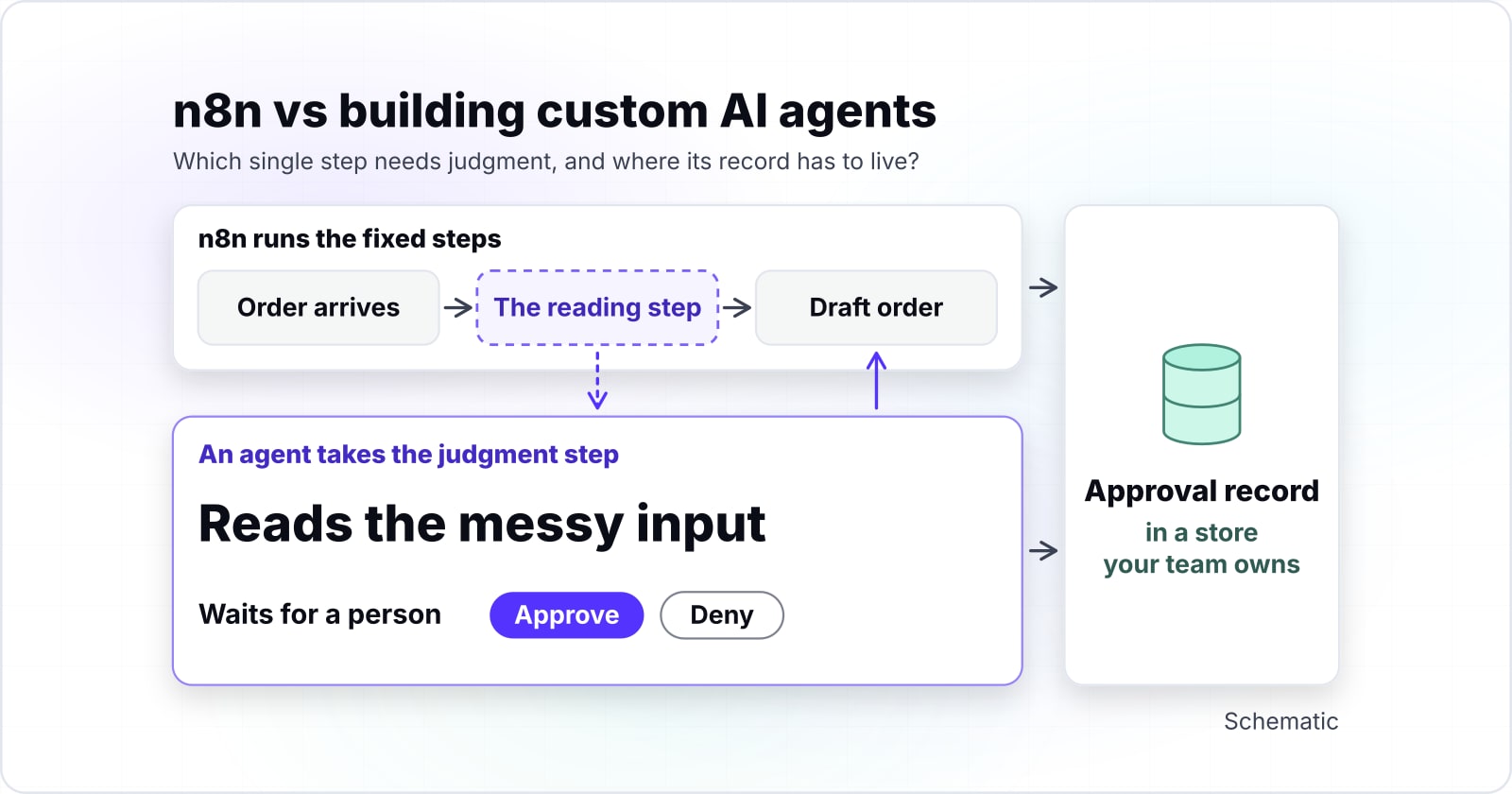
n8n is a workflow tool and LangGraph and Agno are code frameworks for agents, so the usual answer is both: n8n runs the fixed steps and an agent takes the step that needs judgment. The two products describe themselves in different terms. n8n's AI integration docs say it connects model providers to your workflows. There you can "add tools and memory, and combine several models in one workflow." In other words, the model is one node inside a flow that n8n owns.
LangGraph is LangChain's agent framework. Its overview calls it a "low-level orchestration framework and runtime for long-running, stateful agents." Agno's introduction calls Agno the orchestration and service layer around your agents. It exposes them through a REST application programming interface (API) and an MCP (Model Context Protocol) server. Since both are code, your software engineers write each agent and your team runs it.
So the layers stack rather than compete. A workflow tool moves data between systems on a trigger. Meanwhile, a framework gives one hard step its own state, its own pauses and its own record. Seen that way, n8n vs custom AI agent is rarely an either-or.
What does "just do it in n8n" assume about your process?#
The advice assumes your process is a fixed run of steps with clear branches, and most processes are, apart from one step where a person reads something messy and decides. Order entry is a fair example. An order arrives, its fields are read and its lines are matched to the catalogue. Then a draft order is created. In practice, every step is fixed except the reading, because every customer sends a different layout.
Our AI purchase order entry case study shows that split on a real product. In that build, one AI service reads each emailed PDF (Portable Document Format) purchase order, which is the messy input. Then plain rules match every line to the store catalogue. After that, a person checks the flagged fields before one click sends the order. A cloud workflow engine runs one run per order.
| Step in the build | Fixed or judgment | Who does it |
|---|---|---|
| An emailed PDF purchase order arrives | fixed | a cloud workflow engine, one run per order |
| Read the purchase order | judgment: the messy input | one AI service |
| Match every line to the store catalogue | fixed | plain rules |
| Check the flagged fields | judgment | a person |
| Send the order | fixed | one click |
Also, the study's record turned down "an agent framework that loops until the order looks done", because the job has a fixed shape. That is the point. In short, the advice to use a workflow tool was right for the fixed steps. However, it said nothing about the one step that needed a model to read and a person to decide. So find that step in your own process before choosing anything.
When is n8n on its own enough?#
n8n is enough when the steps are fixed, the branches are clear, the volume is modest and nobody has to approve anything halfway through a run. Lead routing from a web form, a weekly report, a sync between two systems: each one runs the same path every time. If a branch fails, the run fails where someone can see it.
n8n's plans page, read in November 2026, says "An execution is a single run of your entire workflow," however many steps it has. So a ten-step flow and a two-step flow count the same per run. As a result, adding steps is cheap while the number of runs stays inside the plan.
The saved-run caps are generous for most teams, and they set the size of your history window.
Show data table
| Item | Value |
|---|---|
| n8n Cloud Starter | 2,500 runs |
| n8n self-hosted default | 10,000 runs |
| n8n Cloud Pro | 25,000 runs |
| n8n Cloud Enterprise | 50,000 runs |
Saved-run caps rise from 2,500 on Cloud Starter to 50,000 on Enterprise, and they set the size of your history window.
In n8n's cloud data management docs, accessed 18 November 2026, Start and Starter keep at most 2,500 saved executions. In the same docs, Pro keeps 25,000 and Enterprise keeps 50,000. If your process runs a few dozen times a day and no one asks about last month's runs, these numbers never bite. In that case n8n alone is the right answer, and a framework build would only add code to own.
What do n8n's AI Agent node and human review already cover?#
n8n already pauses a run for a person: a tool with human review enabled stops the workflow until someone approves or denies it, per n8n's docs. Its human-in-the-loop for tools page puts it plainly: "the workflow pauses and waits for a person" to approve or deny. The request can go through Slack, Telegram or n8n's own chat. If the reviewer denies it, the action is cancelled and the AI is told.
That covers a lot. For instance, an n8n AI agent that drafts a refund can be held back from sending it until a person clicks approve. The same docs name the cases it is meant for. These are tools that delete data, send external messages or make purchases, and compliance rules that need a human sign-off.
n8n can also wait outside the AI layer. The Wait node docs say a paused workflow offloads the run's data to the database. Then it resumes after a time, at a set date, on a webhook call or on a form submission. So pausing for a person does not, on its own, need a custom build. Instead, the better question is what happens to the record once the run ends.
How long does n8n keep the record of a run?#
n8n prunes finished runs by default, keeping 7 days of history on Cloud Starter, 14 on a self-hosted default and 30 on Pro, according to n8n's docs, accessed November 2026. The execution data page is plain about it: "n8n enables pruning by default." On a self-hosted instance, that page, read in November 2026, says a finished run is deleted once it is older than 336 hours, which is 14 days. It is also deleted once the total passes 10,000 runs, oldest first.
Show data table
| Item | Value |
|---|---|
| n8n Cloud Starter | 7 days |
| n8n self-hosted default | 14 days |
| n8n Cloud Pro | 30 days |
By default n8n keeps 7 days of finished runs on Cloud Starter, 14 on a self-hosted default and 30 on Pro.
In short, the history window is a debugging tool, not an audit trail. To be fair to n8n, its self-hosted docs make two exceptions. Runs that are still waiting are never pruned, and runs you tag or rate are kept. Also, Enterprise retention has no time limit. Even so, the default is a window of days.
So picture a question three weeks after the fact: who approved this order, and what did the model see? On Starter or a default self-hosted instance, that run is gone unless the approval was written somewhere else. Therefore, if your process must answer for its decisions later, plan where that record lives on day one. That holds whichever tool runs the flow.
Which signs say a process has outgrown a workflow tool?#
A process has outgrown a workflow tool when its inputs are messy, its decisions need judgment, its pauses last days, or its records must outlive the tool's own history. Because each one is concrete, you can check it against your own process in a few minutes.
That last sign matters more than it looks. n8n's self-hosted concurrency control docs, updated in October 2026, are direct. They say that in regular mode "n8n doesn't limit how many production executions may run at the same time." Then the same page says too many concurrent runs can slow the instance down. You can set a limit, but it is off by default. On n8n Cloud, by contrast, the Cloud concurrency page, read in November 2026, says n8n limits concurrent runs on each Cloud instance by its plan, and extra runs wait in a queue. Still, one sign alone rarely justifies a build. Two or three together usually do.
What do LangGraph and Agno handle at those points?#
LangGraph saves a run's state at every step and resumes it from a thread id, and Agno pauses a run until its approvals are resolved, both by their own docs. When a step calls for input, LangChain's interrupts docs say "LangGraph saves the current graph state and waits for you to resume execution with input." A thread id points back to that saved state, so the run can resume later, once the person answers.
Also, the persistence docs name two stores. Checkpointers keep one run's state for pauses, replays and recovery from failure. Stores keep data across runs, such as facts an agent should remember. Because both write to a database your team chooses, the record lasts as long as you keep it. The interrupts page also advises a durable checkpointer in production. That means someone on your team picks, runs and backs up that database.
Meanwhile, Agno works at a similar point. Its human-in-the-loop overview says a run "pauses until the HITL requirements are resolved by the admin, user or external tool." HITL is its short form for human-in-the-loop. The same page lists admin approval "with persistence, resolution tracking, and audit trails." Then the runtime page describes AgentOS, Agno's service layer. It serves agents as an API and keeps sessions in your own database.
| At this point | LangGraph, by its docs | Agno, by its docs |
|---|---|---|
| A pause for a person | saves the current graph state and waits for you to resume execution with input | pauses until the HITL requirements are resolved by the admin, user or external tool |
| Resuming later | a thread id points back to the saved state | the run waits until its approvals are resolved |
| The record | checkpointers and stores write to a database your team chooses | admin approval with persistence, resolution tracking, and audit trails |
| Serving many callers | a runtime for long-running, stateful agents | AgentOS serves agents as an API and keeps sessions in your own database |
So framed as n8n vs LangGraph or Agno, the question misses the layer. In short, a framework gives the judgment step a pause, an approval and a record that you own. In exchange, you own the code, the database and the service that runs it. If you are already choosing between frameworks, our LangGraph and CrewAI comparison splits them by layer in the same way.
What does each path cost to keep running?#
n8n's quiet failures are defaults: no workflow timeout and no limit on concurrent production runs in self-hosted regular mode, while a framework build's cost is the software engineers who keep it running. Both costs are real, but they arrive at different times.
First, on n8n, the cost hides in settings that work at low volume and fail quietly as volume grows. n8n's executions settings page, read in November 2026, lists the default workflow timeout as -1, which disables it. So a stuck run can sit until someone notices. The same page says storing run data in S3 (Amazon's file storage) needs a self-hosted Business or Enterprise plan. Also, history shrinks as volume grows, because the saved-run cap fills faster.
At higher daily volume, the saved-run cap binds before the day limit does, and the history window shrinks.
Show data table
| Dimension | n8n Cloud Starter | n8n self-hosted default | n8n Cloud Pro |
|---|---|---|---|
| 40 runs a day | 7 days | 14 days | 30 days |
| 200 runs a day | 7 days | 14 days | 30 days |
| 1,000 runs a day | 2 days | 10 days | 25 days |
| 3,000 runs a day | 0 days | 3 days | 8 days |
At 1,000 runs a day the saved-run cap binds first: Starter keeps 2 days, the self-hosted default 10 and Pro 25.
So here is a worked example from those n8n limits, accessed 18 November 2026. Say an order flow runs 40 times a day. Then, on n8n's November 2026 limits, it keeps 7 days on Starter, 14 on the self-hosted default and 30 on Pro, because the day limit binds first. Now say it runs 1,000 times a day. In that case, by the same n8n docs, the saved-run cap binds first, so Starter keeps 2 days, the self-hosted default keeps 10 and Pro keeps 25.
Days of run history your volume keeps
Put in how many times your flow runs a day. It computes the days of history each n8n plan keeps, from the saved-run caps and retention limits n8n documents.
Days kept on Cloud Starter
2
- Days kept on the self-hosted default
- 10
- Days kept on Cloud Pro
- 25
Arithmetic from n8n's cloud data management and execution data docs, accessed 18 November 2026. Modelled, not measured.
Second, a framework build costs differently. You pay up front for the build, and then for the people who own it. Someone patches it, watches it and answers when it fails at night. Agent code also brings its own security work. For example, our MCP server security post covers a published flaw in the n8n-MCP package. The same care applies to any agent you wire into internal systems.
Moving off n8n later is the cost people forget. Every flow is rebuilt in code and every connection is set up again. Meanwhile, the old run history stays behind in n8n until it is pruned. Therefore, if you can already see the signs, move the judgment step out early, while it is one step.
Which questions decide n8n, a framework build, or a mix?#
Answer each question yes or no for your own process: mostly no points to n8n, a yes on judgment points to a mix, and yes across the board points to a framework build.
| Question about your process | If yes | If no |
|---|---|---|
| Do the inputs arrive in layouts you cannot list in advance? | the reading step goes to an agent | n8n reads them |
| Does a step need a judgment a rule cannot make? | a mix: n8n around an agent step | n8n alone |
| Does a run wait days for a person, then resume? | n8n can wait; check where the record lives | n8n alone |
| Must you show who approved what, after n8n's history window has passed? | write the record to a store you own, or build | n8n's history is enough |
| Does each run need a cap on model spend? | code that someone owns, in either layer | n8n alone |
| Do several teams or products call the same agent at once? | a framework build with its own service | n8n alone |
So mostly no means stay in n8n. A yes on the second question with mostly no elsewhere is the usual mix. In that case n8n triggers the flow and moves the data, and one agent takes the judgment step. If the last three are yes as well, that points to a framework build. By then sessions, records and limits are the product, not a side effect.
When is a custom AI agent the wrong tool?#
A custom AI agent is the wrong tool when the steps never change, no step needs judgment, and nobody on the team will own code after launch. In that case, stay in n8n and turn on human review for the one risky tool, as n8n's human review docs describe. As a result, the approval happens where the flow already runs.
An unmaintained build is worse than a workflow that works. So pick the smaller tool when the test comes back mostly no.
Where should you go from here?#
If the test pointed to a mix or a framework build, start with the one step that needs judgment and keep everything else where it already runs. Then name that step, write down what a wrong answer costs, and decide where its record lives.
For that split from the business side, read our post on AI purchase order entry for business-to-business sellers. Once you are choosing a framework, the LangGraph and CrewAI comparison is the next read. And before an agent touches internal systems, read the MCP server security post.
When the step is named, we can help design the AI agent for it. We can also build the API integrations that wire n8n, that agent and your systems together. However, the docs linked above are enough to make the call on your own.