Why RAG fails in production, and the service fixes that come before retrieval
The demo answered every question in the meeting. Then real people started asking at once, and the trouble turned out to sit in the code around the model, not in the model.
Why RAG fails in production: is it the retrieval or the service around it?#
When a RAG demo that answered well starts failing with real users, look first at the service around the pipeline: the server, the connections, the retries, the endpoints and the tests. A demo has one person asking one question at a time. But a service has many people asking at once. It also has a chat platform that retries and a model provider that sometimes fails.
Barnett and colleagues made the same point in a January 2024 paper on RAG systems. Their paper draws seven failure points from three case studies. As they put it, "validation of a RAG system is only feasible during operation". So the demo cannot show you the failures that matter most.
Atyantik's Slack assistant case study, published 12 October 2026, shows what that looks like in practice. At first, the assistant answered well in testing. However, before it could run as a service, it had seven gaps:
- A development web server where a production server belongs.
- A new database connection for every query.
- Shared state across threads with no lock.
- Internal endpoints with no access control of their own.
- A frozen "Analyzing your request..." message when the model was briefly unavailable.
- Duplicate Slack events, where two threads could both accept the same event.
- No automated tests.
| Gap | How it shows under real users | The fix |
|---|---|---|
| A development web server | It fails when many people ask at once | A production server with a fixed number of workers |
| A new database connection for every query | The database runs out of connection slots | A connection pool sized under the database's limit |
| Shared state across threads with no lock | Two threads can both accept the same event | The duplicate check and the per-user limits in one locked step |
| Internal endpoints with no access control of their own | Internal describes where it was meant to be called from, not who can call it | A shared-secret check on every internal endpoint, secrets validated at start-up |
| A frozen "Analyzing your request..." message | It looks like the assistant is still working | Retries with backoff and jitter, then a try-again message |
| Duplicate Slack events | One question can arrive four times | A duplicate check on the event id |
| No automated tests | The next change can undo any fix made once | Tests on every build, before any release |
Yet none of the seven is about chunking, embeddings or ranking. Therefore, RAG in production is a service problem first and a search problem second. Next comes each gap in turn, with its fix and its cost.
What does an unhardened service layer cost a RAG pilot?#
In the worked example, one slow question to a chat assistant arrives four times and costs 12 model calls, so the pilot loses budget and trust together.
Also, the market figures point the same way. Gartner predicted on 29 July 2024 that "At least 30% of generative AI (GenAI) projects will be abandoned after proof of concept by the end of 2025". In that release, Gartner named poor data quality, inadequate risk controls, escalating costs or unclear business value as the causes. Meanwhile, Fortune reported on 18 August 2025 that MIT NANDA's study found about 5% of AI pilot programs achieve rapid revenue acceleration. In that MIT report, the 95% failure rate "represents the clearest manifestation of the GenAI Divide". Still, Fortune adds that MIT's research points to flawed enterprise integration, not model quality.
Moving an AI proof of concept to production is judged on two things anyone can see. One is the cost of each answer, and the other is whether people trust it. Now take the worked example. Say your assistant takes longer than three seconds to acknowledge a Slack event. Under Slack's Events API docs, read in October 2026, that counts as a failed delivery. So Slack retries three times, and one question arrives as four deliveries.
When there is no duplicate check, each delivery runs the full answer path. Also, say your code tries a failing model call up to three times per delivery. Then one question can cost 4 times 3, or 12, model calls. Then the thread can show up to four answers to one question.
Show data table
| Item | Value |
|---|---|
| One delivery, one attempt | 1 |
| Four deliveries, one attempt each | 4 |
| Four deliveries, three attempts each | 12 |
Four deliveries with three attempts each turn one question into 12 model calls.
Once a duplicate check runs on the event id, the same question comes back to one delivery. It then makes at most three attempts. As a result, the user sees one answer, and the bill shows one question's worth of calls.
Your own model calls per question
Set your deliveries per question, your model attempts per delivery and whether a duplicate check runs on the event id; the calculator multiplies them.
Model calls per question
12
- Answers posted in the thread
- 4
Arithmetic from Slack's Events API docs, read October 2026. Modelled, not measured.
Why do a development server and a connection per query break under real users?#
A development server and a new database connection per query hold up for one tester and fail when many people ask at once. Because both are the defaults a prototype starts with, both survive every demo.
A development server is built for one person editing code. Flask, a common Python web framework, is one example. In its deployment guide, Flask says "Do not use the development server when deploying to production". Instead, it points to a dedicated WSGI server.
A connection per query fails more quietly. First, each request opens a new database connection, uses it once and closes it. While traffic is light, that only adds a little delay. Under load, though, the database runs out of connection slots. PostgreSQL is one common example. Its documentation, read in October 2026, says the default for max_connections is "typically 100", with three slots held back for superusers. Since a RAG answer can run several queries, a busy hour can reach that ceiling with far fewer people than connections.
Barnett and colleagues' January 2024 paper notes the same pressure from the model side. It says "RAG systems struggle with concurrent users due to rate limits and the cost of LLMs". In short, load breaks the parts a demo never stresses.
So the fix is two changes. First, run a production server with a fixed number of workers. Second, give the service a connection pool sized under the database's limit. For example, say four workers each have a pool of ten connections. Then they hold 40 connections at most, whatever the traffic. Each separate store, such as a vector store beside the database, needs a pool of its own, which is one reason to weigh one database that keeps documents, vectors and graph links together.
Why do duplicate events and stacked retries multiply the work?#
Slack retries a delivery three times when no HTTP 2xx arrives within three seconds, so a slow answer path can run the same question again and again. Slack's Events API docs, read in October 2026, state the rule directly. In Slack's words, "Your app should respond to the event request with an HTTP 2xx within three seconds."
Next, the same Slack page, read in October 2026, sets out the retry timetable. The first retry comes nearly immediately, the second after 1 minute and the third after 5 minutes. Also, each retry carries an x-slack-retry-num header with the attempt number, 1, 2 or 3. And every delivery carries the same event_id, which is the key a duplicate check needs.
Retries also stack across layers. The Amazon Web Services Builders' Library article on timeouts and retries, read in October 2026, gives an example. It works through a five-layer call stack with three retries at each layer. In that article, read in October 2026, Amazon writes that "If each layer retries independently, the load on the database will increase 243x".
Show data table
| Item | Value |
|---|---|
| 1 layer | 3 x |
| 2 layers | 9 x |
| 3 layers | 27 x |
| 4 layers | 81 x |
| 5 layers | 243 x |
With three retries at every layer, five layers raise the load on the bottom layer 243 times.
Although a chat assistant has fewer layers, the shape is the same. Slack retries the delivery, your code retries the model call, and a client library may retry under that. So each layer that retries on its own multiplies the others. Instead of blaming Slack, treat the retries as documented behaviour that your service has to absorb once.
How do you stop shared state and duplicate deliveries from racing?#
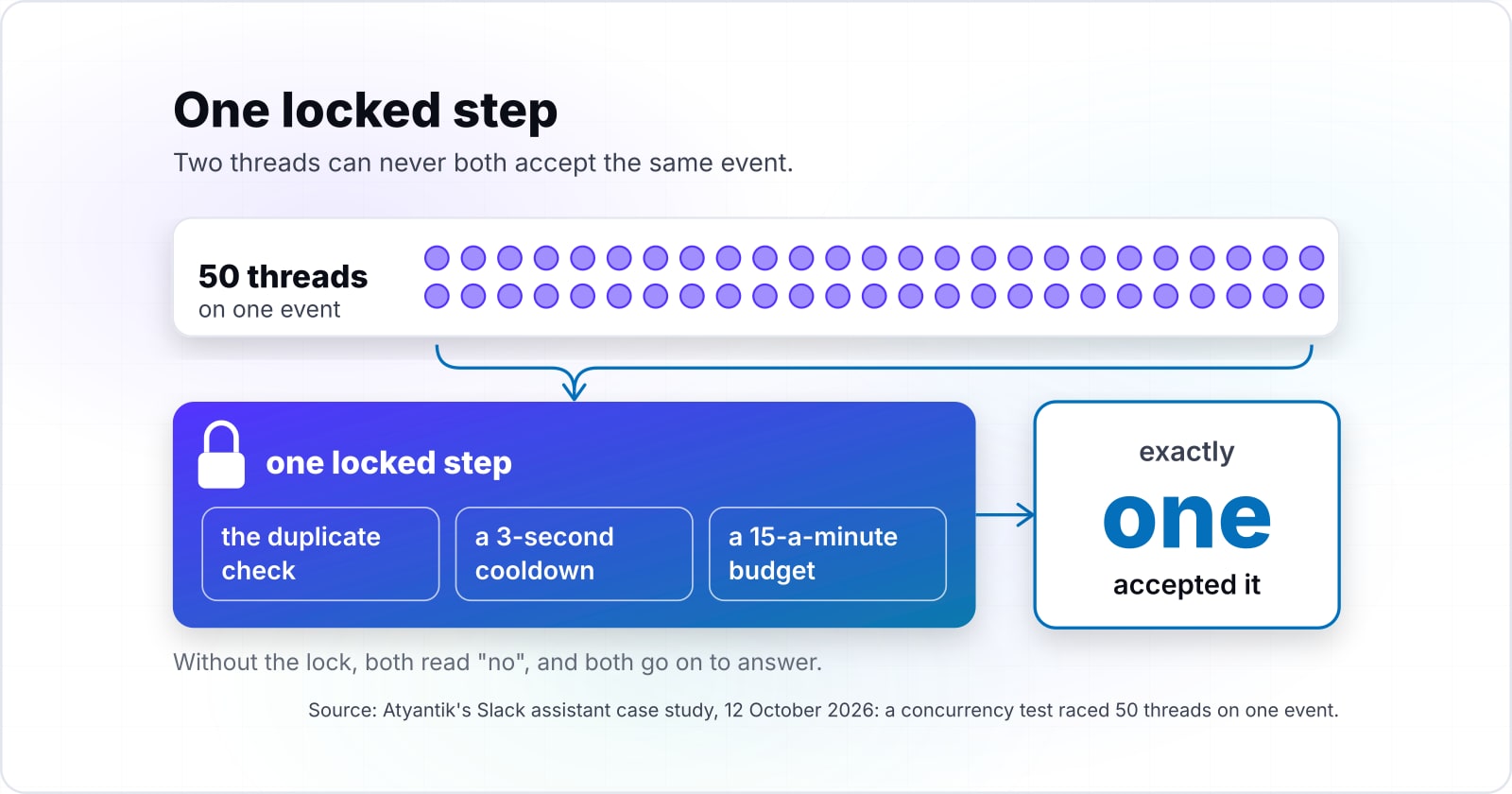
Put the duplicate check and the per-user limits in one locked step, so two threads can never both accept the same event. Without the lock, two threads can each check "have I seen this event?" Both read "no", and both go on to answer.
Atyantik's Slack assistant case study, published 12 October 2026, describes this fix. There, the duplicate check, a 3-second cooldown and a 15-a-minute budget run as one locked step. In that case study, a concurrency test raced 50 threads on one event, and exactly one accepted it. In Atyantik's case study, published 12 October 2026, old records are pruned every 100 events or 120 seconds. That keeps the memory from growing without bound.
But the lock matters more than the check. A duplicate check that reads and then writes in two steps still lets a retry slip through. Because the read and the write sit inside one lock, the second thread always sees the first one's record.
Still, the fix has a cost, and the case study names it. The state lives in memory, in one process with four threads. Therefore, the service cannot run a second worker until that state moves to a shared store. So the limit is written into the container file and the code comments, where it cannot be missed. That trade made sense because the controls had to work without new infrastructure. However, a team that expects to scale out soon should plan the shared store from the start.
| Where the state lives | What it does | What it costs |
|---|---|---|
| In memory, in one process with four threads, under one lock | The duplicate check, a 3-second cooldown and a 15-a-minute budget run as one locked step, without new infrastructure | The service cannot run a second worker until that state moves to a shared store |
| A shared store | Lets the service scale out past one worker | New infrastructure, planned from the start by a team that expects to scale out soon |
What should the user see when the model call fails?#
Retry a failed model call with backoff and jitter, then replace the placeholder with a clear try-again message instead of leaving it frozen. After all, a frozen placeholder is the failure users remember, because it looks like the assistant is still working.
In Atyantik's Slack assistant case study, published 12 October 2026, users could see a frozen "Analyzing your request..." message. It happened when the model was briefly unavailable. So the fix was model retries with backoff, then a try-again message in place of the placeholder.
Here, backoff means waiting longer after each failure. Then jitter adds a random spread to each wait, so many clients do not retry at the same moment. Also keep the number of attempts small, such as the three in the worked example above. And count your attempts together with every other layer that retries, because they multiply.
Next, the same case study records a second failure worth planning for. The model provider retired the model version the assistant was configured for. After that, every model call failed until a configuration change pointed it at a current version. Yet no code changed. As a result, the next step it names is a start-up check that makes one small model call. Such a check turns a retirement into a warning before it becomes an outage.
How do you close internal endpoints and catch bad secrets before the first request?#
Give every internal endpoint its own shared-secret check, validate secrets at start-up, and answer a long-running trigger at once while the job runs in the background. "Internal" only describes where an endpoint was meant to be called from, not who can call it.
In Atyantik's Slack assistant case study, published 12 October 2026, internal endpoints had no access control of their own. So the fix added a shared-secret key on those endpoints and checked secrets when the service started. As a result, a missing or wrong secret stops the service at start-up, not at the first user's question.
Long jobs need the same care. For example, in Atyantik's case study, published 12 October 2026, a scheduled caller started the nightly sync and gave up after 5 seconds. Meanwhile, syncing 25 documents from Google Drive alone took 40.6 seconds in testing. So the work ran about eight times longer than the caller would wait.
5 s
Caller's timeout
40.6 s
Drive sync of 25 documents, in testing
The sync ran about eight times longer than the caller would wait.
| Option | seconds |
|---|---|
| Caller's timeout | 5 s |
| Drive sync of 25 documents, in testing | 40.6 s |
Source: Atyantik Technologies, AI Slack bot case study, 2026
Instead, the fix starts the sync in the background and answers the caller at once. It also refuses a second run while one is going. In the case study, that change is finished on its own branch and not yet merged. Still, the pattern applies to any long trigger: acknowledge first, then work.
Which official pages do you build the service layer from?#
Build from the official pages in this order: the framework's deployment guide, the database's connection limits, Python's Lock, Slack's Events API retry rules and Slack's rate limits. The list uses one common example stack, a Python web service on Flask with PostgreSQL. If your stack differs, find the matching page in its own docs.
- Flask's deployment guide. Take one thing from it: run a production WSGI server, never the development server.
- PostgreSQL's connection settings. Take
max_connections, the ceiling your pool must stay under. - Python's threading module. Take
Lock, with itsacquire()andrelease(), used as awithblock. - Slack's Events API. Take the three-second reply, the
x-slack-retry-numheader and theevent_idyou de-duplicate on. - Slack's rate limits. Take the HTTP 429 Too Many Requests error and its
Retry-Afterheader. Also note thatchat.postMessagegenerally allows one message per second per channel.
Together, the five cover every fix named earlier, from the production server to the rate limits.
| Official page | Take from it | The fix it serves |
|---|---|---|
| Flask's deployment guide | Run a production WSGI server, never the development server | The production server |
| PostgreSQL's connection settings | max_connections, the ceiling your pool must stay under | The connection pool |
| Python's threading module | Lock, used as a with block | One locked step for shared state |
| Slack's Events API | The three-second reply, the x-slack-retry-num header and the event_id | The duplicate check |
| Slack's rate limits | HTTP 429 Too Many Requests and its Retry-After header | The rate limits |
What does the smallest correct de-duplication step look like in code?#
The smallest correct version is one function that checks the event id and the user's budget under a single lock and acknowledges before any model call. Because the sketch uses only Python's standard library, it runs as written with python3. Then, in a real service, you call handle() from your web framework's request handler.
import threading
import time

_lock = threading.Lock()
_seen = {}        # event_id -> time it was accepted
_asks = {}        # user id -> times of that user's recent questions
PER_MINUTE = 10   # an example budget; set your own
KEEP_SECONDS = 600


def accept(event_id, user):
    """True for exactly one delivery of an event, within the user's budget."""
    now = time.monotonic()
    with _lock:
        if event_id in _seen:
            return False
        recent = [t for t in _asks.get(user, []) if now - t < 60]
        if len(recent) >= PER_MINUTE:
            return False
        _seen[event_id] = now
        _asks[user] = recent + [now]
        for old in [k for k, t in _seen.items() if now - t > KEEP_SECONDS]:
            del _seen[old]
        return True


def handle(payload, headers, answer):
    """Acknowledge at once; answer in a background thread."""
    retry = headers.get("x-slack-retry-num")
    if retry:
        print("retry", retry, "of", payload["event_id"])
    event = payload["event"]
    if accept(payload["event_id"], event.get("user", "")):
        threading.Thread(target=answer, args=(event,), daemon=True).start()
    return 200  # reply inside three seconds, even to a retry


if __name__ == "__main__":
    wins = []
    racers = [threading.Thread(target=lambda: wins.append(accept("Ev1", "U1")))
              for _ in range(20)]
    for t in racers:
        t.start()
    for t in racers:
        t.join()
    print(sum(wins))  # prints 1: one thread accepted the event
So four steps happen in order. First, handle() reads the event_id and the retry header. Second, accept() checks for a seen event and the user's budget under one lock. Third, handle() returns 200 at once and starts the answer in a threading.Thread. Finally, old records are pruned on every accepted event. Also, a user over budget should get a short "slow down" reply in a real service, not silence.
What do tests, a release path and alerting look like once the assistant is live?#
Run the tests inside the built image on every build, ship through a reviewed release that backs up production first, and page by severity with repeats grouped into one incident. But the next change can undo any fix made once.
At the start of Atyantik's Slack assistant case study, published 12 October 2026, the assistant had no automated tests. After the work, Atyantik's case study counts 226 tests. They run inside the built image on every development and user acceptance testing (UAT) build. Note that this is a test environment, not production.
Atyantik's pricing assistant case study, published 11 October 2026, shows the next step, because that assistant is in production. There, failures are sorted by kind and paged by severity, with repeats of one failure grouped into one incident. Also, every change ships from the test system to production through a reviewed pull request. Before it deploys, the release path backs up production.
Timings belong in the same habit, too. For example, Atyantik's pricing case study, published 11 October 2026, tracks the median time per message on the test system. It rose from 3.2 to 6.6 seconds over three months as model steps were added. So a measured timing caught a drift no single change made obvious.
3.2 s
Earlier
6.6 s
Three months later
The median time per message rose from 3.2 to 6.6 seconds over three months as model steps were added.
| Option | seconds per message |
|---|---|
| Earlier | 3.2 s |
| Three months later | 6.6 s |
Barnett and colleagues' January 2024 paper says it well. In their words, "the robustness of a RAG system evolves rather than designed in at the start". In practice, tests, timings and paging are how that change stays visible.
When is hardening the service the wrong tool for a failing RAG pilot?#
If the answers are wrong for one careful tester, the service is not the problem; fix retrieval, the documents or the scope before any hardening. When you take a RAG proof of concept to production, service work makes a correct answer arrive once and on time. However, it cannot make a wrong answer right, and a wrong answer is sometimes why RAG fails in production.
So here are three cases where something else comes first:
- The right document exists but the answer misses it. Barnett and colleagues name this case. Their January 2024 paper lists missing content and missed top-ranked documents among its seven failure points. If so, tune retrieval first. For instance, Atyantik's Slack assistant case study, published 12 October 2026, drops excerpts further than 0.70 in cosine distance. In a live test reported in that 12 October 2026 case study, relevant excerpts scored 0.21 to 0.44 and unrelated ones 0.84 to 0.97.
- The documents cannot be read. Also, the same case study says scanned PDFs need text recognition before search. Otherwise the assistant finds file names and little else. If so, fix the content pipeline first.
- The pilot has no clear job. Gartner's July 2024 prediction names unclear business value among the causes of abandoned projects. Poor data quality is on the same list. So narrow the scope to one question people ask every week.
If the real question is retrieval versus fine-tuning, see the post on RAG versus fine-tuning and model choice. And if the real question is whether to build an internal assistant at all, see the guide on when buying an assistant beats building one.
| What you see | Where the failure is | Fix first |
|---|---|---|
| The right document exists but the answer misses it | Missing content or missed top-ranked documents | Tune retrieval |
| The documents cannot be read | Scanned PDFs need text recognition before search | The content pipeline |
| The pilot has no clear job | Unclear business value | Narrow the scope to one question people ask every week |
The seven checks to run against your pilot this week#
Run the seven checks against your pilot this week, and fix whichever fails first before you touch retrieval, chunking or the model. Each one takes minutes to check in your own code:
Server. Is a production server with a fixed worker count in front of users?
Connections. Does the service use a pool sized under the database's limit?
Shared state. Is every check-then-write on shared state inside one lock?
Duplicates. Does a retried event with the same event_id produce one answer?
Model failure. Do retries stop after a few attempts and end in a try-again message?
Endpoints and secrets. Does every internal endpoint check a secret, and does a bad secret stop start-up?
Tests. Do tests run on every build, before any release?
For the systems around an assistant, three posts go further. First, the post on building a B2B ecommerce AI assistant covers the build-or-buy choice. Then the guide to MCP server security covers tool access. And whether to build an MCP server covers the step before it. Also, the Slack assistant case study and the B2B pricing case study show the fixes above in full. Atyantik's pages on AI software engineering and API integrations describe that kind of work. Still, the five official pages and the checklist are enough to start on your own.