Glean alternatives: when building your own internal AI assistant beats a per-seat licence
A Glean quote prices one index across many apps. Your team may need far less than that, or it may already pay for most of it inside Microsoft, Google, Atlassian or Slack.
Which Glean alternatives are worth pricing before you sign a quote?#
Before signing a Glean quote, price the assistant inside the suite that already holds your content, and build only when one or two sources hold most answers. That gives three branches. First, switch on what your suite already has. The Glean alternatives here are Microsoft 365 Copilot, Gemini in Google Workspace, Atlassian Rovo and Slack's enterprise search. Other search products exist too, but these four sit on suites you may already license. Second, buy Glean when answers are spread across many apps and each person must see only their own share. Third, build a narrow assistant when the sources are few. That works when a shared folder is a fair limit on what it may read.
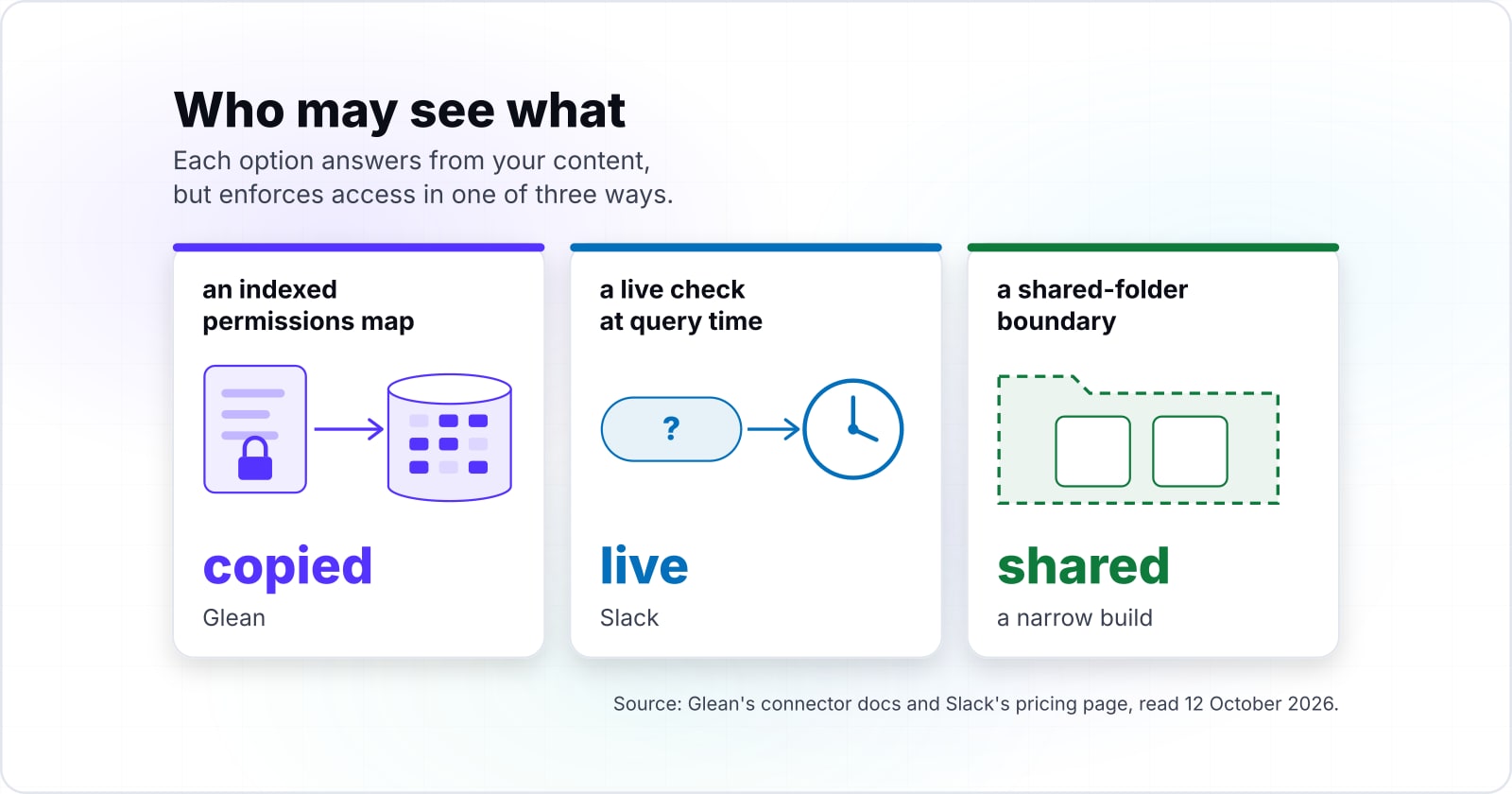
Each branch rests on a different way of deciding who may see what. Glean's connector docs, read 12 October 2026, say its connectors "also fetch the permissions map from each source". Slack, by contrast, checks access live at the moment someone asks. A narrow build can simply read only what was shared with it. Our Slack assistant case study shows that third model. So the real choice is less about features than about where your answers live.
What does a Glean quote actually buy?#
Glean sells an index of your connected apps that also carries each source's permissions map, so search results follow who may open what. According to Glean's connector docs, read 12 October 2026, connectors fetch data from each app. Then they store it in Glean's system. They also parse common file types such as PDF, Word and PowerPoint. Search results then follow the access rules set in each source. In short, the quote buys breadth: many apps, one search box, and access rules copied from each one. Most Glean alternatives are measured against that breadth.
The price is not on a public list. Glean's pricing page, read 12 October 2026, offers a demo rather than a figure. Vendr is a firm that tracks software contracts. Its Glean page says Glean "does not publish transparent list pricing publicly". Instead, Vendr reports what contracts close at, from 174 purchases, on a page last updated February 2026.
On Vendr's page, last updated February 2026, Glean contracts run from a low of $29,880 to a high of $208,897 a year. So one median hides a wide spread.
Show data table
| Item | Value |
|---|---|
| Low | 29,880 |
| Median | 98,890 |
| High | 208,897 |
Glean contracts run from a low of $29,880 to a high of $208,897 a year, so one median hides a wide spread.
In practice, the seat count drives most of that spread. Vendr's page, last updated February 2026, also says Glean typically asks for a minimum of around 100 to 250 users.
What does a Glean quote work out to per seat?#
In a worked example, Vendr's median Glean contract of $98,890 a year, read 12 October 2026, spread over 250 users is about $396 per user. Divide your own quote by the seats it covers. Then you have the number the suite assistants are priced in. The seat count moves it more than anything else.
Vendr's Glean page, last updated February 2026, groups deployments at 100, 250 and 1,000 users. In a worked example on that Vendr median, the cost is about $989 per user a year over 100 users. Over 1,000 users, the same worked example on Vendr's median gives about $99.
Show data table
| Item | Value |
|---|---|
| 100 users | 989 |
| 250 users | 396 |
| 1,000 users | 99 |
On the same median, about $989 per user a year over 100 users falls to about $99 over 1,000 users.
Your quote, per seat
Enter the annual quote and the seats it covers; it divides the quote by the seats, then by twelve months, to give the per-seat figure that Glean alternatives in your suite are listed in.
Cost per seat per year
$396
- Cost per seat per month
- $33
Arithmetic from Vendr, Glean pricing, last updated February 2026. Modelled, not measured.
Suite assistants are listed per month, so divide by twelve to compare in the same unit. Two contract terms then change the real number. Vendr's Glean page, last updated February 2026, says renewals often add 3 to 7% a year. It also says larger deployments usually get lower rates per user. So ask for the seat count, the minimum and the renewal cap in writing before you compare anything.
Which alternative is already inside the suite you pay for?#
Microsoft 365 Copilot and Gemini in Google Workspace both sit on a suite you may already license, so start with where your documents already live. If most answers sit in one of those suites, its own assistant already holds the content. It holds the sharing rules too.
Microsoft's Copilot pricing page, read 12 October 2026, lists Microsoft 365 Copilot Business as an add-on at $21 per user a month, paid yearly. On that page, a promotion brings it to $18 until 31 December 2026. Microsoft's same page lists Business Standard with Copilot at $23.50 per user a month. On that Microsoft page, Business Premium with Copilot is $32 per user a month, paid yearly. Microsoft's enterprise pricing page adds the condition: "A separate license for a qualifying Microsoft 365 plan is required".
| Item | US dollars per user per month, paid yearly |
|---|---|
| Microsoft 365 Copilot Business, promotional to 31 December 2026 | $18 |
| Microsoft 365 Copilot Business, list | $21 |
| Microsoft 365 Business Standard with Copilot | $23.50 |
| Microsoft 365 Business Premium with Copilot | $32 |
Google takes a different route. Its Workspace Admin Help page was read 12 October 2026. It says Google started adding Gemini AI features to Business and Enterprise editions in January 2025. Before that, those features came with Gemini add-ons. The page lists Gemini in the side panel of Gmail, Docs, Sheets, Slides and Drive. So for a Google Workspace team, the first step is an admin check, not a new purchase.
Still, both pages describe the assistant through the suite's own apps. Therefore, before you count either one as one of your Glean alternatives, check what it reaches outside that suite.
What does Atlassian Rovo include if your team lives in Jira and Confluence?#
Atlassian's Rovo pricing page, read 12 October 2026, includes Rovo in Standard, Premium and Enterprise Cloud plans and meters it in credits pooled across the organisation. That pricing page sets the allowance per user a month. On Jira or Confluence, Atlassian's October 2026 page gives 25 credits on Standard, 70 on Premium and 150 on Enterprise. Atlassian's Teamwork Collection plans carry 250 to 1,500 credits.
Show data table
| Item | Value |
|---|---|
| Jira or Confluence, Standard | 25 |
| Jira or Confluence, Premium | 70 |
| Jira or Confluence, Enterprise | 150 |
| Teamwork Collection, Standard | 250 |
| Teamwork Collection, Premium | 700 |
| Teamwork Collection, Enterprise | 1,500 |
Rovo allowances run from 25 credits a user on Jira or Confluence Standard to 1,500 on Teamwork Collection Enterprise.
Also, the credits are not tied to each person. Atlassian's page says every allowance in an organisation goes into a single shared pool. So heavy users draw more and light users less. For example, Atlassian's pricing page, read 12 October 2026, works through 100 Premium users on Jira and Confluence. Each app gives 7,000 credits, so the pool holds 14,000 a month. Atlassian's same October 2026 page charges 10 credits for a basic AI interaction. So in a worked example, that pool covers about 1,400 basic interactions a month. Premium interactions vary per event, so heavier features use the pool faster.
| Item | per month for 100 Premium users on Jira and Confluence |
|---|---|
| Pooled Rovo credits | 14,000 |
| Basic AI interactions the pool covers | 1,400 |
Access follows the person asking. Atlassian's Rovo overview says "Rovo respects your user permissions". Its search also reaches connected apps such as Google Drive and Slack. So for a team that works in Jira and Confluence, Rovo is often already paid for. The open question is whether the pool covers your use. The credits view in Atlassian Administration shows that.
Slack AI vs Glean: what does Slack's enterprise search cover?#
Slack lists enterprise search on its Enterprise+ plan and checks each person's access at the moment they ask, where Glean copies permissions into its index. Slack's pricing page, read 12 October 2026, places enterprise search under Enterprise+. That plan is sold through sales rather than at a listed price.
Slack's enterprise search page explains the access check. Results come "based on your access and permissions to that data at that exact time". So a change in access applies at once. Slack calls this the federated method. It fetches from each connected app in real time instead of keeping its own copy. Also, Slack says customers on Enterprise+ "can use enterprise search by enabling connectors at the admin and user levels". For an in-house source, Slack's developer docs require an app installed on the org. Such an app cannot be listed in the Slack Marketplace.
So Slack AI vs Glean comes down to two facts about your team. When every question is already asked in Slack on Enterprise+, Slack's own search may cover your main sources. But if you need one index across many apps with access copied in, that is the model Glean's connector docs describe. On a lower Slack plan, enterprise search is not on the list at all.
How does each option decide who may see what?#
Each option answers from your content, but enforces access in one of three ways: an indexed permissions map, a live check at query time, or a shared-folder boundary.
| Option | Where it looks | How it decides access | How it is sold |
|---|---|---|---|
| Glean | Connected apps, copied into Glean's system | Copies each source's permissions map | By quote; Vendr reports contract data |
| Microsoft 365 Copilot | Microsoft 365 apps | Not stated on the pricing and licensing pages cited here | Add-on to a qualifying Microsoft 365 plan |
| Gemini in Google Workspace | Gmail, Docs, Sheets, Slides, Drive | Google says existing Workspace protections apply | Included in Business and Enterprise editions |
| Atlassian Rovo | Atlassian apps and connected apps | Shows people only what they can already open | Included in Standard, Premium and Enterprise Cloud, metered in credits |
| Slack enterprise search | Connected apps, fetched at query time | Live check at the moment of asking | Enterprise+ plan |
| Narrow build | The sources you connect | Reads only what was shared with its account | Your own build and running costs |
Source: each vendor's own page, read 12 October 2026; the narrow build row is from our published case study.
In short, the three models ask different things of you. An indexed map needs a connector to every source and trust in the copy. A live check needs each source to answer at query time, and Slack ties it to its top plan. A boundary needs no rule per person, but anyone who can ask sees whatever sits inside it.
Google's Drive API scopes page shows the boundary is also a choice of scope. It files drive.readonly, which can view and download all Drive files, as a restricted scope. In contrast, drive.file is non-sensitive and grants access per file, to files the user opens or shares with the app.
When does building your own internal AI assistant beat a per-seat licence?#
A narrow build wins when one or two sources hold most answers, the team already asks in one chat tool, and a shared folder is a fair boundary. The Glean vs build question turns on those three conditions, not on a general view of buying or building.
First, few sources
Every extra source is a connector to write, test and keep working.
Second, one chat surface
If everyone already asks in Slack, the assistant needs no new home.
Third, a boundary
A shared folder can be a fair limit on what the assistant may read. Then you can skip rules per person.
The worked example above shows why the seat count matters here. A licence priced per seat grows with every user you add. In contrast, a narrow build's scope is set by its sources, not its headcount. However, a build is not free to run. It needs a model provider, hosting, tests and a team that owns it after launch.
Our case study states the boundary test in one line. It reads: "Shared folders are a fair boundary for what the assistant may read." When that holds for your team, it can make sense to build an internal AI assistant instead of Glean. The general build-versus-buy method applies the same test to other software.
What does a narrow build cover, and what does it leave for later?#
In one Slack assistant we extended, Google Drive came in through a read-only account that sees only folders shared with it, and per-user filtering was left for later. The assistant already answered from Jira tickets and Bitbucket commits. The work added Drive as one more source. As the case study records, it reads 7 file types, from Docs to PowerPoint. Each document answer links the files it came from.
In particular, one design choice keeps answers honest. The case study sets a cutoff of 0.70 in cosine distance. That is a measure of how far apart two texts are in meaning, and lower is closer. Excerpts past that cutoff are dropped before the model sees them. If nothing passes, the assistant says it found nothing, without calling the model at all.
The limits were chosen, not missed. Next on the case study's list is per-user filtering of Drive results. Text recognition for scanned PDFs comes after it. Then a shared store, so the service can run more than one worker. Also, this is not a production result. The Drive work sits on the client's development and test branches. So the case study reports scope and design, with no figure yet for questions answered or time saved.
If you add more sources later, each one carries the scoping work set out in MCP server security best practices.
When is building your own the wrong fit, and buying wins?#
Buying wins when each person must see only what they can open across many sources, when content sits in one suite, or when no team will own the service. In those cases a licence is the better tool. Here is which one, for each case.
First, buy Glean when answers are spread across many apps and access must follow each person. Its connectors copy each source's permissions map, which is the work a narrow build leaves for later. Second, use the suite assistant when one suite holds most of your content. Microsoft, Google and Atlassian each sell or include one on the content they hold. Third, use Slack's enterprise search when your team asks everything in Slack on Enterprise+. Among Glean alternatives, these three are the ones to price before any build.
Also hold off on a build when no team will run it. In our case study, the model provider retired the model version the assistant used. Every call failed until a setting changed. The service fixes that come before retrieval show what running one involves. Then there are two content cases. If most documents are scanned PDFs, text recognition has to come first. And when documents cannot go to a hosted model provider, check a self-hosted model's cost and quality first.
What should you ask before signing, or before building?#
Ask any vendor, or your own team, which sources matter, which permission model applies, how many seats need it, and who owns each connector. The same short list settles a vendor shortlist and a build plan. It works for Glean and for Glean alternatives alike.
Name the sources that answered
Which two or three apps answered most of last week's questions?
Choose the access rule
Must each person see only what they can open, or is a shared folder a fair boundary?
Check the seat count and the minimum
How many seats does the quote assume, and what is the minimum? Vendr's Glean page, last updated February 2026, says minimums often start around 100 to 250 users.
Ask what caps the renewal
What caps the renewal? The same Vendr page reports escalations of 3 to 7% a year.
Confirm the Slack connectors
For Slack, will connectors be enabled at both the admin and user levels?
Pick the Drive scope
For Drive, does the plan need the restricted drive.readonly scope, or will access per file do?
Name the owner of each connector
Who owns each connector, and who hears about it when a source changes?
If your own team cannot answer the last question, that alone is a strong reason to buy. Meanwhile, a vendor that cannot answer the second one in writing has not told you how access works.
Where should you go from here?#
Start from the content your team asks about most, because the sources behind last week's questions decide which branch fits. For example, search your Slack channels for questions that begin with "where" or "does anyone know". Then note which app held each answer.
When the list points at one suite, start with that suite's assistant. If it points at many apps and strict access per person, set Glean's quote beside your figure from the calculator. And when it points at one or two sources and a shared folder, a narrow build is worth scoping. The Slack assistant case study shows one in full.
For the other side of the same choice, Should I build an MCP server? covers opening your own platform to assistants. An assistant that serves customers rather than staff is a different build, set out in the B2B ecommerce AI assistant guide. Our API integrations and custom software development pages describe how we connect tools when a build is the answer. If the assistant has to act in your systems rather than answer, see AI agent development. Still, the vendor pages linked above are enough to make the call on your own.