Should I build an MCP server for my platform, and what goes in it first?
Most teams with an API are now being asked for an MCP server. The useful answer is rarely a plain yes or no. It is which few tools, which door, and which actions stay switched off.
Should I build an MCP server, or is my API enough?#
Build an MCP server when AI clients are a real way your customers will use your product, and start with a few read-only tools shaped around tasks. The MCP introduction calls the protocol "an open-source standard for connecting AI applications to external systems". Your API already serves people and code that know your data model. However, an AI client does not know it. Instead, it reads a list of tools, picks one, and fills in the arguments from a chat.
So the question is not whether your API is good. Instead, it is whether your customers will ask questions of your product from inside an AI app. And if they do, you want those answers to be safe and correct. If they will, a small server pays off. If they will not, your API and its docs are enough.
When does an MCP server earn its place over the API alone?#
An MCP server earns its place when customers already work inside AI clients, the questions they ask cross several screens, and the answers live in data your API already serves. So three tests follow from that sentence, and you can run them on your own product this week.
First, do your customers already work inside AI clients? The MCP architecture guide describes a host, such as a desktop AI app or a code editor. The host opens one client for each server it uses. If your customers never open such a host, your server will sit unused.
Second, do their questions cross several screens? In our case study, a question like "how many orders failed to export this week?" meant a person clicking through tables. That is the kind of question a model can answer in one call when the right tool exists.
Third, is the data already behind your API or your database? A server should read what you already serve. If it needs a new data model first, then build that first.
| Your answers to the three tests | What to build |
|---|---|
| Yes to all three | A small MCP server with read-only tools first |
| Customers do not use AI clients yet | The API alone, with good docs |
| One fixed question, asked the same way each time | A report or a feature in your product |
| No clear owner for each record | Nothing yet; fix the data model first |
So when a team asks "do we need an MCP server for my API?", the answer depends on those three tests. It does not depend on the API.
Why does mapping every API endpoint to a tool work badly?#
In Start Debugging's August 2026 test, one tools/list response for 229 generated tools came to 213,628 bytes, about 933 bytes for every tool. The test registered identical generated tools with six documented parameters each. That is the shape an API generator tends to emit, and the cost per tool stayed flat as the count grew.
So the tool list grows in a straight line with the number of tools, and every request carries all of it.
Show data table
| Item | Value |
|---|---|
| 1 tool | 1,120 bytes |
| 8 tools | 7,623 bytes |
| 30 tools | 28,101 bytes |
| 120 tools | 111,931 bytes |
| 229 tools | 213,628 bytes |
Each generated tool adds about 933 bytes, so 229 tools came to 213,628 bytes on every request.
Bytes are only half the cost. Start Debugging's write-up also notes a second cost. As the list grows, the model picks the wrong tool more often and wastes turns. Because a generated tool mirrors one endpoint, a question like "which orders failed this week?" can turn into several chained calls. A tool shaped around the task answers it in one.
For tool design, Workato's guide puts the rule plainly. In Workato's words, "Each tool should have a single, clear purpose." A purpose is a task, such as "find failed orders", not an endpoint such as a paged list of orders.
The old way out has also closed. Before the 2026-07-28 revision, many teams used to show each session a short list and add tools as the chat went on. But the 2026-07-28 changelog says list endpoints "no longer vary per-connection", so that trick no longer fits the spec. As a result, the list you ship is the list every request pays for. On Start Debugging's August 2026 numbers, that is about 933 bytes a tool.
How large would your tool list be if every endpoint became a tool?#
In a worked example at 933 bytes per tool, 150 endpoints mapped one tool each come to 139,950 bytes on every request, against 7,464 bytes for eight tools. That gap is the cost of a generated catalog, and it is paid before the model does any work.
Multiply your own endpoint count by Start Debugging's August 2026 figure of 933 bytes. The result is the size of the list.
Your tool list if every endpoint became a tool
Put in your own endpoint count; the default is the worked example of 150, and each tool adds 933 bytes, Start Debugging's August 2026 figure.
Bytes in one tools/list response, one tool per endpoint
139,950
- Bytes for eight task-shaped tools
- 7,464
Arithmetic from Start Debugging, August 2026 (933 bytes per tool). Modelled, not measured.
139,950 bytes
150 endpoints, one tool each
7,464 bytes
Eight task-shaped tools
A generated catalog of 150 tools sends 139,950 bytes on every request, against 7,464 bytes for eight task-shaped tools.
| Option | bytes in one tools/list response, at 933 bytes a tool; a worked example |
|---|---|
| 150 endpoints, one tool each | 139,950 bytes |
| Eight task-shaped tools | 7,464 bytes |
Source: arithmetic from Start Debugging, August 2026. Modelled, not measured
As worked examples at the same 933 bytes a tool, 40 endpoints come to 37,320 bytes and 400 endpoints come to 373,200 bytes. Neither is a measurement of any one product.
In practice, the right list is far shorter. WorkOS wrote an April 2026 post on turning a REST API into an MCP server. In it, WorkOS cites Workato's guidance of five to eight tools a server, with twelve as a soft ceiling.
So the work is choosing, not generating. First, start from the questions your team answers by hand. Then write one tool for each, and stop when the list covers most of them. Finally, measure your own tools/list response, because your descriptions and parameters will differ from the test.
Which tools should you expose first, and which should stay off?#
Release read-only tools first, and keep every tool that changes data switched off until an operator turns it on. The Model Context Protocol's tools spec, dated 2026-07-28, says there should always "be a human in the loop with the ability to deny tool invocations". A read cannot break anything. But a write can, and a model may call it with the wrong arguments.
The same spec also covers tool annotations, such as a hint that a tool only reads. It says clients must treat them as "untrusted unless they come from trusted servers". So a label on the tool is not a lock. Instead, the server itself must refuse a write it has not been told to allow.
A simple release order works for most products:
- Reads of the caller's own data, such as orders, runs and account status.
- Health and status reads that help someone fix a failed job.
- Writes that can be undone, behind a switch an operator turns on.
- Never through the server: deletes, payments and changes to sign-in or keys.
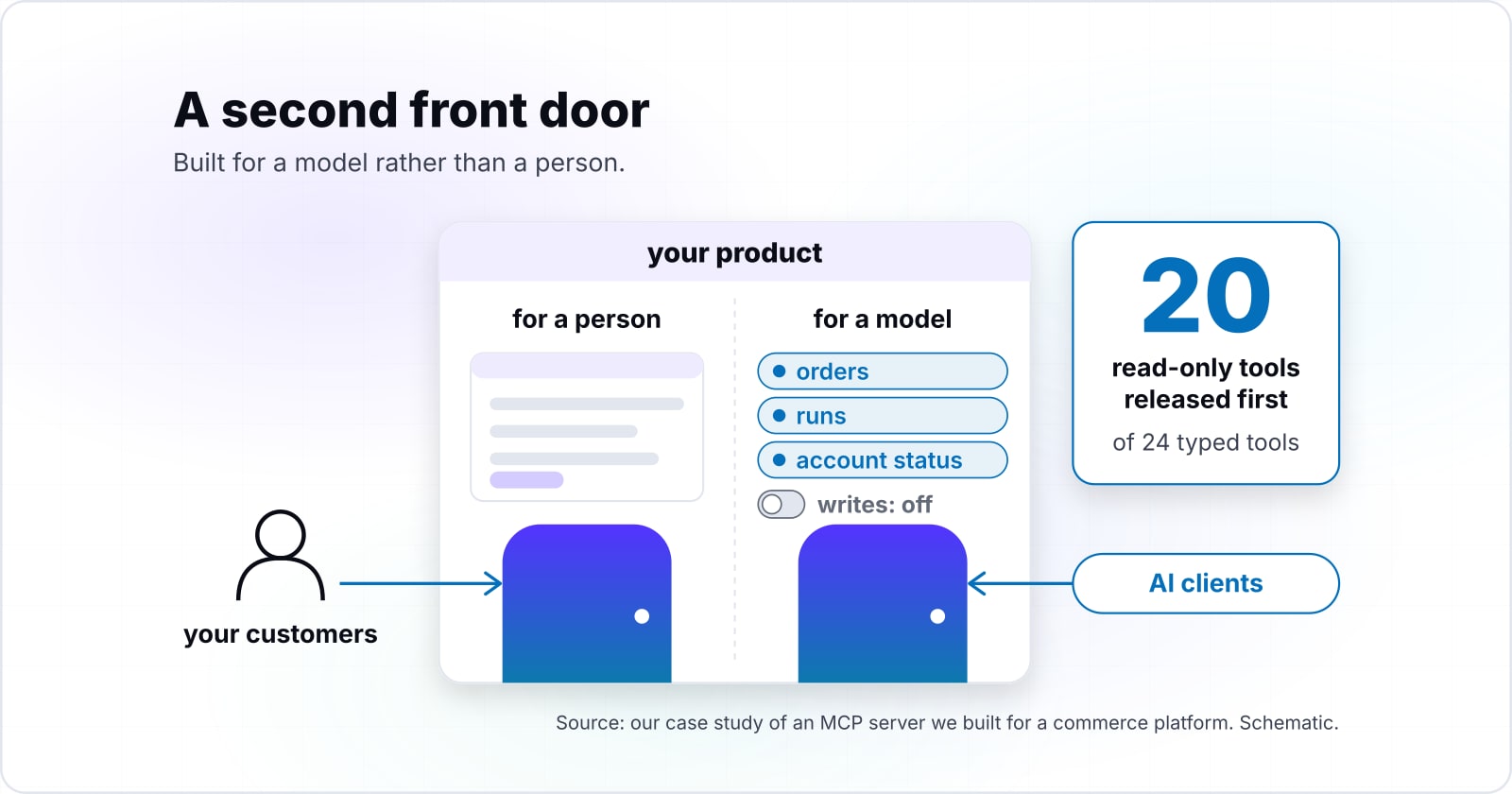
That is the order our case study followed. There, the 20 read-only tools went out first. Then the two write tools came off by default, marked so a client can ask a person before calling them. If you are planning an MCP server for SaaS customers, start with your support queue. The first list is usually the questions it answers most often.
Should you run one server per system or one large server?#
Run one small server per system you own, so each server carries a short, task-shaped tool list and its own access rules. The architecture guide says a host creates "one MCP client for each MCP server". So a host can hold several servers side by side. So your billing system and your order system do not need to share a door.
The case for one large server is real. It is one thing to deploy, with one sign-in and one version to keep current. But every tool in it travels with every request. In Start Debugging's August 2026 test, that was about 933 bytes a tool. Also, when tools from different systems sit together, the model has more wrong choices to make.
The boundary is the system, not a tool count. For example, the server in our case study is one package with 24 tools in seven areas. That is because all seven areas live in one platform with one sign-in and one rule for which company owns which store. Splitting it would have meant copying that rule into several places. So split where the access rules split, and keep together what shares them.
Also, the tools spec warns that tool names are unique only within one server. Two servers may each offer a "search" tool, and a client must tell them apart. Clear, system-specific names save that trouble.
| One server per system | One large server | |
|---|---|---|
| Tool list on every request | A short, task-shaped list for each server | Every tool travels with every request, about 933 bytes a tool |
| Access rules | Each server keeps its own access rules | One sign-in for every system in it |
| Deploying and versions | One server to deploy for each system | One thing to deploy, with one version to keep current |
| Choices for the model | Only the tools of one system | More wrong choices when tools from different systems sit together |
What changes between a local operator and a remote AI client?#
A local server run by a trusted operator takes its credentials from the environment, while a remote server needs authorization on every call it answers. The Model Context Protocol's authorization spec, dated 2026-07-28, is plain about it. It says "Implementations using an STDIO transport SHOULD NOT follow this specification", and that such servers get credentials from the environment. The architecture guide adds that a local server typically serves a single client, while a remote one typically serves many.
Remote is now the common case. DevToolHub counted 30,375 servers in the official registry in a snapshot of 10 September 2026. In that count, remote-only servers led local-only ones.
Show data table
| Item | Value |
|---|---|
| Remote only (HTTP / SSE) | 54.8% |
| Local only (installable package) | 38.9% |
| Both | 4.9% |
| Neither declared | 1.4% |
Remote-only servers lead local-only ones, 54.8% against 38.9%.
The MCP Registry is still in preview, and it holds metadata that points to packages, not the code itself. So a listing tells you a server exists, not that it is safe.
In our case study, the two doors are built differently. There, the local client skips the HTTP checks and is trusted as an operator. Remote calls pass a rate limit and then a token check, and each token sees only its own company's stores. When you build the remote door, that is the minimum: a limit, a token, and a scope tied to one account. The spec's security best practices cover the rest, and they deserve their own careful read before launch. Our post on MCP server security checks, in the order a request meets them walks through each one.
What did the 2026-07-28 MCP specification change for a new server?#
The 2026-07-28 MCP specification removed protocol sessions and the initialize handshake, added server/discover, and moved client registration toward Client ID Metadata Documents. Much of the advice you will find was written against older revisions, so check the date on anything you read.
Three changes matter most for a server built now. First, the server is stateless. Every request now carries its own protocol version. Then any state that must last across calls goes in "explicit, server-minted handles passed as ordinary tool arguments", in the changelog's words. Second, servers must answer server/discover, which tells a client which versions and features they support. Third, Dynamic Client Registration is deprecated in favour of Client ID Metadata Documents. It stays available for older authorization servers, but a new remote server should plan for the new way.
The changelog also deprecates Roots, Sampling and Logging, and asks new builds not to add them. Meanwhile, list results such as tools/list must now carry cache hints. So a client can keep your tool list for a while instead of fetching it every turn.
| Area | What the 2026-07-28 revision says |
|---|---|
| Sessions | Protocol sessions and the initialize handshake are removed; every request carries its own protocol version |
| State across calls | Explicit, server-minted handles passed as ordinary tool arguments |
| Discovery | Servers must answer server/discover with the versions and features they support |
| Client registration | Client ID Metadata Documents; Dynamic Client Registration is deprecated |
| Roots, Sampling and Logging | Deprecated; new builds should not add them |
| List results such as tools/list | Must carry cache hints |
What should you ask a vendor who offers to build or host it?#
Ask a vendor which tools ship first, how writes are switched on, how a token is tied to one account, and which specification revision the server speaks. Then each question tests one part of this guide, and a good answer is specific.
- Which tools ship first? A good answer names a short list of read-only tools, each tied to a real question. A weak answer is "all of your endpoints".
- How are writes switched on? A good answer is a switch an operator controls on the server, off by default. A weak answer relies on the client to ask first.
- How is a token tied to one account? A good answer scopes every read to the caller's company, the same way your own screens do. Our case study scopes every tool this way before the tool set grew.
- Which revision does the server speak? A good answer is 2026-07-28, with server/discover and no protocol sessions. A weak answer cannot name one.
Also ask how they will measure the size of your tool list, and what they will leave out. The tools a vendor chooses not to expose say as much as the ones they do.
Which tools ship first?
A good answer names a short list of read-only tools, each tied to a real question. A weak answer is "all of your endpoints".
How are writes switched on?
A good answer is a switch an operator controls on the server, off by default. A weak answer relies on the client to ask first.
How is a token tied to one account?
A good answer scopes every read to the caller's company, the same way your own screens do. Our case study scopes every tool this way before the tool set grew.
Which revision does the server speak?
A good answer is 2026-07-28, with server/discover and no protocol sessions. A weak answer cannot name one.
When is an MCP server the wrong tool?#
An MCP server is the wrong tool when your customers never work inside AI clients, or when a fixed feature in your own product answers the question better. In those cases, a server adds a separate process, a client connection and a new door to secure, all for traffic that never comes.
There is also a fourth case. If your data cannot leave your network for any AI provider, remote access should wait. Until then, a local client run by your own operators is the only safe option.
If the need is search across your team's own documents, see whether a packaged assistant or your suite already covers it.
Is an MCP server the same as an API? No, because it sits on top of your API or your data. It describes tools in a form an AI client can read and call. Your API still serves everything else.
Where should you go from here?#
Read the case study of a server built this way, then the posts on API styles and agent runtimes if the decision is still open. That commerce platform case study shows the read-only first release, the write switch and the two doors in one build.
If you are still weighing API styles, our guide to API types and architectures covers what each one costs to run. Then, for the client side, how an agent runtime keeps a task going shows what calls your tools. And our post on the agentic SDLC covers how agents change review and control in a software team.
If you want a hand, our API integration work and our SaaS development work are where a server like this usually starts. If an agent will call it, our AI agent development page covers the limits to require on every tool. But the MCP specification and its guides are enough on their own to build a good first server.