When AI agents edit Excel Word PowerPoint files: what breaks and five guardrails
A file that opens is not a file that is right. We ran the same edits through the common Python libraries and their guarded forks, and the breaks we found raised no error at all.
Can AI agents edit Excel Word PowerPoint files without breaking them?#
Yes, if the pipeline refuses unclear edits, records every change as tracked, recalculates formulas and stops for a person, because the libraries underneath fail without an error. That holds for any AI (artificial intelligence) agent. In practice the risk sits in three places. First, Excel loses formula results. Then Word loses runs and revision marks, and slides hide split text. So each section below takes one failure from our 17 October 2026 test and turns it into a rule.
What does a silent break cost when an agent edits a business file?#
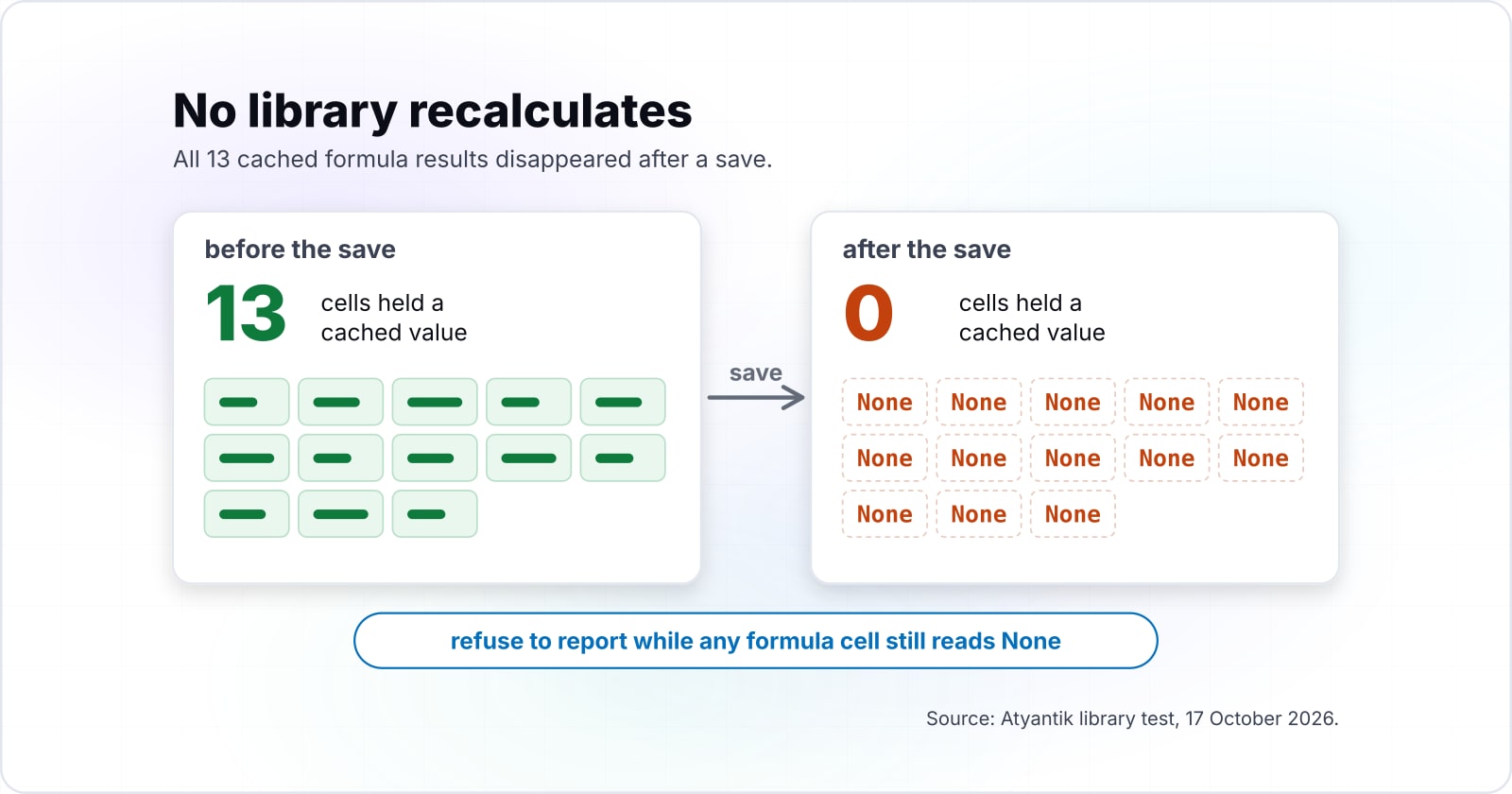
In our 17 October 2026 library test, one input change to a 13-formula model left every result blank, so a read-back returned None where 1215.50625 belonged. But that figure was the result before the edit; after the save the file held no result. As a result, an agent that reports that cell gets nothing, or a stale copy from an earlier step. So the cost is a confident wrong answer that surfaces only when a customer finds it. Therefore the guardrails are worth one thing: a file that skipped its checks never leaves the pipeline.
In practice, production systems already work this way. In our AI purchase order entry case study, an AI service reads each order and rules match every line. Then a person checks the flags before one click sends it.
Silent break
openpyxl: the projected revenue cell reads None.
0 of 13 cached formula results still held
No error, no warning about this loss.
Source: Atyantik library test, 17 October 2026, read from the saved package, not opened in Microsoft Office.
| Edit path | Tool | Count | Said so |
|---|---|---|---|
| Plain library | openpyxl | 0 of 13 | No |
| Fork, same code | the guarded fork, same code | 0 of 13 | No |
| Guarded API | the guarded fork's receipt API | 0 of 13 | Yes |
Why does openpyxl leave Excel formulas with no results after a save?#
In our 17 October 2026 test, all 13 cached formula results disappeared after openpyxl saved one edited input, because the library stores formulas but does not calculate them. openpyxl is the common Python library for Excel files. Its tutorial says a loaded cell holds the "formula (default) or the value stored the last time Excel read the sheet". But it never holds both. That split is the whole openpyxl formula cache problem.
So after a save, the next reader sees blanks until an engine recalculates the file. In that test, the guarded fork lost the same results, but it listed each one in its save receipt.
| edit path | before the save | after the save | reported |
|---|---|---|---|
| openpyxl | 13 | 0 | no |
| guarded fork, same code | 13 | 0 | no |
| guarded fork, receipt API | 13 | 0 | yes, each listed in the receipt |
Also, features the library does not model are dropped. In the same 2026 test, openpyxl removed a sparkline with a warning, while the fork kept it.
| feature | openpyxl | guarded fork |
|---|---|---|
| sparkline | removed, with a warning | kept |
| chart, table, validation, conditional format, defined name | kept, chart XML rewritten | kept, parts byte-identical |
| formula cached values | all 13 removed, not reported | all 13 removed, each listed in the receipt |
| recalculation | none | none; adds a force-recalculate flag |
Source: Atyantik library test, 17 October 2026. And each result comes from the saved package (the zip parts and the XML, or Extensible Markup Language, inside), not from opening the file in Microsoft Office.
Why do agent edits in Word lose formatting and other people's tracked changes?#
Word splits one phrase across several runs, so in our 17 October 2026 test a whole-paragraph rewrite turned 4 runs into 1, dropped the bold, and erased another reviewer's tracked change. python-docx is the usual Python library for Word files. Its text guide says a paragraph "contains one or more runs, each of which contain some part of the paragraph" text.
Because formatting lives on each run, a search that loops over runs misses a phrase split across them. Rewriting paragraph.text does find it, but it flattens the runs.
4
Before the rewrite
1
After the rewrite
The bold on thirty went with them.
| Option | runs in the clause |
|---|---|
| Before the rewrite | 4 |
| After the rewrite | 1 |
Source: Atyantik library test, 17 October 2026, method note above
However, revisions are worse, because they live in separate markup. Microsoft's Open XML guide to revisions names the w:ins and w:del elements that hold them. In particular, in a second clause of our test, the inserted rate was not part of paragraph.text. So the rewrite deleted it and left a clause with no rate. So any plan for python-docx tracked changes has to start from the markup, not from .text.
| revision mark | before the rewrite | after the rewrite |
|---|---|---|
| tracked insertions (w:ins) | 1 | 0 |
| tracked deletions (w:del) | 1 | 0 |
Why does a PowerPoint find-and-replace miss half the matches?#
A run-by-run replace in python-pptx changed 2 of 4 slide occurrences in our 17 October 2026 test, missing the one split across runs and the one inside a table cell. The cause is plain in the python-pptx text guide: "Only runs can actually contain text."
In that 2026 test, the guarded replace reached all 4 and kept the formatting. However, even it left the chart series name and the speaker notes untouched. So a replace must report what it changed and also what it could not reach.
Show data table
| Item | Value |
|---|---|
| python-pptx run loop | 2 of 4 |
| guarded fork, same code | 2 of 4 |
| guarded fork replace_text | 4 of 4 |
Changing the package alone changed nothing; the new call did.
Which five guardrails does a production edit pipeline need?#
Five guardrails hold whichever tool edits the file: refuse an unclear target, write tracked changes, return a receipt, recalculate before reading results, and stop for a person.
- Refuse instead of guess. In our 17 October 2026 test, the guarded Word API (application programming interface) refused three edits. One overlapped a pending tracked insertion, one had a target that existed only as deleted text, and one had 6 matches. After that, the source file was byte-identical.
- Edit as tracked changes. The same API wrote the split phrase as a tracked deletion and insertion, and it kept the bold.
- Return a receipt. The paper-pptx README says its call "returns a machine-readable result and refuses unsupported edits". So any tool you pick should hand back that kind of record.
- Recalculate before reading. The SpreadsheetBench README runs a step that "forces formula recalculation so that cached cell values are available to openpyxl" before it scores.
- Stop for a person. Microsoft's support page says Copilot in Excel has a plan mode, so you can "review and confirm the approach before starting".
| edit | python-docx | guarded fork API |
|---|---|---|
| phrase split across 4 runs | run loop misses it; rewrite collapses 4 runs to 1, bold lost, untracked | tracked deletion and insertion, bold kept |
| rewrite a clause holding another reviewer's tracked change | the tracked insertion is deleted with no trace | refused: overlaps a pending tracked insertion |
| target exists only as deleted text | not applicable | refused: target not found |
| ambiguous target, 6 matches | not applicable | refused, locations listed |
Source: Atyantik library test, 17 October 2026.
Which documentation should an edit pipeline be built from?#
Build from the official pages in this order: openpyxl's loading options, the python-docx and python-pptx text models, then LibreOffice's headless start parameters for recalculation.
openpyxl tutorial
openpyxl tutorial: load_workbook and its data_only flag.
python-docx text guide
python-docx text guide: paragraphs, runs, and where formatting lives.
python-pptx text guide
python-pptx text guide: text frames, paragraphs and runs on a slide.
LibreOffice start parameters
LibreOffice start parameters: --headless and --convert-to, which run the free office suite with no screen.
paper-xlsx README
paper-xlsx README: one example of a save receipt.
The five pages, in order: openpyxl tutorial, python-docx text guide, python-pptx text guide, LibreOffice start parameters, paper-xlsx README.
What is the smallest Excel edit that cannot report a stale number?#
Write the input with openpyxl, recalculate the saved file with headless LibreOffice, then reload with data_only and refuse to report while any formula cell still reads None.
import subprocess
from openpyxl import load_workbook

wb = load_workbook("model.xlsx")
ws = wb.active
ws["B1"] = 0.07
formulas = [c.coordinate for row in ws.iter_rows() for c in row
            if isinstance(c.value, str) and c.value.startswith("=")]
wb.save("model-edited.xlsx")

subprocess.run(["soffice", "--headless", "--convert-to", "xlsx",
                "--outdir", "recalculated", "model-edited.xlsx"], check=True)

values = load_workbook("recalculated/model-edited.xlsx", data_only=True).active
empty = [ref for ref in formulas if values[ref].value is None]
if empty:
    raise RuntimeError(f"no calculated value in {empty}; do not report")
So the last two lines are the guardrail. If the conversion did not recalculate, the check refuses instead of passing a blank on. But our test machine had no LibreOffice, so this step comes from the documentation, not from our run.
Should you build on Python libraries or buy a desktop or SaaS agent?#
An in-app agent edits through the application itself, so Excel still does the calculating, while a library pipeline runs headless inside your systems and leaves every guardrail to you.
For instance, Microsoft's support page says "Copilot updates your workbook using Excel's built-in features". Its limitations page adds that editing needs Calculation Options set to Automatic. Also, it says to "Review, edit, and verify anything Copilot creates before you rely on it." In short, an in-app agent suits files people already open in Excel, one at a time.
Meanwhile, a library pipeline suits files that arrive in bulk from email or another system. SaaS (software as a service) tools sit between the two. But a library's costs are real: no calculation engine, and every guardrail is yours to build. On 17 October 2026, the guarded forks we tested were at version 0.2 and two to three months old. And other tools exist beyond the ones named here.
For example, test any candidate the way SpreadsheetBench, a public benchmark of spreadsheet tasks, tests models: many files per instruction, recalculated before scoring.
Show data table
| Item | Value |
|---|---|
| instructions | 912 items |
| test cases | 2,729 items |
| Verified subset instances | 400 items |
Several test cases per instruction, because one file proves little.
After that, run our three edits on your own files. First, change an input and read a result back. Then rewrite a clause that holds a tracked change, and replace a label that sits in a table. Our library-by-library results for the same three edits show what each save kept and what it lost.
When is an AI agent the wrong tool for editing an Office file?#
An agent is the wrong tool when the file can be regenerated from data, when a person can make the edit faster, or when nobody will review the result. If a monthly report comes from one template, fill it from data instead. When one clause changes, a person in Word is faster. Finally, with no reviewer assigned, use the application's own agent and its change history, or skip the automation.
Where does this pattern show up in other AI agent work?#
The same refuse, track, check and review pattern runs through purchase order automation, AI code review and agent governance, and each has its own write-up below. First, see how AI purchase order entry for business-to-business sellers is decided. Then read how to trust AI-generated code before it ships. Also see where checkpoints sit in an agentic software development lifecycle. If you are building your own, see AI agent development and API integrations. Still, the library docs above are enough to build the check yourself.