Can you trust AI-generated code? The checks that earn it
Code from an assistant looks finished long before anyone has proven it works. Each way it goes wrong has a check that catches it, and three short files put those checks in front of every merge.
Can you trust AI-generated code?#
Trust AI-generated code only as far as a review, a test, a scan or a benchmark has checked it, because fluent code is not evidence of correct code. The tool that wrote a change tells you little about that change. However, the checks it passed tell you a great deal.
Developers already work this way: in Stack Overflow's 2025 Developer Survey, more developers distrust the accuracy of AI tools (46%) than trust it (33%). Only 3% of them report highly trusting the output. Notably, experienced developers are the most cautious group in that 2025 survey, with a highly-trust rate of 2.6%.
Show data table
| Item | Value |
|---|---|
| Distrust the accuracy of AI tools | 46 |
| Trust the accuracy | 33 |
| Highly trust the output | 3 |
More developers distrust the accuracy of AI tools than trust it, and only 3% highly trust the output.
Therefore, the useful question is not whether a model is good. Instead, ask which failure a given change could carry and which check would catch it. The rest of this guide answers that question one failure at a time, which is how to verify AI-generated code without trusting a feeling.
What does a felt speed-up cost on a real task?#
In a worked example built on METR's 2025 trial, a 60-minute task was expected to take 45.6 minutes with AI and was measured at 71.4. The arithmetic is short: before they started, the developers in METR's 2025 trial forecast a 24% shorter completion time, which turns 60 minutes into 45.6. After the tasks, they estimated a 20% saving, so 48 minutes. But METR's 2025 trial measured completion time 19% longer, so 71.4 minutes.
Felt against measured minutes for your task
Set the usual length of a task you know. The percentages default to METR's July 2025 trial; change them if your team has measured its own.
Gap between felt and measured, in minutes
23.4
- Expected with AI, in minutes
- 45.6
- Felt with AI, in minutes
- 48
- Measured with AI, in minutes
- 71.4
Arithmetic from METR (arXiv 2507.09089), 25 July 2025. Modelled, not measured.
In that worked example on METR's 2025 figures, the gap between what developers felt and what the clock said is 23.4 minutes. That gap is the business cost, because if a lead plans a sprint on the felt number, every estimate comes out short. Also, every review budget is sized for code that took less effort than it really did.
The example rests on one assumption: that your task behaves like the tasks in METR's 2025 trial. Those were 246 tasks in mature open-source projects, done by 16 developers who knew the code well. Your numbers will differ, of course, but one point survives: a felt gain and a measured gain can point in opposite directions.
Why can't a developer's impression be the check?#
METR's 2025 trial measured experienced developers 19% slower with AI tools, while the same developers estimated afterwards that AI had made them 20% faster. In the paper's own words, "AI tooling slowed developers down". Experts did no better: in METR's July 2025 paper, economics experts had predicted 39% shorter completion times and ML experts 38% shorter.
Show data table
| Item | Value |
|---|---|
| Economics experts' forecast (shorter) | 39 |
| ML experts' forecast (shorter) | 38 |
| Developers' forecast before the tasks (shorter) | 24 |
| Developers' own estimate after the tasks (shorter) | 20 |
| Measured in the trial (longer) | 19 |
Every forecast and the developers' own estimate pointed to a shorter task, and the trial measured it 19% longer.
This does not mean AI tools make people slower everywhere. For example, Microsoft Research's field experiments ran at Microsoft, Accenture and a Fortune 100 company. When Microsoft Research combined data from 4,867 developers in its June 2025 paper, it found a 26.08% increase in completed tasks. In other words, the gains are real in some settings, and less experienced developers gained more in that study.
Both results carry the same lesson for review. The people closest to the code misjudged its effect, in a trial built to measure it. Because of that, a reviewer's sense that a pull request "looks right" is a feeling, not a measurement. Something measured has to take its place.
Why does code that looks right still fail?#
Stack Overflow's 2025 Developer Survey found 66% of developers frustrated by AI answers that are almost right, but not quite, and 45% by slower debugging. Those two numbers describe one failure: code that is close enough to pass a glance and wrong enough to cost an afternoon.
66%
AI solutions that are almost right, but not quite
45%
Debugging AI-generated code is more time-consuming
66% of developers name almost-right answers as a frustration, ahead of the 45% who name slower debugging.
| Option | percent of respondents |
|---|---|
| AI solutions that are almost right, but not quite | 66% |
| Debugging AI-generated code is more time-consuming | 45% |
Studies of the code itself also name the shapes. In Cotroneo and colleagues' August 2025 study of over 500k Python and Java samples, AI-generated code was simpler and more repetitive. Yet it was "more prone to unused constructs and hardcoded debugging". It also held more high-risk security vulnerabilities than human-written code. Then a September 2026 follow-up on arXiv compared 787,562 function pairs. Security depended on the language: models produced more, and more severe, findings in Python and Java. In C, though, they produced fewer high-severity memory-safety findings than humans.
In short, the failure shapes are few enough to remember:
- Almost-right logic: The code solves a nearby problem, not the one asked.
- Missed edge cases: Empty input, a boundary value, two users at once.
- Leftovers: Unused constructs and hardcoded debugging lines.
- Insecure patterns: Findings a scanner knows, more of them in some languages.
- Slow paths: A correct answer computed in a way that will not scale.
Each shape points at a different check, so the next four sections take them in turn.
| Failure shape | Check that catches it |
|---|---|
| Almost-right logic | Human review for intent |
| Missed edge cases | Property-based tests with Hypothesis |
| Leftovers: unused constructs, hardcoded debugging | Human review and code scanning |
| Insecure patterns | CodeQL code scanning |
| Slow paths | A pytest-benchmark comparison in CI |
What should a code review check in an AI-generated pull request?#
Review an AI-generated pull request for intent, edge cases, concurrency, new dependencies and a rollback plan, the questions a linter cannot ask. A linter checks form, while a reviewer with context checks whether the change does what the ticket asked.
Here are the five questions, and what each one catches in generated code:
Finally, AI-generated code review starts before the reviewer arrives: the person who opens the pull request owns every line in it. If they cannot explain a line, the change is not ready for review.
Which tests catch what AI-generated code misses?#
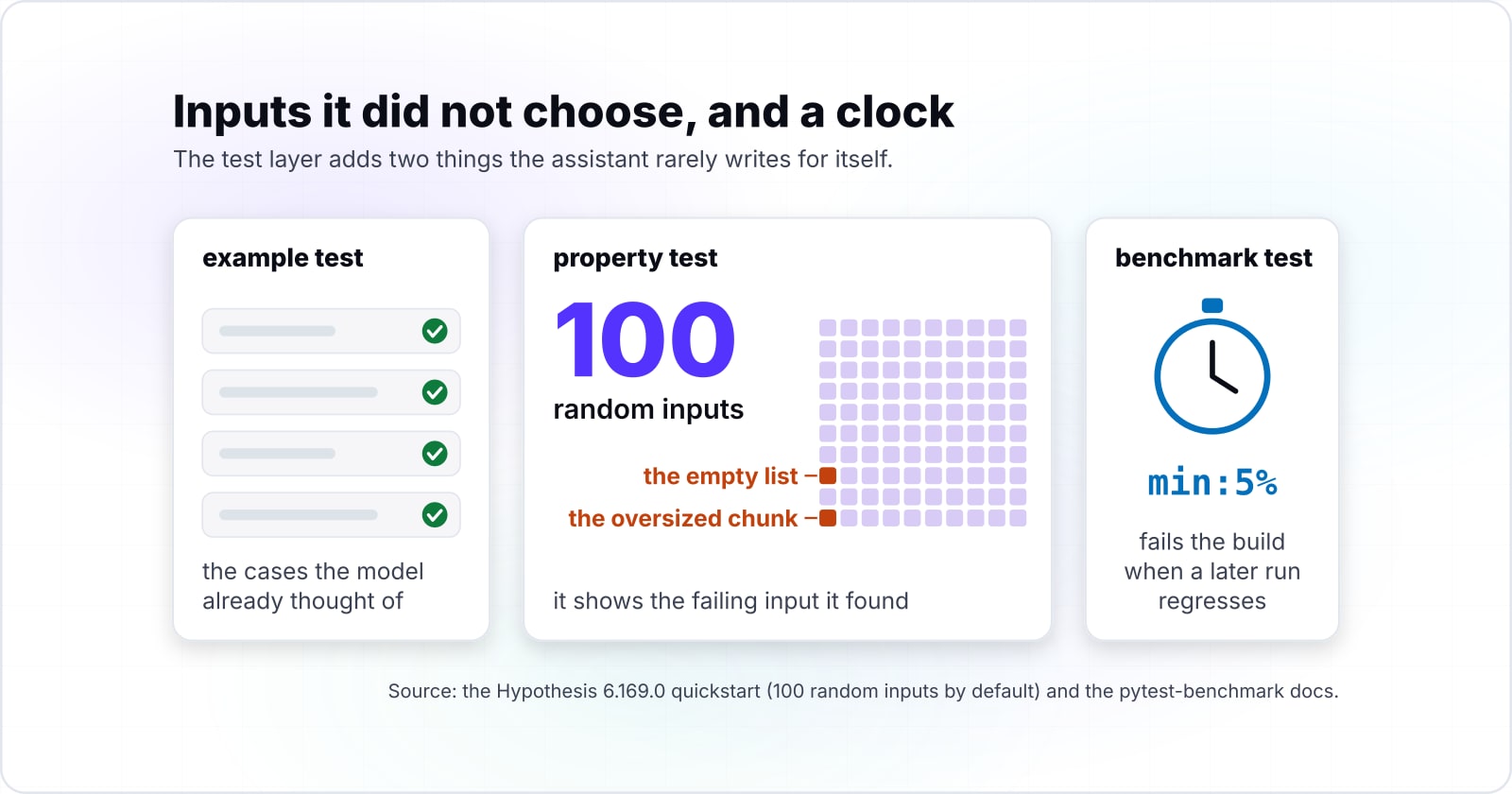
Property-based tests catch the edge cases a generator never imagined, and a benchmark comparison catches the slow path a correct answer can hide. When an assistant writes example tests next to its own code, those tests tend to share the code's blind spots. After all, they check the cases the model already thought of.
A property test, by contrast, works the other way. With Hypothesis, you describe each input with a strategy and state a rule every output must keep. Then the library generates the cases for you. By default it tries 100 random inputs, per the Hypothesis 6.169.0 quickstart. And when a case fails, it shows the failing input it found.
Performance needs its own test, because a correct function can still be slow. For that, pytest-benchmark times a function through its benchmark fixture and saves a run with --benchmark-autosave. Then --benchmark-compare-fail fails the build when a later run regresses past an expression such as min:5%.
Overall, the test layer adds two things the assistant rarely writes for itself. One is inputs it did not choose, and the other is a clock.
Where do code scanning and an AI reviewer fit, and what do they miss?#
GitHub's own documentation says Copilot code review may not identify all of the problems that are present in code, so it adds a layer and replaces none. The same Copilot responsible use page adds "especially where changes are large or complex". It also warns of false positives, where the reviewer flags problems that do not exist. And it says to use the tool "to supplement human reviews, not to replace them".
Static scanning, meanwhile, covers a different gap. CodeQL code scanning looks for known insecure patterns. Its default setup picks the languages, queries and trigger events for you. In the advanced setup, a scan runs on each push to the default branch. It also runs on each pull request raised against it, per GitHub's documentation. As a result, it catches the insecure patterns the studies above found more often in generated Python and Java. For AI-generated code security, it is the cheapest layer to add.
| Layer | What it does | What its documentation says |
|---|---|---|
| Copilot code review | Adds a machine second opinion on a pull request | May not identify all of the problems present in code; can raise false positives; supplements human review |
| CodeQL code scanning | Finds known insecure patterns; default setup picks languages, queries and triggers | Advanced setup scans each push to the default branch and each pull request against it |
| Human reviewer | Judges intent, edge cases, concurrency, dependencies and rollback | Owns the merge decision |
Both layers sit inside a wider frame. The OWASP Top 10 for LLM applications, 2025 edition, names Improper Output Handling as a risk: insufficient validation of what a model produces. Meanwhile, NIST's Secure Software Development Framework, published in February 2022, sets out a core set of secure development practices for any life cycle. Since none of those practices depends on who typed the code, generated code needs no new rule. It needs the old ones, applied every time.
Which documentation do you build the gate from?#
Build the gate from four pages in order: GitHub Actions for the workflow, Hypothesis for property tests, pytest-benchmark for the regression check, CodeQL for scanning.
- 1
Building and testing Python, GitHub Actions
Building and testing Python, GitHub Actions: the workflow shape, with actions/checkout, actions/setup-python and a pytest step.
- 2
Hypothesis quickstart
Hypothesis quickstart: @given and the strategies that describe each input.
- 3
pytest-benchmark usage
pytest-benchmark usage: the benchmark fixture, --benchmark-autosave and --benchmark-compare-fail.
- 4
About code scanning with CodeQL
About code scanning with CodeQL: turning on default setup, so scans run without a workflow file.
The four pages, in order: Building and testing Python, Hypothesis quickstart, pytest-benchmark usage, About code scanning with CodeQL.
Read them in that order, because each one adds a single piece to the same pipeline.
What is the smallest gate you can add today?#
The smallest useful gate is one Hypothesis property test, one benchmark test and a workflow that runs both on every pull request. Say an assistant wrote a chunk helper that splits a list into pieces of a given size. The files below assume it lives in src/chunks.py, beside a tests/ folder.
# tests/test_chunks.py: one property test and one benchmark test
from hypothesis import given, strategies as st
from src.chunks import chunk
@given(st.lists(st.integers()), st.integers(1, 50))
def test_chunk_keeps_every_item_in_order(items, size):
    parts = chunk(items, size)
    assert [x for part in parts for x in part] == items
    assert all(1 <= len(part) <= size for part in parts)
def test_chunk_speed(benchmark):
    data = list(range(100_000))
    result = benchmark(chunk, data, 100)
assert len(result) == 1_000# .github/workflows/ai-code-gate.yml
name: ai-code-gate
on: [pull_request]
jobs:
gate:
runs-on: ubuntu-latest
steps:
- uses: actions/checkout@v6
- uses: actions/setup-python@v5
with:
python-version: '3.12'
- run: pip install pytest hypothesis pytest-benchmark
- name: Time the main branch version as the baseline
run: |
git fetch --depth=1 origin main
git checkout FETCH_HEAD -- src
python -m pytest tests/test_chunks.py -k speed --benchmark-autosave
git checkout HEAD -- src
- name: Property tests, then fail on a slowdown
run: python -m pytest --benchmark-compare --benchmark-compare-fail=min:5%Then work through four steps in order:
- First, add the test file: because Hypothesis generates the lists and sizes, the empty list and the oversized chunk are covered without a hand-written case.
- Then add the workflow: it times the main branch's version of
srcfirst, and then runs every test against the pull request's version. - Next, open a pull request: a broken property, or a slowdown past the threshold, fails the check.
- Finally, turn on CodeQL default setup in the repository's code security settings, which needs no file.
First, the baseline step needs the benchmark test to exist on main. So merge the test file once before the gate can compare. Second, shared runners are noisy, so loosen min:5% if it fails on unchanged code and tighten it later.
Which decisions stay with a human?#
Stack Overflow's 2026 Developer Survey found 48% of developers trust AI when they can easily validate the answers, which leaves the unvalidated decisions with people. In the same 2026 survey, only 16% extend that trust to most tasks that are not important work decisions.
Show data table
| Item | Value |
|---|---|
| Trust AI when they can easily validate the answers | 48 |
| Use AI with familiar code | 67 |
| Use AI when debugging or refactoring | 61 |
| Extend trust to most tasks that are not important work decisions | 16 |
Trust follows validation: 48% trust AI when they can easily validate the answers, and only 16% extend it to most tasks that are not important work decisions.
That is the right instinct, and it also sets the line. Whatever the checks report, three decisions stay with an accountable person:
- The merge: A green pipeline says the checks passed, but it does not say the change was the right one to make.
- The rollback plan: Someone has to know how to undo the change, and be awake when it is needed.
- Trust boundaries: Any change to authentication, payments, personal data or production access gets a named human approver, even when every check is green.
When is the full gate the wrong tool?#
For a throwaway spike or a one-off script, the full gate is the wrong tool; running it once by hand and deleting it is the honest check. So scale the checks to what the code will touch. A script that renames files on your own laptop needs a dry run, not a benchmark.
At the other end, though, some generated code should not be gated at all. If an assistant writes its own encryption, token handling or password hashing, replace it with a vetted library. Because no test suite can prove hand-rolled cryptography safe, a gate there only adds false comfort. And OWASP's 2025 list already names the root risk: model output accepted without enough validation.
| The code is | Use instead of the full gate |
|---|---|
| A throwaway spike or one-off script | Run it once by hand, then delete it |
| A script that only touches your own laptop | A dry run |
| Generated encryption, token handling or password hashing | A vetted library, not a gate |
Over-checking has a cost too, since GitHub's Copilot documentation warns that machine review can raise false positives. When a team runs every layer on every change, it learns to click past the warnings, and that habit is worse than a lighter gate taken seriously.
Where do you go from here?#
Start with the gate on your next AI-assisted pull request, then widen it one check at a time as the failures you find tell you where. When a review catches a bug the tests missed, write the property that would have caught it. Similarly, when production finds a slow path, add it to the benchmark.
For the wider picture, how agents change the software lifecycle covers specification and verification beyond a single pull request. Also, AI in software testing looks at the same tools from the testing side. Then the psychology of bugs explains why people miss defects at all. Finally, risk-based testing techniques show where to spend review hours when generated code touches money or auth.
If you would rather have the gates built with you, Atyantik works on AI-augmented development and DevOps and CI/CD pipelines. But the four documentation pages above are enough to build all of it yourself.