The AI Approval Workflow Automation TypeLLM Can Run Inside Your ERP and SaaS
An approval needs a judgement, a rule and a person with authority. Here is which of the three a typed model call can take on, and which ones your own code and your approvers must keep.
How much of AI approval workflow automation TypeLLM should decide?#
TypeLLM should return typed recommendations, while your application checks policy in code and a person with authority approves anything costly, irreversible or uncertain. Artificial intelligence (AI) is good at reading a messy request and naming what it is. But it holds no authority, so it should never approve a payment on its own.
Also, the guide says a field with "source": "user" is never answered by the model. That is where a person's decision enters the graph.
What does an AI approval step cost to run each month?#
In a worked example of 10,000 requests a month, TypeLLM's rates as published on 21 October 2026 put inference near USD 1.23, so the integration is where the budget goes. The pricing page, read that day, charges USD 0.05 per million input tokens and USD 0.50 per million thinking tokens. Typed answers are free.
USD 0.05
Input tokens
USD 0.50
Thinking tokens
Typed answers are free, so an approval call bills only its input and thinking tokens.
| Option | USD per million tokens |
|---|---|
| Input tokens | USD 0.05 |
| Thinking tokens | USD 0.50 |
For the example, take the usage block in TypeLLM's API reference, read on 21 October 2026. It shows 410 input and 204 thinking tokens for one call. Because the rates are flat, the bill grows in a straight line with volume.
Show data table
| Item | Value |
|---|---|
| 1,000 requests | 0.12 USD |
| 10,000 requests | 1.23 USD |
| 100,000 requests | 12.25 USD |
The bill grows in a straight line with volume, from USD 0.12 at 1,000 requests to USD 12.25 at 100,000 in this worked example.
Monthly TypeLLM inference for an approval step at your volume
Enter your monthly approval requests and the tokens one call reads and thinks; it applies TypeLLM's published rates.
Monthly TypeLLM inference
$1.23
- Inference per 1,000 requests
- $0.12
An estimate, not financial advice. Modelled, not measured.
So the value case rests on faster routing and fewer incomplete requests. The cost case rests on the build around the call.
Where does TypeLLM fit between the request and the ERP record?#
TypeLLM sits after context enrichment and before deterministic policy checks, so it recommends on clean input and never writes to the system of record. In short, only your application writes.
First, your API checks who sent the request and gives it an id. Next, enrichment adds what the model must not guess: department, remaining budget, vendor status and the approver chain. Then one call to POST /v1/generate answers the typed questions. TypeLLM's API reference calls it "one endpoint that does the work."
After that, your code tests the answers against fixed rules. If a person must sign off, the request waits in your own approval record. Once approved, the backend acts with an idempotency key, so a retry cannot create two orders. Finally, the audit log keeps the request id, input version, model settings, answers, rule results and each reviewer's decision.
What does a typed expense approval workflow look like in TypeLLM?#
One TypeLLM call can classify the request, flag missing information and recommend a route, with depends_on ordering the fields and when skipping the ones that do not apply. For an illustrative case, a fictional company gets a request for a GBP 2,400 (British pounds) yearly SaaS plan. The vendor is new, and its tool will read company data.
First, the fields that need nothing else run in parallel: the spend category, data access and any missing detail. Then a risk_note field runs only when data access is true. Next, a route field lists the other three in depends_on, so it sees their answers before it recommends.
In practice, the workflows guide also allows a test on how sure an answer is, such as {"confidence": {"gte": 0.8}}. So a sure answer moves on and an unsure one goes to a person in the same call. The result is an automated expense approval workflow with a person at the end.
320
Four serial calls
149
One TypeLLM call
Four serial calls read 2.1 times the input tokens of one call in the vendor's test, a vendor measurement, not an independent one.
| Option | input tokens |
|---|---|
| Four serial calls | 320 |
| One TypeLLM call | 149 |
Source: TypeLLM, The workflow model, accessed 21 October 2026
| Measure | Four serial calls | One TypeLLM call |
|---|---|---|
| API calls | 4 | 1 |
| Input tokens | 320 | 149 |
| Median time in seconds | 2.6 | 1.38 |
The vendor's own post, The workflow model, was read on 21 October 2026. In it, four serial calls read 2.1 times the input tokens of one call. But that is the vendor's test on a support ticket, not on an approval.
How do human approval and resumption work past 24 hours?#
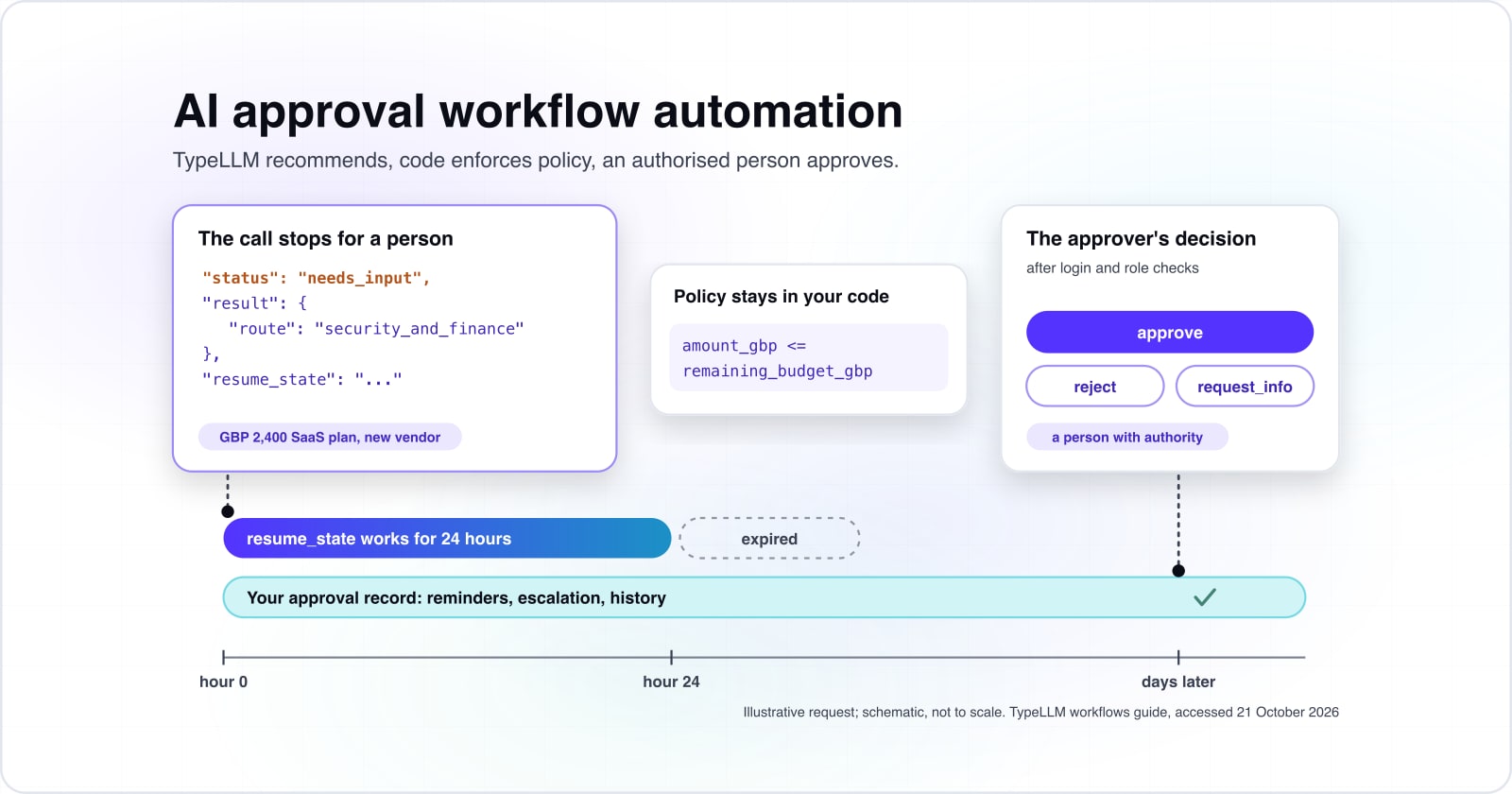
TypeLLM's docs, read on 21 October 2026, say a resume_state works for 24 hours, so an approval that waits longer needs its record in your own database. When the call reaches a source: "user" field, it answers what it can and stops with status needs_input.
Then the response carries a resume_state. Because the guide warns that "The service keeps nothing in between, so hold on to it," your code must store it. The changelog dates this feature to version 0.7.0, on 14 October 2026.
- Hour 0
The call stops.
It answers what it can and stops with status needs_input, carrying a resume_state.
- Hour 24
The resume_state runs out.
A resume_state works for 24 hours, and an expired one is rejected with an error.
- Days
Your approval record carries on.
The application's own approval record, reminders and escalation run past it for days.
Source: TypeLLM workflows guide, accessed 21 October 2026.
Still, a finance approver may take days, and this human-in-the-loop step is where most of the build sits. So your application owns the approval record, the approver's role, expiry, escalation, notices, duplicate clicks and history. When the window closes, run a fresh call with the decision as context. Otherwise, keep the wait in a durable engine. For example, LangGraph's interrupts guide, read on 21 October 2026, says a paused graph "waits indefinitely until you resume execution." Temporal's approval pattern keeps every decision in its Workflow history as Signal events.
Show data table
| Item | Value |
|---|---|
| low | 512 tokens |
| default thinking_budget | 1,024 tokens |
| medium | 2,048 tokens |
| high | 4,096 tokens |
Each effort level caps the thinking one field can bill, from 512 tokens at low to 4,096 at high.
Also, a resumed call bills the answers and any reasoning, so those caps bound what a resume costs.
Which pages do you build a TypeLLM integration from?#
Build from the TypeLLM workflows guide for the graph, then the API reference for limits and errors, then the pricing page for the budget. Add a durable wait only if approvals outlast a day.
- Graph: TypeLLM workflows guide:
depends_on,when,source: "user"and resuming a stopped call. - Limits: TypeLLM API reference: the request body, the limits table and the error codes.
- Budget: TypeLLM pricing: the input and thinking rates for your estimate.
- Long waits: Temporal approval pattern: Signals, timeouts and the approval history for long waits.
What is the smallest working TypeLLM approval call?#
The smallest working version sends typed questions in one call, stops when the response says needs_input, and resumes with the approver's answer. The block uses only the Python standard library and the web (HTTP) calls in TypeLLM's docs.
import json, os, urllib.request
scheme, token = "Bearer", os.environ["TYPELLM_TOKEN"]  # your TypeLLM key
def generate(body):
    req = urllib.request.Request(
        "https://api.typellm.ai/v1/generate",
        data=json.dumps(body).encode(),
        headers={"Authorization": f"{scheme} {token}",
                 "Content-Type": "application/json"})
    with urllib.request.urlopen(req, timeout=90) as r:
        return json.load(r)
amount_gbp = 2400  # an illustrative request
request_text = ("Marketing asks for a yearly SaaS plan from a new vendor, "
                f"GBP {amount_gbp}. The tool will read our customer list.")
# 1. Typed questions. The model recommends; a person decides.
questions = {
    "category": {"type": "string", "enum": ["software", "hardware", "services"],
                 "instructions": "Which spend category is this?"},
    "data_access": {"type": "boolean",
                    "instructions": "Will the vendor access company data?"},
    "missing_info": {"type": ["string", "null"],
                     "instructions": "Which required detail is missing, if any?"},
    "risk_note": {"type": "string", "when": {"data_access": True},
                  "instructions": "Name the data risk a reviewer should check."},
    "route": {"type": "string", "enum": ["manager", "finance", "security_and_finance"],
              "depends_on": ["category", "data_access", "missing_info"],
              "instructions": "Recommend a review route."},
    "approver_decision": {"type": "string", "enum": ["approve", "reject", "request_info"],
                          "source": "user", "depends_on": ["route"],
                          "instructions": "The approver's decision."},
}
# 2. One call with the request as context.
resp = generate({"context": request_text, "questions": questions})
# 3. The call stops for the approver.
if resp.get("status") == "needs_input":
    print(resp["result"]["route"], resp["needs_input"])
    decision = "approve"  # from your approval screen, after login and role checks
    # 4. Resume within 24 hours with the approver's answer.
    resp = generate({"resume_state": resp["resume_state"],
                     "answers": {"approver_decision": decision}})
# 5. Policy stays in your code; read the budget from your ERP, not the model.
remaining_budget_gbp = 5000  # illustrative
approved = (resp["result"]["approver_decision"] == "approve"
            and amount_gbp <= remaining_budget_gbp)
print("create purchase order" if approved else "stop")
So the final check reads its numbers from your systems, never from the model.
How does TypeLLM compare with rules engines, structured outputs and LangGraph?#
A rules engine owns fixed policy, OpenAI Structured Outputs holds one model call to a schema, TypeLLM runs a typed decision graph, and Temporal or LangGraph hold long-running state. No option wins by default, because each owns a different part of the job.
| Option | What it owns | Wins when | Real downside |
|---|---|---|---|
| Rules engine or plain code | Thresholds, vendor lists, approver authority | Every rule is a number or a list | Cannot read free text or spot a vague request |
| OpenAI Structured Outputs | One model call held to your schema | You already run OpenAI models | Order and conditions between answers are your code |
| TypeLLM workflow | Typed fields with depends_on and when in one call | Several linked judgements on one request | One vendor; 64 questions a call; 24-hour resume_state |
| Temporal or LangGraph | Durable state, waits, retries, human input | Approvals that last days and escalate | Infrastructure to run; the model step is still yours |
Source: TypeLLM API reference, OpenAI Structured Outputs guide, LangGraph interrupts guide and Temporal approval pattern, all accessed 21 October 2026.
TypeLLM is not the only schema-safe option for JavaScript Object Notation (JSON) output. OpenAI's Structured Outputs guide says its models "always generate responses that adhere to your supplied JSON Schema." Still, a valid shape is not a correct answer, and it is never an authorisation.
In practice, most approval systems combine a rules layer, one typed model step and a durable store. So you need LangGraph or Temporal only when waits run past a day.
Show data table
| Item | Value |
|---|---|
| gpt-6-luna input | 0.1 |
| gpt-6-luna output | 0.5 |
| gpt-6.1-sol input | 2 |
| gpt-6.1-sol output | 10 |
OpenAI bills output tokens as well as input, and each model listed charges more per output token than per input token.
What does a TypeLLM approval integration cost beyond inference?#
Inference is the smallest line, while the integration, policy rules, approval screens, connectors, persistence, testing and security review carry most of the cost. The inference term is input tokens over a million times the input rate, plus thinking tokens over a million times the thinking rate.
- Build: connectors to your ERP, procurement and identity systems, policy rules, approval screens, the approval store, and tests.
- Run: reviewer time, monitoring, upgrades when the model changes, and security reviews.
Because a rules-only design calls no model, it has no inference line at all. By contrast, OpenAI's pricing page, read on 21 October 2026, bills output tokens as well as input. So run the formula on your own volume, then weigh it against the build lines.
What can go wrong in production, and which controls are yours?#
Prompt injection in request text, expired resume state, vendor outages and silent model changes are risks your own code must handle, because TypeLLM is not an approval system. Also, it is not an identity provider or a long-running process engine.
Its API reference, read on 21 October 2026, sets a call timeout of 60 seconds by default. It also rejects an expired resume_state with an error. Therefore, if a call fails, route the request to a person, never to approval.
Your controls start with role-based access and the least data each call needs. Also keep keys in a secrets store, and review the vendor's data retention. And treat request text as untrusted input. Before launch, fix the expected result for each test request before any run:
Routine
routine and complete requests;
Incomplete or unusual
incomplete requests and unusual vendors;
Conflicting or in breach
conflicting details, policy breaches and vague purposes.
Then measure routing accuracy, false approval advice, missed gaps, escalations, latency and cost. Run the same set against a rules-only baseline and after every model change.
When is TypeLLM the wrong tool, and when should you buy a platform?#
When every rule is a threshold and every request arrives complete, a rules engine or the approval module you already own is the better choice. If your expense chain is standard and your integrations are few, buy a spend platform and configure it.
Also weigh the vendor tie. TypeLLM's API reference, read on 21 October 2026, limits a call to 64 questions and 128K tokens of input. If approvals run for weeks across many systems, start with a durable engine such as Temporal. Then add the model step once the waits work.
But build custom when approvals live inside a proprietary SaaS product, or when your policies are unusual. The same holds when several systems must stay in sync, or the typed decision ships in a product you sell.
| Case | Use instead |
|---|---|
| Every rule is a threshold and every request arrives complete | A rules engine or the approval module you already own |
| Your expense chain is standard and your integrations are few | Buy a spend platform and configure it |
| Approvals run for weeks across many systems | Start with a durable engine such as Temporal, then add the model step |
| Approvals live inside a proprietary SaaS product, or your policies are unusual | Build custom |
Where to go from here#
Start with one approval flow, keep authority in your own code, and test the typed step against a rules-only baseline before widening it.
For fixed-schema models, read Jev against general language models and real-time AI decisions. Then see how extraction differs from approval in AI purchase order entry, and where thresholds belong in System One models. For a team to build it, see AI agent development, ERP development or API integrations. Otherwise, TypeLLM's own docs are enough to build the first call.