Real-time AI decisions: how small AI models act while your customer is still on the page
In a growing business, one person often sorts yesterday's enquiries, orders and sign-ups each morning, long after the customers who sent them have moved on. A small, focused model can sort each one as it arrives, and the two settings that matter most belong to the business.
What are real-time AI decisions, and why make them while your customer is still on the page?#
Real-time AI decisions are small yes-or-no calls a focused model makes in about a tenth of a second, so a risky order or a spam sign-up is caught before the customer leaves. TypeSafe's guide to building with its models, as of September 2026, puts it plainly: "Most queries complete in about 100 ms."
Compare that with how most growing firms work today. Enquiries, orders and sign-ups land in a pile, and the person who sorts it has a day job too. So the pile waits for the next morning, or for a batch job at midnight. By then the customer has waited, gone quiet or bought elsewhere. Real-time AI decisions move the sorting to the moment of the click, the one moment you know the customer is paying attention.
Most people picture AI as a chat window or a report that lands overnight. This is a different kind of tool. TypeSafe, the company behind a model called Jev, calls this kind a System One model, after the fast, gut-feel thinking that Daniel Kahneman made famous. TypeSafe's System One page says such a model "evaluates a state and returns typed answers and probabilities." In plain words, you hand it the facts of one case and one question. Then it hands back a short answer from a list you wrote, plus a score for how sure it is.
It does not write replies or explain itself. As a result, your own software can read the answer and act on it at once. When the customer clicks submit, the model answers, and the case is sorted before the thank-you screen loads.
What does deciding in the moment change for the business?#
Deciding in the moment means an enquiry reaches the right team at once, a risky order waits before it ships, and nobody spends the morning sorting yesterday's pile. In short, you get faster replies, fewer lost leads and less manual sorting. Each of those has a simple cause.
Faster replies come first. For example, an enquiry about a large order goes straight to your sales team. It does not wait in a general inbox that someone checks after lunch. Because the right team sees it at once, the reply comes sooner.
Fewer lost leads follow. A serious enquiry that sits in the wrong queue for a day often cools. But when it lands with the right person in the same minute, that person can call while the customer still has the tab open.
Less manual sorting is the third gain, and your operations lead will feel it most. Take a worked example, not a measured rate: say your website gets 400 enquiries, orders and sign-ups a day. Today someone reads all 400 to decide where each goes. If the model is sure about nine in ten, only 40 reach a person. In this worked example, that leaves 360 cases a day that skip the manual queue.
400
Today, sorted the next morning
40
Model sure about nine in ten
In this worked example, 360 cases a day skip the manual queue.
A worked example, not a measured rate.
| Option | cases a day read by a person, worked example |
|---|---|
| Today, sorted the next morning | 400 |
| Model sure about nine in ten | 40 |
Source: worked example, change it in the confidence dial calculator
How many decisions you can send in a minute is a setting on your account, not a public number. TypeSafe's models page, re-read on 15 October 2026, says: "Rate limits are set per organization." Each firm sees its own limits in TypeSafe's developer console. Cloudflare's limits page, last updated 17 September 2026, lists limits by kind of task and does not name Jev. So ask your technical leader what your account allows before you plan a busy day around it.
Once that is settled, the real question is which decisions you trust the AI with. The next one is what happens to the rest.
Which business decisions suit a yes-or-no answer with a confidence score?#
The decisions that suit this are narrow questions with a short list of answers: is this order risky, which team should take this enquiry, is this sign-up spam. Each one comes up many times a day, and each has a fixed set of answers you can write down in advance.
TypeSafe's System One page shows the shape of these questions. One kind asks the model to pick from a list. Its own example is "Which team should handle this ticket?" with the answers billing, technical or account. Another kind asks for a yes or no, such as "Does this message request a refund?" A third gives a score on a scale, such as how upset a customer sounds.
Here are three everyday cases most firms spot at once.
| Decision | The question | The answers | What happens next |
|---|---|---|---|
| Flag a risky order | Is this order risky? | Yes or no | A yes holds it for a quick review; a no lets it through |
| Route an enquiry | Which team should take this enquiry? | One of four or five teams | It goes straight to that team's queue |
| Catch a spam sign-up | Is this sign-up spam? | Yes or no | Anything clearly spam is set aside; unclear ones get a second look |
For instance, a sign-up with a made-up name and a throwaway address gets a clear yes on spam. But a sign-up from a real firm with an odd email gets a lower score. That is where the next section starts.
What these cases share is that a person could make each call in a few seconds. Yet few people want to make it hundreds of times a day. That is the sweet spot. If the call needs a long think, a written answer or a sum, it belongs elsewhere, and a later section covers those cases.
What happens when the AI is not sure?#
When the AI is not sure, the case goes to a person, and TypeSafe's own example sends anything under 0.6 confidence to a human. Every answer comes with a confidence score between 0 and 1. So your software checks the score before it acts.
TypeSafe's page on confidence-gated routing, as of September 2026, walks through a banking example. It says: "The 0.6 floor catches anything the model is genuinely uncertain about." Above that floor, the line rises with the stakes. Showing a customer their balance is fine at 0.6. But approving a money transfer needs more than 0.85, and below that the system asks the customer to confirm first.
Show data table
| Item | Value |
|---|---|
| hand to a person below this on any action | 0.6 |
| act on a low-stakes answer at or above | 0.6 |
| act alone on a high-stakes answer above | 0.85 |
The riskier the action, the higher the line you set before the AI acts alone.
There is an honest limit here, and TypeSafe states it on its System One page. The page says the scores are tuned against real outcomes, and that this is measured across groups of answers. However, it adds that this "does not guarantee that an individual answer is correct." So a sure answer can still be wrong now and then.
That is why the line matters. It is not a switch that makes mistakes vanish. Instead, it marks the point where you want a person to look. Below it, a wrong call would cost more than a few minutes of that person's time. Meanwhile, the confident cases flow through without anyone touching them.
How do you set the confidence dial, and what does it cost in staff time?#
Where you set the confidence dial decides how many cases a person handles each day and how much risk the business accepts on the rest. If you raise the line, more cases go to people and fewer mistakes slip through. If you lower it, your team does less checking, but the AI acts alone more often.
This trade is not new. A 2017 paper by Geifman and El-Yaniv, posted on arXiv, describes a model whose owner sets a target error level. Then, the paper says, the model "rejects instances as needed, to grant the desired risk (with high probability)." In business terms, it passes the cases it cannot answer safely to someone else.
So the dial is a staffing choice and a risk choice at once. It is not a setting for the IT team to pick alone.
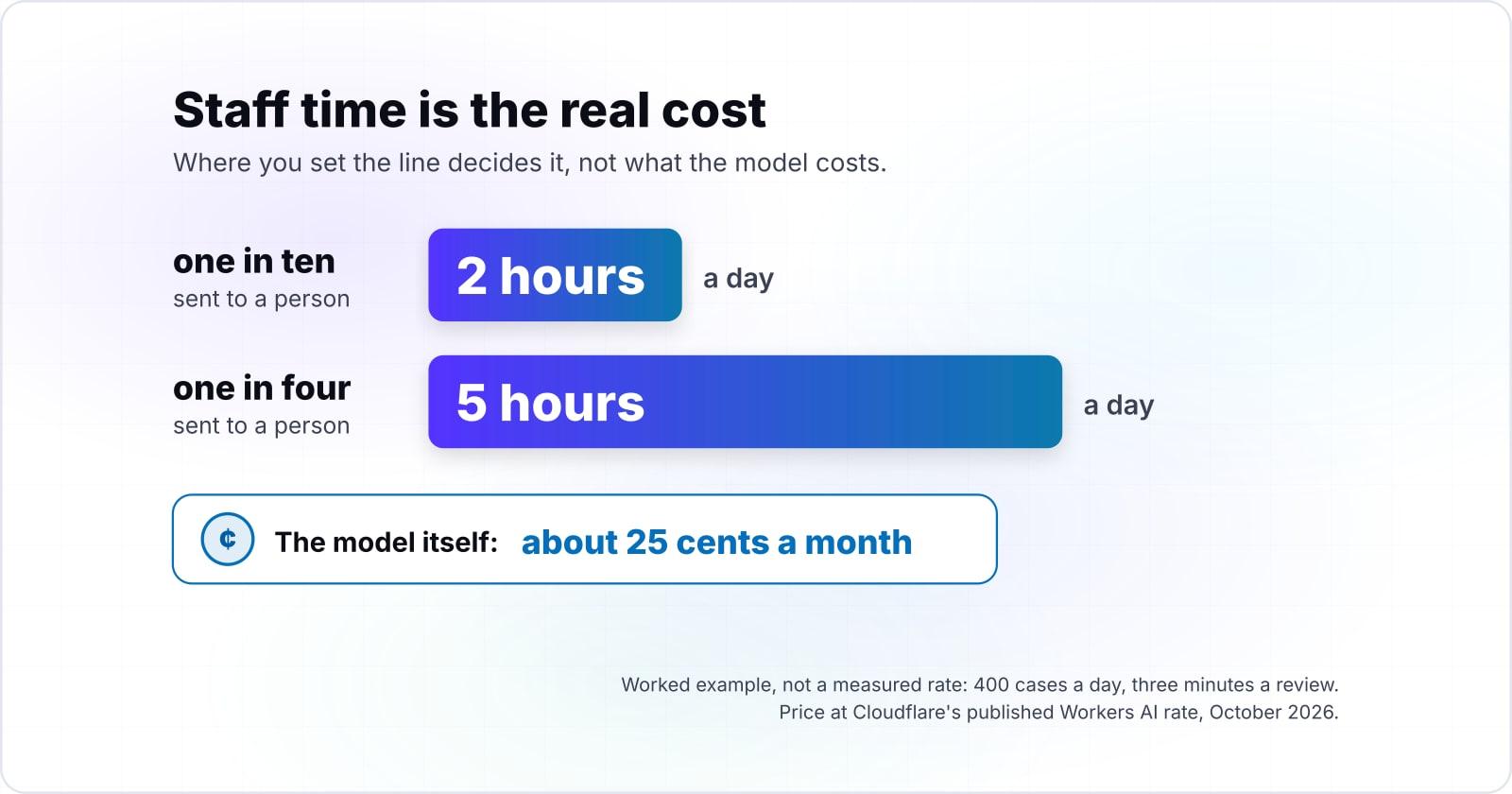
The calculator below starts from a worked example, not a measured rate: 400 cases a day, one in ten sent to a person, three minutes a review. Move the share and watch the staff hours change. For instance, at one case in four, the same example needs five hours a day instead of two.
What your dial setting costs in staff time
Put in your own number of cases a day, the share you send to a person and the minutes each review takes; it returns the cases and staff hours a day.
Staff hours a day
2 h
- Cases a person handles each day
- 40
The defaults are a worked example, not a measured rate. Change them to your own.
Then ask the second half of the question: what does a wrong call cost at this step? A spam sign-up that slips through costs almost nothing. A risky order that ships can cost the goods and the shipping. Because those costs differ, the right line differs too, and each decision can have its own. In practice, start with a high line and watch what reaches your team. Lower it once you trust the pattern.
A wrong call has a customer on the other end too. For example, when the AI holds a good order as risky, a real customer waits for your review. So agree how fast held orders are checked, and tell the customer when a short delay is possible. Otherwise, a high line with a slow review queue can still lose the sale.
What does your customer see when the AI provider is down?#
When the AI provider is down, a simple backup rule decides instead, so the order still goes through, the enquiry still lands in a shared inbox, and the customer notices nothing. You write the rule in advance, in plain words. Then your software follows it whenever the AI does not answer in time.
Outages are real. In a technology note, Info-Tech Research Group reports that four leading AI services had problems within the same few hours on 3 September 2026, though for one of them, Google's Gemini, the evidence came from outside monitoring rather than from Google. Its first piece of advice is: "Classify AI workloads by business impact." Then it asks firms to define what each service should do when its model is unavailable.
MarketScale, on 11 September 2026, drew a similar lesson. Summing up CIO's reporting, it says firms should list which workflows depend on a single AI provider. Its own analysis adds that they may want to write down manual fallback steps.
For small decisions, the backup rule can be very plain. For example:
- Risky order: if the AI does not answer, accept the order and hold it for a person to review before it ships.
- Enquiry routing: if the AI does not answer, send the enquiry to a shared inbox that the whole team watches.
- Spam sign-up: if the AI does not answer, let the sign-up through and mark it for a check later.
In each case the customer sees the same thank-you screen. They never wait on a spinner, and no sale is lost. That also fits TypeSafe's build guide, which tells builders to keep fixed rules in their own code rather than in the model. Because the rule lives in your software, not in the AI, it works when the AI does not.
The cost of the backup is a short spell of manual sorting while the outage lasts. That is a known, bounded cost. And it is far better than a checkout that stops.
What does one decision cost on Cloudflare Workers AI?#
Even a decision that fills TypeSafe Jev's whole window costs about a tenth of a cent on Cloudflare Workers AI, at the price Cloudflare publishes for the text the model reads. Cloudflare's Jev model page lists the input price per million tokens as $0.042, as of October 2026. It lists the output price as $0.00.
A token is a small chunk of text, roughly part of a word. The same Cloudflare page, as of October 2026, lists a window of 32,000 tokens, the most text the model can read for one decision.
Show data table
| Item | Value |
|---|---|
| one decision filling the whole window | 0.001 |
| 1,000 such decisions | 1.344 |
| 100,000 such decisions | 134.4 |
Even a decision that fills the whole window costs about a tenth of a cent, so the model is rarely the big cost.
Take a worked example of 400 cases a day at 500 tokens each. At the published price above, that comes to about 25 cents a month. But the two staff hours a day in the calculator's worked example cost far more than that. So the money question is where you set the line, not what the model costs.
When is a yes-or-no AI model the wrong tool?#
A yes-or-no model is the wrong choice when the decision needs counting, date arithmetic or a written reply, and TypeSafe lists those weak spots itself. Its page on where Jev 1.13 struggles, last reviewed on 17 September 2026, lists them plainly.
It says Jev "does not count reliably." It says the model "reads dates as text, not as ordered quantities," so asking which of two dates comes first is unreliable. It also says Jev "is not trained to generate text." Here is what to use instead in each case.
| When the decision needs | The problem | Use instead |
|---|---|---|
| Adding up or counting | TypeSafe says Jev "does not count reliably" | A plain rule in your software, such as order value over a set amount |
| Comparing dates | TypeSafe says it "reads dates as text, not as ordered quantities" | Your software works it out, such as whether a return falls inside 30 days; the model can still read the date |
| Writing a reply | TypeSafe says Jev "is not trained to generate text" | A chat model |
| A rare, costly call | The decision is rare and a mistake would be costly, such as a large refund | A person makes it; the model can gather the facts |
| A decision people will try to game | TypeSafe notes that text written to trick the model can move its answer | A higher line and a person nearby |
Two more cases call for care. If a decision is rare and a mistake would be costly, such as a large refund or a legal matter, a person should make it. The model can still help by gathering the facts, but the call stays human.
Finally, TypeSafe's page notes that text written to trick the model can move its answer. So a decision that people will try to game needs a higher line and a person nearby.
What should you ask your technical leader before you start?#
Before you start, ask your technical leader four things: which decision to try first, where the confidence line should sit, who picks up unsure cases, and what the backup rule is. Those four answers are enough to begin a small, safe trial of real-time AI decisions.
TypeSafe's build guide sums up the approach in one line: "build a normal software workflow and insert System One only where AI is needed." That fits a first trial well. Your forms and checkout stay as they are, and one small decision is added inside them.
- Question 1
Which single decision should we try first?
Pick one that happens often, costs little when wrong and eats staff time today. Spam sign-ups and enquiry routing are good first picks.
- Question 2
Where should the line sit, and how many cases will that send to a person each day?
Ask for the number of cases, not just the score, so you can plan the hours.
- Question 3
Who picks up the unsure cases, and how fast?
Name the team, and agree how quickly they respond.
- Question 4
What does the backup rule do when the AI provider is down?
Ask to see it written in one sentence. Also ask how you will know it has kicked in.
Then agree what you will measure in the first 30 days, before the trial starts. Usually four numbers are enough: how long a customer waits for a first reply, how many enquiries go unanswered, how many hours your team spends sorting, and how many wrong calls the review catches. For a fair comparison, measure them for a week beforehand too.
Where should you and your technical leader read next?#
Your technical leader will want the System One explainer next, and you may want the plain comparison of a yes-or-no model with a chat assistant. Both are short, and neither assumes a past AI project.
The System One explainer covers how the model works and how it fits into an existing system. The plain guide to Jev and chat models shows when each kind of AI fits. For the enquiry case as a worked build, see routing form submissions with AI on Cloudflare.
If the business decides it wants help building this, the Cloudflare development and AI-augmented development pages describe that work. But nothing on them is needed to start. The TypeSafe and Cloudflare pages linked above are enough on their own for a technical leader to run a first trial.