The AI content workflow WordPress can run without plugins: a REST route, WP-Cron and a person who publishes
A model can write your first drafts without an AI plugin on the site. Four parts of WordPress core do the work, and none of them lets the model press Publish.
How do you add AI to WordPress without a plugin?#
You add AI to WordPress without installing a plugin by writing a must-use file that registers a REST route, a WP-Cron worker and a custom status, so the model drafts and a person publishes. A must-use file is a PHP file in wp-content/mu-plugins/. WordPress loads it on every request, and it cannot be switched off from the plugins screen.
First, the route takes a brief from a logged-in editor and stores it under a custom status. Then a cron worker picks up the brief and calls the model through the WordPress HTTP API. Finally, it saves the reply as a pending post. Pending is a core status, and WordPress.org's post status article defines it as "Awaiting a user with the publish_posts capability". So review is not a habit the team has to keep. Instead, it is how WordPress already treats the post.
The example provider here is Anthropic's Messages API. However, the same pattern works with another provider's HTTP API. Only the URL, the headers and the shape of the JSON change.
What does a governed drafting pipeline change for an editorial team?#
An editor stops writing first drafts and starts reviewing them, while the site carries no extra plugin to vet, update or trust with the provider key. That trade is the whole business case. For example, a team that publishes four posts a week can spend its writing hours on review. It can also spend them on the facts only it knows.
The second gain is custody. A plugin that talks to a model holds the provider key, and it runs with full access to the site. OWASP's Secrets Management Cheat Sheet, accessed 8 October 2026, warns that many organisations keep secrets "hardcoded within the source code in plaintext". In contrast, a file you wrote reads the key from the server and holds nothing else. As a result, one less vendor sits between your site and your key.
The cost is ownership. Your team maintains about a hundred lines of PHP, and it updates them itself when the provider changes its API. In practice, that is a fair trade for a team that already deploys its own theme code. So the AI content workflow WordPress gives you this way is cheap to run but yours to keep.
Which core APIs make up the AI content workflow WordPress already ships?#
Four core pieces carry the whole workflow: a REST API route takes the brief, WP-Cron runs the worker, the HTTP API calls the model, and post statuses gate publishing. Each one does one job, and each is documented on developer.wordpress.org.
- The REST API route.
register_rest_route()adds an endpoint, and itspermission_callbackdecides who may call it. The custom endpoints handbook, updated 18 September 2024, puts that call on therest_api_inithook. - WP-Cron. It runs scheduled hooks. However, the WP-Cron handbook, updated 14 December 2023, notes that "it is only triggered on page load".
- The HTTP API.
wp_remote_post()sends the request to the model. Then it returns the response or aWP_Error. - Post statuses.
register_post_status()adds the queued status. Meanwhile, the core pending status holds the finished draft for review.
| Core part | Call | Job in the pipeline |
|---|---|---|
| REST API route | register_rest_route() | takes the brief |
| WP-Cron | wp_schedule_event() | runs the worker |
| HTTP API | wp_remote_post() | calls the model |
| Post statuses | register_post_status() and pending | gate publishing |
Because WP-Cron waits for traffic, a quiet site can leave a brief waiting. So a production site usually hands the schedule to the server. The system scheduler page, updated 20 March 2025, sets DISABLE_WP_CRON to true. Then the system cron calls wp-cron.php on a fixed interval.
Why does the model call run in WP-Cron and not in the REST request?#
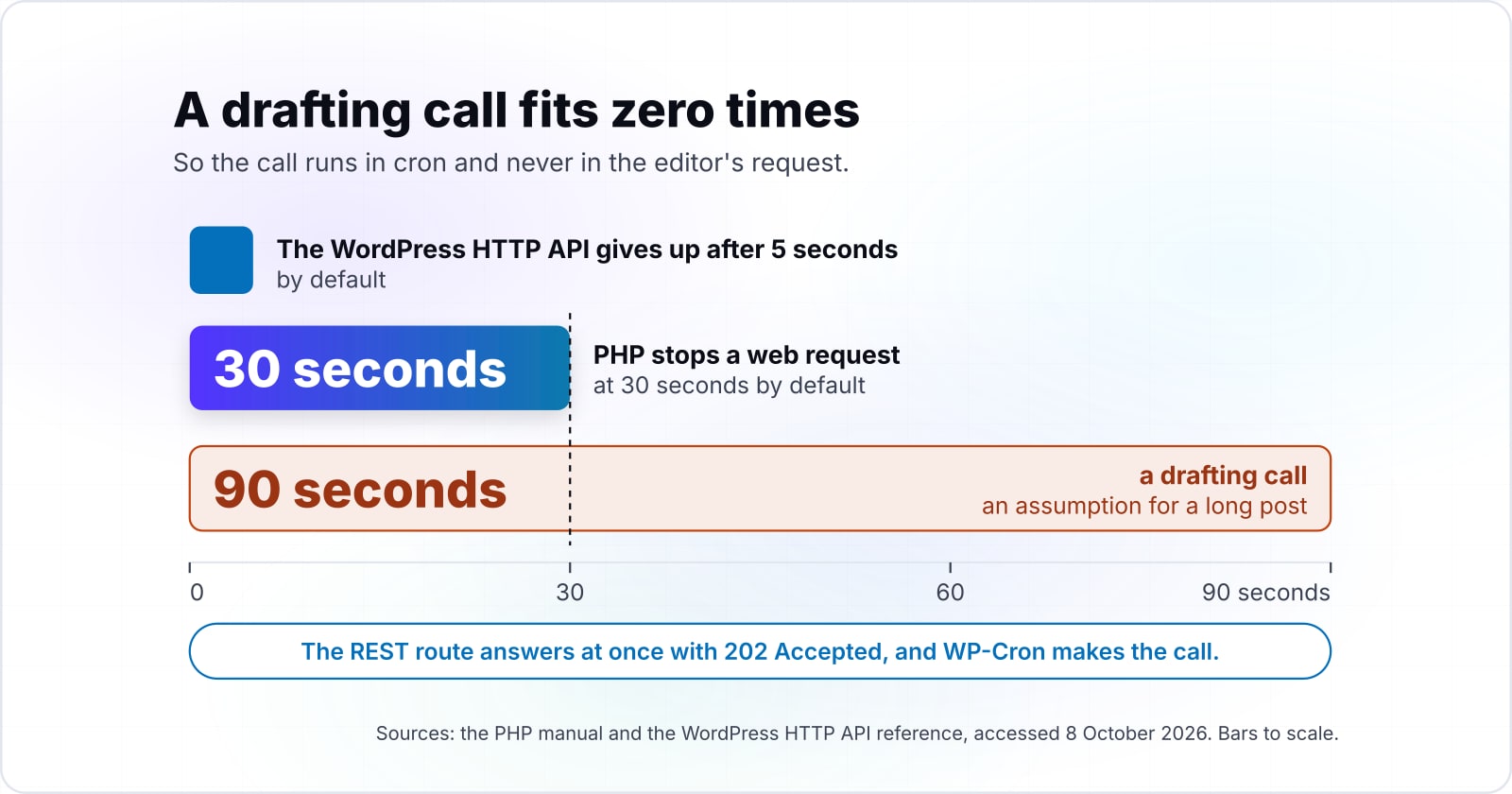
A web request in PHP stops at 30 seconds by default, per the PHP manual accessed 8 October 2026, and a long drafting call can outlast it. The WordPress HTTP API is stricter still. Its WP_Http::request() reference, accessed the same day, sets a 5-second default timeout.
Show data table
| Item | Value |
|---|---|
| WordPress HTTP API default timeout | 5 s |
| PHP max_execution_time default on a web request | 30 s |
A drafting call has 5 seconds by default from WordPress and 30 seconds from PHP.
The PHP limit is less simple than it looks, and the manual says so. On systems other than Windows the default timer counts CPU time, so a network wait may not count. However, some builds count wall time. Since PHP 8.3.0, the manual says, that is the default for thread-safe builds. Meanwhile, the web server has its own clock. For example, the PHP manual, accessed 8 October 2026, notes that Apache's Timeout directive defaults to 300 seconds.
So a synchronous design depends on three timers you may not control. Instead, the REST route answers at once with 202 Accepted. MDN's status reference, last modified 4 July 2025, describes 202 as a request "accepted for processing" whose processing "has not been completed". Then the slow call runs where it can take its time. When the system cron starts PHP from the command line, the PHP manual gives max_execution_time a default of 0. That means no limit at all.
How many model calls fit inside one web request?#
At the WordPress default of 5 seconds per call, six calls fit one 30-second PHP web request, per the PHP manual accessed 8 October 2026. That is the best case. Every call uses its full timeout, and nothing else in the request takes time.
Model calls that fit one web request
Set the per-call timeout and the request budget; it counts how many whole calls fit, floor(budget / timeout), in the best case where every call uses its full timeout.
Whole calls that fit
6
- Seconds left to save the post
- 0
A worked example from dataset calls-per-web-request. Modelled, not measured.
Raise the timeout and the budget runs out fast. With the 30-second default from the PHP manual, accessed 8 October 2026, three calls fit at 10 seconds each. At 15 seconds, only two do. Finally, at 30 seconds one call takes the whole request, with no time left to save the post.
Show data table
| Item | Value |
|---|---|
| 5 s per call, the WordPress default | 6 |
| 10 s per call | 3 |
| 15 s per call | 2 |
| 30 s per call | 1 |
Six calls fit at the 5-second default, and one call fills the request at 30 seconds.
Now say you allow a drafting call 90 seconds, an assumption for a long post and not a measured figure. Against the 30-second PHP default, it fits zero times. Therefore the worker sets its own timeout of 90 in wp_remote_post(). It also runs where the request budget does not apply.
How do you keep a human in the loop before anything is published?#
The worker saves each draft as pending, which WordPress.org defines as awaiting a user with the publish_posts capability, so publishing stays a human act. The post status article, updated 13 January 2023, adds a detail. A user with edit_posts but not publish_posts sees "Submit for Review" instead of "Publish".
Roles decide who holds that capability. WordPress.org's roles and capabilities article, updated 2 September 2026, calls an Author "somebody who can publish and manage their own posts". In contrast, a Contributor is somebody who "cannot publish them".
| Role | Holds publish_posts | What it can do with an AI draft |
|---|---|---|
| Administrator | yes | review and publish any draft |
| Editor | yes | review and publish any draft |
| Author | yes | publish its own posts |
| Contributor | no | write and submit for review only |
Source: WordPress.org, Roles and Capabilities, updated 2 September 2026.
As a result, the review step needs no new screen. Pending posts already appear in the posts list with their own filter. An editor opens one, fixes it and publishes it. Also, set the brief's author to the person who asked for it, so the draft lands in that person's own queue.
How do you stop the model from publishing directly?#
The worker hard-codes the pending status in its wp_insert_post call and never reads a status from the model's reply, so no prompt can promote a post. The model returns text. Then the code places that text in post_content and nowhere else.
Three guards close the other paths. First, the route's permission_callback checks current_user_can( 'edit_posts' ) before anything is queued. When that callback returns false, the custom endpoints handbook says "the request will not proceed with processing". Second, the worker runs the reply through wp_kses_post(), which keeps the HTML a post may hold and strips scripts. Third, the worker writes the post itself, so the model never holds a WordPress login.
A prompt injection inside a brief can still change the words of a draft. However, it cannot change the status, the author or the date. None of those come from the reply. In short, the worst case is a bad draft that a person rejects.
Where should you keep the provider API key?#
Keep the provider API key in a secret store or the server environment and read it in wp-config.php, never in the options table or the repository. A key in wp_options is readable by any plugin, and it lands in every database backup. Likewise, a key in the repository stays in its history after someone deletes it.
The OWASP cheat sheet names that second failure directly: secrets "hardcoded within the source code in plaintext". So set the key as an environment variable on the server, or let your secret manager write it there. Then wp-config.php reads it with getenv() and defines a constant. Finally, the must-use file reads that constant.
Give the key the smallest scope the provider allows, and rotate it on a schedule. Because the worker is the only code that sends it, a rotation touches one server setting and no PHP.
| Where the key lives | What follows |
|---|---|
| The options table (wp_options) | readable by any plugin, and in every database backup |
| The repository | stays in its history after someone deletes it |
| Server environment or secret manager, read in wp-config.php | the worker alone sends it, so a rotation touches one server setting |
Which official pages should you build this from?#
Build it from five official pages in this order: custom REST endpoints, register_post_status, WP-Cron scheduling, wp_remote_post and the Messages API reference. Each page holds one call the pipeline makes.
Step 1: the route
Adding custom endpoints: register_rest_route(), the permission_callback and argument sanitising.
Step 2: the status
register_post_status(): the queued status and its admin list filter.
Step 3: the schedule
Scheduling WP-Cron events: wp_schedule_event() and the wp_next_scheduled() check that stops duplicate events.
Step 4: the outbound call
wp_remote_post(): the outbound call, its arguments and its timeout.
Step 5: the model
The Messages API reference: the POST /v1/messages request shape, with model, max_tokens and messages.
The five pages, in order: Adding custom endpoints, register_post_status(), Scheduling WP-Cron events, wp_remote_post(), The Messages API reference.
Also read the API overview. It lists the headers each call needs, including anthropic-version with the example value 2023-06-01. Another provider swaps these last two pages for its own reference and changes nothing else.
What is the smallest working code for this pipeline?#
The smallest working pipeline is three PHP pieces in one must-use file: a route that queues a brief, a cron worker that calls the model, and a pending insert. Save it as wp-content/. Then define ACME_AI_KEY and ACME_AI_MODEL in wp-config.php from the server environment.
<?php
/**
 * Plugin Name: Acme AI drafts (must-use)
 */

// Step 1. A status for queued briefs, and a route that only queues.
add_action( 'init', function () {
	register_post_status( 'ai_queued', array(
		'label'                     => 'Queued for AI',
		'public'                    => false,
		'show_in_admin_status_list' => true,
	) );
} );

add_action( 'rest_api_init', function () {
	register_rest_route( 'acme-ai/v1', '/generate', array(
		'methods'             => 'POST',
		'callback'            => 'acme_ai_queue_brief',
		'permission_callback' => function () {
			return current_user_can( 'edit_posts' );
		},
		'args'                => array(
			'brief' => array(
				'required'          => true,
				'sanitize_callback' => 'sanitize_text_field',
			),
		),
	) );
} );

function acme_ai_queue_brief( WP_REST_Request $request ) {
	$post_id = wp_insert_post( array(
		'post_title'   => 'AI draft (queued)',
		'post_content' => $request['brief'],
		'post_status'  => 'ai_queued',
		'post_author'  => get_current_user_id(),
	), true );
	if ( is_wp_error( $post_id ) ) {
		return $post_id;
	}
	return new WP_REST_Response( array( 'queued' => $post_id ), 202 );
}

// Step 2. A cron worker that calls the model outside any web request.
add_action( 'acme_ai_worker', 'acme_ai_run_worker' );
if ( ! wp_next_scheduled( 'acme_ai_worker' ) ) {
	wp_schedule_event( time(), 'hourly', 'acme_ai_worker' );
}

function acme_ai_run_worker() {
	$briefs = get_posts( array( 'post_status' => 'ai_queued', 'numberposts' => 1 ) );
	foreach ( $briefs as $brief ) {
		$response = wp_remote_post( 'https://api.anthropic.com/v1/messages', array(
			'timeout' => 90,
			'headers' => array(
				'x-api-key'         => ACME_AI_KEY,
				'anthropic-version' => '2023-06-01',
				'content-type'      => 'application/json',
			),
			'body'    => wp_json_encode( array(
				'model'      => ACME_AI_MODEL,
				'max_tokens' => 2048,
				'messages'   => array(
					array( 'role' => 'user', 'content' => 'Draft a blog post from this brief: ' . $brief->post_content ),
				),
			) ),
		) );
		if ( is_wp_error( $response ) ) {
			continue; // The brief stays ai_queued, and the next run retries it.
		}
		$data = json_decode( wp_remote_retrieve_body( $response ), true );
		if ( empty( $data['content'][0]['text'] ) ) {
			continue; // A 429 or any error body leaves the brief queued.
		}

		// Step 3. Save the reply as pending. The status is set here, never by the model.
		wp_insert_post( array(
			'ID'           => $brief->ID,
			'post_title'   => 'AI draft: review before publishing',
			'post_content' => wp_kses_post( $data['content'][0]['text'] ),
			'post_status'  => 'pending',
		) );
	}
}
To queue a brief, a logged-in editor sends POST /wp-json/acme-ai/v1/generate with a brief field. The route answers with the queued post's ID and status 202, the code MDN's status reference, last modified 4 July 2025, reserves for work handed to another process. Then the worker handles one brief per run, so a slow call never stacks.
When the provider rate-limits the call, the brief simply waits for the next run. Anthropic's rate limits page, accessed 8 October 2026, says such a call gets a 429 error with a retry-after header. Because the worker only acts on a reply that carries text, an error leaves the brief queued.
When is a no-plugin build the wrong tool?#
A no-plugin build is the wrong tool when the site already runs WordPress 7.0 or later and you would rather let its AI Client and one provider plugin manage keys. To be plain, WordPress 7.0's AI Client needs a provider plugin, because it does not work alone. The developer note of 24 March 2026 says "WordPress Core does not bundle any AI providers directly".
With a provider plugin installed, an administrator configures it on the Settings > Connectors screen. Then your code calls wp_ai_client_prompt(), and WordPress routes the request to a configured model. The releases page, updated 6 October 2026, lists 7.1.3 as the current version. So many sites can take this route today.
Pick the AI Client when your team would rather not maintain HTTP code or switch providers by hand. It is also the better fit when several plugins on one site need the same model access. However, keep the hand-built file when the site runs a version before 7.0, or when you want no plugin at all. It also wins when you need full control of the request. In both cases, the pending status and the publish_posts check still do the gating.
| Hand-built must-use file | WordPress 7.0 AI Client | |
|---|---|---|
| Plugins needed | none | one provider plugin, since core bundles no AI providers |
| WordPress version | works before 7.0 | 7.0 or later |
| Keys | read from the server environment in wp-config.php | managed by the provider plugin, set on Settings > Connectors |
| Code you keep | about a hundred lines of PHP, HTTP calls included | a wp_ai_client_prompt() call, no HTTP code |
| Publishing gate | the pending status and the publish_posts check | the same pending status and publish_posts check |
Where should you go next?#
Read how WordPress fires its hooks and how to structure a growing codebase next, since the pipeline registers on those hooks and lives in that structure. The request lifecycle post explains init and rest_api_init, the two hooks the file uses. Then structuring WordPress at scale with Composer and PSR-4 shows where a file like this lives once it grows. Also, postmeta versus custom tables covers where to keep the brief and the model's metadata beside each draft.
If you would rather have a team build this into an existing site, our WordPress developers do that work. Our AI-augmented development page sets out the same human-review rule at company scale. Either way, the five official pages above are enough to build it yourself.