CRM best practices for implementation, adoption and a CRM that is already live
Most CRMs that disappoint are not broken software. One habit is missing, and the useful work is finding out which one before the next renewal is signed.
What are CRM best practices for implementation and adoption?#
CRM best practices are the habits that keep a CRM's records true and used: scope implementation to one workflow, train people for their real job, and repair one broken condition at a time.
In practice that splits into two moments. Before go-live, implementation decides what the system holds and who owns it. After go-live, adoption decides whether anyone opens it on a Tuesday. However, most advice treats both as one checklist, so a team runs ten practices at once and cannot tell which one worked.
Eurostat, the statistics office of the European Union, reports use of this software rising by 2.68 pp between 2023 and 2025. On its own figures, that is 25.83% of EU enterprises in 2023 and 28.51% in 2025.
25.83%
2023
28.51%
2025
More EU firms run a live system than two years earlier.
| Option | share of EU enterprises using such software |
|---|---|
| 2023 | 25.83% |
| 2025 | 28.51% |
That rise matters because a growing share of firms now has the second problem, not the first. Therefore most of what follows is about a system that already exists, and the best CRM strategy for it is one repair at a time.
What are CRM implementation best practices?#
CRM implementation best practices put a single workflow, its data and its owner in place before go-live, then review the design at fixed checkpoints, as Microsoft's Dynamics 365 implementation guide does.
Dynamics 365 is the customer and business application suite from Microsoft. The Success by Design guide, updated 4 August 2026, splits a rollout into five phases. They are Discover, Initiate, Implement, Prepare and Operate. The guide makes the Solution Blueprint Review mandatory and starts it early, "before design decisions become costly to reverse." Then Implementation Reviews cover the data model, security and integration while the build is young. Finally, a Go live Readiness Review is the last stop before launch.
The lesson travels beyond one product, because a review at launch only finds what is too late to change. So checkpoints belong in the plan from the first week. Salesforce adds the human half in its Trailhead deploy unit. Trailhead is the free learning site from Salesforce, and it says to tell the company when training happens and to include the links now. Also, it says to pick a training method that fits the audience and timeframe.
Scope also depends on size. Eurostat's 2025 survey found 24.69% of small EU enterprises using it, against 65.43% of large ones.
Show data table
| Item | Value |
|---|---|
| Small enterprises | 24.69 |
| All EU enterprises | 28.51 |
| Large enterprises | 65.43 |
Large firms are more than twice as likely to run one.
Because a smaller firm has fewer people to absorb change, it should scope tighter, and one pipeline, one team and one report is enough to start. A 2021 study in the peer-reviewed journal PLOS ONE drew on 331 respondents from Palestinian small and medium firms. Salah, Yusof and Mohamed found that firm size moderates how compatibility, top management support and IT infrastructure shape adoption. In short, a practice lands differently at 20 people than at 2,000. If the rollout went wrong before go-live, start with the failure patterns that show up before go-live.
What are CRM adoption best practices?#
CRM adoption best practices make the system the fastest way for each person to do their own work, because training alone teaches the tool but does not create a reason to open it.
The Trailhead adoption module puts it bluntly: you will not see a return "unless your team actually uses it." Meanwhile, Microsoft's training strategy guidance, dated 25 October 2023, sets a higher bar, where users should "know how to do their job" in the new system, not just where the buttons are.
Time is the limit that training cannot lift. The Salesforce State of Sales report, published in February 2026, surveyed 4,050 sales professionals and found the average seller spends 40% of their time selling.
Show data table
| Segment | Value (%) | Share |
|---|---|---|
| Selling | 40 | 40% |
| Everything else | 60 | 60% |
Selling is the minority of the week.
So in that February 2026 survey, every field you ask for comes out of the 60% that is already crowded. The same report says Gen Z reps lose about two full hours each week to manual data entry. Since the publisher sells this kind of software, read it as a disclosed vendor survey.
In the PLOS ONE results, top management support and compatibility were among the factors with a significant effect on adoption. Therefore sponsorship, simpler screens and a feedback loop matter more than a second round of classes. The Trailhead long-term adoption unit says to "Gather feedback from reps" through a simple process. In practice, adoption is a return the user gets that same week.
Do CRM industry best practices differ by sector?#
The practices hold across sectors, but the starting point differs: Eurostat counts 63.14% of EU information and communication enterprises using CRM in 2025 against 16.43% in construction.
Show data table
| Item | Value |
|---|---|
| Information and communication | 63.14 |
| Transportation and storage | 18.55 |
| Construction | 16.43 |
Sector sets where a firm starts.
A firm in a sector where most peers run one is usually repairing one. Meanwhile, a firm in construction or transport is more often implementing for the first time. So sector tells you which half of this guide to read first. However, it does not change the practices, since a construction firm still needs one owner, a short field list and a feedback loop.
Four conditions: which one is broken in your CRM?#
Almost every symptom on a stalled CRM routes to one of four conditions: the record serves reporting, data decays, the system is cut off, or nobody owns the operating model.
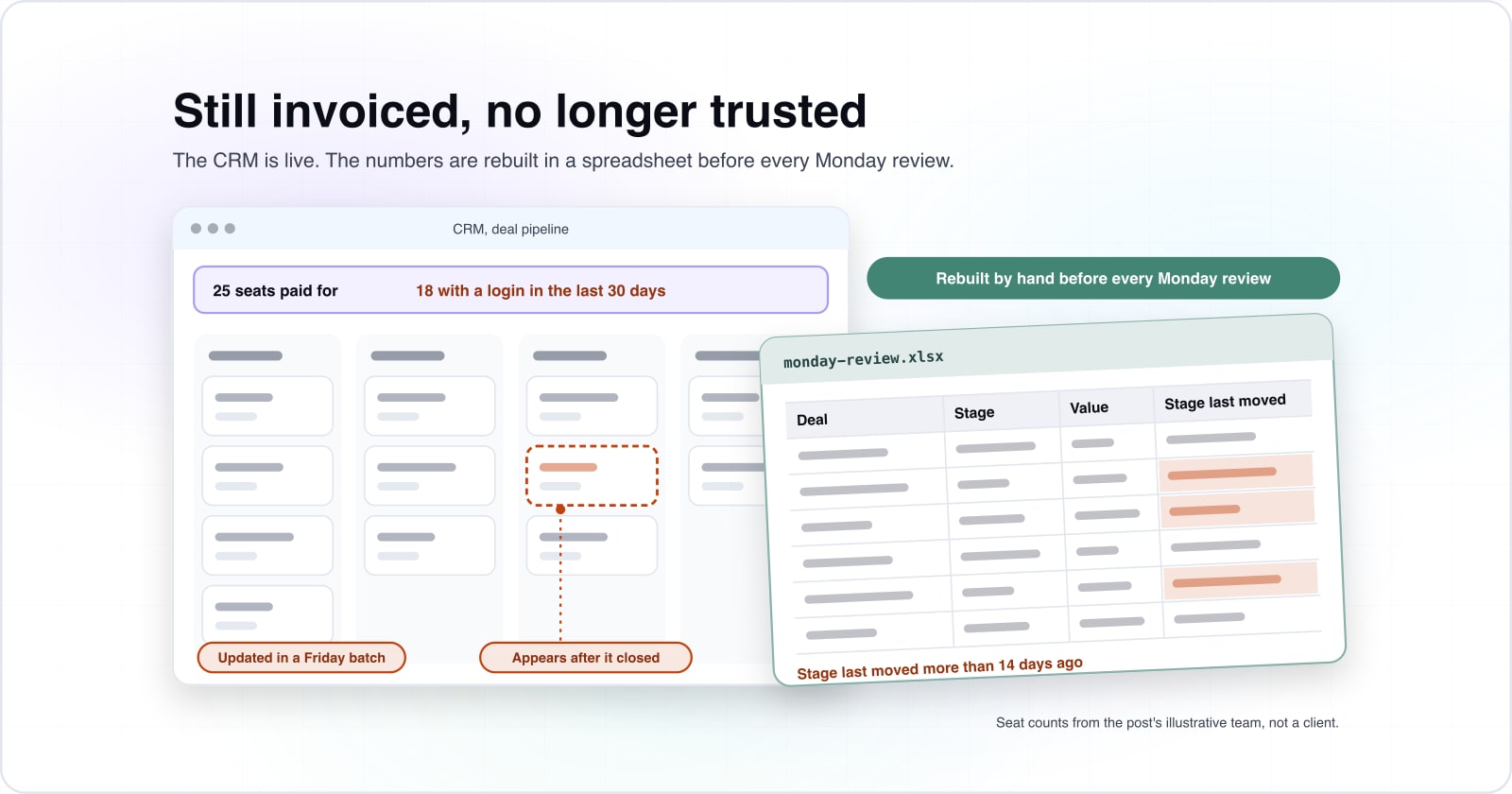
A stalled system is still running and still invoiced, but no longer trusted to decide anything. Someone rebuilds the numbers in a spreadsheet before every Monday review. Deals appear in the system after they close. Because these signs are countable, you can test them this week. First, count seats paid for against seats with a login in the last 30 days. Then count open deals whose stage last moved more than 14 days ago.
Published failure figures will not grade your own system. Writing in Harvard Business Review on 20 December 2018, Scott Edinger noted figures from 18% to 69%. Because each came from a different count with its own meaning of failure, none of them describes your system. Instead, route your loudest symptom into one condition:
| What you can observe this week | The condition it indicates | Who owns the repair | What changes in 30 days |
|---|---|---|---|
| Records are updated in a Friday batch, and notes get shorter over time. | One: the record serves reporting rather than the work. | The person entering the data, and whoever can give them something back that week. | The lag between a real event and its record falls. |
| A full deduplication buys a few quiet months, then the same meeting comes back. | Two: the data decays faster than anyone repairs it. | Whoever publishes the weekly number on the three fields that matter most. | Completeness on those three fields moves. |
| Three teams have each built the same export to reconcile the same two systems. | Three: the system sits apart from where the truth lives. | The person who runs the review the spreadsheet exists for. | How often anyone opens the reconciliation spreadsheet falls. |
| The field list has only ever grown since go-live. | Four: nobody owns the operating model. | One named person who can refuse a field request from a senior stakeholder. | The field count on the main record falls. |
Each repair fixes exactly one condition, which is what makes repairs orderable. As a rule, fix the condition your headline report depends on first. Fix ownership last, so the other repairs are not undone within two quarters.
Condition one: who is the record actually for?#
A record built for the monthly report rather than the person entering it gets updated in a Friday batch, and its notes get shorter every quarter.
The symptom
A record built for the monthly report rather than the person entering it gets updated in a Friday batch, and its notes get shorter every quarter.
The cause
The trade behind it is lopsided, since the seller pays the cost of entry while someone else gets the benefit.
The repair
The repair gives the person entering data something back that same week.
The trade behind it is lopsided, since the seller pays the cost of entry while someone else gets the benefit. As a result, entry quality falls, and no training reverses it. The PLOS ONE study counts compatibility among the factors with a significant effect. A system that fits how people already work gets used; one that adds a second job does not.
Therefore the test is timing rather than mood, and records updated on Friday mean the system is a chore. The repair gives the person entering data something back that same week. For example, a working call list qualifies, and so does a reminder that saves a lookup. However, a new mandatory field does not, because it only adds cost. Once the record serves the work, the report comes along for free.
What customer data should a CRM store?#
A CRM should store the customer data that a named decision or workflow uses, and nothing more.
Every extra field is one more thing to decay, and condition two is decay outrunning repair. In practice that leaves four groups. First, who the customer is: the account, the contacts and how to reach them. Second, the state of each deal: stage, value and the date the stage last moved. Third, the next action and the person who owns it. Finally, the consent and source record where the law requires one.
The EU General Data Protection Regulation (GDPR) has applied since 25 May 2018, and it puts the same rule in law for personal data. Article 5 requires data "adequate, relevant and limited to what is necessary in relation to the purposes for which they are processed". It must also be "accurate and, where necessary, kept up to date". The UK Information Commissioner's Office (ICO) gives the working step in its data minimisation guidance. It says to "identify the minimum amount of personal data you need to fulfil your purpose." A field that nobody reads fails both tests.
Security follows from the same list. In particular, Article 32 of the GDPR asks for "a level of security appropriate to the risk". It names "the pseudonymisation and encryption of personal data" among the measures. In practice, that means each team sees only the records it works. Leavers lose access on the day, and integrations run under named accounts, never a shared login.
Then let the platform hold the line. HubSpot is a widely used platform, and its deduplication guide was updated on 2 October 2026. It says "HubSpot automatically deduplicates contacts using email addresses", and companies by domain name. Its property field types include a dropdown select, where only one option from a set list can be chosen. Because a dropdown cannot be misspelled, it decays more slowly than free text.
Hygiene also tracks results. For example, in the Salesforce State of Sales survey, published February 2026, 79% of high performers prioritise data hygiene, while only 54% of underperformers do.
Show data table
| Item | Value |
|---|---|
| High performers | 79 |
| Underperformers | 54 |
The teams that sell best keep their records cleanest.
What are CRM integration best practices?#
CRM integration best practices start from the business goal, name the system that owns each fact, and let the CRM read that fact instead of asking someone to retype it.
Microsoft's integration guidance is dated 1 February 2024. It says that before integrating anything, "you should define your goals from a business perspective." It then groups integrations into three types: look and feel, data, and process. Most gaps are the data type. Billing, support or product usage lives elsewhere, and the record holds an older copy. So the system holds opinions while other systems hold the facts.
The tell is repetition: if three teams each built the same export to reconcile the same two systems, the gap is structural. Microsoft's data management guidance describes the result, where two departments can show different values in the same report because they use two different systems. Its answer is data governance: agreed definitions, with an owner for each term.
Therefore write down which system owns each fact the team reports on. Then stop every export that copies that fact by hand. Integration glue with its own upkeep rota is software nobody owns. A maintained API integration to the system of record replaces all three exports with one owned connection.
Condition four: does anyone own the operating model?#
A CRM with nobody who can refuse a field request grows a field list that only ever lengthens, and every new field is one more thing to decay.
Ownership means one named person who can say no to a senior stakeholder. Without that person the schema only grows, because adding is free for the person asking and costly for everyone else. Although "get buy-in" sounds like governance, buy-in is not a decision right.
The work does not end at launch either. The Success by Design guide names Operate as a phase of its own, aimed at stabilising and planned improvement. Trailhead notes that Salesforce releases new features three times each year, and it advises reading the release notes to choose what to adopt. So the owner holds two powers: refuse a field, and retire a field nobody reads.
What does the broken condition cost you every quarter?#
Compute the quarterly cost from unused seats, hours lost to manual entry and forecast error before the renewal, or the renewal gets signed on habit.
Nucleus Research, an analyst firm, published a finding on 3 August 2023 that spending on these systems returns $3.10 per dollar spent. It describes a 37 percent decline over 10 years, from $4.90 to $3.10.
$4.90
A decade earlier
$3.10
2023
A dollar of spend no longer returns what the original business case assumed.
| Option | return per dollar spent |
|---|---|
| A decade earlier | $4.90 |
| 2023 | $3.10 |
Source: Nucleus Research, 3 August 2023
The useful reading is not the multiple. Instead, a dollar of that spend cannot be assumed to behave like the dollars in your original business case. So the cost of a stall has to be counted in your own numbers.
Three lines do it, on a 13 week quarter. First, unused licences: seats paid for minus seats with a login in 30 days. Second, manual entry: active users times hours a week of retyping times 13. Third, forecast error: the gap between forecast and actuals.
Take an illustrative team, not a client account. Suppose 25 seats are paid for and 18 people logged in during the last 30 days, which leaves 7 licences unused. Next, suppose each active seller loses 3 hours a week to manual entry. In this illustrative case that is 702 hours a quarter, from 18 times 3 times 13. Finally, assume the forecast missed actuals by 12 percent last quarter.
Put your own numbers in, then read which line is largest
Unused licences
7 unusedTime lost to manual entry
702 hoursForecast error against actuals
12% missUnused licences
28%7 unused this quarter, of the seats you pay for. 25 seats paid for minus 18 with a login = 7, which is 28% of the seats.
Forecast error against actuals
12%12% miss this quarter, of the forecast. The forecast missed actuals by 12%.
Time lost to manual entry
7.5%702 hours this quarter, of the working week you set. 18 people x 3 hours a week x 13 weeks = 702 hours; 3 of the 40 hour week you set is 7.5%.
The largest line this quarter is unused licences
On your numbers the licence line loses the largest share. That is the one case where the renewal conversation is also the biggest conversation, so take the seat count into it with the other two lines beside it. Change the hours to see when entry time overtakes it.
| Line | Rank | This quarter | Share lost | How it is computed |
|---|---|---|---|---|
| Unused licences | 1 of 3 | 7 unused | 28.0% | 25 seats paid for minus 18 with a login = 7, which is 28% of the seats |
| Forecast error against actuals | 2 of 3 | 12% miss | 12.0% | The forecast missed actuals by 12% |
| Time lost to manual entry | 3 of 3 | 702 hours | 7.5% | 18 people x 3 hours a week x 13 weeks = 702 hours; 3 of the 40 hour week you set is 7.5% |
Modelled, not measured. Every figure above is your own input run through the arithmetic stated beside this model, on a 13 week quarter. Each line is ranked by the share of its own base it loses, because seats, hours and a percentage cannot be added together.
Seats are the easiest line to negotiate, which is why they get negotiated first. However, only your own numbers say which line is largest. For a view of what a working system should return, read how the right setup lifts business performance.
When is repairing this CRM the wrong fit?#
Repairing is the wrong fit when no one inside the company can own the broken condition, or when the process the CRM models keeps changing faster than configuration can follow.
Three signals argue for stopping. First, nobody will accept ownership of the schema. Second, the modelled process has changed twice since go-live and will change again. Third, the workarounds now cost more than the system, and a parallel process already runs. Even the Success by Design guide says it "doesn't guarantee implementation outcomes", and no framework can.
Two situations make these CRM practices the wrong start. If you have not gone live yet, selection comes first, and the selection guide serves you better. Also, if the product is not selling, the system is only the messenger. In that case a quarter spent on adoption is a quarter lost.
When configuration cannot express what your business does differently, you are at the build-versus-off-the-shelf decision. Although a rebuild is sometimes correct, it inherits every unnamed condition from the old system. Therefore name all four conditions first, then read what a custom build like this typically costs before you commit a budget.
How do you know within 30 days that the repair is working?#
Pick the single number the broken condition moves, record it this week, and read it again in 30 days; if it has not moved, the diagnosis was wrong.
Every one of these CRM best practices should move one number within 30 days. Pick a number that already exists. A measure you must build first is not a test, because building it becomes the project. For condition one, watch the lag between a real event and its record. Condition two moves completeness on three chosen fields. Meanwhile, condition three shows in how often anyone opens the reconciliation spreadsheet. Condition four shows in whether the field count fell.
- Condition one
The lag between a real event and its record
For condition one, watch the lag between a real event and its record.
- Condition two
Completeness on three chosen fields
Condition two moves completeness on three chosen fields.
- Condition three
How often the reconciliation spreadsheet opens
Meanwhile, condition three shows in how often anyone opens the reconciliation spreadsheet.
- Condition four
Whether the field count fell
Condition four shows in whether the field count fell.
Direction beats level, so a number rising for two quarters beats a higher one that has fallen. If the number did not move, go back to the routing table and pick the next condition instead of adding a second workstream.
When the diagnosis lands on fit rather than habit, the platform may be the wrong shape for your business. You can read how we approach custom CRM development when you want a second view. Otherwise, the vendor documentation linked above is enough to run these practices yourself.