WordPress multisite malware ad injection: how it gets in, where it hides, how to clean it
Ads and spam links on pages nobody edited are rarely a single bad file. On a network they are a way in and a hiding spot that every site shares, and both have to be found before the cleanup holds.
What is WordPress multisite malware ad injection, and how does it reach every page?#
WordPress multisite malware ad injection is code an attacker plants once, in a plugin, the database or a must-use plugin, so every site in the network serves the ads. A multisite network is one WordPress install that runs many sites from one set of files and one database. Because of that shared design, a single planted file or row turns up everywhere at once.
For example, the WordPress.org page on must-use plugins describes a special folder whose plugins load without anyone switching them on. The page says it plainly: "They are automatically enabled on all sites in the installation." So a file placed in that folder runs on every site of the network. And it runs on every request, with no activation step for anyone to notice.
The campaigns that do this work at scale. GoDaddy's annual cybersecurity report for 2024 counted 149,351 detections of Balada Injector. That campaign sends people to scam sites through a chain of redirects. In the same 2024 report, GoDaddy lists its injection points as database options, theme files and common JavaScript files. Those are exactly the places a network shares.
Show data table
| Item | Value |
|---|---|
| Balada Injector | 149,351 detections |
| Japanese SEO spam | 117,393 detections |
| Sign1 | 96,084 detections |
| Gambling SEO spam | 79,817 detections |
Balada Injector led GoDaddy's 2024 detections, at 149,351.
Ad injection rarely shows itself to the site owner. In practice, the code adds a script, an iframe or a block of hidden links to the page as WordPress builds it. GoDaddy's 2024 report says the spam campaigns use cloaking and geo-targeting. As a result, someone arriving from search can see a different page from the one a logged-in editor sees. Sucuri's August 2025 write-up of a fullscreen iframe infection describes the same trick, with the iframe shown or hidden based on the browser that asks for the page.
So the problem has two halves. The first half is the way in, the hole or the password that let the code be written. The second half is the hiding spot, the place the code lives so it runs again on the next request. Deleting the script on the page removes neither. And on a network, both halves are shared by every site.
How long does a known plugin hole stay open on your update schedule?#
On a weekly update schedule a known plugin hole can stay open for 168 hours, while Patchstack's 2026 report, accessed October 2026, puts the median to mass exploitation at 5 hours. That 5 hours is Patchstack's figure for heavily exploited vulnerabilities. It is measured from public disclosure to the first exploitation attempt Patchstack saw. Also, the same 2026 report says about half of high impact vulnerabilities are exploited within 24 hours.
The number worth reporting upward is exposure hours times sites. Because a network shares one plugins directory, an open window on one plugin is an open window on every site that loads it. So the update cadence is not housekeeping. Instead, it sets how long the whole network stays exposed after a hole becomes public.
5 h
Median time to mass exploitation
168 h
Weekly updates, worst case
On a weekly update schedule a known plugin hole can stay open for 168 hours, against a 5 hour median to mass exploitation.
| Option | hours after public disclosure |
|---|---|
| Median time to mass exploitation | 5 h |
| Weekly updates, worst case | 168 h |
Take a network of 40 sites that updates plugins once a week. In this illustrative case, a hole disclosed just after the weekly run stays open for up to 168 hours on each of 40 sites. That is 6,720 site-hours of exposure for one plugin, in a modelled example. If the same network updated daily, the modelled total would fall to 960 site-hours.
Even then, the window runs 24 hours, well past Patchstack's 2026 median of 5 hours.
Site-hours of exposure for one plugin hole
Set how many sites your network runs and how many hours pass between update runs; it multiplies them into the worst-case site-hours one newly disclosed plugin hole stays open.
Worst-case site-hours of exposure
6,720
- Hours open on each site
- 168 h
- Patchstack median to mass exploitation
- 5 h
An illustrative model of the 40-site example above, not a measurement.
However, patch speed is only half the defence. Patchstack's 2026 report gives the other half in one line. It says "46% of vulnerabilities did not receive a fix from the developer in time for public disclosure." For nearly half of new holes, then, no cadence closes the window. There is nothing yet to install. That is why the later sections treat the blast radius, how far one foothold reaches, as the second number to shrink.
Why does one compromise spread to every site in a multisite network?#
The Super Admin role holds every capability, and the plugins, must-use plugins and database are shared, so one foothold reaches every site at once. The Super Admin is the network-level account that manages every site, user, plugin and theme. WordPress.org's roles page states it without qualification: "Multisite Super Admins have, by default, all capabilities."
The same roles page lists the abilities that only the Super Admin holds on a network. They include install_plugins, edit_plugins, edit_themes, edit_files and unfiltered_html, the right to save raw HTML and script into content. On a single site, an Administrator holds all of them. On a network, a site Administrator does not, and that is a real containment benefit.
So the spread rarely comes from one subsite Administrator alone. Instead, it travels through the parts every site shares. There are four of them:
- One plugins directory. The Network Admin page in WordPress.org's handbook says network activating a plugin makes it active on every site in the network. So one vulnerable plugin, network activated, is one hole in every site.
- One must-use plugins folder. Its files load on all sites with no activation, as the must-use plugins page says.
- One database. Each site keeps its own options table, but all of them sit in the same database under the same database user.
- One Super Admin role. A single stolen Super Admin login can install a plugin, edit a theme file or add raw script, and the change applies network-wide.
Go back to the 40-site example. If you think in subsites, you see 40 separate risks, each with its own admin. In fact the network has one set of keys and one shared codebase. As a result, one compromised plugin file, one injected row or one Super Admin login is a compromise of all 40 sites.
This also answers a common question. Can one hacked subsite infect every site in the network? Yes, when the foothold sits in shared code, the shared database or a Super Admin account. But a subsite Administrator account on its own lacks the rights to install plugins or edit files. So the spread goes through those shared parts instead.
How do vulnerable plugins and themes let the injection in?#
Patchstack's 2026 report, accessed October 2026, counts 11,334 new WordPress ecosystem vulnerabilities in 2025, and 91% of them sat in plugins rather than core. The rest, 9%, sat in themes. In the same 2026 report, Patchstack counts only 6 vulnerabilities in WordPress core, all of them low priority.
But not every one of those holes is dangerous. Patchstack's 2026 report rates 4,124 of the 2025 total, 36%, as a real threat that needed a protection rule. Then it rates 1,966, or 17%, as high severity and likely to be used in automated mass attacks.
Show data table
| Item | Value |
|---|---|
| All new vulnerabilities | 11,334 vulnerabilities |
| Serious enough to need mitigation rules | 4,124 vulnerabilities |
| High severity, likely mass-exploited | 1,966 vulnerabilities |
| In WordPress core | 6 vulnerabilities |
Of 11,334 new vulnerabilities in 2025, only 6 sat in WordPress core.
Still, the gap between disclosure and fix is the real problem. As quoted above, Patchstack's 2026 report says 46% of vulnerabilities had no developer fix in time for public disclosure. And some never get one. Patchstack's 2025 report says 1,614 plugins and themes were removed from the WordPress repository in 2024 for unpatched security issues. So an abandoned plugin that stays active on a network is a hole that no update will ever close.
What does an unpatched hole let an attacker do? It depends on the class of bug, but the ones useful for ad injection share a theme. They let someone write where they should only read. That can mean saving a setting, uploading a file, creating a user or storing raw script in a post. Any of those is enough to plant the hiding spot covered further down.
Sucuri's 2023 Hacked Website and Malware Threat Report found that 13.97% of compromised websites still had at least one vulnerable plugin or theme at the time of cleanup. Also, in the same 2023 report, Sucuri found 39.1% of CMS installs outdated at the point of infection. Therefore the plugin and theme list is the first suspect on any infected network. First, check each one against its latest release. Then flag every plugin that is network activated, because its hole is every site's hole.
How do stolen passwords and nulled plugins hand over the network?#
A reused password and a nulled plugin both give an attacker a logged-in foothold, and no security update closes either one. Both routes skip the patch question entirely. So a network can run the newest version of everything and still be handed over this way.
First come stolen or reused passwords. WordPress.org's brute-force guide describes the simplest attack as trying username and password pairs until one works. Those tries are automated and often spread across a botnet. And a password reused from a leaked service needs even fewer tries. The same guide advises two-factor login, a second proof such as an app code, for all administrator accounts. It also notes that WordPress core does not include it.
On a network, one Super Admin login is the worst case. Melapress's account of a compromised 40-site network, covering September to December 2024, traced the damage to one Super Admin account. That account was used to write Russian spam text across the sites and load fake backdoor plugins. It also changed files in the root folder. Looking back, the volunteer who led the recovery named two missing controls. Had the network "limited the number of Super Admins to two or three" and used two-factor login, he said, the incident probably would not have happened.
Second, there are nulled plugins. A nulled plugin is a paid plugin with its licence check stripped out, shared for free on piracy sites. A 2022 Georgia Tech study by Kasturi and colleagues, presented at USENIX Security, found 47,337 malicious plugin installs on 24,931 unique websites. In particular, the same 2022 study found that nulled plugins more often than not bring malicious code onto the server, including spam injection.
Yet paid plugins carry their own risk even when bought honestly. Patchstack's 2026 report counted 1,983 valid vulnerability reports in premium or freemium components in 2025, 29% of all reports. Of those, 58.6% were rated high priority and open to mass attack.
Show data table
| Segment | Value (% of reports) | Share |
|---|---|---|
| High | 58.6 | 58.6% |
| Medium | 17 | 17% |
| Low | 24.4 | 24.4% |
More than half of the 2025 premium and freemium reports were high priority.
Also, premium plugins often update outside the WordPress.org repository, so a network can miss their fixes. In short, who can log in and where each plugin came from matter as much as version numbers do.
Where does injected ad code hide so it keeps coming back?#
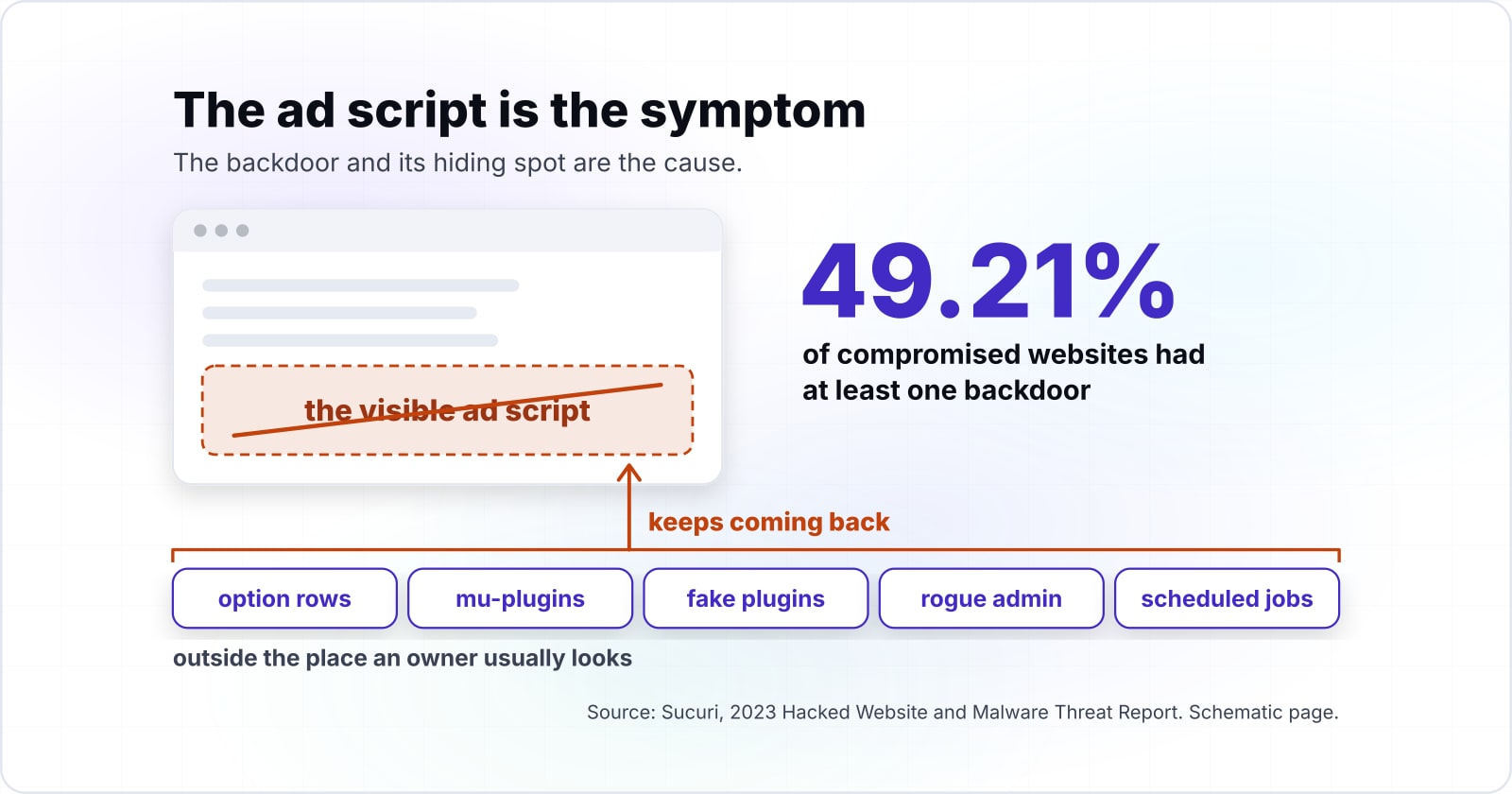
Sucuri's 2023 cleanup report, accessed October 2026, found at least one backdoor on 49.21% of compromised websites, so deleting the visible ad script rarely ends an infection. A backdoor is hidden code that lets the attacker back in after the obvious damage is removed. So the ad script is the symptom. The backdoor and its hiding spot are the cause.
Show data table
| Item | Value |
|---|---|
| At least one backdoor | 49.21% |
| Outdated CMS at infection | 39.1% |
| SEO spam | 20.3% |
| Vulnerable plugin or theme at remediation | 13.97% |
| Fake plugin | 4.18% |
| Malicious cron job | 2.14% |
A backdoor was the most common finding, on 49.21% of compromised websites.
These are the hiding places that survive a naive cleanup, and why each one does:
- Option rows in the database. WordPress keeps settings in an options table, called wp_options on the main site. Sucuri's August 2025 write-up found a fullscreen iframe stored in the wpcode_snippets option. That option belongs to WPCode, a legitimate plugin for adding code snippets. Also, GoDaddy's 2024 report says the Sign1 campaign stored its code in the database through legitimate plugins and widgets, to avoid file scans. So a file scan finds nothing here.
- Must-use plugins. WordPress.org's must-use plugins page says these files load in alphabetical order before normal plugins. They cannot be switched off from the dashboard. The Hacker News reported in July 2025 on a backdoor named wp-index.php in that folder. It fetched its next stage into the options table, created an admin user and reinstated itself when deleted.
- Fake plugins. Sucuri's 2023 report found at least one fake plugin on 4.18% of compromised websites. Because they are named to look like ordinary tools, they pass a quick glance down the plugin list.
- Rogue administrators. In Sucuri's 2023 report, 55.2% of websites with database malware had at least one malicious admin user. On the 40-site network, Melapress's 2024 account found around 1,000 administrator accounts with fake or invalid email addresses. Removing them took several days.
- Scheduled jobs. Sucuri's 2023 report found a malicious cron job, a task set to run on a timer, on 2.14% of compromised websites. Such a job drops fresh malware, usually a backdoor, after the cleanup ends.
- Changed core, theme and JavaScript files. GoDaddy's 2024 report names theme files and common JavaScript files among Balada Injector's injection points. Also, the WordPress.org hacked-site FAQ, last updated 26 July 2026, names the .htaccess server file as one of the files attackers change most often.
Every one of these sits outside the place an owner usually looks. For instance, a must-use plugin never appears in the normal plugin list. An option row never appears on a screen. And a rogue admin can hide among 40 sites' worth of users. That is why WordPress multisite malware ad injection so often returns after a cleanup. So a cleanup only counts once each spot has been checked on every site, not just the site where the ads were first noticed.
Which official checks find tampered files and rogue admins?#
WP-CLI can verify core and plugin files against WordPress.org checksums, and the role list shows who holds Super Admin, which together show what changed and who can change it. A checksum is a short fingerprint of a file, so any edit to the file changes it. The core command's own page describes the job in one line: "Verifies WordPress files against WordPress.org’s checksums."
These are the official pages to work from, in the order a check runs:
- Page 1
wp core verify-checksums. Take the core check from here. It downloads the md5 checksums for the installed version from WordPress.org and compares them with the files on disk.
- Page 2
wp plugin verify-checksums. Take the --all flag, which checks every plugin. Then take the --strict flag, which also flags soft changes such as an edited readme file.
- Page 3
Roles and capabilities. Take the list of what only a Super Admin can do on a network. Then compare that list of rights with the accounts that hold them.
- Page 4
Must-use plugins. Take where these files live and how they load, so the folder the dashboard hides gets read by hand.
- Page 5
wp-config.php. Take the DISALLOW_FILE_EDIT and DISALLOW_FILE_MODS settings, which stop file editing and plugin installs from the admin screens.
The five pages: wp core verify-checksums, wp plugin verify-checksums, Roles and capabilities, Must-use plugins, wp-config.php.
In practice, each check answers one hiding place from the list above. Checksums catch changed core and plugin files. The role list catches rogue Super Admins. And reading the must-use folder catches the loader that the dashboard never shows. However, the options table sits outside all three file checks. So database rows still need a separate look, with a fresh backup taken first.
A premium plugin bought outside WordPress.org has nothing to compare against there. For those, download a fresh copy from the vendor and compare the folders directly. That gap is one more reason to keep the plugin list short.
What is the smallest set of commands to check a network today?#
Two checksum commands, a look inside the must-use plugins directory and one wp-config constant give a first read on a network before any cleanup starts. Run them from the WordPress root folder on the server, as a user that can read the files. Because they only read, they do not change the infected files you may still need as evidence.
# 1. Core files: compare against WordPress.org checksums for this version
wp core verify-checksums

# 2. Every plugin: compare against WordPress.org checksums (add --strict to flag soft changes)
wp plugin verify-checksums --all

# 3. Must-use plugins: list the folder the dashboard hides, newest first
ls -lat wp-content/mu-plugins/

# 4. Is file editing from the admin screens switched off?
grep -n "DISALLOW_FILE_EDIT" wp-config.php
If step 4 prints nothing, file editing is still on. In that case, add this line to wp-config.php above the line that says to stop editing:
define( 'DISALLOW_FILE_EDIT', true );Then read the output with care. When a core file fails the check, or a file turns up that core does not expect, follow it up. When a plugin fails, it may be edited, or it may be a premium plugin with no checksums on WordPress.org. Then, in the must-use folder, ask of every file who added it and why. A host or an agency may have added some on purpose.
Because these commands are read-only, they are safe to run before anyone decides on a cleanup plan. They give a first map, not a verdict. And a clean result on all four still leaves the database and the user list to check.
In what order do you clean up and recover a hacked network?#
Contain the network first, keep a copy for evidence, find the way in, then clean, rotate every secret and only then bring sites back online. Each step comes before the next for a reason, and skipping one is how the way back stays open. This is the order:
Contain
Contain. The WordPress.org hacked-site FAQ, last updated 26 July 2026, says the first place to lock down is your users. It advises a global password reset and new secret keys in wp-config.php to log everyone out. Also put the network into maintenance if people are being sent to scam pages.
Preserve
Preserve. Before changing anything, take a full backup of files and database, and note the details of the host setup. The same FAQ says those details will be needed later in the response. Keep the infected copy as evidence, never as something to restore.
Find the way in
Find the way in. Check the plugin list against known holes and the Super Admin list against the people who should hold it. Then read the server logs around the first sign of trouble. Without the entry point, the cleanup only resets the clock.
Clean every hiding spot
Clean every hiding spot. Work through the list above on every site: option rows, must-use plugins, fake plugins, rogue admins, scheduled jobs and changed files. Also remove plugins that are abandoned or unused.
Reinstall from known-good sources
Reinstall from known-good sources. The FAQ suggests reinstalling the parts that can be replaced, such as core, rather than cleaning each file by hand. Then fetch plugins and themes fresh from their source.
Rotate every secret
Rotate every secret. Change every access point the FAQ names: SFTP, the WordPress admin, the hosting panel and the database. Then replace the keys and salts in wp-config.php. The wp-config page notes that changing them makes every existing login cookie invalid.
Monitor
Monitor. Run the checks again after a day and after a week. Meanwhile, watch for new admin accounts and new must-use files.
Melapress's account shows what this looks like on a real network. In Melapress's account of late 2024, the volunteer found more than 6,000 infected files across the network. He also found around 1,000 administrator accounts with fake or invalid email addresses. He also cut the Super Admins to two, turned on two-factor login and deleted abandoned plugins with no activations.
Should you restore a backup or clean a hacked WordPress network in place? Restore only from a backup taken before the entry point was used, and only after the hole is closed. Otherwise the restore brings back the same hole, and often the same hiding spot. After all, a backdoor can sit unnoticed for weeks before the ads appear.
How do you keep a multisite network from being reinfected?#
Fewer Super Admins with two-factor login, updates on a short cycle, file editing switched off and a list of every must-use plugin close the routes traced above. Each control maps to one route in or one hiding spot. Here is the map:
| Route or hiding spot | Control |
|---|---|
| Super Admin logins | Keep two or three Super Admins, as the Melapress account advised after its 2024 recovery. Then turn on two-factor login for every one of them, as WordPress.org's brute-force guide advises for all administrators. |
| Plugin and theme holes | Shorten the update cycle. Since WordPress 3.7, core has updated itself in the background, and WordPress.org's update guide says plugin and theme updates can run the same way. So against Patchstack's 2026 median of 5 hours, a daily or automatic cycle beats a weekly one. |
| Abandoned plugins | Remove any plugin that has stopped getting releases, and replace it before a hole appears. A plugin pulled from the repository for an unpatched issue never gets the fix. |
| Nulled code | Install plugins only from WordPress.org or the vendor's own site. Then pin each version, so a strange copy stands out. |
| File editing | Set DISALLOW_FILE_EDIT in wp-config.php, or DISALLOW_FILE_MODS to also block installs from the admin screens. The wp-config page says the second constant also turns off the file editor. |
| Database rights | WordPress.org's hardening guide, last updated 7 January 2026, says normal use needs only basic read and write rights. So rights such as DROP, ALTER and GRANT can be removed for everyday running. |
| Hidden folders and accounts | Keep a written list of every must-use plugin and every Super Admin, and compare it on a schedule. The must-use plugins page advises keeping a record of why each one exists, who maintains it and how it is updated. |
None of these is exotic. Instead, each one shrinks either the window a hole stays open or the number of sites one foothold reaches. Those are the same two numbers that set the cost of WordPress multisite malware ad injection in the first place.
When is cleaning a hacked network in place the wrong fit?#
Cleaning in place is the wrong fit when the server itself is compromised, when no clean backup exists to compare against, or when personal data may have leaked. Each case calls for a different tool, and each is worth naming plainly.
First, the server may be the real problem. If other accounts on the same host are infected, or files keep changing after a full cleanup, the attacker may hold more than WordPress. Sucuri's 2023 report found malicious cron jobs on 2.14% of compromised websites. And a timer at the server level can rewrite a clean install overnight. The WordPress.org hacked-site FAQ advises checking with the host, since shared hosting can spread an infection between sites. In that case, rebuild on a fresh server from verified copies, as the Melapress network eventually did.
Second, there may be nothing clean to compare against. With no known-good backup and many files changed, file-by-file cleaning becomes guesswork. Then a fresh install, with content moved across by export, is often faster and safer.
Third, personal data may have leaked. Injected code that can write script into pages can also read what people type into forms. So the job is no longer only technical. Before anything is deleted, bring in the host and a legal or incident-response adviser. This section is general guidance, not legal advice, and the duty to notify depends on where the people affected live.
Where should you go next?#
The posts and services below pick up where this one stops: how WordPress loads code, how options are stored, and who can run the cleanup. Each one deepens a part of the map above.
To see why a must-use plugin runs before everything else, read how a WordPress request runs, hook by hook. Before you edit an injected option row by hand, read why WordPress stores options as serialized PHP, because a careless edit can corrupt the value. For who patches which part of a site, see what WordPress does well and where it costs you. And to pin every plugin's source and version, see structuring WordPress at scale with Composer. For how shared plugins, users and updates behave across every site, read what running a multisite network teaches about network scope.
If the cleanup or the controls need hands, the security and compliance team handles incidents and hardening. For updates, monitoring and backups on a schedule afterwards, see maintenance and support. Still, the WordPress.org pages linked above are enough on their own to run every check in this guide.