WordPress serialization and JSON: why core still stores PHP serialize() strings
You opened wp_options and found a:6:{s:5: where you expected JSON. That string has a readable grammar, a known way to break during a site move, and one real security trap.
Why does WordPress still use PHP serialization instead of JSON?#
WordPress keeps PHP serialize() for options and meta because it brings every PHP type and object back exactly as stored, and switching formats would break rows that sites already hold. The PHP manual's serialize() page sums it up as "Generates a storable representation of a value". That holds for objects too. Meanwhile, WordPress.org's update_post_meta() reference, read on 8 October 2026, says a meta value "Must be serializable if non-scalar."
That rule is the whole contract. Any array or object you hand to the options or meta API goes through serialize() on the way in. As a result, plugins and themes have stored their settings in this shape for years. Therefore a core switch would need to rewrite those rows on every site, or read two formats forever.
What does the storage format decide for a WordPress site?#
W3Techs counted WordPress on 40.1% of all websites on 8 October 2026, so its storage format decides how safely a large share of the web migrates and reads its settings. The same W3Techs page puts it at 58.6% of sites whose content management system (CMS) is known.
Show data table
| Item | Value |
|---|---|
| websites whose CMS is known | 58.6 |
| all websites | 40.1 |
WordPress runs on 40.1% of all websites, so its storage format reaches a large share of the web.
For a team, the format decides three outcomes. It decides whether a domain move quietly empties options and whether a plugin is open to object injection. It also decides whether anything outside PHP can read the data.
How do you read a serialized string byte by byte?#
A serialized value is a type letter, then a length or a count, then the data, so s:12:"Recent posts" is a string of exactly 12 bytes. The letters are few. For example, a is an array with its element count, and s is a string with its byte length. Then i is an integer, b a boolean, d a float, and O an object with its class name.
Here is a widget option as PHP stores it:
a:6:{s:5:"title";s:12:"Recent posts";s:6:"number";i:5;s:9:"show_date";b:1;s:5:"ratio";d:1.5;s:3:"url";s:25:"https://example.com/blog/";s:4:"tags";a:2:{i:0;s:3:"php";i:1;s:4:"json";}}Read it left to right. The array holds 6 pairs, and each key is a short string. Then show_date is b:1, which means true, while ratio is d:1.5, a float. Also note that the length counts bytes, not letters, so an accented letter counts twice. Our 8 October 2026 test on PHP 8.2.31 printed exactly that string for the widget option.
How do WordPress serialization and JSON compare on one real option?#
In a PHP 8.2 test on 8 October 2026, a 6-key widget array took 182 bytes through serialize() and 124 through json_encode(), yet only serialize() restored objects. JSON was smaller on all four payloads in that test.
Show data table
| Dimension | serialize() | json_encode() |
|---|---|---|
| 5 integers | 46 | 11 |
| Widget settings | 182 | 124 |
| Post ID map | 64 | 47 |
| stdClass object | 71 | 37 |
JSON was smaller on all four payloads, yet only serialize() restored objects.
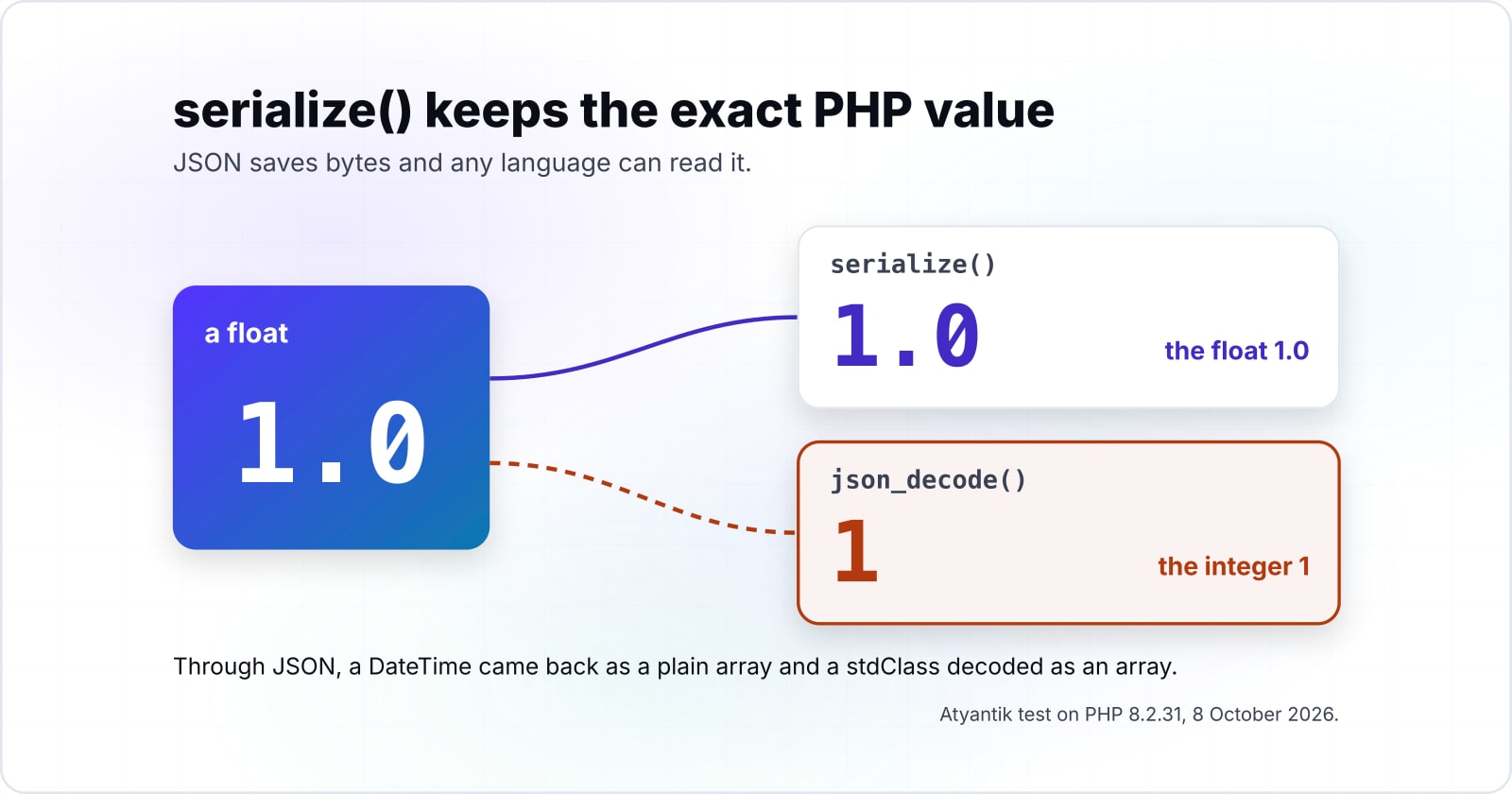
However, size is not the whole story. In the same 8 October 2026 test, a float 1.0 came back from JSON as the integer 1. Then a DateTime came back as a plain array of date, timezone_type and timezone. Similarly, a stdClass decoded as an array. Instead, serialize() returned each one as the type it started as.
So the trade is plain: JSON saves bytes and any language can read it. Meanwhile, serialize() keeps the exact PHP value, which is what a plugin's saved settings expect on the next request.
Why did WordPress core turn down a switch to JSON?#
WordPress Trac ticket #23753 proposed JSON storage and was closed as wontfix, partly because JSON keeps no memory of what class an object was. Filed against WordPress 3.6, the ticket listed it as a con: "no memory of what class an object was".
about 25%
json_encode faster than serialize
about 55%
json_decode slower than unserialize
Encoding to JSON was claimed faster and decoding slower, so speed did not settle the switch.
| Option | percent, as stated in the ticket and not measured again |
|---|---|
| json_encode faster than serialize | about 25% |
| json_decode slower than unserialize | about 55% |
Source: WordPress Trac ticket #23753, archived 18 September 2021
In short, the speed case pointed both ways, so speed did not settle it. Still, core did adopt JSON where the data leaves PHP. WordPress.org's Make WordPress Core post of 25 October 2013 moved most api.wordpress.org calls to JSON in WordPress 3.7. On security, it said serialized data "has the potential to lead to security exploits via PHP object injection." Also, the strings are hard to read in other languages. Therefore the split is deliberate: PHP format at rest, JSON on the wire.
Which WordPress functions serialize and unserialize your data?#
update_post_meta() serializes an array for you, maybe_serialize() decides what gets serialized, and maybe_unserialize() reads it back only if it was serialized. These four pages are the whole build, in the order you meet them:
- update_post_meta(): the meta value must be serializable if it is not a scalar.
- maybe_serialize(): arrays and objects get serialized, and a string that is already serialized is serialized again.
- maybe_unserialize(): it "Unserializes data only if it was serialized."
- unserialize() in the PHP manual: the allowed_classes option and the warning about untrusted input.
In particular, the second page holds the trap. Because maybe_serialize() serializes an already serialized string again, calling serialize() yourself before update_post_meta() stores a string inside a string. Therefore you never need to serialize WordPress meta by hand. Pass the array, and the WP serialize helper does it.
How do I turn WordPress serialized data into an array?#
Read it through get_post_meta() or get_option() and you already get the array, and for a raw string from $wpdb, maybe_unserialize() converts it safely. So turning WordPress serialized data to array form is mostly done for you. The third case is a string you did not write, and there you refuse every object.
<?php
// 1. Meta and options come back as arrays already.
$settings = get_post_meta( $post_id, 'widget_settings', true );

// 2. A raw string read from the database by your own query.
$settings = maybe_unserialize( $raw );

// 3. A string from outside your site: no objects at all.
$settings = unserialize( $raw, [ 'allowed_classes' => false ] );
Step 1 covers most code, since the meta API unserializes on read. Then step 2 is for a value you pulled with your own SQL. If the string was never serialized, maybe_unserialize() hands it back as it was. Finally, step 3 turns any object in the string into __PHP_Incomplete_Class, which our 8 October 2026 test confirmed.
Why does a find and replace break serialized data?#
A plain text replace changes a string's real length but not its s:N prefix, so unserialize() returns false and the option reads as empty. In our 8 October 2026 test, replacing http://old.test (15 bytes) with https://new-site.example (24 bytes) left the prefix at s:15. As a result, unserialize() returned false, and get_option() would hand back nothing.
Show data table
| Dimension | Declared s:N length | Real length |
|---|---|---|
| Home URL | 15 | 24 |
| Logo URL | 24 | 33 |
After a plain text replace, each s:N prefix still states the old length, so it no longer matches the string.
Try your own domain move
Type your old and new URL lengths in bytes, the stored s:N prefix, and how often the URL appears in that one value.
Real length after a plain replace
24
- Bytes the prefix is off by
- 9
unserialize() still works only when the real length equals the stored prefix.
However, the same replace on the JSON copy decoded fine, because JSON stores no lengths. For a serialized site, use WP-CLI search-replace instead, a command line tool for WordPress. WordPress.org's WP-CLI reference, read on 8 October 2026, says "Search/replace intelligently handles PHP serialized data". In practice, run it with --dry-run first, and add --precise for complex serialized values.
When is unserialize() a PHP object injection risk?#
unserialize() can build any class your autoloader knows, so feeding it outside input lets an attacker run __wakeup or __destruct code, and the PHP manual warns against it. The OWASP page on PHP Object Injection shows the pattern. An O: payload names a class, and its magic method runs on load.
The PHP Group's unserialize() page, read on 8 October 2026, says "Do not pass untrusted user input to unserialize() regardless" of allowed_classes. That option helps, because it stops named classes from loading. However, it is a second line of protection, not a pass. For data from a form, a cookie or an API, use json_decode() and check the shape.
The values WordPress itself wrote are a different case. Because those strings came from your own code, get_option() reading them is the normal path. Instead, the risk starts when a plugin unserializes a value that someone outside the site can set.
When is PHP serialization the wrong tool for your data?#
Store JSON with wp_json_encode() when another language, a REST client or a MySQL JSON query must read the value, or when the data arrives from outside your site. Three cases point to JSON.
- A non-PHP reader. A Node service or a mobile app should not parse s:N strings. JSON is what the Make WordPress Core post of 25 October 2013 chose for that reason.
- Queries inside the value. MySQL's JSON_EXTRACT() reads inside a JSON value. However, a TechNetExperts guide shows it failing on a serialized option with "Invalid JSON text".
- Outside input. Data from a form or a partner API belongs in JSON, decoded with json_decode().
| Your data | Store it as | Why |
|---|---|---|
| Read by a Node service or a mobile app | JSON | A non-PHP reader should not parse s:N strings |
| Queried inside the value with JSON_EXTRACT() | JSON | MySQL reads inside a JSON value |
| From a form or a partner API | JSON, decoded with json_decode() | Outside input belongs in JSON |
| Plugin settings with PHP objects, floats and exact types | serialize() | The exact PHP value survives the round trip |
Keep serialize() when PHP objects, floats and exact types must survive the round trip, which covers most plugin settings. In short, choose JSON at a language or trust boundary, and PHP format everywhere else.
Where should you go next with WordPress data storage?#
Next, see where get_option() runs in the WordPress request lifecycle, and decide whether heavy serialized meta belongs in a custom table instead. The WordPress request lifecycle guide maps those reads. Then the postmeta against custom tables guide walks through the table call. If an O: payload worries you, how autoloading works at scale shows which classes your site can load. For a domain move, the WordPress to Cloudflare migration notes cover the steps around search-replace.
For hands-on help, there are WordPress developers and PHP developers who do this work. Still, the four reference pages listed earlier are enough on their own for most sites.