WordPress multisite network lessons: the five functions that act at network scope
A multisite network rarely fails loudly. One site keeps old settings, another misses a setup step, and the logs stay clean. Each of those faults traces back to a core function doing exactly what its reference page says.
What are the WordPress multisite network lessons that matter most?#
A WordPress multisite network shares one copy of every plugin and theme across its sites, so most network faults come from core functions behaving at network scope. The WordPress.org guide to creating a network puts it plainly: the sites "all share the same WordPress installation core files" and "can also share plugins and themes". However, each site still has "separate tables in the database". That split, one copy of the code and many copies of the data, is the root of every lesson below.
First, a loop over sites is only as wide as its query. Second, a switch moves the data and leaves the code where it was. The switch_to_blog() reference is blunt about it. It says "PHP code loaded with the originally requested site, such as code from a plugin or theme, does not switch." Third, a setting has a scope, and the wrong read function returns the wrong copy. Fourth, network activation is one event, not one event per site. Finally, an update is never staged by the network itself, because every site loads the same files.
| Core function | At network scope | How the fault shows | The check |
|---|---|---|---|
| get_sites() | Returns at most 100 sites unless you pass number | A loop updates 100 sites and skips the rest without an error | Compare the loop count with wp site list --field=url | wc -l |
| switch_to_blog() | Switches data and cache, not the code loaded for the original site | A loop builds site 7's links with site 1's filters | Keep work that needs the target site's own plugins out of the loop |
| get_option() and get_network_option() | Read two scopes: the site options table and the network sitemeta table | A loop reads site 9's empty copy and writes that blank back | Ask who should see a change, then pick the read function |
| register_activation_hook() | Fires once, with network_wide set to true | The other sites get the code but not its setup | Check a stored version option on each site's first request |
| Plugin update | Every site loads the same files | An update reaches every site together | Test on a staging copy, then switch behaviour on per site in waves |
So when a fault shows up on some sites and not others, start with the scope question. Which of these five functions touched the data, and at what scope did it run?
What does a silent multisite failure cost on a larger network?#
In this worked example, a migration that loops over get_sites() with no number argument on a 250-site network updates 100 sites and skips 150 without an error.
The WP_Site_Query reference on WordPress.org, read on 13 October 2026, gives the reason in one line: "Maximum number of sites to retrieve. Default 100." Nothing warns when the query hits that cap, so the loop ends cleanly.
The takeaway is that a default loop misses every site past that cap, so the cost grows with the network while the logs stay clean.
Show data table
| Item | Value |
|---|---|
| 250-site network | 150 |
| 600-site network | 500 |
| 1200-site network | 1,100 |
A default loop skips every site past the first 100, so the miss grows with the network.
Because the skipped sites never ran the change, they keep the old value. For example, a settings migration leaves them on the old format. A cleanup job leaves their stale rows in place. Then the next release assumes the new format everywhere. In practice, the fault surfaces weeks later on a skipped site, and by then the migration is old news.
Sites a single get_sites() call reaches
Enter your network's site count and the number argument your loop passes, and see how many sites a single call reaches, how many it skips, and how many paged calls reach them all.
Sites reached by one call
100
- Sites skipped without an error
- 150
- Paged get_sites() calls to reach every site
- 3
Arithmetic from the WP_Site_Query default number of 100. Modelled, not measured.
The fix is cheap, and the get_sites() section below shows it. The cost is in noticing, since the bug produces no error, no warning and no slow query.
What does network activation actually run on each site?#
Network activation fires a plugin's activation hook once, with network_wide set to true, so setup that writes per-site tables or options never reaches the other sites. The register_activation_hook() reference describes the hooked function's argument. It has "one boolean argument, $network_wide which indicates if the plugin is network activated." The activate_plugin hook reference adds a second limit: "If a plugin is silently activated (such as during an update), this hook does not fire."
As a result, a plugin that creates a table or seeds an option on activation does that work once. It runs for the site the request ran on. The other sites get the plugin's code but not its setup. Also, a site added to the network next month never ran the hook at all.
There are two reliable answers. First, when $network_wide is true, loop over the sites and run the setup on each. A user note on the register_activation_hook() reference shows that pattern with switch_to_blog() and restore_current_blog() around each site. However, that note's loop calls get_sites() with only the fields argument, so it carries the same default cap from the last section. Second, set up lazily instead. Check a stored version option on each site's first request, and run the setup when it is missing or old.
Also, the lazy route covers new sites and silent activations, since it does not depend on the hook firing. Meanwhile, the is_plugin_active_for_network() reference tells you whether a plugin "is active for the entire network". It returns false for plugins in mu-plugins, which "can't be activated", so do not use it to detect those.
What does switch_to_blog() switch, and what does it leave behind?#
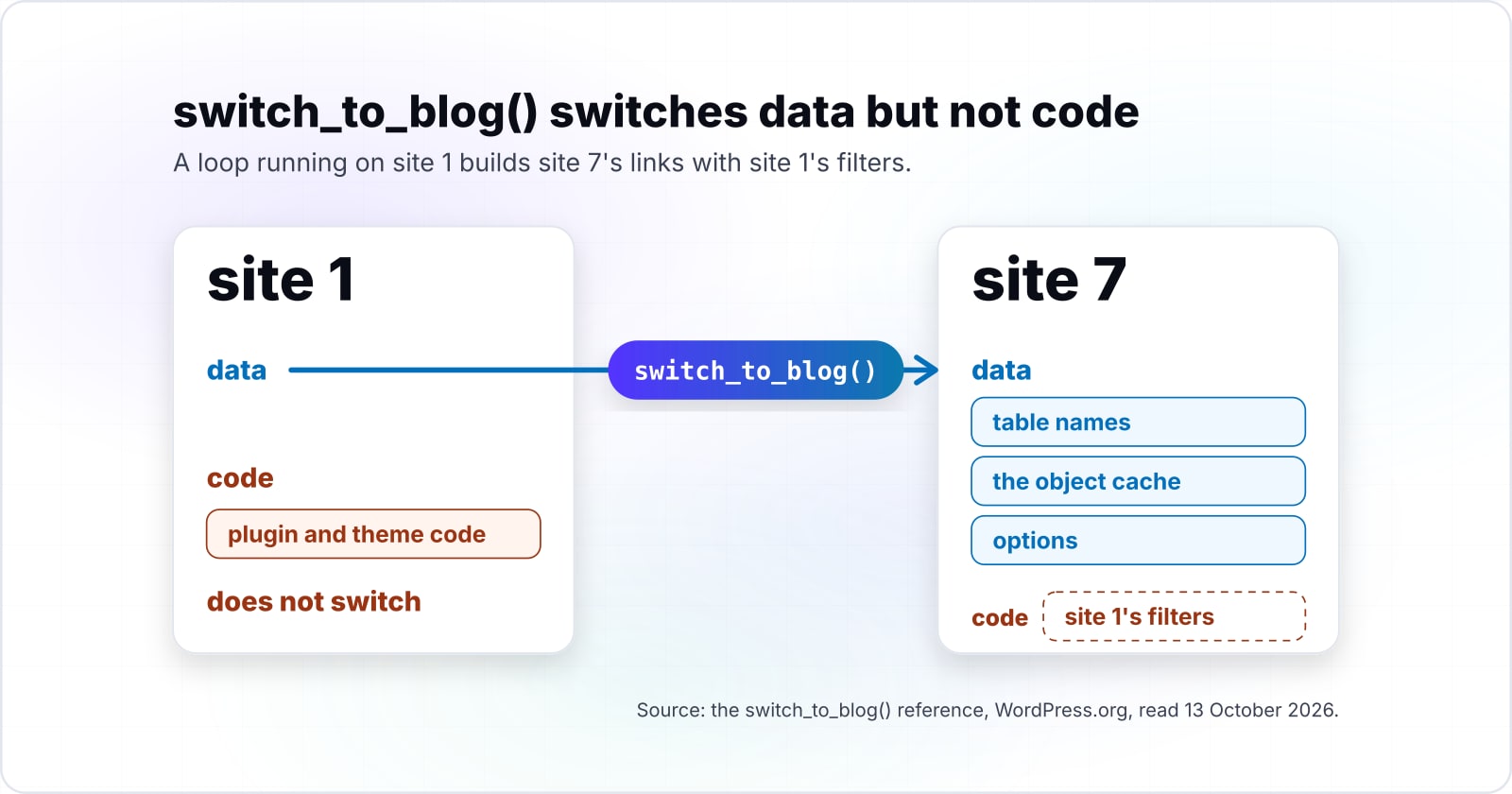
The switch_to_blog() function points table names, the object cache and options at another site, but plugin and theme code loaded for the original site keeps running. The function's source on its reference page shows the work. It pushes the current site ID onto a global stack, calls $wpdb->set_blog_id(), resets the table prefix, and calls wp_cache_switch_to_blog(). It then fires the switch_blog action and sets $GLOBALS['switched'] to true.
Push the stack
It pushes the current site ID onto a global stack.
Set the blog ID
It calls $wpdb->set_blog_id() and resets the table prefix.
Switch the cache
It calls wp_cache_switch_to_blog().
Announce the switch
It fires the switch_blog action and sets $GLOBALS['switched'] to true.
What never happens
No plugin loads, no theme loads, and no functions.php runs.
Now notice what is missing from that list. In particular, no plugin loads, no theme loads, and no functions.php runs. Therefore a filter that the target site's theme would add is not there during the switch. For instance, say site 7 runs a theme that filters its permalinks. A loop running on site 1 builds site 7's links with site 1's filters. The request lifecycle explains why: plugins and the theme load once, early, for the requested site. The request lifecycle post walks through that order.
Then there is the stack, and the restore_current_blog() reference says it "should be called after every switch_to_blog()". If it is not, the global $GLOBALS['_wp_switched_stack'] is left non-empty. Then WordPress "will think it is in a switched state and can potentially return the wrong URL for the site via wp_upload_dir()". Switching back with a second switch_to_blog() call does not empty the stack, because every switch pushes a new entry.
In short, treat a switch as a database and cache switch only. Pair every call with restore_current_blog(), and keep any work that needs the target site's own plugins out of the loop.
When does a setting belong in a network option instead of a site option?#
A value every site must share belongs in get_network_option(), which reads the network's sitemeta table, while get_option() reads only the current site's own options table. The get_network_option() reference shows the query, which selects from $wpdb->sitemeta by option name and network ID. Meanwhile, the get_site_option() reference calls itself "almost identical to get_option(), except that in multisite, it returns the network-wide option."
However, the names are the trap. The same reference admits the terms changed. There used to be "blogs" on a "site", and now there are "sites" on a "network". So get_site_option() reads the network scope, despite its name. It is easiest to read it as get_network_option() with the current network filled in.
Also, the tables make the split concrete. The database structure page from WordPress VIP, a managed WordPress host, lists wp_sitemeta and wp_users as network tables. It lists wp_options for the main site, then wp_2_options, wp_2_posts and the rest for site 2.
| Field | Site option | Network option |
|---|---|---|
| Read function | get_option() | get_network_option(), or get_site_option() despite its name |
| Table | The current site's own options table: wp_options for the main site, wp_2_options for site 2 | The network sitemeta table, wp_sitemeta |
| Who sees a change | One site | Every site on the network |
| Usual case | A value one site owner may change | A licence key or an API endpoint |
So pick the scope by asking who should see a change. If one site owner may change it, it is a site option. Instead, a value every site must see is a network option. A licence key or an API endpoint is the usual case. The common bug mixes the two inside a switch. A loop switches to site 9 and calls get_option() for a value that lives in sitemeta. As a result, it reads site 9's empty copy and writes that blank back. Both kinds of value are often stored as serialized PHP, and the serialization post covers reading them safely.
How do you reach every site when get_sites() stops at 100?#
The get_sites() function returns at most 100 sites unless you pass number, so a network loop pages with number and offset and checks its count against wp site list. The WP_Site_Query reference on WordPress.org, read on 13 October 2026, documents both arguments. Its offset is the "Number of sites to offset the query". Meanwhile, fields set to 'ids' "returns an array of site IDs" instead of full site objects.
In short, a paged loop needs one get_sites() call per hundred sites, so the call count grows slowly while coverage stays complete.
Show data table
| Item | Value |
|---|---|
| 250-site network | 3 |
| 1200-site network | 12 |
| 10000-site network, the large-network threshold | 100 |
One call per hundred sites keeps every site in reach, even at the large-network threshold.
So why page at all, instead of passing a huge number? Because a single query that loads every site holds them all in memory at once. Also, the wp_is_large_network() reference, read on 13 October 2026, treats a network as large past 10,000 sites. Core keeps a function just to flag that size, so code that assumes a small network will not age well.
Then prove the loop did its job. The wp site list command prints every site with --field=url, and piping it to a line count gives an independent total.
Say your loop logs 100 and the shell says 250, so the mismatch tells you the loop stopped short. As a result, one command catches the most common silent failure on a large network.
How do you roll out a change when every site shares one copy of the code?#
Every site on the network runs the same plugin files, so a safe rollout tests the update on a staging copy first and switches new behaviour on per site in waves. In practice, there is no per-site copy of a plugin to update one at a time. Kinsta, which sells managed WordPress hosting, lists "simpler updates" as a multisite benefit. In its words, "you can just update once in the network admin, and every network site will benefit". The same Kinsta page lists the flip side as a "single point of failure".
So separate two things that feel like one. Shipping the code is network-wide by construction. Turning the behaviour on can be per site, if the code reads a site option before it acts. For example, a new checkout flow can ship to every site while only five sites set the option that enables it.
A rollout then runs in four steps. First, copy the network to staging and run the update there. The wp plugin update command has a --dry-run flag that will "Preview which plugins would be updated". Second, ship the code to production with the new behaviour off everywhere. Third, set the per-site option on a small wave of sites. Target each one with the WP-CLI --url flag and watch its logs. Finally, widen the wave until every site is on.
- Step 1
Copy the network to staging and run the update there, with wp plugin update --dry-run to preview which plugins would be updated.
- Step 2
Ship the code to production with the new behaviour off everywhere.
- Step 3
Set the per-site option on a small wave of sites, target each one with the WP-CLI --url flag and watch its logs.
- Step 4
Widen the wave until every site is on.
Also, network activation follows the same rule. The wp plugin activate reference shows wp plugin activate hello --network for network-wide activation. Without --network, pair the command with --url to activate the plugin on one site at a time. Activating per site first gives you the same wave control before you commit the whole network. How the plugin code is laid out matters too. The Composer and PSR-4 post covers structuring a shared plugin estate.
Which documentation pages do you build a multisite maintenance routine from?#
Build the routine from the developer reference pages, read in the order the code calls them: site query, switching, restore, network options and WP-CLI site targeting. Each page gives one piece the loop in the next section uses.
- WP_Site_Query::__construct(): the number, offset and fields arguments, and the default of 100.
- switch_to_blog(): what the switch changes, and the note that plugin and theme code does not switch.
- restore_current_blog(): why every switch needs a restore, and what a non-empty stack breaks.
- get_network_option(): the network scope and the sitemeta table it reads.
- wp site list: the --field=url output and the --url flag that targets one site.
Read in that order, every argument the loop needs is in front of you. The multisite overview is the right page for the bigger picture.
What is the smallest safe loop over every site on the network?#
The smallest safe loop asks get_sites() for site IDs in pages, switches to each site, does its work, restores, and stops only when a page comes back empty. Save it as a file and run it with WP-CLI's eval-file command, or call it from a migration.
<?php
// 1. Page through site IDs; number and offset come from WP_Site_Query.
$offset  = 0;
$reached = 0;
$licence = get_network_option( null, 'my_plugin_licence' ); // network scope, read once

do {
    $site_ids = get_sites( array(
        'fields' => 'ids',
        'number' => 100,
        'offset' => $offset,
    ) );

    foreach ( $site_ids as $site_id ) {
        // 2. Switch data and cache to this site (its plugins do not load).
        switch_to_blog( $site_id );

        // 3. Do the per-site work against this site's own options table.
        if ( ! get_option( 'my_plugin_version' ) ) {
            my_plugin_install_site( $licence );
        }

        // 4. Restore after every switch so the switched stack empties.
        restore_current_blog();
        $reached++;
    }

    $offset += 100;
} while ( ! empty( $site_ids ) );

echo "Sites reached: {$reached}\n";
Compare the printed count with the shell's own total:
wp site list --field=url | wc -lIn short, the two numbers should match, and if they differ, the loop did not reach every site. The gap is the number of sites still on the old state.
How do you debug a fault that shows on one site and not its neighbours?#
Reproduce the fault with WP-CLI's --url flag against the one failing site, log with WP_DEBUG_LOG, and compare its options and active plugins with a healthy neighbour. The wp site list reference describes --url in one line. "In multisite, this argument is how the target site is specified." So any WP-CLI command can run as if the request came from the broken site.
Then turn on logging with the setting the WordPress.org debugging guide shows, where WP_DEBUG_LOG set to true writes errors to debug.log in wp-content. It also sets WP_DEBUG_DISPLAY to false, so visitors never see the messages. Because every site shares one install, that one log file catches errors from all of them.
Next, diff the suspects in this order. First, compare the active plugins on the broken site and on a healthy one. A plugin can be active for the network or for one site only, and is_plugin_active_for_network() tells the two apart. Second, compare the site's own options against its neighbour's. Look for a value that is missing, blank or in an old format. That is often the trace of a loop that stopped at 100. Third, check for a switch that never restored. The ms_is_switched() function returns true while the stack is non-empty. In that state, the restore reference warns of wrong upload URLs.
In practice, a single-site fault on a shared install is almost always one of those three differences. Diffing them first beats reading the stack trace, since the code is the same on every site.
When is multisite the wrong fit for a group of sites?#
Multisite is the wrong fit when sites need different plugins, separate owners, separate backups or different uptime terms, because every site shares one install and one user table. The WordPress.org multisite overview says each site has "its own unique tables in the database", and "only the user table is shared between the instances". The code, though, is always shared.
Three cases call for a different tool. First, sites that need different plugin sets fit separate installs better. Kinsta's comparison notes that "site administrators cannot install their own plugins" on a network. Some plugins also need a costlier licence there. Second, sites with separate owners or legal entities fit separate installs too. One user table means one shared identity store. Third, sites that need different maintenance windows fit separate installs, since an update reaches the whole network at once.
However, separate installs cost more upkeep per site, so the gain is not free. Kinsta, which hosts both shapes, lists more control and better plugin compatibility for separate installs. On the other side it lists separate updates for each site and, sometimes, a licence per site. The test is simple, and it comes down to one question about what the sites share.
| Field | Multisite network | Separate installs |
|---|---|---|
| Plugin sets | One shared set; site administrators cannot install their own plugins | Each site picks its own |
| Owners and users | One user table, one shared identity store | Separate owners and legal entities stay apart |
| Maintenance window | An update reaches the whole network at once | Each site is updated on its own schedule |
| Upkeep | Update once in the network admin; a single point of failure | More control and better plugin compatibility; separate updates for each site and, sometimes, a licence per site |
If a pair of sites would never share a plugin update, a user or a maintenance window, run them apart and manage both with the same tooling.
Where should you go next with a WordPress multisite network?#
Run the paged loop against a staging copy of your network first, then read the related posts on multisite security, plugin structure and the request lifecycle. Those three cover the same shared install from other angles.
First, the multisite malware post shows how one infected plugin reaches every site, which is the security side of shared code. Second, the Composer and PSR-4 post covers structuring the plugin code a network runs. Finally, the request lifecycle post explains when plugins load, which is why a switch cannot load them.
If you would rather have WordPress developers untangle a network with you, the WordPress developers page describes that work. If you want updates and monitoring handled on a schedule, the maintenance and support page covers it. Either way, the reference pages above are enough to apply these WordPress multisite network lessons on your own.