Tailwind vs Bootstrap in 2026: Tailwind CSS v4 and Bootstrap 5.3 built on the same page
Feature lists rarely say which version they describe. Here one small page is built twice, once per framework, the bytes are counted, and the choice comes down to who designs your interface and who builds it.
What is the difference between Tailwind and Bootstrap?#
In Tailwind CSS vs Bootstrap, or Bootstrap vs Tailwind, the split is the same: Tailwind CSS v4 gives you utility classes and generates only the ones your templates use, while Bootstrap 5.3 gives you finished components with their own CSS and JavaScript. A utility class does one small job, such as flex, rounded or bg-blue-600. You combine many of them in your HTML to build a part. Tailwind Labs' v4.0 release post, dated 22 January 2025, says "all of your template files are discovered automatically". Then the build writes CSS only for the classes it finds.
Bootstrap works the other way round. Its 5.3 introduction asks for one stylesheet link and one script. That script is the JavaScript bundle "including Popper for positioning dropdowns, popovers, and tooltips". Popper is a small library that places a floating menu next to the button that opens it. Then you write navbar, card or btn btn-primary and get a styled part.
In short, with Tailwind you design the button, and with Bootstrap you pick one. Everything else follows from that split. It decides what each one ships and how you change the look. It also decides who on the team can change it, and when each one is the better choice.
How much CSS and JavaScript does each ship for the same page?#
Built from the same navbar, card grid and form, the Tailwind page shipped 3,008 bytes of gzipped CSS and JavaScript, and the Bootstrap dist files 47,440. That comes from our single local build of 3 October 2026, with tailwindcss 4.3.3 and bootstrap 5.3.8. So treat it as one page on one machine, not a benchmark. Gzip is the compression a web server applies before it sends a file, so gzipped bytes are close to what the browser downloads.
The split matters as much as the total. In that 3 October 2026 build, Tailwind's stylesheet was 2,839 gzipped bytes and its menu script was 169. That was enough, because a three-statement toggle script was all the navbar needed. By contrast, Bootstrap's dist stylesheet was 30,887 gzipped bytes in the same build. Its JavaScript, bootstrap.min.js without Popper, added 16,553 more.
Show data table
| Item | Value |
|---|---|
| Tailwind CSS | 2,839 |
| Tailwind menu JS | 169 |
| Bootstrap lean Sass CSS | 19,808 |
| Bootstrap dist CSS | 30,887 |
| Bootstrap JS (no Popper) | 16,553 |
| Bootstrap JS bundle | 23,767 |
Bootstrap's dist stylesheet alone is many times the size of the Tailwind stylesheet for the same page.
Your own page will move these numbers, and the JavaScript share is the part you control most. If a page needs dropdowns, popovers or tooltips, Bootstrap's docs point you to the bundle with Popper. In our build of 3 October 2026, that bundle was 23,767 gzipped bytes, against 16,553 for the plain script. And if a page needs no Bootstrap JavaScript at all, you can drop the script and keep only the stylesheet.
Bootstrap CSS, gzipped
30,887 bytesBootstrap JS, gzipped
16,553 bytesBootstrap total
47,440 bytesTailwind total, same page
3,008 bytesbootstrap.min.css + bootstrap.min.js: 47,440 gzipped bytes, 16x larger than Tailwind's 3,008
Single local buildThat is 44,432 more gzipped bytes than the Tailwind build of the same page.
bootstrap.min.js runs Collapse for the navbar and leaves Popper out.
Source: Atyantik single local build, 3 October 2026 (tailwindcss 4.3.3, bootstrap 5.3.8), gzip -9. Not a benchmark.
| Stylesheet | JavaScript | Total, gzipped |
|---|---|---|
| Dist file | None | 30,887 bytes |
| Dist file | Collapse only | 47,440 bytes |
| Dist file | With Popper | 54,654 bytes |
| Lean Sass build | None | 19,808 bytes |
| Lean Sass build | Collapse only | 36,361 bytes |
| Lean Sass build | With Popper | 43,575 bytes |
Why does Tailwind ship less CSS than Bootstrap?#
Tailwind writes CSS only for classes it finds in your files, while Bootstrap's dist stylesheet carries every component, and even a lean Sass build kept 144,131 raw bytes. In short, the gap is generation against inclusion. Tailwind's class detection docs say it scans your project as plain text. It skips files in .gitignore, the node_modules folder and binary files. So a page with twelve utilities gets twelve rules, plus the base styles.
Bootstrap, instead, ships the whole kit by default. Its optimize guide says to trim it "by only @importing the components you need" in Sass. Sass is a language that compiles to CSS, and Bootstrap's source is written in it. We did that trim in the same build on 3 October 2026, keeping the grid, forms, buttons, nav, navbar and card. As a result, the raw stylesheet fell from 232,111 bytes to 144,131.
However, the lean file stayed far larger than Tailwind's 9,953 raw bytes in the 3 October 2026 build. Bootstrap's utility API page explains why. It says "The utility API is a Sass-based tool to generate utility classes." Then it builds every class in the $utilities map you import, whether your HTML uses it or not.
9,953
Tailwind CSS
144,131
Bootstrap lean Sass CSS
Even trimmed to the components the page uses, Bootstrap's stylesheet stayed far larger than the one Tailwind generated.
| Option | bytes, uncompressed (wc -c) |
|---|---|
| Tailwind CSS | 9,953 |
| Bootstrap lean Sass CSS | 144,131 |
Source: Atyantik single local build, 3 October 2026, not a benchmark
So you can predict your own page. Each new Tailwind class adds a rule, so the Tailwind file grows with your design. But Bootstrap's file stays nearly flat, because it was already full. The gap narrows on a large app, yet it starts wide.
What changed in Tailwind CSS v4, and where does Bootstrap 5.3 stand?#
Tailwind CSS v4.0 shipped on 22 January 2025 with configuration in CSS and automatic content detection, and Bootstrap's 5.3 line reached 5.3.8 on 26 August 2025. Those dates come from the GitHub release records of both projects, read on 3 October 2026. On that day the latest Tailwind release was v4.3.3, published on 16 July 2026. Bootstrap 5.3.0, for its part, dates from 30 May 2023.
The v4.0 post from Tailwind Labs, dated 22 January 2025, lists the changes that matter here. First, a new engine, where "full builds are up to 5x faster". Incremental builds that add no new CSS are over 100x faster, the post says. Second, setup is a single line, @import "tailwindcss";, in your CSS file. Third, the post says "Instead of a tailwind.config.js file", you set your options in that same CSS file.
As a result, any guide that tells you to fill in a content list or edit tailwind.config.js describes v3. Meanwhile, Bootstrap has shipped patch releases on the 5.3 line since May 2023. Its model of Sass source, dist files and a JavaScript bundle has stayed the same. So an old comparison is mostly wrong about Tailwind and mostly right about Bootstrap.
- 30 May 2023
Bootstrap 5.3.0
The 5.3 line begins.
- 22 January 2025
Tailwind CSS v4.0
Configuration in CSS and automatic content detection.
- 26 August 2025
Bootstrap 5.3.8
The 5.3 line reaches 5.3.8.
- 16 July 2026
Tailwind CSS v4.3.3
The latest Tailwind release on 3 October 2026.
How does customising Tailwind differ from customising Bootstrap?#
Tailwind is customised with @theme variables in the CSS file that imports it, and Bootstrap with Sass variables, maps and a utility API compiled before deploy. Tailwind's theme docs call design tokens "low-level design decisions" and store them as theme variables. They are "special CSS variables defined using the @theme directive that influence which utility classes exist in your project."
For example, adding --color-mint-500 inside @theme creates bg-mint-500 and the other color utilities at once. Because the tokens are CSS variables, you can also read them in plain CSS or in inline styles. So the source of truth stays in one stylesheet.
Bootstrap's Sass guide asks you to create your own stylesheet that imports Bootstrap. Then you override its variables and maps before the import, so it compiles with your values. Its docs also say to "avoid modifying Bootstrap's core files". After that, the utility API lets you add or remove utility classes through the $utilities map.
| Tailwind CSS v4 | Bootstrap 5.3 | |
|---|---|---|
| Where settings live | @theme variables in the CSS file that imports Tailwind | Sass variables and maps set before the Bootstrap import |
| Build step to change them | The Tailwind build that already runs | A Sass build step |
| Adding utilities | A theme variable creates its utilities | The utility API's $utilities map |
| Defaults | A starting palette | A finished look |
The practical difference is who can change the look. In Tailwind, a designer who reads CSS can edit tokens in a file the browser already understands. In Bootstrap, the change needs a Sass build step and someone who knows Bootstrap's variable names. However, Bootstrap's defaults already look finished, while Tailwind's defaults are a starting palette.
Is Tailwind more popular than Bootstrap in 2026?#
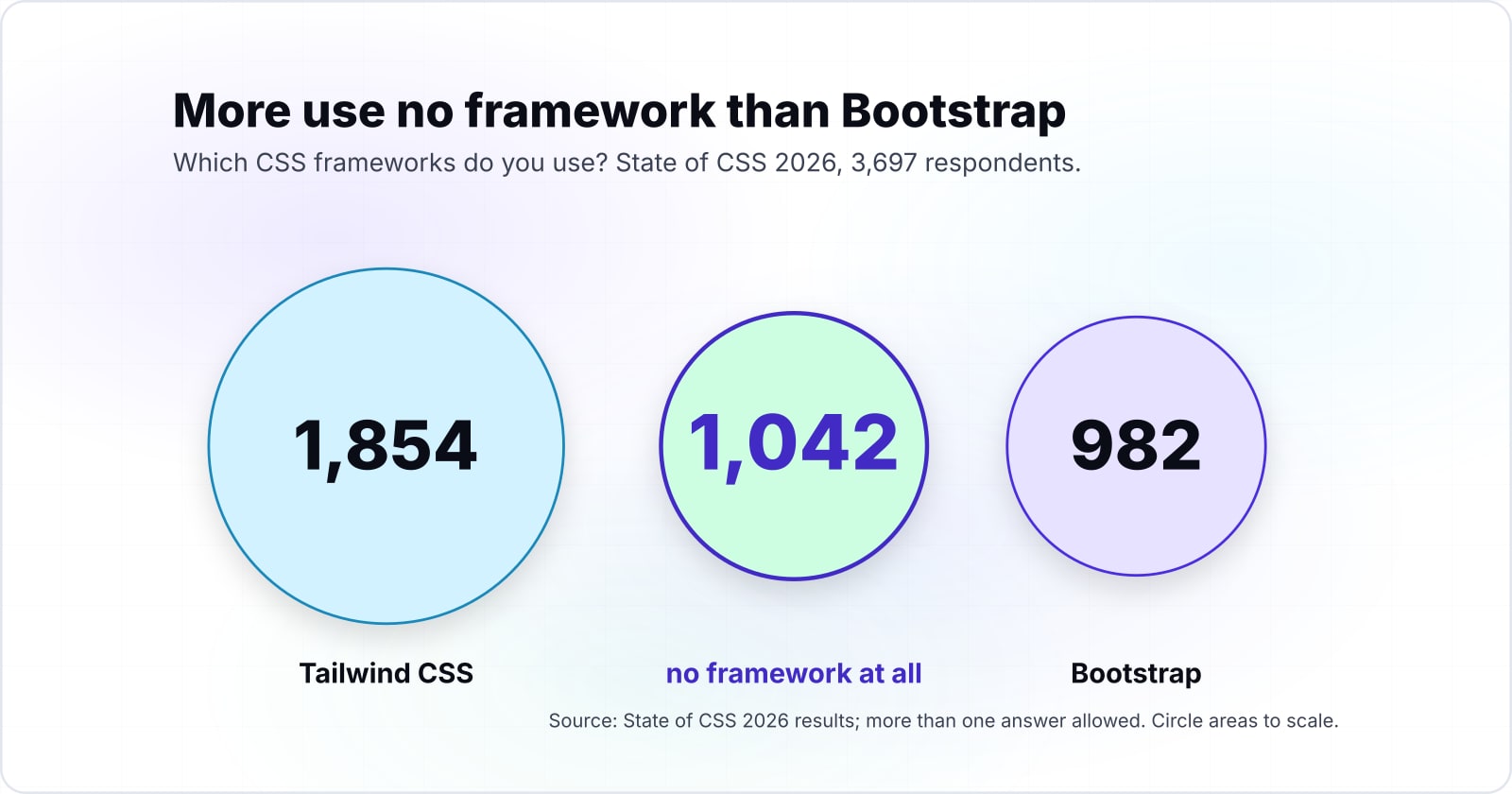
In the State of CSS 2026 survey, 1,854 respondents use Tailwind CSS and 982 use Bootstrap out of 3,697, a picture of survey takers rather than every team. The State of CSS 2026 results asked "Which CSS frameworks do you use?" and allowed more than one answer.
Show data table
| Item | Value |
|---|---|
| Tailwind CSS | 1,854 |
| None | 1,042 |
| Bootstrap | 982 |
| shadcn/ui | 802 |
| Custom/in-house | 705 |
| Material UI | 692 |
More respondents use no framework at all than use Bootstrap.
So Tailwind leads by almost 2 to 1 among people who answer a CSS survey. But the second answer is the one to notice. In the State of CSS 2026 results, 1,042 people use no framework at all, more than use Bootstrap. The survey's own note says the biggest threat to Tailwind may be no framework at all, since CSS itself now covers more of what frameworks used to do.
Keep the limit in mind, though. A survey of people who follow CSS closely leans toward newer tools. Still, the result answers a hiring question. If you need frontend software engineers next year, more of them will have used Tailwind than Bootstrap.
Do npm downloads tell the same story?#
npm counted 528,508,252 tailwindcss downloads and 26,166,721 bootstrap downloads from 1 to 30 September 2026, a ratio inflated by tools that install tailwindcss as a dependency. That is from the npm registry downloads API, read on 3 October 2026. npm is the package registry most JavaScript projects install from.
528,508,252
tailwindcss
26,166,721
bootstrap
Downloads put Tailwind about 20 to 1 ahead, a ratio inflated by tools that install tailwindcss as a dependency.
| Option | downloads in the window |
|---|---|
| tailwindcss | 528,508,252 |
| bootstrap | 26,166,721 |
Source: npm registry downloads API, 2026
The direction matches the survey, but the size does not. The npm figures for September 2026 put Tailwind about 20 to 1 ahead, while the State of CSS 2026 survey put it near 2 to 1. Because a download is not a team, the gap is wider than it looks. Every fresh install counts again, and so does every CI (continuous integration) run and every package that lists tailwindcss as a dependency.
Also, many Bootstrap sites never touch npm at all. Bootstrap's introduction starts with links to hosted copies of its files, and those page loads appear in no npm count. So read the npm number as a sign of where new JavaScript projects are. Then read the survey as the better guide to how people actually work.
Tailwind vs Bootstrap: which is better for your team and project?#
Pick Tailwind when your team owns a custom design and builds its own components, and Bootstrap when stock components and ready JavaScript are what you need. In Tailwind vs Bootstrap, the size gap and the popularity numbers are inputs, not the verdict. Instead, the deciding question is who designs the interface and who builds the parts.
| Team | Project type | Verdict |
|---|---|---|
| A designer and frontend software engineers | Marketing site or product with its own brand | Tailwind |
| A team with a design system to build | Shared component library across apps | Tailwind |
| No designer, a backend-heavy team | Internal admin dashboard or back office | Bootstrap |
| A team on an existing Bootstrap codebase | Ongoing features and fixes | Bootstrap |
| A small team that needs widgets now | Modals, dropdowns, tooltips, carousels | Bootstrap |
| A team moving off Bootstrap | Gradual migration, page by page | Both, with a Tailwind prefix |
We should say where we stand. atyantik.com is built with Tailwind v4 on top of design tokens, and we moved our component library to it one package at a time. That fits the first two rows, because we design our own interface. But it would be the wrong call for the third row, and we would not make it there.
When is Tailwind the wrong fit and Bootstrap the better choice?#
Bootstrap is the better choice for an admin dashboard built from stock components, a team with no designer, an existing Bootstrap codebase, or ready-made JavaScript widgets. When the team has no designer and the interface is standard, Bootstrap's finished parts are less work than building them from utilities.
First, a team with no designer gets a consistent look on day one. Tailwind gives you the pieces of a button, and somebody still has to decide what a button looks like. Second, an admin tool is mostly tables, forms and modals, which Bootstrap already ships. Its introduction lists JavaScript for modals, dropdowns, tooltips, carousels, toasts and more.
Third, a working Bootstrap codebase is an asset. A rewrite to Tailwind costs time and buys a smaller stylesheet that the staff using an internal tool rarely notice. Finally, the JavaScript widgets matter most. Tailwind is a CSS framework, so a dropdown's behaviour means writing a script or adding a library. The widgets come built, and Bootstrap's docs only ask whether you need Popper. If you skip dropdowns, popovers and tooltips, they say to "save some kilobytes by not including Popper".
Show data table
| Item | Value |
|---|---|
| Tailwind | 3,008 |
| Bootstrap lean Sass | 36,361 |
| Bootstrap dist | 47,440 |
Even the lean Sass build ships far more than Tailwind, the cost of parts that come built.
So in those cases, the 47,440 gzipped bytes from our 3 October 2026 build are a fair cost for parts you did not have to build.
Can you use Tailwind with Bootstrap in the same project?#
Yes, with care: Tailwind's prefix(tw) option renames every generated class and variable, and dropping Preflight stops Tailwind's base styles from resetting Bootstrap's. Tailwind's utility classes docs say "you can prefix all Tailwind-generated classes and CSS variables using the prefix option". You write it as @import "tailwindcss" prefix(tw);.
Preflight is Tailwind's reset stylesheet, the base styles it adds before any utility. Its Preflight docs say it is "automatically injected into the base layer" when you import tailwindcss. But Bootstrap has its own reset, Reboot, so two resets fight over headings, lists and form fields. The fix in those docs is to import Tailwind's theme and utilities files on their own and leave Preflight out. Then the prefix goes on both imports.
Order is the other half. A project collaborator answered this on 23 January 2025, in a Tailwind discussion on running both. Their advice is to place Bootstrap's CSS in a cascade layer before Tailwind's utilities. That reply also warns that "Tailwind expects everything to be in its respective CSS-native cascade layer." Cascade layers are a CSS feature that decides which rules win by the order of the layers.
The cost is plain, though: the page ships both frameworks. So mixing them is a migration path, page by page, and not a place to stay.
Which documentation pages reproduce this comparison?#
Four documentation pages are enough to rebuild the measured page: the Tailwind CLI install, Bootstrap's introduction, its contents list and its lean Sass guide. Take them in the order a build uses them.
What is the smallest build that reproduces the numbers?#
Two installs, one CSS line and one CLI command produce the Tailwind file, and Bootstrap's measured files ship straight from its dist folder. Run this in a folder that holds your index.html, because Tailwind scans it for classes.
# Tailwind CSS 4.3.3: no config file, one import line
npm install --save-exact tailwindcss@4.3.3 @tailwindcss/cli@4.3.3
mkdir -p src && echo '@import "tailwindcss";' > src/input.css
npx @tailwindcss/cli -i ./src/input.css -o ./dist/output.css --minify

# Bootstrap 5.3.8: the dist files ship as they are
npm install --save-exact bootstrap@5.3.8

# Measure raw and gzip bytes the same way for each file
for f in dist/output.css node_modules/bootstrap/dist/css/bootstrap.min.css node_modules/bootstrap/dist/js/bootstrap.min.js; do
  echo "$f raw=$(wc -c < "$f") gzip=$(gzip -9 -c "$f" | wc -c)"
done
Our run on 3 October 2026 used Node v26.3.0 and npm 11.16.0, and the Tailwind CLI reported "Done in 30ms". Because the same wc and gzip calls measure any page you build, you can swap in your own markup and compare. If your result differs a lot from ours, check which Bootstrap script you shipped first.
Where to go from here#
If layout is the next question, grid and flexbox come first, and if you are building components on Tailwind, start with a component guide. Both frameworks sit on top of the same layout tools, covered in using CSS grid and flexbox together. If you chose Tailwind, you will build your own parts, and building scalable UI components walks through how.
Shipped bytes affect page speed, which building an SEO-friendly frontend treats as a search input. If you want tokens and components built once for several apps, see our design systems work. And if you need people to build or migrate on either framework, we have frontend software engineers who do that work.
Still, whichever side of Tailwind vs Bootstrap you land on, the docs linked above are enough on their own to rebuild the measured page and test yours.