Supplier portal build or buy: what decides it when parts need a sample approval
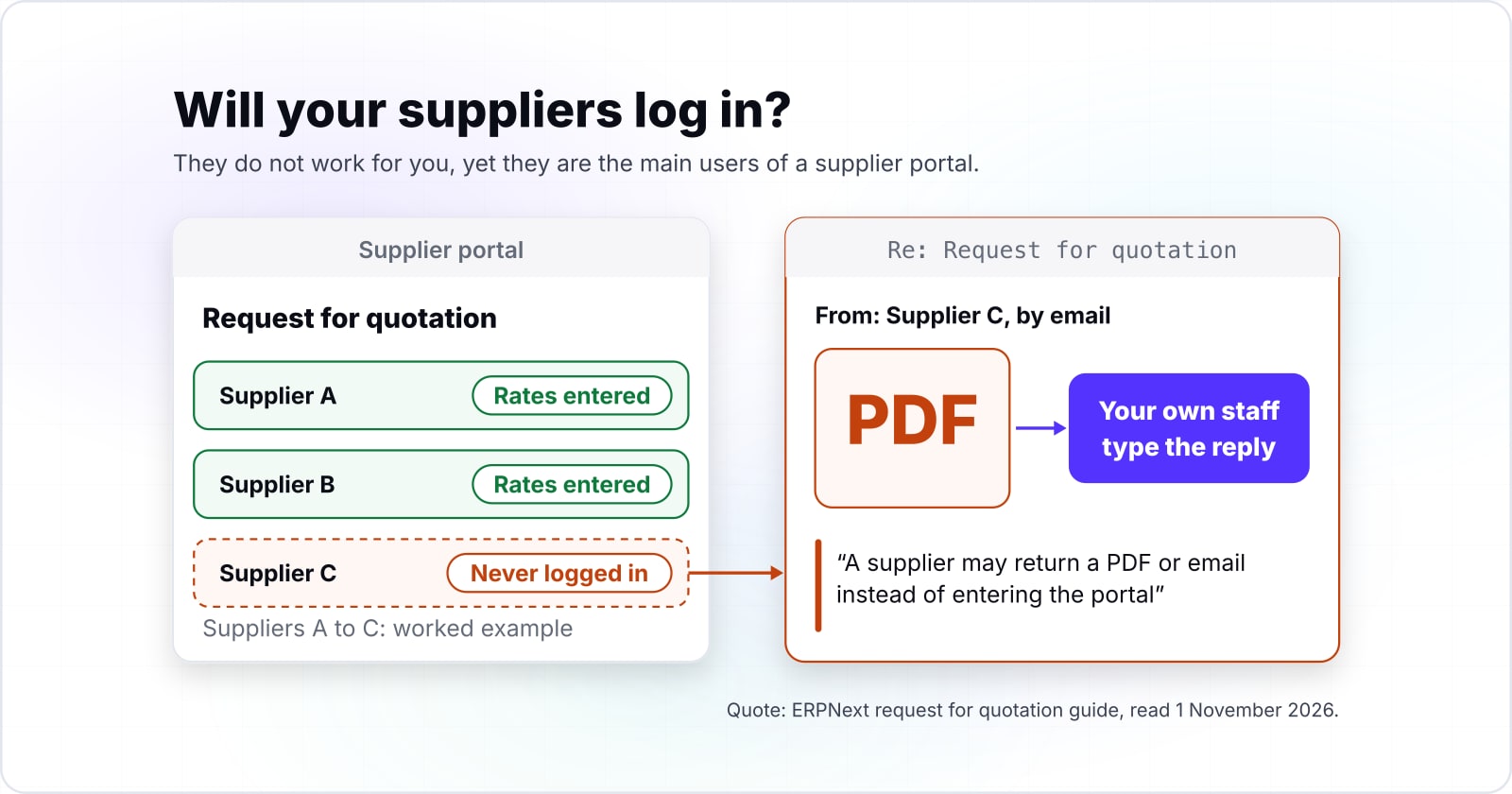
Your suppliers do not work for you, yet they are the main users of a supplier portal. That one fact settles more of the choice than any feature list.
Supplier portal build or buy: which route fits a plant whose parts pass a sample approval?#
Pick by your suppliers first and your stages second: an ERP's own portal, a portal product, a custom build or a shared tracker each wins under different facts.
First, an ERP's own portal, as in Odoo or ERPNext, gives outside firms a login to the system you run. Second, a portal product such as NimbleS2P sits beside your ERP and connects to it. Third, a custom build follows your plant's own steps. Finally, a shared tracker is a sheet both sides edit, with no login at all.
Two facts decide between them. One is whether the firms you buy from will use another login. The other is whether you need stages that packaged guides do not describe. A sample approval before the bulk order is one. We built the third kind for an India-based manufacturer, and the case study shows what that covered.
Which stages does each route cover natively, by configuration, or not at all?#
Odoo, ERPNext, Oracle iSupplier Portal and SAP Business Network each document quotation, shipment or receipt steps for suppliers, so check every stage you need against each guide.
For example, the Odoo 18 documentation covers requests for quotation and quality control points that can run on receipts. ERPNext's request for quotation guide, read 1 November 2026, lets a supplier contact open the request online. The supplier then enters rates. Its quality inspection guide checks incoming goods against a purchase receipt.
Oracle's iSupplier Portal User's Guide, Release 12.1, has suppliers "Alert the buying company of any upcoming deliveries by sending advance shipment notices". In that guide, quality results are "available only if the buying company uses Oracle Quality". Meanwhile, SAP Learning describes quality notifications that give both sides "a structure for communicating the resolution of those issues". NimbleS2P's own page says "Advance Shipment Notes map automatically to GRNs", meaning goods receipt notes.
However, none of these saved guides describes a sample approval between the quote and the bulk purchase order. That does not prove a product cannot do it. It means you ask each vendor to show you that stage running.
2 of your 9 stages appear in no saved guide
Shown in no saved guide: Sample approval, Gate entry. Ask each vendor to show these stages running before you sign.
A blank is not proof a product cannot do it. Ask each vendor to show you that stage running.
| Stage | Odoo | ERPNext | Oracle iSupplier Portal | SAP Business Network | NimbleS2P |
|---|---|---|---|---|---|
| Inquiry and quote request | In its guide | In its guide | In its guide | Not in the saved guide | Not in the saved guide |
| Sample approval | Not in the saved guide | Not in the saved guide | Not in the saved guide | Not in the saved guide | Not in the saved guide |
| Purchase order acknowledgement | Not in the saved guide | Not in the saved guide | In its guide | Not in the saved guide | Not in the saved guide |
| Advance shipment notice | Not in the saved guide | Not in the saved guide | In its guide | Not in the saved guide | In its guide |
| Gate entry | Not in the saved guide | Not in the saved guide | Not in the saved guide | Not in the saved guide | Not in the saved guide |
| Goods receipt and quality check | Left to setup | In its guide | Left to setup | In its guide | In its guide |
| Rejection and return | Not in the saved guide | Not in the saved guide | In its guide | Not in the saved guide | Not in the saved guide |
| Supplier scorecard | Not in the saved guide | Not in the saved guide | In its guide | Not in the saved guide | Not in the saved guide |
| Audit and corrective action | Not in the saved guide | Not in the saved guide | Not in the saved guide | In its guide | Not in the saved guide |
| In its guide | 1 of 9 | 2 of 9 | 5 of 9 | 2 of 9 | 2 of 9 |
Will your suppliers log in, and who pays for their accounts?#
Odoo's pricing page, read 2 November 2026, lists suppliers who use its portal as free users, so that licence counts only your own staff.
The page says "External users (such as clients or suppliers) using Odoo through the portal are not" paying users. As a result, the price line is about your purchase, quality and stores teams. Odoo's US price list, October 2026, starts at US$31.10 per user per month on Standard, billed yearly. That plan is Rs 725 on Odoo's India price list, read 2 November 2026. Each list is priced on its own, so neither figure is a conversion of the other.
Show data table
| Item | Value |
|---|---|
| Standard, billed yearly | 31.1 USD |
| Standard, billed monthly | 38.9 USD |
| Custom, billed yearly | 61 USD |
| Custom, billed monthly | 76.2 USD |
Odoo's US list rate runs from US$31.10 to US$76.20 per internal user per month, and suppliers on the portal are not counted.
| Odoo plan | Rupees per internal user per month |
|---|---|
| Standard, billed yearly | Rs 725 |
| Standard, billed monthly | Rs 950 |
| Custom, billed yearly | Rs 1,350 |
| Custom, billed monthly | Rs 1,690 |
Also, Odoo's portal guide adds that "Portal users only have read/view access". So a free login is not the same as a supplier who can act on your orders.
Then there is the supplier who never logs in. ERPNext's guide plans for this: "A supplier may return a PDF or email instead of entering the portal". Your own staff then type the reply into a supplier quotation. In short, a portal that suppliers skip moves the typing in-house instead of removing it. So ask every route who pays for a supplier account. Also ask what happens to a supplier who only answers by email. NimbleS2P's portal page prints no price, so that answer comes only from a quote.
Which workflow facts push a manufacturer toward building its own portal?#
Six facts push toward a build: a part-wise approver, a sample stage, one shipment record through gate and quality, gate documents, rejection-weighted scores and dated audits.
A part-wise approver
First, sign-off belongs to one named person for each part, not to anyone with the same job title.
A sample stage
Second, a sample must pass before the bulk order opens.
One shipment record
Third, a single shipment notice follows each delivery past the gate, into stores and on to inspection.
Gate documents
Fourth, the papers that arrive with a delivery are checked at the gate against that same notice.
Rejection-weighted scores
Fifth, a supplier rating counts returned lots hardest.
Dated audits
Finally, each review visit opens on its due date.
First, sign-off belongs to one named person for each part, not to anyone with the same job title. Second, a sample must pass before the bulk order opens. Third, a single shipment notice follows each delivery past the gate, into stores and on to inspection.
Fourth, the papers that arrive with a delivery are checked at the gate against that same notice. Fifth, a supplier rating counts returned lots hardest. Finally, each review visit opens on its due date.
If your plant is in India, the gate checks three papers. The GSTN (Goods and Services Tax Network) runs the e-way bill. Its e-way bill questions page, read 1 November 2026, says the bill travels with goods worth more than Rs 50,000. The page adds that the "tax invoice or bill of sale or delivery challan" must be at hand. So the gate matches those papers to one shipment notice.
Our case study is proof that a build can hold all six. The more of these facts your plant has, the more setup a packaged portal needs.
Does a supplier portal need ERP integration on day one?#
Not always: a portal can start with purchase orders uploaded from the ERP and add a live connection once suppliers are actually using it.
In the case study, orders were copied in from the existing system as files, so no live link was needed first.
However, file imports have a cost. Someone runs them, and an order changed in the ERP waits for the next import. Therefore, a plant that edits orders many times a day will want the live link sooner. An API is the interface one system offers another, and what a third-party API integration involves covers how that link is built. In practice, scope the connection while the first suppliers learn the portal, then switch it on.
Supplier portal build or buy: what do five years cost by route?#
Odoo's Custom plan lists $61.00 per user per month on its US price list, October 2026, so 10 internal users cost $36,600 over 60 months in this worked example.
Because Odoo does not bill outside portal users, the licence line grows with your staff, not your supplier list. At Odoo's Standard rate of US$31.10 on the same list, the same 10 users cost $18,660.
Show data table
| Item | Value |
|---|---|
| 10 on Standard | 18,660 USD |
| 25 on Standard | 46,650 USD |
| 50 on Standard | 93,300 USD |
| 10 on Custom | 36,600 USD |
| 25 on Custom | 91,500 USD |
| 50 on Custom | 183,000 USD |
The five-year Odoo licence grows with your internal users, and suppliers on the portal add nothing.
ERPNext itself is free to use, so its line is hosting. Frappe Cloud's pricing page, read 2 November 2026, starts Server plans at US$40 a month, or Rs 3,600 on the same page. For example, sixty months on that plan come to $2,400, and on Frappe Cloud's Site plan, from US$5, they come to $300.
$300
Site plan, five years
$2,400
Server plan, five years
Sixty months come to $300 on the Site plan and $2,400 on the Server plan.
| Option | US dollars over 60 months |
|---|---|
| Site plan, five years | $300 |
| Server plan, five years | $2,400 |
A custom build has no list price, so its line is your quote plus hosting and support. No line here includes taxes, offers, setup, training or time spent keying email replies. India list prices differ, and both vendors print them in rupees on the same pricing pages.
Your five-year licence and hosting by route
Enter your internal users, suppliers, a list rate per user per month and monthly hosting, in US dollars. Defaults: 25 users, 300 suppliers as an example, Odoo's Custom rate of US$61.00 (US price list, October 2026) and Frappe Cloud's Server plan of US$40 (read 2 November 2026).
Per-user licence over 60 months
$91,500
- Hosting over 60 months
- $2,400
- Added for each supplier on a free portal login
- $0
Arithmetic from the Odoo US price list (October 2026) and the Frappe Cloud pricing page (read 2 November 2026). Modelled, not measured.
How long until the first supplier is live?#
The first supplier is live when one real purchase order runs through the portal, and that date depends on onboarding more than on software.
A packaged site can exist quickly. For example, Frappe Cloud's pricing page, read 2 November 2026, starts Site plans at US$5 a month, or Rs 410 on the same page. It calls them "designed for simple setups and quick starts". Yet a site with no suppliers in it has done nothing for the plant.
US$5
Site plan, from
US$40
Server plan, from
A site is quick to start; suppliers are not.
| Option | US dollars per month |
|---|---|
| Site plan, from | US$5 |
| Server plan, from | US$40 |
| Frappe Cloud plan | Rupees per month, lowest plan printed |
|---|---|
| Site plan, from | Rs 410 |
| Server plan, from | Rs 3,600 |
Instead, count from the first real order. The portal in our case study opened to its own staff first, then to a few outside firms, then to all of them. So pick the firms that ship to you most, run their next orders through the portal, and fix what they trip on before inviting the rest.
When is a custom supplier portal the wrong fit?#
A custom portal is the wrong fit when your stages match a portal you already own, or when a shared tracker covers the suppliers you have today.
First, if your ERP already has a supplier portal and its guide shows your stages, configure that. On Odoo's terms, read 2 November 2026, outside portal users are free, so trying it costs little.
Second, if you buy from a handful of firms and run no sample stage, a shared tracker is enough. One row per order and a column for whose turn it is will serve until the list grows.
Third, some firms will only ever answer by email. For them, any portal adds a login they will not use. ERPNext's request for quotation guide already accepts a PDF or email reply and records it for you. Start there, and revisit a portal once suppliers ask for one.
| Your situation | Do this instead |
|---|---|
| Your ERP already has a supplier portal and its guide shows your stages | Configure that |
| You buy from a handful of firms and run no sample stage | A shared tracker, one row per order and a column for whose turn it is |
| Some firms will only ever answer by email | Accept the PDF or email reply; revisit a portal once suppliers ask for one |
Where should you go next?#
If your stages point to a build, start from the ERP you keep; if they point to a product, test it with a few real suppliers before you sign.
The ERP question comes first, and custom ERP development: build, extend or buy covers it. To see where the portal sits beside stores and transport systems, read how supply chain management software fits together. Once the route is chosen, a request for proposal (RFP) template helps you brief any vendor the same way.
If you want the portal built beside your ERP, our ERP development team does that work. If you keep a packaged portal, API integrations covers wiring it in. Otherwise, each vendor's own guide for the stages you ticked answers most of this on its own.