Microsoft-Decision-1 Foundry decision automation: the integration work, and who should do it
The model answers one narrow question very fast. Wiring that answer into your help desk or ERP, safely, is the part that takes judgment, and it is the part you hire for.
What does Microsoft-Decision-1 Foundry decision automation involve beyond the model?#
Microsoft-Decision-1 returns a typed decision with a probability, so the project is the integration around it: the adapter, the thresholds, the shadow test and the path to a person. Microsoft's how-to guide, updated 9 October 2026, says the model (sometimes written Microsoft Decision One) "returns a typed, numerical decision" and writes no rationale.
It runs inside Microsoft Foundry, Microsoft's platform for deploying and managing AI models. So the model call is the easy part. Your code still has to send the right record, read the answer, and then act or hand the case to a person. That code is where a project succeeds or stalls.
What does a classify-then-route build look like in practice?#
Our published form-routing build scores each incoming message, routes it when the score clears a threshold, and sends the doubtful ones to a person for review. We wrote it up in our guide to routing form submissions with AI, published 17 September 2026. Its advice is to "set a confidence threshold and route uncertain ones for human review" on every form.
What does the integration work involve with a help desk, ERP or older system?#
The work runs in five steps: list the decisions, build an adapter that sends each record and acts on the answer, set thresholds, run a shadow test, then switch on. First, the decision list names each call, its options and who handles it today. Second, the adapter turns a ticket or an order into the request the model expects. Then it turns the answer back into an action your system understands.
- Step 1
List the decisions
The decision list names each call, its options and who handles it today.
- Step 2
Build an adapter
The adapter turns a ticket or an order into the request the model expects, then turns the answer back into an action your system understands. It is usually the hardest step.
- Step 3
Set thresholds
Each decision gets its own threshold, set by the cost of a wrong call.
- Step 4
Run a shadow test
The model scores live records while your people keep deciding. Nothing acts on its answers.
- Step 5
Switch on
Your system acts on the answer, or hands the case to a person.
The adapter is usually the hardest step. Accelirate, which sells automation services, names "no API layer" as a common blocker. Many older systems have no application programming interface (API) to call. So someone has to build middleware or a screen-level bridge. Also, Redwerk, which sells software development services, argues for a separate adapter layer. That way the ERP stays stable when the AI side changes.
Finally, data quality decides how much the model can see. Panorama Consulting Group, writing on 8 August 2024, warns that poor data quality and fragmented sources hold back AI inside an ERP.
When should you keep the integration in-house, and when does a partner earn its place?#
Keep it in-house when your team already owns the interfaces of the help desk or ERP and has time for a shadow test; bring in a partner when either is missing. In-house wins on context, because your people know the odd fields. However, it costs their time, and a shadow test competes with daily work.
A partner wins when the old system has no clean interface. It also wins when your team cannot give the test weeks of attention. Still, a partner learns your data from zero, and you pay for that learning. Also, Panorama Consulting Group lists a skills gap among the challenges of AI in an ERP. So if your team will run the system later, plan the handover from the start.
In short, ask two questions about your own team. Do we own the interfaces? Do we have the time to test properly? Two yes answers point in-house, while a no on either points to help.
| Axis | In-house | Partner |
|---|---|---|
| Context | Wins: your people know the odd fields | Learns your data from zero, and you pay for that learning |
| Interfaces | Wins when your team already owns them | Wins when the old system has no clean interface |
| Time to test | Costs your team's time; the shadow test competes with daily work | Wins when your team cannot give the test weeks of attention |
| Skills and handover | A skills gap is among the challenges of AI in an ERP | Plan the handover from the start if your team will run it later |
What should you ask a software partner before signing?#
Ask which systems like yours they have connected, how they will reach yours, who sets each threshold, and how the shadow test will be judged before anything goes live. First, ask what they have connected that looks like your stack, and talk to someone who ran it. Accelirate asks vendors the same question, because the answers "will tell you more than any demo".
Second, ask how they will connect: an API, a database read, or a screen-level bot. A vague answer is a warning sign. Third, ask who owns each threshold and how it maps to the cost of a wrong call. Then ask what pass mark the shadow test must hit before go-live. Finally, ask who watches the scores after launch and who reviews changes.
What have you connected that looks like our stack?
Talk to someone who ran it. The answers "will tell you more than any demo".
How will you connect?
An API, a database read, or a screen-level bot. A vague answer is a warning sign.
Who owns each threshold?
Ask how it maps to the cost of a wrong call.
What pass mark must the shadow test hit?
Agree it before go-live.
Who watches the scores after launch?
Ask who reviews changes, too.
For reference, at Atyantik every change goes through code review by a senior software engineer. Also, CI/CD (continuous integration and delivery) gates every merge. Microsoft's guide adds a rule for consequential decisions about people. Use the model "for decision support with meaningful human review", it says, never as the sole decision-maker.
Which of your decisions are a fit for Microsoft-Decision-1?#
A fit is a repeated, bounded call with a short list of answers, such as which team takes a ticket, and a person ready to take the uncertain ones. The model answers three kinds of question, and each fit decision maps to one of them.
| Question you ask | Type | What comes back |
|---|---|---|
| Is this true? | noul | A probability from 0 through 1 |
| Which option is it? | choice | One selected option and the probability for each option |
| How much? | score | A value on an ordered scale and the probability for each level |
Source: Microsoft Learn, Deploy and use Microsoft-Decision-1, 9 October 2026.
For example, "which team takes this ticket" is a choice, and "how urgent is it" is a score. Microsoft's guide also shows three questions about one ticket sharing a single request. Meanwhile, a call with no fixed answers, or one that no person reviews today, is not a fit yet.
How do confidence thresholds and a shadow test keep a person on the calls that matter?#
Microsoft's guide says to treat a low top probability as a signal to escalate, so each decision gets its own threshold, checked in a shadow test before it acts. Its words are "use a low top probability as a signal to" escalate. It also says to set thresholds by the cost of false positives and false negatives.
In a shadow test, the model scores live records while your people keep deciding. Nothing acts on its answers. Then you compare the two, decision by decision. You raise the line until the model agrees with your people on the calls that matter. Because "poorly framed questions still return scores," as the guide warns, the test also catches a badly worded question.
For the confidence dial and an outage fallback, read our post on real-time AI decisions.
How much volume can each Microsoft Foundry quota tier carry?#
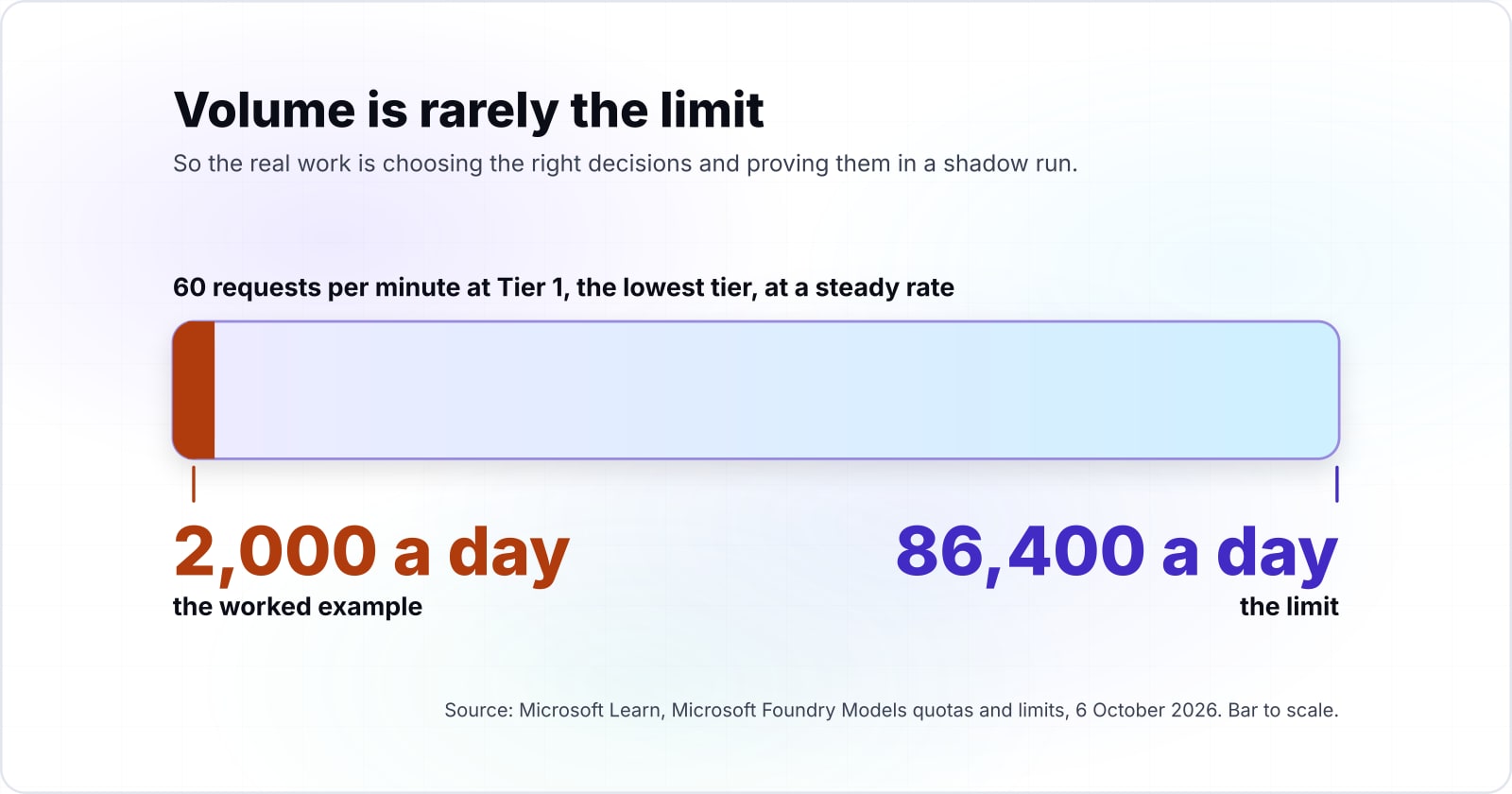
Microsoft's quotas page, updated 6 October 2026, allows 60 requests per minute at Tier 1, which is 86,400 requests a day at a steady rate. So even the lowest tier carries far more than most help desks receive.
Show data table
| Item | Value |
|---|---|
| Tier 1 | 86,400 |
| Tier 2 | 216,000 |
| Tier 3 | 324,000 |
| Tier 4 | 518,400 |
| Tier 5 | 720,000 |
| Tier 6 | 1,296,000 |
Even Tier 1 carries 86,400 requests a day at a steady full pace.
| Tier | Requests per minute (RPM) |
|---|---|
| Tier 1 | 60 |
| Tier 2 | 150 |
| Tier 3 | 225 |
| Tier 4 | 360 |
| Tier 5 | 500 |
| Tier 6 | 900 |
In practice, traffic arrives in bursts, not at a steady pace. Therefore size against your busiest minute, not your daily total. The quotas page also notes that your real limit depends on the capacity you deploy.
How do you check the return before you commit?#
In an illustrative worked example of 2,000 tickets a day, the return is the share that clears the threshold multiplied by the minutes a person spent on each. Say, as an illustration, that 70% clear the line and each took a person three minutes to sort. Then 1,400 tickets skip manual triage in this illustrative case, which returns 4,200 minutes, or 70 hours, a day.
Hours of manual triage returned per day on your own numbers
Put in your decisions a day, the share that clears your threshold and the minutes a person spends on each; it returns the hours returned per day and the number still sent to people.
Hours returned per day
70 h
- Decisions still sent to people
- 600
The defaults are illustrative, not measured. Change them to your own. An estimate, not financial advice.
This calculator gives an estimate, not financial advice. You cannot guess the share that clears. So ask your partner to measure it in the shadow test. Also, all three questions about a ticket fit in one request. So 2,000 tickets in this illustrative case mean 2,000 requests, well inside Tier 1 on the October 2026 quotas page.
When is Microsoft-Decision-1 the wrong tool?#
It is the wrong tool when a fixed rule already decides the case, when a decision about a person carries no review, or when the answer must be written prose. First, a rules engine wins when the policy is exact, such as an approval limit on orders. It is cheaper to run and easier to audit.
Second, a person stays in charge of consequential calls about individuals. Microsoft's guide says not to use its scores "as the sole basis for decisions about individuals" at all. Third, a generative model wins when the task is to write or explain. For that, the guide says to "use a generative LLM instead", meaning a large language model. Also, you can pair them, so the scoring model routes and the writing model replies. Our post on when a small typed model beats a general one weighs that trade.
| The case | Use instead | Why |
|---|---|---|
| A fixed rule already decides it | A rules engine | Cheaper to run and easier to audit |
| A consequential call about a person | A person stays in charge | Not the sole basis for decisions about individuals |
| The answer must be written prose | A generative model (LLM) | It writes or explains; the scoring model routes |
What is the first step for your team?#
Write down five decisions your team makes over and over, the answer options for each, and who handles the doubtful ones today, before you speak to any partner. That list is the first deliverable of any project, so it is useful whether you build in-house or not.