How manual testing improves automation quality, from one session to the next regression check
A green suite proves that the checks someone wrote still pass. The bugs users report next live where nobody thought to look, and a person exploring the product is how you find them first.
How manual testing improves automation quality#
Manual testing is still important because an exploratory session finds the defects no script was written to look for, and each root-caused finding becomes the next automated check. That is the short answer to why manual testing still matters when the suite is green. Because a suite can only confirm what someone already expected, it misses the rest. However, the next bug a user reports is usually one nobody expected.
Two sources describe the same loop from opposite ends. First, Ham Vocke's practical test pyramid on martinfowler.com, February 2018, covers the hand-off. After exploring, he writes, "you can happily automate most of your findings with" automated tests. Second, the ISTQB test automation strategy syllabus, CT-TAS v1.0 of May 2024, covers the split. It says "Manual testing efforts are suggested to focus on exploratory testing" beside automation. Neither source treats manual and automated work as rivals. Instead, each one feeds the other.
So the question is not whether to keep manual testing. Instead, it is how to run it so that every session leaves the suite stronger. The rest of this guide is that routine. It covers how a session works and how a finding becomes a check. Then it covers where the check should live, and when a finding should stay manual.
What does a team gain when findings become checks?#
Each finding written as a small, stable check stops that defect from returning, and at the per-size flaky shares Google Testing Blog lists for April 2017 it adds little noise. The gain is easy to report upward, because every escaped defect that comes back costs a second investigation, a second fix and a second apology. A check written from the first finding ends that cycle for that defect.
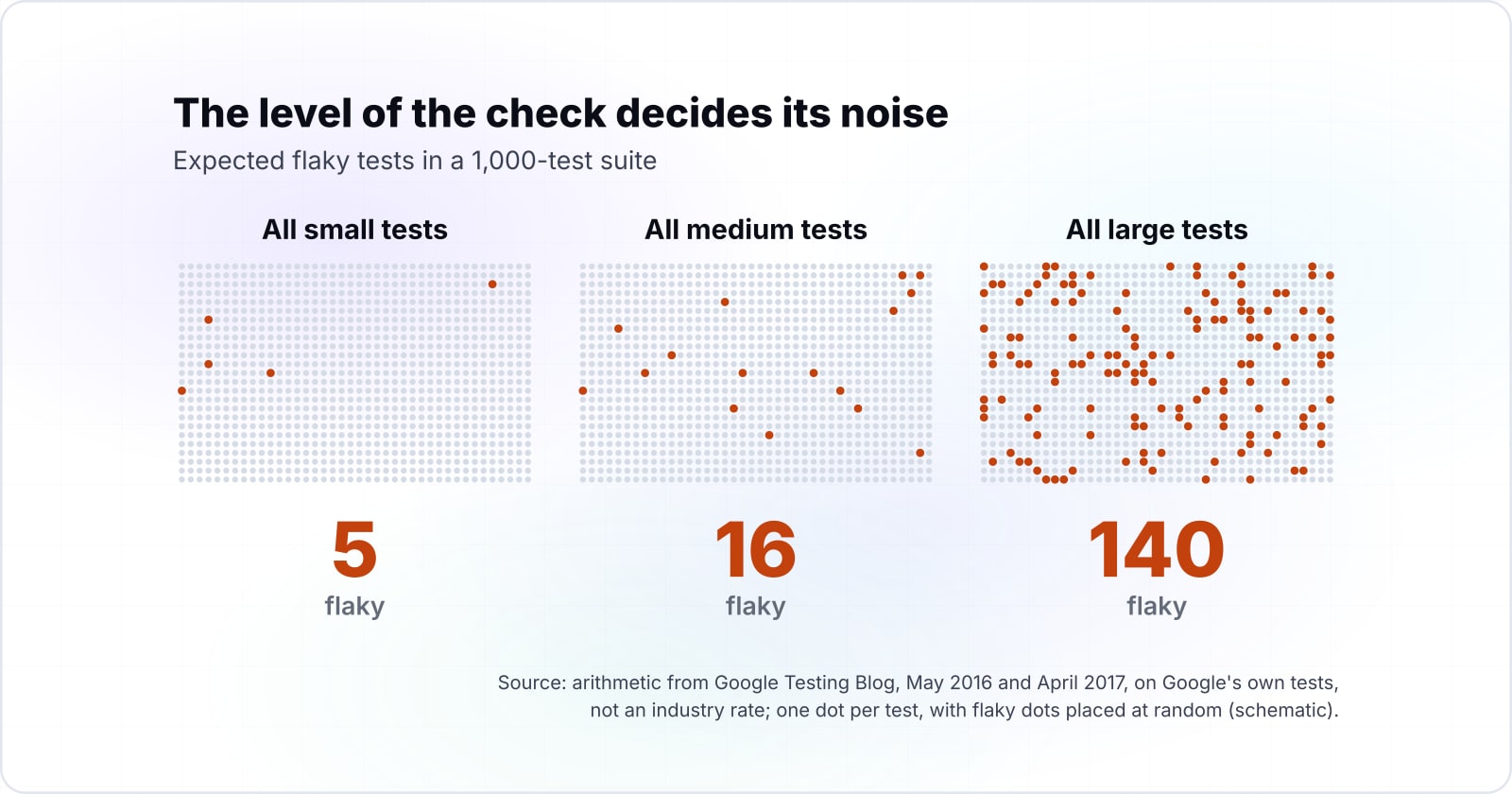
The cost side is noise. A flaky check passes and fails on the same code. So every red run needs a person to decide whether it is real. Google Testing Blog wrote in May 2016 that an average Google project holds about 1,000 tests. In April 2017 the same blog reported Google's own flaky shares by test size. Applied to 1,000 tests, Google's 2017 shares mean about 5 flaky tests if every test is small. They mean 16 if every test is medium, and 140 if every test is large.
Show data table
| Item | Value |
|---|---|
| All small tests | 5 |
| All medium tests | 16 |
| All large tests | 140 |
Written all large, the same suite expects about 140 flaky tests against about 5 written all small.
Those numbers describe Google's tests, not an industry rate, and your shares will differ. Still, the shape is the lesson. For example, say your suite has 1,000 tests and 10% of them drive a browser through the UI. Say the rest split into 700 small and 200 medium tests, as an example. At Google's 2017 shares, that mix holds about 21 flaky tests. As a result, the 100 large tests supply 14 of them. In practice, the share of checks you write at the browser level drives most of the noise.
Flaky tests in your suite mix
Change the share of large and medium checks and the suite size to see how many flaky tests to expect, and how many come from large tests.
Expected flaky tests in the suite
21
- Of those, from large UI-level tests
- 14
- Small tests in the suite
- 700
Rates from Google Testing Blog, April 2017, Google's measurement of its own tests; suite size from Google Testing Blog, May 2016. Modelled, not measured.
What is the difference between testing and checking?#
Testing is learning about a product by exploring it, while checking verifies a proposition someone already wrote down, and an automated suite can only check. James Bach and Michael Bolton drew this line on the Satisfice blog in 2013. Their definition is short. "Checking is the mechanistic process of verifying propositions about the product." Testing, in the same post, is learning about a product through experiencing, exploring and experimenting.
That split is also the clearest answer to manual vs automated testing. An automated test is a check that a machine runs and decides. Bolton made the point first on DevelopSense in August 2009, proposing that "unit tests" be called unit checks. The machine is fast and tireless at checking. However, it cannot notice a thing it was never told to compare.
Therefore, a green suite says one precise thing. Every expectation someone wrote down still holds. It says nothing about the expectations nobody wrote. Also, a suite can turn red for reasons that are not bugs at all. That is a separate kind of blindness.
1.5%
Test runs reporting a flaky result
84%
Pass-to-fail transitions that involve a flaky test
About 1.5% of runs were flaky, yet about 84% of pass-to-fail transitions involved a flaky test.
Show data table
| Option | percent, Google's own test runs and pass-to-fail transitions |
|---|---|
| Test runs reporting a flaky result | 1.5% |
| Pass-to-fail transitions that involve a flaky test | 84% |
Source: Google Testing Blog, 27 May 2016
Google Testing Blog reported on 27 May 2016 that about 1.5% of Google's own test runs gave a flaky result. In the same 2016 post, Google found that about 84% of pass-to-fail transitions in its CI system involved a flaky test. So in Google's data, most new failures involved a flaky test rather than a fresh bug. Meanwhile, the real gaps were the bugs no check covered at all.
How does an exploratory session find what scripted checks miss?#
ISTQB's CTFL v4.0.1 syllabus, dated September 2024, describes exploratory testing as tests designed, executed and evaluated at once while the tester learns, inside a chartered time box. The Certified Tester Foundation Level syllabus comes from the International Software Testing Qualifications Board. In its words, "tests are simultaneously designed, executed, and evaluated while the tester learns" about the test object.
The same section describes session-based testing, the structure that keeps exploration accountable. First, a test charter states the session's objectives. Second, the session runs inside a defined time box. Then the tester records steps and discoveries on test session sheets. Finally, a debrief with the people who care about the results decides what the session found.
A test charter states the session's objectives.
For example, explore coupon entry with odd inputs for 60 minutes. It sets a target and does not script the steps.
The session runs inside a defined time box.
Inside it, tests are designed, executed and evaluated at once while the tester learns.
The tester records steps and discoveries on test session sheets.
The sheet is what a finding is reproduced from later.
A debrief decides what the session found.
It is held with the people who care about the results.
Here is why a session finds what a script walks past. First, a script follows its steps and compares its one expected result. However, a person on a charter notices the odd thing beside the step. It might be a total that rounds the wrong way, or a field that keeps a stale value. Because the next action depends on what they just saw, the person follows the surprise. For example, a charter such as "explore coupon entry with odd inputs for 60 minutes" sets a target. It does not script the steps.
The syllabus also says exploratory testing works best when the tester has domain knowledge, curiosity and analytical skill. That is a fair warning, because a session run by someone who does not know the product turns into clicking. For a worked example of session notes, see the guide to running a session with Rapid Reporter.
How does a finding become the next automated test?#
A finding becomes a test in five steps: reproduce it, root-cause it, pick the lowest level that still reproduces it, write the check, then link it back to the session notes. The route from exploratory testing findings to automated tests is the same every time. That routine is where manual testing improves automation quality most directly.
- Reproduce it. Write the shortest set of steps that shows the defect again, from the session sheet.
- Root-cause it. Find the function, query or rule that produced the wrong result. The finding is a symptom until this step is done.
- Pick the lowest level. Ask which test size still fails without the fix. It could be a unit check, a service check or a browser check.
- Write the check. Make it fail on the broken build and pass on the fixed one. Then name it after the behaviour.
- Link it back. Put the session sheet reference in the check's comment. Then the debrief can see what it became.
Ham Vocke's article on martinfowler.com, February 2018, gives the reason for step four. A check written for a bug you found makes sure "there won't be any regressions of that bug in the future." Step three is the easiest one to skip. Because the bug was seen in the browser, it feels natural to write a browser test. However, the root cause usually sits lower, and the lower check is faster and steadier.
However, not every finding should pass through all five steps. A debrief may decide a finding is a duplicate, a design question or not worth fixing. Deciding that is triage, and the guide to running bug triage covers who decides and how.
At which level should the new check be written?#
Google Testing Blog reported in April 2017 that, over one week, 0.5% of Google's own small tests, 1.6% of its medium tests and 14% of its large tests were flaky. In Google's post of 17 April 2017, a large test was about 28 times as likely to flake as a small one. That is the case for writing each finding at the lowest level that reproduces it.
Show data table
| Item | Value |
|---|---|
| Small tests | 0.5 |
| Medium tests | 1.6 |
| Large tests | 14 |
A large test was about 28 times as likely to flake as a small one.
Martin Fowler's test pyramid, from May 2012, makes the same point as design advice. Have many more low-level unit tests than broad tests that run through a GUI. Google's 2017 numbers put a measured reason under that shape. Each step up the pyramid adds moving parts, and each moving part is another way to flake.
In practice, the test for the level is simple. Remove the fix and ask which is the smallest test that turns red. If a unit check on the discount function turns red, write that and stop. Also, a browser check is right only when the defect lives in the browser itself. Key presses, focus and form behaviour are examples.
Which Playwright pages do you build the check from?#
Three Playwright documentation pages cover a browser-level regression check: writing tests for the structure, locators for finding elements by role, and assertions for the expectation itself. Playwright is Microsoft's open-source browser testing framework, and its own pages are enough to write a correct check.
- Writing tests: the shape of a test file,
test(),page.goto()and the actions such asfill()andpress(). - Locators:
page.getByLabel()andpage.getByRole(), which find elements the way a user sees them rather than by brittle markup. - Assertions:
expect()with auto-retrying matchers such astoBeVisible()andtoHaveURL(). They wait for the page instead of failing on a slow render.
| Page | What it supplies | Calls taken from it |
|---|---|---|
| Writing tests | The shape of a test file and the actions | test(), page.goto(), fill(), press() |
| Locators | Finding elements the way a user sees them | page.getByLabel(), page.getByRole() |
| Assertions | Auto-retrying matchers that wait for the page | expect(), toBeVisible(), toHaveURL() |
In particular, locators by label and role matter for flakiness. A check tied to a CSS class breaks when the markup changes. However, a check tied to a visible label breaks only when the user's view changes. If your team has not picked a browser tool yet, the comparison of Selenium, Cypress and Playwright weighs the options.
What does the smallest regression check look like?#
The smallest useful check is one Playwright test in TypeScript that replays the finding's steps and asserts the corrected behaviour with a retrying assertion. Say the session found that pressing Enter in the coupon field placed the order instead of applying the coupon. That defect lives in form behaviour, so it truly needs the browser.
import { test, expect } from '@playwright/test';

// Finding from an exploratory session on coupon entry:
// pressing Enter in the coupon field submitted the order.
test('Enter in the coupon field applies the coupon', async ({ page }) => {
  await page.goto('https://shop.example.com/cart'); // assumption: your cart page
  await page.getByLabel('Coupon code').fill('SPRING10');
  await page.getByLabel('Coupon code').press('Enter');
  await expect(page.getByText('Coupon applied')).toBeVisible();
  await expect(page).toHaveURL('https://shop.example.com/cart');
});
First, the URL, the label text and the code are assumptions to replace with your own. The test opens the screen and replays the input. Then it asserts the fixed behaviour, and asserts that the page did not move on. It runs in a project set up with @playwright/test, as the writing-tests page shows.
The comment carries the session reference, which is step five of the routine. Then the check fails on the broken build and passes on the fixed one. It also stays readable to the next person who meets it in a red run.
What should a team automate first, and what stays manual?#
ISTQB's CT-TAS v1.0 syllabus from May 2024 names regression testing as the easiest place to start automating, and moves manual effort toward exploratory testing. The syllabus explains why. "It is only a matter of time before the number of regression tests becomes greater than" the time a manual team has. Because regression checks repeat on every release, automating them pays back first.
A simple sort works for most backlogs:
- Automate now: stable behaviour that repeats every release and has a clear expected result, such as totals, permissions and saved data.
- Automate later: behaviour on screens that still change every sprint, where a check would need rewriting each time.
- Keep manual: exploration, usability, and anything whose expected result needs a person's judgment, such as whether a message reads clearly.
| Sort | What belongs there | Examples |
|---|---|---|
| Automate now | Stable behaviour that repeats every release, with a clear expected result | Totals, permissions, saved data |
| Automate later | Screens that still change every sprint | A check would need rewriting each time |
| Keep manual | Anything whose expected result needs a person's judgment | Exploration, usability, whether a message reads clearly |
Vocke's article on martinfowler.com draws the same line for usability. Once you test for a "looks good" factor, he writes, you leave automated testing. Then you rely on exploratory and usability testing. Other human-judgment methods help there too, such as heuristic evaluation and cognitive walkthroughs.
Can AI replace manual testing?#
Su and colleagues' arXiv study of December 2024 counted 52 incorrectly reported bugs from its LLM testing agents, 14 of them hallucinations, so a person still judges every finding. The paper is Automated Soap Opera Testing Directed by LLMs and Scenario Knowledge. Its authors built three agents on large language models (LLMs) and ran scenario tests on three apps.
Still, the agents did find real bugs in that 2024 study. Su and colleagues report that the 34 bug reports the system submitted led to 3 fixes and 13 confirmations. They also report a significant gap against manual execution, including under-explored scenarios and false positives. The authors traced the 52 incorrect reports to four causes.
Show data table
| Item | Value |
|---|---|
| Unreasonable or unnecessary suggestions | 20 |
| LLM hallucination | 14 |
| Screenshot-based GUI presentation | 12 |
| Wrong GUI element located | 6 |
Unreasonable or unnecessary suggestions were the largest cause, 20 of the 52 incorrect reports.
So the honest answer is that AI can help run a session, but it cannot yet own the verdict. In Su and colleagues' 2024 study, the human participants also stressed one point. Exploration finds bugs beyond the known oracles, the expected results a script compares against. Therefore, treat an agent as a session assistant whose findings a person reviews before any of them become checks.
When not to turn a finding into an automated check?#
Skip the automated check when the expected result needs human judgment, when the screen still changes weekly, or when a stable check cannot be written below the browser. In each case a flaky or brittle check costs more than it protects. The better tool is a repeat session charter that a person runs on the next release.
15 min
One run of the integration test
45 min
Three runs under the flaky rule
Under that rule, a 15 minute integration test takes 45 minutes to report a real break.
Show data table
| Option | minutes, a 15 minute integration test under the three-failure rule |
|---|---|
| One run of the integration test | 15 min |
| Three runs under the flaky rule | 45 min |
Source: Google Testing Blog, 27 May 2016
Also, the cost of a flaky check is time as well as noise. On 27 May 2016, Google Testing Blog described how Google marks a flaky test to fail only after three straight failures. Under that rule, a 15 minute integration test that your change truly broke takes 45 minutes to say so. Meanwhile, the people waiting on it learn to ignore red runs.
ISTQB's CT-TAS v1.0, May 2024, gives a plain warning sign too. Something is wrong if the automation's maintenance time is greater than the manual testing time. Finally, if a check from a finding keeps needing repair, delete it and move the finding back into a charter. For instance, "explore the redesigned checkout with saved cards" keeps the risk covered without a test that breaks every sprint.
Where do you go from here?#
Run one chartered session this week, take its best finding through the five steps, and check where the new test landed in the pyramid. Then count how many of your existing browser checks could move down a level. That count is usually the fastest way to cut noise without losing coverage.
For the session itself, the Rapid Reporter session guide shows the notes. Then the bug triage guide shows how to decide what gets fixed. If the new checks need a pipeline that handles flaky tests, our DevOps and CI/CD work covers that. For a product that needs steady regression coverage over years, see maintenance and support.
You do not need any of that to start, though. The ISTQB syllabus, Fowler's pyramid and the Playwright docs are enough to run the loop on your own.