Laravel DigitalOcean deployment with Laravel Forge: the production 80 percent
The atomic deploy is the easy 20 percent. Here is the production 80 percent: droplet sizing, queue workers, migration safety, tuning, and hardening every Forge tutorial stops before.
How long does the first Forge deploy take?#
About twenty minutes, from connecting a DigitalOcean provider to a green site serving traffic. Reach for Forge and the first deploy feels like magic. Connect a DigitalOcean provider, provision a droplet, link a Git repository, and press deploy. That part is genuinely quick, and this guide will not pad it out.
Because the happy path is short, most tutorials end there. However, a green deploy is not a production system. The work that keeps a Laravel DigitalOcean deployment up starts after the first deploy succeeds. Also, the reason teams choose this stack, over a managed platform, is control, and control means owning the operations. For the trade-off behind the framework itself, see why teams choose Laravel over WordPress for this kind of app.
What does every guide to a Laravel DigitalOcean deployment with Forge skip?#
Most guides skip the production 80 percent: queue workers, migration safety, droplet sizing, tuning, hardening, and backups. The gap is not subtle. Line up the production concerns against what a click-through actually covers, and the missing 80 percent is obvious. Each row below maps a skipped concern to the concrete command or config that closes it, all of which this runbook works through.
| Production concern | What the tutorials show | What this runbook gives you |
|---|---|---|
| Zero-downtime deploy | A single "deploy" button | The releases/ + current-symlink atomic model, dissected |
| The deploy script | The default, unexplained | Every line, its ordering, and its failure mode |
| Queue workers + scheduler | Skipped entirely | The Supervisor program and the schedule:run cron |
| Migration safety | migrate --force, no context | Backward-compatible migrations + a tested rollback |
| Droplet sizing | Pick a size by feel | pm.max_children and worker count from RAM arithmetic |
| PHP-FPM + opcache tuning | The stock config | pm settings, opcache, and realpath cache from the math |
| Server hardening | "SSL installed, done" | Firewall, key-only SSH, database off the public interface |
| Backups + monitoring | Not mentioned | A scheduled dump with a rehearsed restore + a health route |
How do you size the droplet for a Laravel app?#
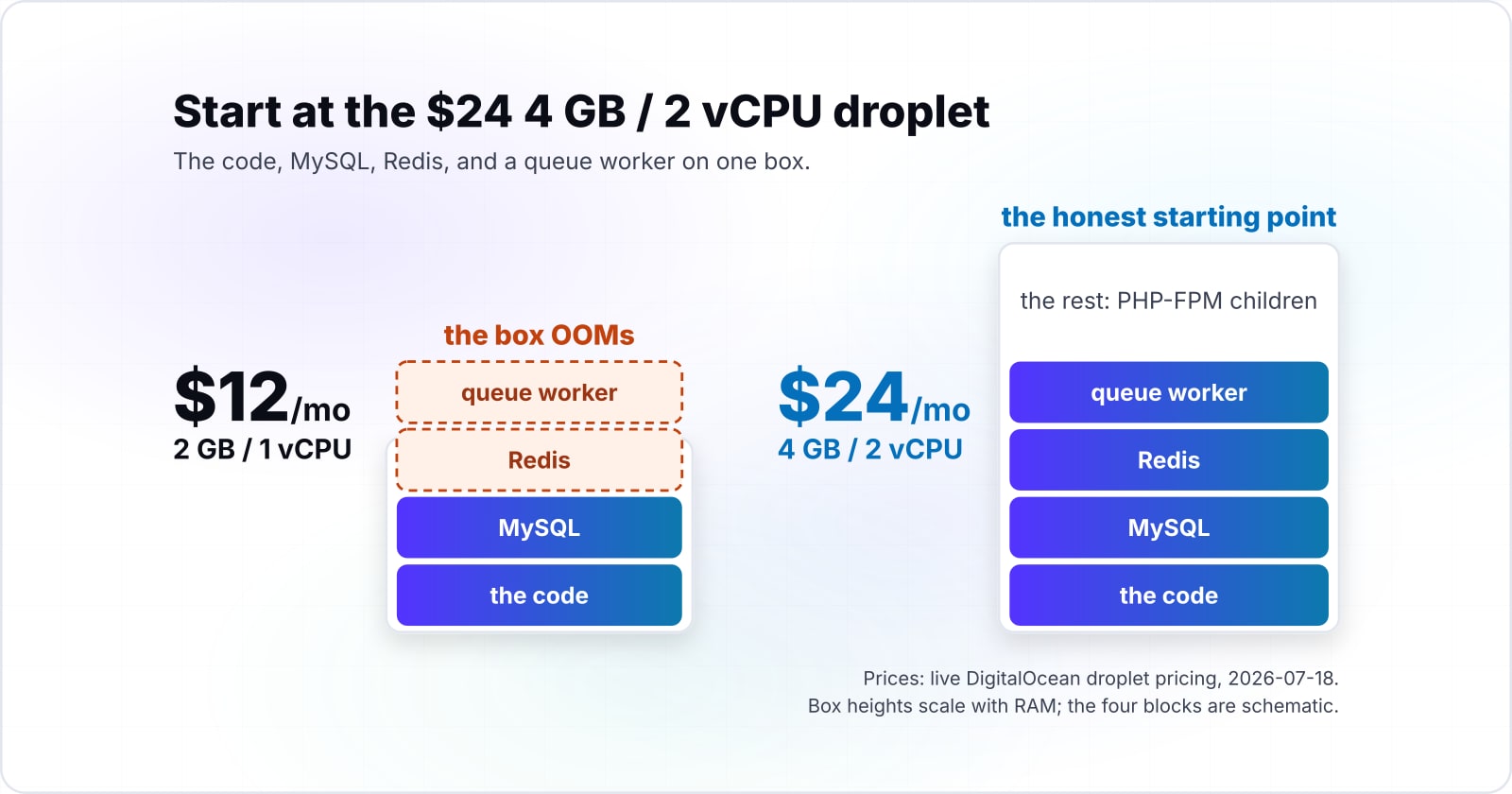
Start a single-server app at the $24 4 GB / 2 vCPU droplet, and derive everything else from RAM arithmetic rather than a default click. In practice, sizing is the first place a runbook and a tutorial part ways. A tutorial picks a Laravel DigitalOcean droplet by vibe, and the wrong size fails in production, not in the demo.
The rungs, and why the $12 2 GB tier OOMs a single-server app#
The live 2026 DigitalOcean droplet pricing gives clean rungs. They run $4 for 512 MiB, $6 for 1 GB, $12 for 2 GB, $18 for 2 GB with 2 vCPU, $24 for 4 GB with 2 vCPU, $48 for 8 GB with 4 vCPU, and $96 for 16 GB with 8 vCPU. The $12 tier looks like the sensible starter. However, a single-server Laravel app runs the code, MySQL, Redis, and a queue worker on one box.
At 2 GB those four pieces contend for memory. Under real load the kernel runs out and kills a process, and the box OOMs. Therefore the honest starting point for a single-server Laravel DigitalOcean app is the $24 4 GB / 2 vCPU droplet. It gives 4 GB RAM, 2 vCPUs, 80 GB SSD, and 4,000 GiB transfer. The next step up, when traffic grows, is the $48 8 GB / 4 vCPU rung. When one droplet becomes a fleet of clusters, installing Rancher on DigitalOcean Kubernetes with Helm is the managed route.
The arithmetic: RAM to pm.max_children, opcache, and worker count#
A live formula is worth more than a fixed recommendation, because your app is not the worked example. Pick a rung or set RAM and vCPU below, choose your app's memory profile, and watch the pool settings recompute. The calculator subtracts the OS, database, and worker memory from total RAM, then divides the rest by the memory one PHP-FPM child uses.
Pick a droplet, or set RAM and vCPU below
Live 2026 DigitalOcean Basic rungs.
| RAM / vCPU | 4096 MiB / 2 vCPU |
|---|---|
| reserved (OS + Redis) | 768 MB |
| MySQL footprint | round( 0.30 x 4096 ) = 1229 MB |
| queue workers | max( 1, 2 vCPU ) = 2 (90 MB) |
| PHP-FPM pool RAM | 4096 - 768 - 1229 - 90 = 2009 MB |
| pm.max_children | floor( 2009 / 45 ) = 44 |
| opcache.memory_consumption | clamp( round( 4096 / 32 ), 64, 256 ) = 128 MB |
The sizing rule: subtract the OS, database, and queue-worker memory from total RAM, then divide the rest by the memory one PHP-FPM child uses. That quotient is pm.max_children. Below 4 GB the pieces barely fit, so a single-server app OOMs under load; at 1 GB and below the rest is negative and there is no pool to size at all.
Notice the fit verdict flip as you drop below 4 GB. That is the OOM line the previous section named, made operable. Consequently the droplet choice stops being a guess and becomes a number you can defend.
Connect Forge and link the Git repository#
This is the genuinely quick part, so it stays short. Connect your DigitalOcean provider in Forge, provision the sized droplet, then attach the repository and the branch you deploy from. Forge installs PHP, Nginx, MySQL, and Redis for you.
What does the Forge deploy script do, line by line?#
It builds a fresh release off the live path, runs composer, the asset build, and migrations there, then flips the current symlink and restarts queue workers. No ranking page dissects the deploy script or explains the atomic model. Yet the script is where a deploy either stays safe or serves broken code to a live visitor. So this is the core teach.
In-place git-pull vs zero-downtime atomic, side by side#
There are two shapes of deploy script. The naive one pulls into the live directory. The safe one builds a fresh release and flips a symlink. Switch between them below and watch where the risk lives.
# In-place deploy. The directory the live site serves IS the working copy.
cd /home/forge/app
git pull origin main
composer install --no-interaction --prefer-dist --optimize-autoloader --no-dev
npm ci && npm run build
php artisan migrate --force
php artisan optimize
php artisan queue:restart
# Between "git pull" and "optimize" the live site serves half-old, half-new
# code. A visitor in that window can hit a class that no longer exists.# Zero-downtime deploy. Forge builds a fresh release, then flips one symlink.
# With zero-downtime deployments on, Forge wraps your script in these macros.
$CREATE_RELEASE() # clone the repo into a new releases/TIMESTAMP directory
cd $RELEASE_DIRECTORY
composer install --no-interaction --prefer-dist --optimize-autoloader --no-dev
npm ci && npm run build
php artisan migrate --force # --force is required, or Artisan prompts and aborts
php artisan optimize # config:cache + route:cache + view:cache in one
$ACTIVATE_RELEASE() # atomically flip the "current" symlink to the new release
$RESTART_QUEUES() # restart workers so they load the NEW code, not the oldThe difference is the window. In the in-place script, the live site serves a half-updated directory while composer and the build run. Meanwhile the atomic script does all that work off to the side, then switches the site over in one step. A clean Git history makes either script easier to reason about, and a branching workflow that pairs cleanly with Forge's deploy hooks keeps the branch you deploy from honest.
Forge's atomic model: releases/ and the current symlink#
In short, the atomic model is one idea. Each deploy builds into its own timestamped directory under releases/. Only when the build and migrations succeed does Forge flip the current symlink to the new release. Because that flip is a single filesystem operation, there is no moment when the site serves a partly built release. The Forge deployments documentation describes the macros that wrap it.
Ordering that actually matters, and each failure mode#
The line order is not decorative. Each step guards the one after it, so a wrong order is a real failure. Below are the two that bite most often.
Shared paths and release retention#
Two details make the atomic model survive real use. First, shared paths like storage/ are symlinked from a single shared directory into every release, so user uploads persist across deploys. Second, old release directories are pruned past a retention count, so disk does not grow without bound.
# Forge links shared paths from a shared/ dir into every new release, so user
# uploads and the .env survive a deploy. storage/ is the common case.
/home/forge/app
|-- current -> releases/20260718T1230
|-- releases/
|   |-- 20260716T0910
|   |-- 20260717T1432
|   `-- 20260718T1230
|       `-- storage -> /home/forge/app/shared/storage
`-- shared/
    |-- .env
    `-- storage/            # uploads live here, once, across every release
# Old releases are pruned past the retention count, so disk does not grow forever.
What day-2 operations do Forge tutorials skip?#
They skip queue workers under Supervisor, the schedule:run cron, and queue:restart on every deploy. Queues and the scheduler are where the click-throughs go silent. Yet a real Laravel DigitalOcean app leans on both. So this section is pure differentiation from the happy path.
Queue workers under Supervisor and Horizon#
A queue worker is a long-lived PHP process, so it needs a supervisor to keep it alive. Forge writes a Supervisor program for you from the site's Queue tab. Notice that numprocs is the queue-worker count from the sizing calculator, which is 2 on the $24 droplet. The Forge queues documentation covers the dashboard side.
; /etc/supervisor/conf.d/app-worker.conf
; Forge writes this from the site's Queue tab. numprocs is the queue-worker
; count from the sizing calculator: 2 on the $24 droplet.
[program:app-worker]
process_name=%(program_name)s_%(process_num)02d
command=php /home/forge/app/current/artisan queue:work redis --sleep=3 --tries=3 --max-time=3600
directory=/home/forge/app/current
autostart=true
autorestart=true
stopwaitsecs=3600
user=forge
numprocs=2
redirect_stderr=true
stdout_logfile=/home/forge/app/storage/logs/worker.log
For the reliability side of workers, retries, and idempotency, our guide to running Laravel queues reliably at production scale goes deep on the model. Here the point is narrower: the worker count is a derived number, and Supervisor is what turns it into processes.
The scheduler cron: schedule:run every minute#
Laravel's scheduler needs exactly one cron entry on the server. That single line calls schedule:run every minute, and Laravel's own code decides what actually fires. The click-throughs never mention it, so scheduled jobs silently never run. Maintenance jobs live on that schedule too, such as pruning a Spatie activity log by retention class, so a missing cron entry also means audit tables that grow without limit.
# crontab -e for the forge user. This one line runs the Laravel scheduler.
# Laravel's own schedule() method decides what actually fires each minute.
* * * * * php /home/forge/app/current/artisan schedule:run >> /dev/null 2>&1
It belongs on the server, not in the app, because only the operating system's cron ticks reliably every minute. Therefore this one line is the difference between a working scheduler and a queue of jobs that never dispatch.
queue:restart on every deploy, or workers run stale code#
How do you run Laravel migrations safely and roll back?#
Back up the database before every migrate, split destructive changes across two deploys, and roll back by repointing the current symlink. Production migration safety is absent from the ranking set. A concrete recovery path is too. Both matter more than any tuning flag on a Laravel DigitalOcean server, because a bad migration is the one failure a symlink flip cannot undo.
Guarding destructive and irreversible migrations#
Some migrations cannot reverse. A dropped column takes its data with it, so the down() method can restore the shape but never the values. Therefore treat any drop or rename as a two-deploy change. First stop writing the column, then drop it a release later, once no running code depends on it.
// A migration that DROPS a column cannot auto-reverse to the old data.
// Split it across two deploys, so an atomic rollback stays safe.
// Deploy 1: stop writing the column in app code, but keep it in the schema.
// Deploy 2, a release later: drop it, once no running code reads it.
public function up(): void
{
    Schema::table('orders', function (Blueprint $table) {
        $table->dropColumn('legacy_status'); // irreversible: the data is gone
    });
}

public function down(): void
{
    Schema::table('orders', function (Blueprint $table) {
        $table->string('legacy_status')->nullable(); // shape back, DATA does not
    });
}Back up before you migrate, and test the restore#
The rule is short. Take a database backup before the migrate step, on every deploy. Then, and this is the part teams skip, restore that backup into a scratch database and confirm it works.
# Back up the database BEFORE the migrate step, on every deploy.
# An untested backup is not a backup, so restore it into a scratch db and diff.
mysqldump --single-transaction --quick forge_app \
  > /home/forge/backups/pre-deploy-$(date +%Y%m%dT%H%M%S).sql

# Rehearse the restore once, so you trust it on the day you actually need it.
mysql scratch_restore_test < /home/forge/backups/pre-deploy-20260718T1230.sqlWhen a deploy breaks: symptom to command#
After the first green deploy, a handful of failures show up again and again. Pick the symptom you actually hit, and the panel gives the likely cause, the exact recovery command, and the one check that confirms the fix.
Select the failure you hit from the list. The panel shows the distinct cause, the exact recovery command, and the one check that confirms the fix. Every case is also listed in full below.
Every symptom and its recovery command, readable without the buttons.
- 502 Bad Gateway right after a deploy
- PHP-FPM is holding a stale bootstrap or a broken cached config, so Nginx has no healthy upstream to reach. It usually follows an optimize step that cached a bad value.
Confirm: A reload, not a restart, so in-flight requests drain first. Then curl the health route and watch for a 200.php artisan optimize:clear php artisan optimize sudo service php8.3-fpm reload - A migration failed halfway through
- One migration in the batch errored, so the schema is half-applied. Laravel does not wrap a whole migration batch in one transaction on MySQL, because MySQL commits DDL implicitly.
Confirm: Restore the pre-deploy backup first, confirm migrate:status is clean, then re-run the fixed migration. Never hand-patch a half-applied schema.mysql forge_app < /home/forge/backups/pre-deploy.sql php artisan migrate:status php artisan migrate --force - Workers still run the old code after deploy
- Long-lived queue workers hold the previous release in memory. The deploy flipped the current symlink, but nothing told the running workers to reload.
Confirm: queue:restart signals workers to finish the current job and exit; Supervisor then respawns them on the new release. Confirm every program shows RUNNING.php artisan queue:restart sudo supervisorctl status - 419 or session and CSRF errors after deploy
- A stale cached config is serving an old APP_KEY or session driver, or the APP_KEY changed. Old signed cookies and CSRF tokens no longer validate.
Confirm: Confirm APP_KEY is set and unchanged from the last good release. Rebuild the config cache, then load a form and submit it.php artisan config:clear php artisan config:cache grep APP_KEY /home/forge/app/.env - 500 error, log names a missing vendor class
- composer install did not complete, or the autoloader is stale, so a class from a package cannot be found. Common after a network blip mid-deploy.
Confirm: Re-run composer with the optimized autoloader, then rebuild caches. Tail storage/logs/laravel.log and confirm the class resolves.composer install --no-interaction --prefer-dist --optimize-autoloader --no-dev php artisan optimize - The site is down on a bad release
- A release passed the build but is broken at runtime, and the current symlink points at it. The previous release is still on disk, untouched.
Confirm: Repoint current at the last good release directory, then reload PHP-FPM. In Forge, the deployment history does this same flip with one click.cd /home/forge/app ln -nfs releases/20260717T1432 current sudo service php8.3-fpm reload
Every branch here is a real incident, not a hypothetical. Because the atomic model keeps the previous release on disk, most of these recoveries are fast. The worst case, a half-applied migration, is why the backup step above is non-negotiable.
Atomic rollback via Forge deployment history#
The atomic model gives one clean recovery for free. When a release is bad, repoint current at the previous release and reload PHP-FPM. Forge's deployment history does this same flip from the dashboard with one click.
# The clean recovery the atomic model gives you: repoint current at the
# previous release. Forge's deployment history does this same flip in one click.
cd /home/forge/app
ln -nfs releases/20260717T1432 current
sudo service php8.3-fpm reload
# A stale opcache can survive the flip, so reload PHP-FPM to clear it too.A stale opcache can survive the symlink flip, so the reload matters. In practice, that one reload is what turns a rollback from "still broken" into "recovered."
How do you tune Nginx, PHP-FPM, and opcache beyond the stock config?#
Take pm.max_children from the sizing math, set opcache per environment, and raise the Nginx upload size and fastcgi timeout. In practice, the stock Forge config for a Laravel DigitalOcean server is a sane default, not a tuned one. The real numbers come straight from the sizing section, so tuning here is arithmetic, not guesswork.
PHP-FPM pm settings from the sizing math#
PHP-FPM's pm block decides how many request-handling children run. First, set pm to dynamic. Then take pm.max_children from the calculator. The values below are its default $24 droplet output.
; /etc/php/8.3/fpm/pool.d/app.conf
; Values from the sizing calculator's default $24 4 GB / 2 vCPU output.
; pm.max_children = floor(PHP-FPM pool RAM / memory per child).
pm = dynamic
pm.max_children = 44
pm.start_servers = 11
pm.min_spare_servers = 9
pm.max_spare_servers = 27
pm.max_requests = 500   ; recycle a child after 500 requests to cap leaks
opcache and the realpath cache#
opcache is the single biggest PHP performance win, and it needs two different settings for two environments. Switch between them below. Production trusts the compiled bytecode; local development re-checks files so edits show at once.
; php.ini, production. Trust the compiled bytecode; never re-check files.
; validate_timestamps=0 means a deploy MUST clear opcache to load new code,
; which the current-symlink flip plus a PHP-FPM reload already handles.
opcache.enable=1
opcache.memory_consumption=128      ; the sizing calculator's value for 4 GB
opcache.max_accelerated_files=20000 ; Laravel + vendor is about 12k files
opcache.validate_timestamps=0
opcache.interned_strings_buffer=16; php.ini, local development. Re-check files, so edits show without a reload.
opcache.enable=1
opcache.memory_consumption=128
opcache.max_accelerated_files=20000
opcache.validate_timestamps=1 ; re-stat files on each request
opcache.revalidate_freq=0 ; so a save is visible at once
; realpath cache speeds autoload path resolution in both environments.
realpath_cache_size=4096k
realpath_cache_ttl=600Nginx: client_max_body_size and fastcgi timeouts#
Two stock-config omissions cause real errors. First, without client_max_body_size a large upload returns a 413. Second, a slow export can outrun the default fastcgi timeout and return a 502.
# /etc/nginx/sites-available/app, past the stock Forge config.
# Omit client_max_body_size and a large upload returns 413 Request Entity Too Large.
client_max_body_size 25m;

location ~ \.php$ {
    fastcgi_pass unix:/run/php/php8.3-fpm.sock;
    # A slow export needs longer than the 60s default, or it returns a 502.
    fastcgi_read_timeout 120s;
    include fastcgi_params;
}What belongs on a production-hardening checklist for a Forge server?#
A firewall, key-only SSH with fail2ban, the database off the public interface, secrets out of Git, tested backups, and one monitoring signal. Hardening is where "it's a breeze" tutorials wave and move on. So here are the security steps they skip, each with the actual command. None of this is exotic, and all of it is the difference between a hardened Laravel DigitalOcean server and a breach.
Firewall: ufw and Forge firewall rules#
Because a server should answer only the ports it must, lock the rest down. First, allow SSH and HTTP/S. Then deny everything else. Forge's firewall panel maps directly to these ufw rules.
# Forge's firewall maps to ufw. Allow only SSH and HTTP/S; deny the rest.
sudo ufw default deny incoming
sudo ufw default allow outgoing
sudo ufw allow 22/tcp     # SSH
sudo ufw allow 80/tcp     # HTTP, which redirects to HTTPS
sudo ufw allow 443/tcp    # HTTPS
sudo ufw enable
sudo ufw status verbose
SSH: key-only, PasswordAuthentication no, fail2ban#
Key-only SSH is the highest-leverage hardening step there is. Turn off password authentication, disable root login, then add fail2ban to throttle brute-force attempts. A stolen password is worthless once the server refuses passwords entirely.
# /etc/ssh/sshd_config. Key-only login is the highest-leverage hardening step.
PasswordAuthentication no
PermitRootLogin no
PubkeyAuthentication yes

# Then reload sshd and add fail2ban to throttle brute-force attempts.
sudo systemctl reload ssh
sudo apt-get install -y fail2ban
sudo systemctl enable --now fail2ban
Keep the database off the public interface#
A database that answers the public internet is a breach waiting to happen. Bind MySQL and Redis to localhost or the private network, require a password, and firewall the ports. This one default catches far too many teams.
; /etc/mysql/mysql.conf.d/mysqld.cnf. Keep MySQL off the public interface.
; Bind to localhost, or to the private-network IP if the db is on its own box.
bind-address = 127.0.0.1

# Redis too: bind it to localhost and require a password.
# /etc/redis/redis.conf
bind 127.0.0.1
requirepass a-long-random-string
# Then firewall 3306 and 6379, so neither port ever answers the public internet.Secrets, tested backups, and monitoring#
Three habits finish the checklist. Keep secrets in Forge's encrypted Environment tab, not in Git. Schedule a database backup that ships off-box and has a rehearsed restore. Then expose one health route an uptime check hits every minute.
# Secrets: keep them in Forge's Environment tab, encrypted at rest, not in git.
# For anything larger, pull from a secrets manager at deploy time.

# Backup: a scheduled dump with a REHEARSED restore, stored off-box.
0 3 * * * mysqldump --single-transaction forge_app | gzip \
  | aws s3 cp - s3://app-backups/db/$(date +\%F).sql.gz

# Monitoring: one health route an uptime check hits every minute.
Route::get('/up', fn () => response()->json(['ok' => true]));How does Forge handle SSL with Let's Encrypt, and what is the renewal gotcha?#
Forge installs a Let's Encrypt certificate from the SSL tab in one click and schedules the renewal, but reissuing in a loop hits a rate limit. SSL is the one part the tutorials do cover, so this stays brief. The certificate is valid 90 days and renews at 60: the Let's Encrypt FAQ, last updated on 28 April 2025, still gives 90 days as the default. Repeated issuance is capped too. The rate limits page, last updated on 5 August 2026, allows 5 new certificates for the exact same set of names every 7 days.
# Forge installs a Let's Encrypt certificate from the site's SSL tab in one click,
# and it schedules the renewal for you. The gotcha the tutorials skip: the cert is
# valid 90 days and renews at 60, and Let's Encrypt rate-limits repeated issuance.
# So never delete-and-reissue in a loop while debugging; renew the existing cert.
sudo certbot renew --dry-run
So while debugging a TLS problem, never delete and reissue in a loop. Instead, renew the existing certificate, because a burst of issuance requests can lock you out for a week. For the broader speed picture once TLS is live, our guide to tuning the deployed app for speed and performance post-launch picks up where this runbook ends.
When should you not use Forge?#
Skip Forge when you need multi-server orchestration, Kubernetes scheduling your containers, or zero server ownership. Forge is a single-server tool at heart, and that is its strength, not a flaw. Still, it is worth naming where it stops being the right call, because using it past its lane creates its own operations pain.
In short, Forge fits the single-server and small-fleet Laravel DigitalOcean setup extremely well. Once the shape becomes a container cluster or a serverless workload, the tool underneath should change with it. If you would rather hand the runbook to someone, our DevOps and CI/CD work covers the server side, or you can hire Laravel developers for the application.
Laravel DigitalOcean deployment with Forge: common questions
Can you really get a zero-downtime deploy with a single droplet?
Is php artisan migrate --force safe to run on every deploy?
Do I need Horizon, or is queue:work under Supervisor enough?
How big a droplet do I need to deploy a Laravel app on DigitalOcean with Laravel Forge?
What breaks most often right after the first green deploy?
Running this stack and want a second read on your droplet sizing, deploy script, or hardening checklist before it carries real traffic? No pressure and no lock-in. Everything above is standard, documented Laravel and Forge you own outright.
Talk through your Laravel deployment