Cloudflare Quick Tunnels cloudflared Zero Trust guide: one command, its limits, and the named-tunnel upgrade
One cloudflared command puts a port on your laptop at a public link, with no account and no domain. Cloudflare's own docs also say where that stops, and which flag or tunnel takes over after it.
What is a Cloudflare Quick Tunnel?#
A Cloudflare Quick Tunnel is a temporary trycloudflare.com URL that cloudflared opens to a service on your machine, with no Cloudflare account and no domain. Cloudflare's Quick Tunnels page, last updated 30 September 2026, says it in two lines. First, "Quick Tunnels create a temporary trycloudflare.com URL for a local service". Then, "You do not need a Cloudflare account or domain".
cloudflared is Cloudflare's small connector program. Once installed on the machine that runs your app, it opens the connection out to Cloudflare. So the link lives exactly as long as that process does. In the same page's words, "The URL stops working when you stop the cloudflared process".
Two facts follow from that design. First, nothing is stored in an account, so there is nothing to clean up afterwards. Second, the link is open to the world until you say otherwise. The page is blunt: "Anyone with the URL can access your local service". In short, a Quick Tunnel is for sharing something for an afternoon, not for hosting it.
What is the exact command, and what does it print back?#
Run cloudflared tunnel --url http://localhost:8080 and cloudflared prints a random trycloudflare.com address that forwards to that port until you stop the process. So the Cloudflare Quick Tunnel command keeps one shape, and only the port changes to whatever your local server already listens on. Cloudflare's docs use 8080, and the try.cloudflare.com page uses 8000.
# install cloudflared (macOS; the docs also list apt, rpm, pacman and Windows builds)
brew install cloudflared

# with your app already running on port 8080, open the tunnel
cloudflared tunnel --url http://localhost:8080

# the same tunnel, with each log line printed as JSON for a script
cloudflared tunnel --url http://localhost:8080 --output json
The docs then say only this: "Open the trycloudflare.com URL printed by cloudflared". Cloudflare's own example shows an address like https://quiet-marble-otter.trycloudflare.com, three random words on the trycloudflare.com domain. So copy it from the terminal and send it to whoever needs it.
How does traffic reach a laptop with no open port? The Cloudflare Tunnel overview, updated 4 August 2026, says cloudflared "creates outbound-only connections to Cloudflare's global network". Outbound-only means your machine dials out, and requests come back down that same connection. As a result, your router never accepts a connection from outside. In try.cloudflare.com's words, your router "never accepts inbound traffic".
The JSON form matters once a script starts the tunnel. Cloudflare's Birthday Week post on Protected Quick Tunnels, from October 2026, says that with --output json, "every log line becomes a JSON object". For example, a test runner can start the tunnel and read the URL from that JSON. Then it passes the URL to the service under test.
What does a Quick Tunnel save a team?#
A Quick Tunnel turns a webhook test, a client demo or an agent's preview into a shareable link without a DNS record, an open port or an account. The honest measure is the steps it removes, not hours, because Cloudflare publishes no timing for it. Cloudflare's changelog of 2 October 2026 names the common cases. It lists a "local development server, webhook receiver, or demo", shared without "creating a Cloudflare account or configuring a domain".
Compare it with the named tunnel later in this guide. That route needs a domain on Cloudflare's nameservers, a login, a create step, a config file, a DNS route and a run command. Meanwhile, a cloudflared Quick Tunnel needs only the last of those. The try.cloudflare.com page puts it plainly: "No sign-up, configuration file, or DNS propagation".
Cost is the other step it removes. Cloudflare's Birthday Week post describes Quick Tunnels as "No account, no domain, no cost". It also calls the new email protection "free, like Quick Tunnels themselves". Therefore the trade is not money. Instead, the trade is control, and the next section lists exactly what you give up.
Three uses come up again and again in Cloudflare's own material. A webhook provider needs a public HTTPS address to call while you debug the handler. Then a teammate or a client wants to click through a build on a phone. Also, a coding agent wants to show you the feature it just wrote. As Cloudflare's post notes, there is "no signup form for it to get stuck on".
Which limits does Cloudflare document for Quick Tunnels?#
Cloudflare's Quick Tunnels page, updated 30 September 2026, lists no uptime guarantee, 200 in-flight requests, no Server-Sent Events, browser-only email sign-in and a changing hostname. Each one is a single line on that page, and each one decides a different case.
- No uptime guarantee. The page says "Quick Tunnels have no uptime guarantee". A demo can survive a dropped link, but a webhook a customer relies on cannot.
- 200 requests in flight. The page states: "Each Quick Tunnel supports up to 200 in-flight requests. Additional requests return a 429 response". An in-flight request is one that has arrived and has not yet been answered.
- No Server-Sent Events. Quick Tunnels "do not support Server-Sent Events (SSE)", a response the server holds open and keeps writing updates into. A page that streams that way will not work.
- Email sign-in needs a browser. "Email authentication requires an interactive browser session. It does not support non-interactive clients". So curl, a webhook sender or an API client cannot pass a protected tunnel.
- A new hostname every time. "The hostname changes each time you create a Quick Tunnel". So a saved link breaks on every restart.
The page lists no further limit. In particular, it sets no maximum run time, since a tunnel simply ends when the process ends. It closes with its own advice: "For stable hostnames and production traffic, create a Cloudflare Tunnel". Of the five limits, one can be turned into a number. It is the cap of 200 in-flight requests on Cloudflare's page of 30 September 2026.
| Limit | What it decides |
|---|---|
| No uptime guarantee | A demo can survive a dropped link; a webhook a customer relies on cannot |
| 200 requests in flight | Additional requests return a 429 response |
| No Server-Sent Events | A page that streams that way will not work |
| Email sign-in needs a browser | curl, a webhook sender or an API client cannot pass a protected tunnel |
| A new hostname every time | A saved link breaks on every restart |
How many requests per second does the 200 in-flight cap allow?#
In this worked example, 200 in-flight requests cap a Quick Tunnel near 800 requests per second at a 250 ms mean response, and near 100 at 2 s.
The 200 comes from Cloudflare's Quick Tunnels page of 30 September 2026. Everything after it is arithmetic you can run for your own service.
The rule is Little's law: requests in a system equal the arrival rate times the time each one stays. Because each request holds one of the 200 slots until it is answered, the ceiling is 200 divided by the mean response time in seconds. Say the mean response is 250 ms; then 200 divided by 0.25 gives 800 requests per second. And if it is 2 s, the same sum gives 100.
So the cap falls fast as your service slows, and a slow preview gets a small fraction of a fast handler's ceiling.
Show data table
| Item | Value |
|---|---|
| 50 ms mean response | 4,000 |
| 100 ms mean response | 2,000 |
| 250 ms mean response | 800 |
| 500 ms mean response | 400 |
| 1 s mean response | 200 |
| 2 s mean response | 100 |
The ceiling falls from 4,000 requests per second at 50 ms to 100 at 2 s, so a slow preview gets a small fraction of a fast handler's ceiling.
Your Quick Tunnel's request ceiling
Set the mean response time of your service as a caller sees it; the ceiling is 200 in-flight requests divided by that time in seconds.
Requests-per-second ceiling
800
A ceiling, not a promise: Quick Tunnels carry no uptime guarantee. Modelled, not measured.
Two habits keep the number honest. First, take the response time as a caller sees it, not as your handler logs it. Because a request holds its slot for the whole trip through the tunnel, the handler's log reads low. Second, think in bursts as well as averages. For instance, say one page load fires 20 requests at once, so ten people opening it in the same second fill all 200 slots. In practice, that is why a preview that calls a model on every request meets a 429 long before a static demo does.
What did Protected Quick Tunnels change in October 2026?#
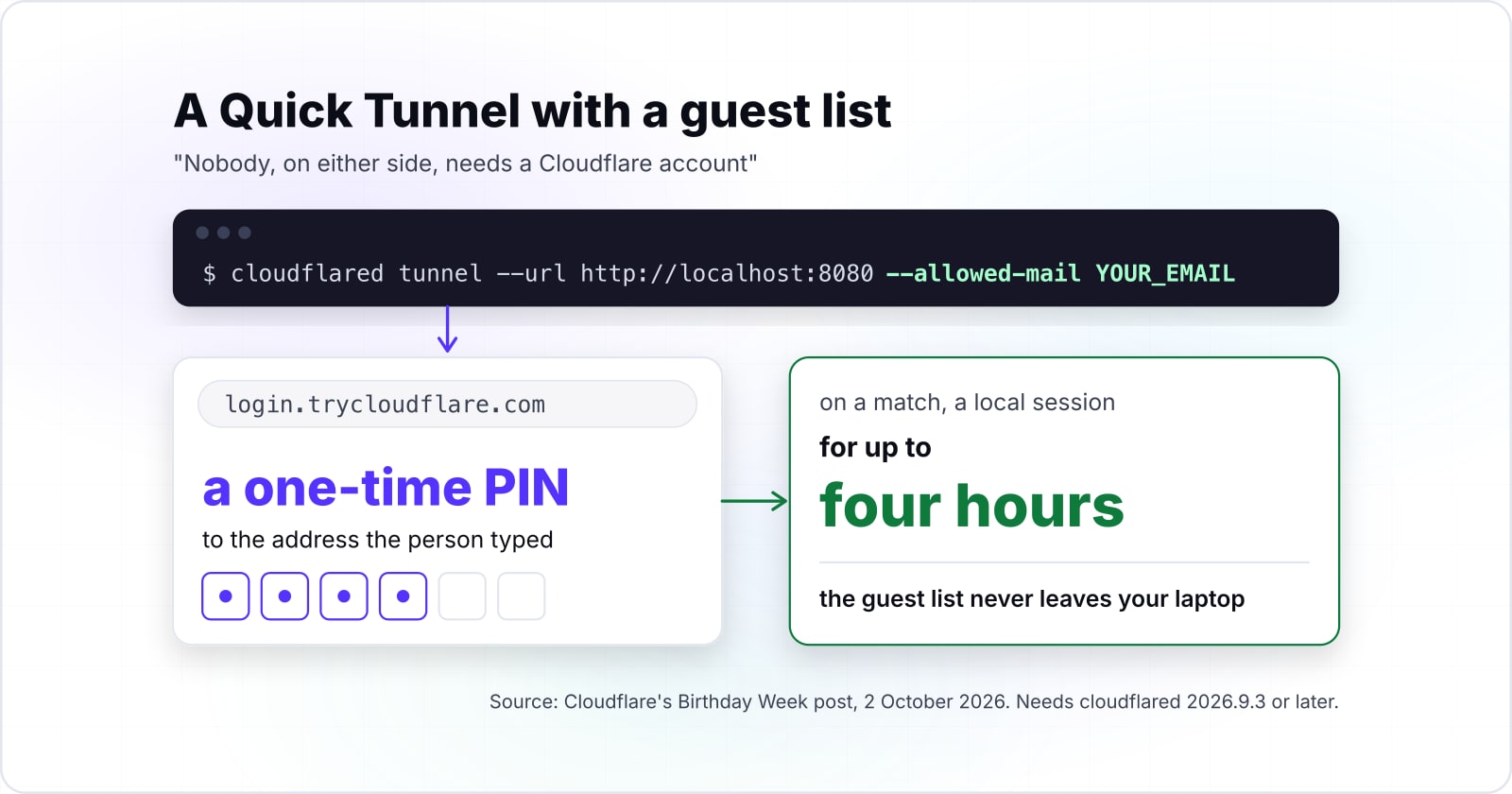
Cloudflare's changelog of 2 October 2026 added --allowed-mail, which makes anyone opening the link prove an email address with a one-time PIN before reaching your service. The changelog entry opens with the change in one line: "You can now restrict who can access a Quick Tunnel".
A one-time PIN is a short code that Cloudflare emails to the address the person typed. Cloudflare's Birthday Week post says the flag works "Starting with cloudflared 2026.9.3". And GitHub's release page for cloudflared shows that version published on 24 September 2026. So check your version before you rely on the flag.
# the flag needs cloudflared 2026.9.3 or later
cloudflared --version

# one address (replace YOUR_EMAIL with a real address)
cloudflared tunnel --url http://localhost:8080 --allowed-mail YOUR_EMAIL

# several addresses: repeat the flag, or pass one quoted, comma-separated list
cloudflared tunnel --url http://localhost:8080 --allowed-mail 'YOUR_EMAIL,TEAMMATE_EMAIL'

# every address on a domain; the quotes stop the shell from expanding the *
cloudflared tunnel --url http://localhost:8080 --allowed-mail '*@YOUR_DOMAIN'
The Quick Tunnels page lists the same three forms, and it also warns you to "Enclose wildcard values in quotes to prevent shell expansion". If you leave the flag out, nothing changes. In the words of Cloudflare's post, "Public Quick Tunnels behave exactly as they always have".
What the change keeps is the part that made Quick Tunnels useful. Cloudflare's post puts it in one line: "Nobody, on either side, needs a Cloudflare account". So you still create no DNS record and write no config file. Also, if you build on Workers, the same post says the latest wrangler starts a protected tunnel too. The command is npx wrangler tunnel quick-start, with the same flag.
Where does the guest list live in a protected Quick Tunnel?#
Cloudflare Access only proves the person opening the link controls the email; cloudflared compares that address with your list on your machine, so the list stays there. Cloudflare Access is Cloudflare's sign-in service, the layer that checks who someone is before traffic reaches an app. But here it does the proving and nothing more.
Cloudflare's Birthday Week post of October 2026 splits the job in two. Authentication proves who a person is, while authorisation decides whether that person gets in. Access handles the first part, and then cloudflared handles the second, "on your machine by comparing the verified address with the rules you typed". According to Cloudflare's post, the first visit runs in four steps:
- cloudflared sees a request with no session and sends the browser to login.trycloudflare.com. It attaches a single-use state, valid for 10 minutes.
- Cloudflare Access emails a one-time PIN to the address the person typed, and checks it.
- A small broker on Cloudflare Workers turns that check into a short-lived signed assertion. The browser delivers it in a form POST.
- cloudflared verifies the assertion and checks the address against your rules. On a match, it creates a local session.
Cloudflare's post says later requests use that session "for up to four hours", or until you stop cloudflared. Meanwhile, the guest list itself never leaves your laptop, and in Cloudflare's words, "It doesn't learn who you invited". The same post adds that "A protected tunnel never falls back to public mode". And if the service cannot confirm the email mode, cloudflared refuses to start rather than print a public link.
The design also sets the edges of what it covers. Because sign-in happens in a browser, the Quick Tunnels page says it "does not support non-interactive clients". Because the list lives in the running process, changing it means a restart. So the page says to "stop cloudflared and start a new Quick Tunnel". Finally, the in-flight cap and the other limits on that page still apply to a protected tunnel.
When is a Quick Tunnel the wrong tool?#
A Quick Tunnel is the wrong tool for production traffic, Server-Sent Events, API clients that cannot open a browser, or any URL someone must bookmark. For each of those there is a better tool, and Cloudflare names most of them itself.
- Production traffic. Use a Cloudflare named tunnel. The Quick Tunnels page says so directly: "For stable hostnames and production traffic, create a Cloudflare Tunnel".
- A link people must keep. Use a named tunnel here too, since its hostname survives restarts.
- Streams over SSE. Cloudflare documents the SSE gap for Quick Tunnels. So test the stream on a named tunnel before anyone relies on it.
- Callers that cannot open a browser. Email sign-in needs an interactive browser, so an API client cannot pass a protected Quick Tunnel. For a short test, run that one tunnel without the flag. For anything longer, put a named tunnel behind an Access application.
- Your own devices, with no public link at all. Cloudflare's Birthday Week post points to Cloudflare Mesh here, "To reach an agent at home from your own devices without any public URL". A public tunnel is more exposure than that job needs.
| Case | Use instead |
|---|---|
| Production traffic | A Cloudflare named tunnel |
| A link people must keep | A named tunnel, whose hostname survives restarts |
| Streams over SSE | Test the stream on a named tunnel |
| Callers that cannot open a browser | No flag for a short test; a named tunnel behind an Access application for anything longer |
| Your own devices, with no public link | Cloudflare Mesh |
Cloudflare's post draws one more line: for "richer rules, such as identity provider groups", it says to "use Cloudflare Tunnel with Cloudflare Access". In other words, a team's guest list belongs in a policy, not in a flag.
Which Cloudflare pages do you build a named tunnel from?#
Three Cloudflare pages cover the build in order: create a locally-managed tunnel, write its configuration file, then publish it behind an Access self-hosted application. A locally-managed tunnel keeps its settings in a file on your machine, not in the dashboard. Before you start, the first guide asks for a domain added to Cloudflare, with its nameservers pointed at Cloudflare.
- Create a locally-managed tunnel, updated 25 August 2026. Take the commands from it:
login,create,route dnsandrun. Also note the tunnel UUID thatcreateprints. - Configuration file, updated 1 September 2026. Take the
config.ymlshape from it: the ingress rules, the catch-all rule, and the command that checks them. - Publish a self-hosted application, updated 17 April 2026. Take the Access application from it: the public hostname and the Allow policy that decides who gets in.
Also keep the account limits page open beside them, since it sets how far one account can grow.
Create a locally-managed tunnel, updated 25 August 2026
The commands: login, create, route dns and run, and the tunnel UUID that create prints.
Configuration file, updated 1 September 2026
The config.yml shape: the ingress rules, the catch-all rule, and the command that checks them.
Publish a self-hosted application, updated 17 April 2026
The Access application: the public hostname and the Allow policy that decides who gets in.
What is the Cloudflare Quick Tunnels cloudflared Zero Trust upgrade path?#
A named tunnel takes cloudflared tunnel login, create, route dns and run, plus a config.yml whose ingress rules end in a catch-all rule. An ingress rule maps one hostname to one local service. The catch-all rule comes last, with no hostname, and it answers anything the rules above it missed.
Cloudflare's configuration file page, updated 1 September 2026, makes the catch-all compulsory, since files with ingress rules "must always include a catch-all rule". So write ~/.cloudflared/config.yml like this, with the UUID that cloudflared tunnel create printed and a hostname on your own domain.
tunnel: <Tunnel-UUID>
credentials-file: /root/.cloudflared/<Tunnel-UUID>.json

ingress:
  - hostname: preview.example.com
    service: http://localhost:8080
  - service: http_status:404
Then run the five steps from the locally-managed tunnel guide, in this order:
# 1. log in; this opens a browser and saves cert.pem in ~/.cloudflared
cloudflared tunnel login

# 2. create the tunnel; note the UUID and the credentials file it prints
cloudflared tunnel create preview

# 3. with config.yml written, check the ingress rules
cloudflared tunnel ingress validate

# 4. point a hostname you own at the tunnel (this creates a CNAME record)
cloudflared tunnel route dns preview preview.example.com

# 5. start the tunnel
cloudflared tunnel run preview
The guide says step 4 creates "a CNAME record pointing to <UUID>.cfargotunnel.com", which is the stable address a Quick Tunnel never has. Also, cloudflared tunnel ingress rule followed by a URL shows which rule that URL matches. That is the quickest check when a request lands on the 404.
The named side is sized in tunnels and replicas, not requests in flight. Cloudflare One's account limits page, updated 4 September 2026, allows 1,000 cloudflared tunnels per account and 25 active cloudflared replicas per tunnel.
| Item | count per account or per tunnel |
|---|---|
| cloudflared tunnels per account | 1000 |
| routes per account (CIDR plus hostname) | 1000 |
| virtual networks per account | 1000 |
| active cloudflared replicas per tunnel | 25 |
A replica is a second cloudflared process running the same tunnel, often on another machine. So one host going down does not take the hostname with it. The in-flight cap is documented for Quick Tunnels, while the account limits page prints no in-flight cap for named tunnels.
How does an Access application replace --allowed-mail on a named tunnel?#
On a named tunnel, a self-hosted Access application holds the policy in your Zero Trust account, and every Access application denies everyone until an Allow policy matches. Cloudflare's guide to a self-hosted application, updated 17 April 2026, states it plainly: "All Access applications are deny by default".
Zero Trust is the part of the Cloudflare dashboard where Access lives. And an Access application is the record that ties a hostname to the rules for reaching it. The guide's steps are short. First, in the dashboard, go to Zero Trust, then Access controls, then Applications, and create a new application. Then choose Self-hosted and private, and add the public hostname your tunnel serves. Finally, attach a policy that allows the people you want.
The policy does what --allowed-mail did, with three differences. First, it lives in your account, not in a running process. Because Access checks people before traffic reaches cloudflared, you can edit the policy without restarting the tunnel. Second, it can use an identity provider, which is what Cloudflare's post means by "identity provider groups". Third, it survives restarts, since the hostname and the policy both outlast any one cloudflared process.
An account has room for that to grow. Cloudflare One's account limits page, updated 4 September 2026, allows 500 Access applications per account and 1,000 email addresses per rule.
| Item | count per account or per application |
|---|---|
| Access applications per account | 500 |
| reusable policies per account | 500 |
| rules per application | 1000 |
| email addresses per rule | 1000 |
| domains per application | 50 |
Where to go from here#
Start with the one command, add --allowed-mail when the link should not be public, and move to a named tunnel behind Access when the traffic is real. Each rung removes one documented limit, so pick the lowest rung the traffic allows.
If the service might run on Cloudflare's network instead, what belongs at the edge works through that choice. When a preview should become a deployed app, React rendering on Cloudflare covers the next step. And for agent builds, the source of many of these previews, Cloudflare AI workflows shows how they fit together. For a cluster console worth reaching this way, Rancher on DigitalOcean Kubernetes with Helm and TLS sets one up.
For help with tunnels, Access policies or the wider platform, there is Cloudflare development. Also, the security and compliance work covers the access side. Even so, Cloudflare's three pages above are enough on their own to build every rung in this guide.