Cloudflare Workflows for AI: four ways a multi-step job fails, and what each fix costs
A call that times out, a call that runs twice, a wait that outlives the process, and state that lived in memory. Each has a construct, each construct has a published limit, and the limits are arithmetic you can check.
What does Cloudflare Workflows for AI actually give you?#
Cloudflare Workflows for AI gives a job made of several calls a place to fail safely. Cloudflare's Workflows overview, updated 2 June 2026, describes the product as a way to "chain together multiple steps, automatically retry failed tasks" and "persist state for minutes, hours, or even weeks". Each step is a function. The engine stores its return value when it completes. If the instance crashes afterwards, it resumes from the last completed step rather than from the start.
For an AI job, the unit is easy to place. Cloudflare's durable agent guide, updated 25 August 2026, puts it in one line: each LLM call and tool call becomes a step. Therefore a five-turn agent loop with two tool calls per turn is fifteen steps. The engine can retry any one of them without repeating the other fourteen.
What changed in Cloudflare Workflows in 2026?#
Four facts about Cloudflare Workflows changed between April and September 2026. First, the scale limits changed with the V2 control plane Cloudflare announced on 15 April 2026. Second, per-step billing began. Third, the default retention window for new Paid Workflows shrank. Finally, retries gained delay functions and steps gained rollback handlers.
| Limit | Before V2 | After V2 |
|---|---|---|
| Concurrent instances per account | 4,500 | 50,000 |
| Instance creations per second per account | 100 | 300 |
| Queued instances per workflow | 1,000,000 | 2,000,000 |
The billing change matters more than the scale change for an AI job. Cloudflare's Workflows changelog entry of 7 July 2026 defines a step as "each unit of work executed by a Workflow, including step operations such as sleeping or waiting for events". The same entry states that step and storage billing would start no earlier than 10 August 2026. In short, a sleep is free of CPU time but no longer free of accounting.
The retention change is the one most likely to surprise you. Per the changelog entry of 10 September 2026, Workflows created on or after that date on the Workers Paid plan keep completed and errored instance state for seven days by default. Previously the default was 30 days. The maximum stays at 30 days, and existing Workflows are unchanged.
Which of the four failures does your multi-step AI job have?#
Every multi-step AI job fails in one of four shapes. Each shape has exactly one construct that answers it. Naming the shape first stops you configuring all four fixes for a job that has one problem.
The first shape is a call that times out. A model call or a tool call takes longer than the caller was willing to wait, so the whole job dies with it. The second shape is a call that succeeds twice. The call landed, the acknowledgement was lost, and a retry sends the email or charges the card again. Next, the third shape is a wait that outlives the process. A human approval or a slow batch takes hours, and nothing in a request-scoped runtime lives that long. The fourth shape is state that lived in memory. A variable held the plan, the process was recycled, and the plan is gone.
Cloudflare's rules of Workflows page, updated 10 September 2026, names two of these plainly. It says that "Workflows may hibernate and lose all in-memory state." It also says that "Because a step might be retried multiple times, your steps should (ideally) be idempotent." The other two shapes are answered by the retry configuration and by step.sleep and step.waitForEvent. The next sections cover them in order.
Why must a step be safe to run twice?#
The engine persists a step's return value, so a crash after it completes never re-runs it. However, the engine may retry a step that did not complete after its side effect already landed. So every step that writes anywhere must check for its own prior write first. Those two facts together are the whole contract.
The durable agent guide describes the first fact directly. After the LLM step, "The response is persisted. On resume, it skips the LLM call and moves to tool execution." In practice, that is why the guide separates the model call and each tool call into their own steps. A cheap failure later never repeats the expensive call.
The second fact is on you. For example, a step that sends a confirmation should first look up whether one was already sent for this instance id. If it was, return the stored result. A step that meets a terminal error, such as an authentication failure, should throw NonRetryableError. Then the instance fails at once rather than retrying five times. Since 5 June 2026, a step can also register a rollback handler. On failure, Cloudflare runs registered handlers in reverse step-start order, which is where compensation such as releasing a reservation belongs.
const confirmation = await step.do(
  'send confirmation',
  { retries: { limit: 3, delay: '10 seconds', backoff: 'exponential' }, timeout: '2 minutes' },
  async () => {
    const key = `${event.instanceId}:send-confirmation`;
    const sent = await this.env.DB.prepare('SELECT message_id FROM sent WHERE key = ?').bind(key).first();
    if (sent) return sent.message_id;               // already landed on an earlier attempt
    const res = await this.env.MAIL.send(message);
    if (res.status === 401) throw new NonRetryableError('mail credentials rejected');
    await this.env.DB.prepare('INSERT INTO sent (key, message_id) VALUES (?, ?) ON CONFLICT DO NOTHING')
      .bind(key, res.id).run();
    return res.id;
  },
);
One cap bounds what a step may return. The limits page, updated 15 June 2026, sets the maximum non-stream step result at 1 MiB. Therefore a step that produces a large document writes it to R2 and returns the key, never the body.
How long can one step legally take under the defaults?#
Under the defaults, one step can wait 310 seconds in retry delays alone. It can occupy about 65 minutes of wall clock if every attempt runs to its timeout. Cloudflare's sleeping and retrying page, updated 9 July 2026, gives the default configuration: a retry limit of 5, a delay of 10,000 milliseconds, exponential backoff, and a timeout of 10 minutes. The page also states that the timeout is set per attempt.
Show data table
| Dimension | Exponential backoff (the default) | Linear backoff | Constant backoff |
|---|---|---|---|
| Before attempt 2 | 10 s | 10 s | 10 s |
| Before attempt 3 | 30 s | 30 s | 20 s |
| Before attempt 4 | 70 s | 60 s | 30 s |
| Before attempt 5 | 150 s | 100 s | 40 s |
| Before attempt 6 | 310 s | 150 s | 50 s |
The default exponential schedule reaches 310 seconds of pure delay by the sixth attempt, more than twice the linear schedule and six times the constant one.
The arithmetic reads the limit as retries after a first attempt, which gives six attempts. Six attempts at a 10-minute timeout each is 3,600 seconds. Add 310 seconds of delay and the worst case is 3,910 seconds. The same documentation also describes the limit as the total number of attempts. On that reading the worst case is five attempts and 3,150 seconds. Either way, the defaults are a ceiling to set on purpose rather than accept. Although the retry cap per step is 10,000, a model call that has failed three times in a row rarely succeeds on the fourth.
Since 9 July 2026, the delay can be a function instead of a fixed duration. The function receives the failed attempt and the error, and returns the next delay. Consequently a rate-limit error can wait for the provider's Retry-After value, while a short network failure retries in seconds.
How many times does one model call get retried?#
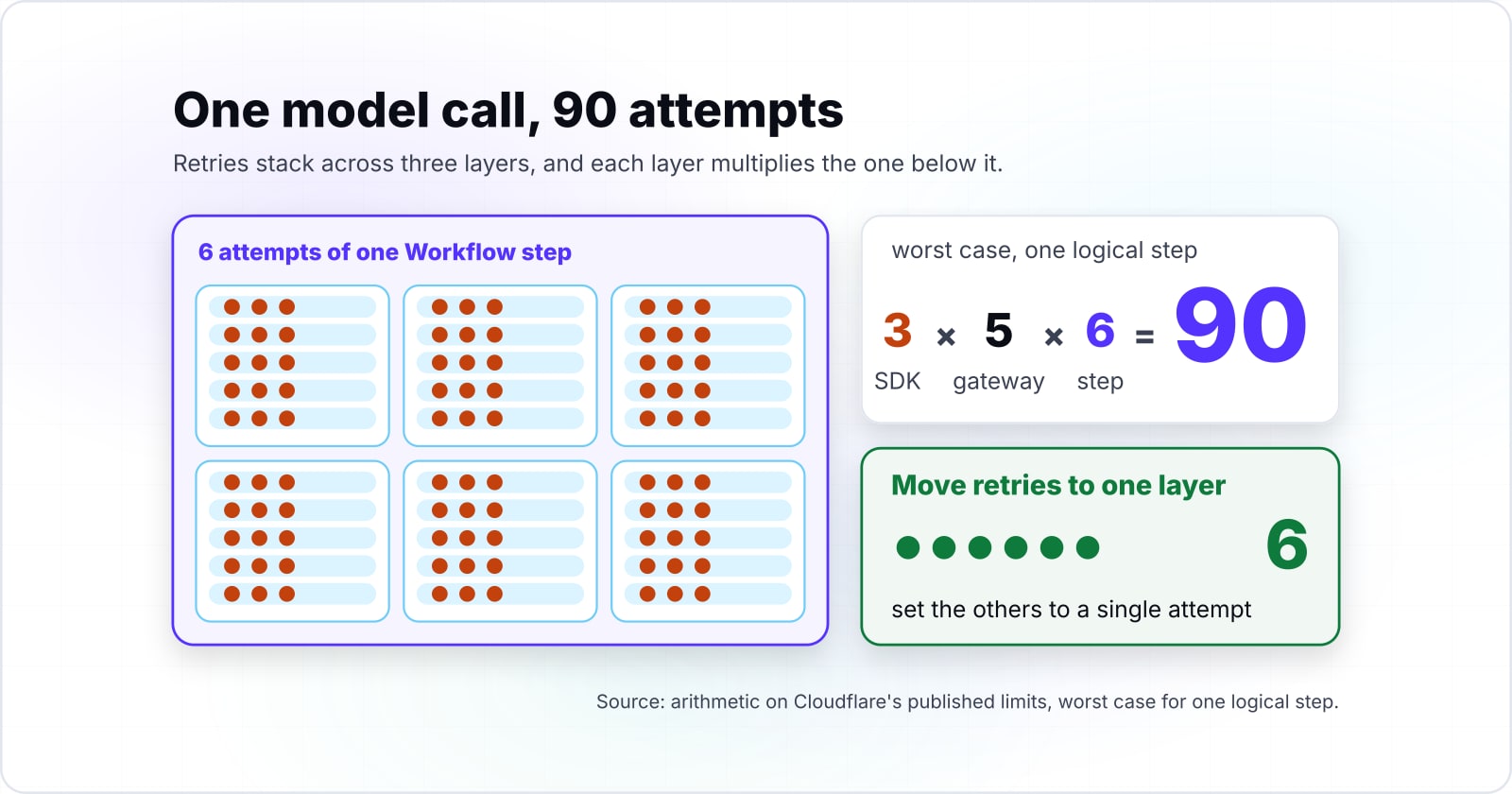
Three retry layers can issue one model call 108 times in the worst case for one logical step. Retries stack across three layers, and each layer multiplies the one below it. The fix is to choose one layer for retries and set the others to a single attempt.
The three layers are the vendor SDK, AI Gateway, and the Workflow step. Most vendor SDKs retry on their own; a setting of two retries means three attempts. Cloudflare's AI Gateway request handling page, updated 14 September 2026, says the gateway "supports automatic retries for failed requests, with a maximum of five retry attempts". The delay between them is at most 60 seconds. It adds that "On the final retry attempt, your gateway will wait until the request completes, regardless of how long it takes." Then the Workflow step retries the whole gateway call up to its own limit, five by default.
Worst-case provider calls for one logical call
6 x 6 x 3 = 108Step timeout minus gateway window
+300 sThe step outlives the gateway window
108 callsThe step timeout (600 s) outlives the gateway window (300 s), so the gateway finishes its own retries before the step decides anything. The step's 6 attempts then cover the case where the gateway gives up.
| step attempts | 6 (the default limit of 5 plus the first try) |
|---|---|
| gateway tries per attempt | 6 (the first request plus the documented maximum of 5 retries) |
| SDK tries per gateway call | 3 (2 retries plus the first try) |
| worst-case calls | 6 x 6 x 3 = 108 |
| step timeout per attempt | 600 s (the default) |
| gateway retry window | 300 s (5 delays at the 60 s maximum) |
| margin | +300 s, the step outlives the gateway window |
Instead of three layers, use one. Put the retry at the layer that understands the failure. For instance, the gateway understands a rate limit. The gateway can also fall back to a second model, since by default Cloudflare triggers the fallback if a model request returns an error. The Workflow understands a whole-step failure, such as a tool that depends on the model's output. Whichever layer you choose, set the other two to a single attempt. Let the chosen one own the backoff.
Why do sleep and wait cost nothing while idle?#
A step.sleep or a step.waitForEvent persists the instance and releases the compute. As a result, a wait of hours or days holds no Worker, costs no CPU time, and does not count against the concurrency limit. That is the answer to the third failure shape. It is why a human approval or a slow batch belongs in a wait rather than a polling loop.
Cloudflare's Workflows pricing page, updated 21 July 2026, states that a Workflow "paused as a result of calling step.sleep, or otherwise idle, does not incur CPU time". The limits page adds that instances that are sleeping, waiting for a retry, or waiting for an event do not count towards concurrency limits. A single sleep may last up to 365 days. Meanwhile, the same page caps an event payload at 1 MiB, the same as a step result.
Two things still count. Since 10 August 2026, the sleep or the wait is itself a billed step. Also, the wait does not preserve the memory of the instance. Anything the job needs afterwards must already be the return value of an earlier step.
Where does state live, and how long does the record survive?#
Any value the job needs later must be the return of a step, because the runtime hibernates an idle instance and discards its memory. That is the fourth failure shape and its fix in one sentence. The second half of the question is how long the completed record survives, and the answer changed this month.
Show data table
| Item | Retention of completed instance state |
|---|---|
| Workers Free, default and maximum | 3 days |
| Workers Paid, default for Workflows created before 10 September 2026 | 30 days |
| Workers Paid, default for Workflows created on or after 10 September 2026 | 7 days |
| Workers Paid, maximum | 30 days |
A Paid Workflow created today keeps its record for 7 days unless you set retention up to the 30 day maximum yourself.
In particular, a seven-day default means an audit trail longer than a week lives in your own storage. Write the final result and the decisions behind it to D1 or R2 as the last step. Treat the instance record as a debugging aid rather than the system of record. The limits page also caps persisted state per instance at 100 MB on Free and 1 GB on Paid. A long agent transcript can reach that faster than expected.
How fast does an agent loop spend its step budget?#
An agent loop spends one step per model call, one per tool call, and one per sleep or wait. At three tools per turn, it reaches the Free plan cap of 1,024 steps at turn 256. It reaches the Paid plan default of 10,000 at turn 2,500. Every one of those steps has been a billed unit since 10 August 2026.
Show data table
| Item | Turn at which the cap is reached |
|---|---|
| Free cap (1,024 steps) | 256 turns |
| Paid default (10,000 steps) | 2,500 turns |
| Paid maximum (25,000 steps) | 6,250 turns |
On the Free plan a three-tool agent loop runs out of steps at turn 256; on Paid the default cap lasts almost ten times longer, and the configurable maximum lasts 25 times longer.
The caps come from the limits page: 1,024 steps per Workflow on Free, and 10,000 by default on Paid, configurable up to 25,000. The quota comes from the pricing page: 3,000 steps per day on Free, and 500,000 included per month on Paid before Cloudflare's per-step charge applies. Those are Cloudflare's published terms, not ours, and they change. The links above reach the current line.
Which other limits bite an AI loop?#
| Limit | Workers Free | Workers Paid |
|---|---|---|
| Compute time per step | 10 ms | 30 s default, 5 min configurable |
| Steps per Workflow | 1,024 | 10,000 default, 25,000 configurable |
| Concurrent instances per account | 100 | 50,000 |
| Instance creation rate | 100 per second | 300 per second per account, 100 per workflow |
| Queued instances | 100,000 | 2,000,000 |
| Completed-instance retention | 3 days | 30 days maximum; 7 days default for Workflows created on or after 10 September 2026 |
| Persisted state per instance | 100 MB | 1 GB |
| Retries per step | 10,000 | 10,000 |
Compute time per step is 30 seconds of active CPU by default on Paid, configurable to five minutes, and 10 milliseconds on Free. Because a model call is network wait rather than CPU, that budget is rarely the problem. Parsing a large response inside the step is. The rules page warns not to do too much CPU-intensive work inside a single step, because on failure it will start over from the beginning of that step.
When is a Workflow the wrong tool?#
A Workflow is the wrong fit for three common AI jobs, and forcing them into steps buys retries you do not want. The honest answer is often another Cloudflare product, or no orchestration at all.
The first is a stream of independent messages, such as classifying every inbound email. Each message needs delivery, not a shared history. Cloudflare Queues, per its overview updated 21 April 2026, exists to guarantee delivery. A Queue consumer that calls a model is simpler than a Workflow per message. The second is a live session that needs a socket and its own storage, such as a chat that streams tokens to a browser. A Durable Object, which Cloudflare describes as uniquely combining compute with storage, fits that shape. So does an Agent from the Agents SDK, with its durable identity, local SQL storage and real-time connections. The Agents SDK can spawn a Workflow for the long-running part and receive progress back. That is the pairing Cloudflare's durable agent guide builds.
The third is a single call that either works or does not. A summarisation endpoint that makes one model call needs a Worker and a gateway fallback, not a step. The only durable thing about it is the retry, and the gateway already provides one. Still, the moment that single call grows a second dependent call, the four failure shapes return and a Workflow is the fix.
Related reading on this site: the post on counting sequential round trips between edge and origin decides where a multi-step job should live before you decide how it should retry. The post on rendering a React app on Cloudflare covers the request-scoped side of the same runtime. To show an agent's build before it is deployed, the guide to sharing a local service through a Cloudflare Quick Tunnel covers the one cloudflared command and its documented limits. Off Cloudflare, the post on what the Google AX agent runtime keeps for a task and restores on resume answers the same question of surviving a failed step for the runtime Google open-sourced.
What should you do first?#
Name the failure shape of the job you already have. Then move retries to one layer, set that step's limit and timeout on purpose, and put the one write that must not happen twice behind an idempotency check. Do that before adding any other step.
In the end, most of the value is in the first step you make durable, not the tenth. Once the model call is a step with a deliberate retry and the write is safe to repeat, the sleeps and waits follow naturally. If you would rather design and build this with a team that already runs on Workers, Atyantik's Cloudflare development work covers Workers, Workflows and the storage around them. The AI-augmented development page describes how a model-in-the-loop delivery runs here. Neither is required to use anything above. The documentation linked throughout is enough on its own.