Cloud POS system guide: offline payments, PCI scope and what to check before switching
Every till vendor now sells the cloud, so the label settles nothing. What settles a switch is in the small print: what happens when the internet drops, who sees the card numbers, and who keeps your sales history.
What is a cloud POS system?#
A cloud POS system is point-of-sale software whose data and logic live on the vendor's servers, so sales, stock and reports update on every connected till and device. In effect, the till becomes a screen on a service rather than a computer in the back office.
The US Chamber of Commerce's CO guide to cloud-based POS systems, read in October 2026, puts it in plain words. In its definition, a cloud POS "stores data remotely instead of on the retailer's or restaurant's local server". As a result, you can read a report from home, add a store without a new server, and take software updates without a site visit.
However, the label leaves out three things you will meet later. First, the till still has to sell when the internet drops. Second, card numbers pass through some device, and that device sets your PCI DSS paperwork. Third, your sales history sits on someone else's servers, so getting it back out is a contract question. Next come those three in order, with the vendors' own documents as the evidence.
How is cloud-native POS different from cloud-hosted POS?#
Cloud-hosted POS is older till software moved onto rented servers, while cloud-native POS was built as online services from the start, which changes how updates ship and outages behave. Because both get sold as "cloud", ask which one you are buying.
accesso, which sells a cloud POS for venues, draws the line in its guide cloud-native vs cloud-based POS, read in October 2026. In its words, a cloud-based POS "may have started life as a legacy, server-based product". Such a product has then "been migrated to run on hosted infrastructure". By contrast, a cloud-native POS is "built from the ground up for the cloud". accesso lists what it sees as the native traits. They are microservices (many small services instead of one big program), an API-first design (an API is the interface other software calls), and continuous updates.
Treat that as one vendor's framing, because the useful test is simpler. Ask what the till does when it cannot reach the servers. For example, Stripe's Terminal documentation, read in October 2026, says its software can "store payments locally on your POS device or smart reader" and forward them later. In practice, that local store-and-forward behaviour matters more on a Saturday than any word on the brochure.
So the question for a vendor is not "are you cloud-native?" Instead, ask how often releases ship, whether a release can break a lane mid-shift, and what keeps working offline.
Which retail POS companies offer cloud-based deployments?#
Most current retail POS vendors sell a cloud deployment, from app-based systems such as Square, Shopify POS and Lightspeed Retail to payment platforms such as Stripe Terminal that retailers build on. The choice is between categories, not between cloud and not cloud.
The four examples below are listed alphabetically, with the same fields for each, and they are not a ranking. Also, many other vendors sell cloud POS; the US Chamber's CO guide, read in October 2026, names Clover and Toast, for example.
| Vendor and product | Category | Offline card payments in its own docs | Source, read October 2026 |
|---|---|---|---|
| Lightspeed Retail (X-Series) | Packaged POS app with its own payments | In beta, on the Smart Terminal (WisePOS E) only, set up in advance | Lightspeed support centre |
| Shopify POS | Packaged POS app tied to the online store | Optional; you set a device daily limit and a transaction limit | Shopify help centre |
| Square Retail POS | Packaged POS app with its own payments | On by default from April 2026 unless you opt out | Square support centre |
| Stripe Terminal | Payment platform you build a POS app on | Store and forward in the software kit, with a per-payment maximum | Stripe documentation |
Source: each vendor's support or documentation page, linked where it is cited, read in October 2026.
Because the categories differ, so do the trade-offs. A packaged app gives you a working till on day one. It comes with the vendor's payments, reports and app store. A build-on platform such as Stripe Terminal gives you card terminals and a software kit. After that, someone writes the till itself. Then that second route makes sense only when the packaged apps cannot run your process, which a later section covers.
What happens to card payments when the store internet drops?#
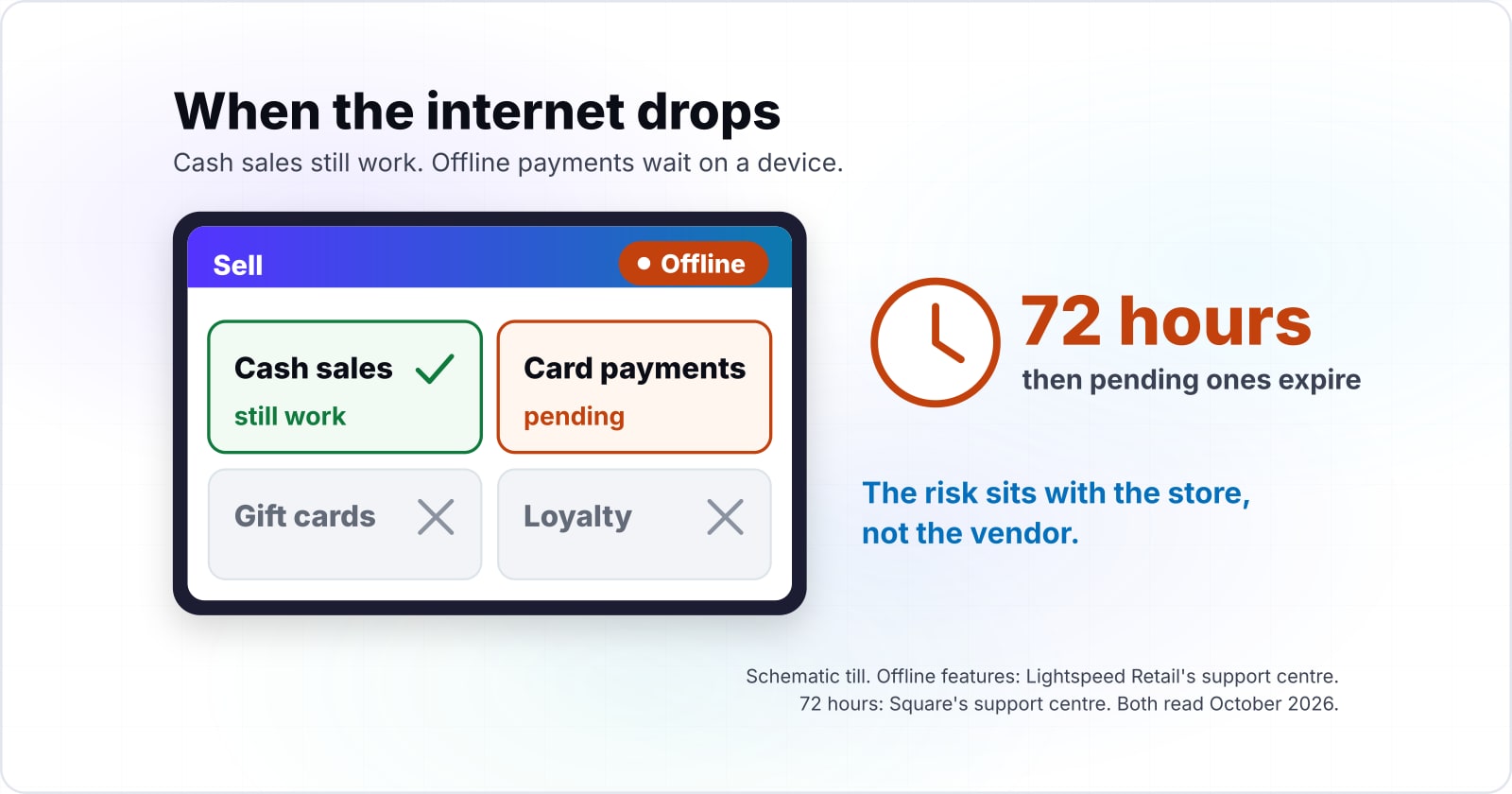
Cloud POS systems store offline card payments on the device unauthorised, and Square's support centre, read October 2026, says pending ones expire after 72 hours. Until then, the card's bank has not been asked whether the money is there.
Square's page on offline payments, read in October 2026, sets the clock in three steps. Some card terminals, such as its 2nd-generation contactless and chip device, can take offline payments for 24 hours per session. On the same October 2026 page, Square also recommends uploading within 24 hours "to reduce your risk of chargebacks or card declines". Then comes the hard stop: "Pending offline payments will expire after 72 hours" if you do not reconnect. After that, Square says they "cannot be retrieved or reprocessed".
Show data table
| Item | Value |
|---|---|
| Time to take offline payments in one session | 24 hours |
| Recommended upload window | 24 hours |
| Hard expiry for pending offline payments | 72 hours |
A pending offline payment that does not upload within 72 hours expires and cannot be retrieved.
The risk sits with the store, not the vendor. In Square's words, "You're responsible for any expired, declined, or disputed payments accepted while taking offline payments". Stripe's guide to collecting card payments offline, read in October 2026, puts it the same way. There, "authorization is only attempted after connectivity is restored". If you want the online half of that process, the post on payment intents and cart updates shows how a normal authorisation works.
Also, read the default. Square says that "In April 2026, offline payments will be automatically enabled on all your devices" unless you act. So a store that never chose offline mode may be running it today.
How much card revenue can one offline day leave unauthorised?#
In a worked example with 12 devices, the example limit of 5,000 USD per device per day in Shopify's help centre, read October 2026, lets one offline day collect 60,000 USD unauthorised. That number is a ceiling, and you set it yourself.
Shopify's page on accepting card payments offline, read in October 2026, asks for two limits when you switch offline payments on. The device daily limit caps "the maximum total of all offline card payments on a single device". Meanwhile, the transaction limit caps one order, and Shopify's October 2026 example for it is 100 USD. Shopify also notes that with several stores, "offline payment settings and transaction limits apply to all locations".
Now take an illustrative retailer with three stores and four POS devices in each, so 12 devices. With Shopify's October 2026 example device daily limit of 5,000 USD, one store's four devices can hold 20,000 USD of unauthorised payments. Across all 12 devices, Shopify's example limit becomes 60,000 USD in one offline day. In short, exposure is device count times the device daily limit.
Show data table
| Item | Value |
|---|---|
| 1 device | 5,000 USD |
| 2 devices | 10,000 USD |
| 4 devices, one store | 20,000 USD |
| 12 devices, three stores | 60,000 USD |
Exposure is device count times the device daily limit, so 12 devices at 5,000 USD hold 60,000 USD unauthorised.
Your worst offline day
Put in the number of POS devices across all your stores and the device daily limit you set; it multiplies the two, which is the most card revenue that can sit unauthorised after one offline day.
Most card revenue unauthorised after one offline day (USD)
60,000
A ceiling set by your own limit, not a forecast of what an outage will cost.
The better move is to set the limit from your own sales. Say, as an illustrative assumption, each device takes about 3,000 USD on a busy day. Then a limit near that illustrative figure keeps the till selling, and 12 devices cap out at 36,000 USD in this example.
One large ticket needs a second plan either way. Stripe's offline guide, read in October 2026, sets a "Stripe-enforced offline maximum of 10,000 USD" for a single payment.
Where does PCI DSS scope sit when card data never touches your systems?#
If a validated P2PE terminal encrypts card data so your own computers never see it, the PCI Security Standards Council's SAQ P2PE replaces the catch-all SAQ D. In the Council's SAQ texts of April 2022, that one design choice sets how much of PCI DSS you self-assess.
PCI DSS covers "Entities that store, process, or transmit cardholder data", according to the PCI Security Standards Council's PCI DSS page, read in October 2026. P2PE means point-to-point encryption. In the Council's P2PE overview, read the same month, card data "is unreadable until it reaches the secure decryption environment".
Tokenisation is the second half of keeping data out. After the processor authorises a card, your systems keep a stand-in reference, called a token, rather than the card number. As a result, your order history and refunds can point at a payment without ever holding the number itself.
The two questionnaires, side by side, from the Council's own text:
| Question | SAQ P2PE | SAQ D for Merchants |
|---|---|---|
| Who it is for | Merchants that process account data only through a validated, PCI-listed P2PE solution | Merchants eligible for an SAQ that "do not meet the criteria for any other SAQ type" |
| Card data on your computers | None: they "do not have access to clear-text account data on any computer system" | Allowed, including electronic storage of cardholder data |
| Where card data is entered | Only into payment terminals from the listed P2PE solution | Any channel, including a website that accepts card data |
| Your extra duty | Apply every control in the P2PE Instruction Manual (PIM) from the solution provider | The full set of PCI DSS requirements in the questionnaire |
| Channels it excludes | E-commerce channels and service providers | Service providers |
Source: PCI Security Standards Council, SAQ P2PE and SAQ D for Merchants, version 4.0 text dated April 2022, read October 2026.
Those SAQ texts are the April 2022 version 4.0 editions. The Council's bulletin of 15 October 2024 published the v4.0.1 SAQs. It lists eligibility changes only for SAQ A, A-EP and C-VT. It also says the v4.0 SAQs "will remain active until PCI DSS v4.0 is retired on 31 December 2024". So file the v4.0.1 editions from the Council's document library.
Before you count on SAQ P2PE, check with the bank or payment brand that receives your SAQ. In its 15 October 2024 bulletin, the Council encourages every merchant to confirm eligibility with that entity first. Also, offline payments wait on a device, so ask your vendor where they are stored and encrypted. This is general guidance, not legal or compliance advice. If you want help, a security and compliance review can map your own scope.
What should you check before switching to a cloud POS?#
Before switching, get five answers in writing: the offline limits, whether the processor is bundled, who owns exported data, which integrations are native, and where PCI scope sits. Each one costs little to ask before a cloud POS system goes live, and a lot to discover after.
Offline limits.
Ask for the session window, the upload deadline, and the device and transaction caps. Shopify's caps apply to every location, so one setting covers the whole chain.
Processor lock-in.
Ask whether you can use your own card processor. Lightspeed's page on offline mode for Lightspeed Payments, read in October 2026, says its limits are "pre-filled with the maximum permitted limits" and cannot be raised.
Data ownership.
Ask which records you can export, in what format, and for how long after you leave.
Integration scope.
Ask which links to your online store, stock and loyalty systems are native. Then ask which of them work offline. If RFID tags drive your stock counts, see the five builds behind RFID in inventory software.
PCI scope.
Ask whether the terminals belong to a PCI-listed P2PE solution, and which SAQ the vendor expects you to file.
Source for check 2: Lightspeed's page on offline mode for Lightspeed Payments, read in October 2026.
Link for check 4: the five builds behind RFID in inventory software.
When the answers come back, check how offline payments reach your books. For example, Lightspeed says offline payments "are not linked to a sales record", so someone has to match them by hand. Also, JumpMind, which sells retail POS software, advises getting the PCI "shared responsibility split in writing" before you sign.
Which integrations stop working first when a cloud POS goes offline?#
Gift cards, loyalty, customer edits and inventory lookups stop first offline, according to Lightspeed Retail's support centre, read October 2026, while cash sales still work. In its words, offline "You can't edit existing customers, redeem/sell gift cards, redeem Loyalty, or view product inventory information".
Lightspeed's page on selling in offline mode adds a harder line about cards in 2026. It says, "You won't be able to process normal integrated payments while your Internet is down". The exception is the Smart Terminal option, if it was set up in advance. Meanwhile, cash sales, new customers and new products still work on the Sell page.
Square's list, read the same month, is similar. Its offline page says Square Gift Cards, Tap to Pay on iPhone and Android, and manually entered cards do not work offline. In addition, Square says you will need to "manually link and accrue customer points" from offline payments after you reconnect.
So rank your integrations by one test: does this have to work during an outage? A loyalty lookup can wait an hour. By contrast, a stock count that feeds tonight's online orders cannot be wrong for a day. If shelf counts often drift, check whether an RFID tag pays back on each item before buying the tooling. Then that list becomes the scope for any API integration work between the POS and your other systems.
When is custom POS work not a fit?#
Custom POS work is not a fit when a packaged cloud POS already covers the store's flows and integrations; it earns its place only where a missing process drives revenue. Most stores should buy and configure.
First, if your checkout, returns and stock flows match what a cloud POS system such as Square, Shopify POS or Lightspeed already does, buy the app. You get the vendor's updates and its offline handling. Also, the app store covers common add-ons.
Second, if the gap is one missing link, such as a feed to an older ERP (enterprise resource planning) system, build only that link. Because a small integration has fewer parts, it ages far better than a whole new till.
Third, if your process is the product, a build-on platform fits. Stripe's Terminal overview, read in October 2026, lists the "Ability to run custom POS app" in its table of reader features. For instance, a store that sells by appointment and custom fitting may need a till shaped around that flow. Only then does custom software development earn its cost over a packaged app.
Where should you go from here?#
The next step depends on the gap your checklist found: payments, catalogue data, online storefront, or an integration nobody sells. None of these is urgent, and each has one good next read.
When payments are the open question, the guide to cart updates and payment intents explains authorisation and capture. For product data, build or buy a PIM covers who owns each field. And if the online store is next, headless vs traditional ecommerce compares the two shapes. If the gap sits on the shop floor, where computer vision in retail pays back covers shelf and checkout data.
For the links between systems, see API integrations. For card data scope, see security and compliance. Even so, the vendor pages and PCI documents linked above are enough on their own to run every check.