Android RFID reader SDK: one app, an adapter per vendor, dedupe by EPC
Handhelds from different vendors disagree on power units, sessions, re-reads and permissions. Let the app own those differences in one place, and a new device becomes a new adapter instead of a new app.
What does one app over every Android RFID reader SDK look like?#
Put every Android RFID reader SDK behind one small interface (connect, set power, set session, start, stop, a stream of tag reads) and let the app, not the SDK, deduplicate reads by EPC.
We built this for a software vendor that sells RFID inventory tracking to small multi-store retailers. The RFID stock tracking case study shows the whole build. Its summary of the choice fits in one line. "The app talks to one interface for re-reads and read range; a new device is a new adapter, not a new app".
In practice the interface has six parts: connect and disconnect, a power level the app understands, and a session and target setting. Then come start, stop and a listener that gets one EPC at a time. Everything else a vendor offers stays inside its adapter. The same shape holds for any UHF RFID reader SDK, because ultra-high frequency (UHF) handhelds read tags built to the same GS1 Gen2 standard.
Why build one app with an adapter per vendor instead of one app per reader?#
One Android app with an adapter per reader vendor SDK means a fix ships once, and a new reader becomes a new adapter rather than a new app to test and release.
The case study names the cost of the other route. With an app per reader vendor, "every fix and every store approval multiplies with each device supported". Since stores bought handhelds from different vendors, no retailer could be locked to one device. As a result, the platform had to support three vendor SDKs at once.
However, the adapter layer does not remove vendor quirks; instead, it moves them to one known place. The case study says so too. Each vendor SDK's quirks "still had to be handled inside its adapter". In short, a bug in the scan screen is fixed once. Also, a store rollout is one release, whatever device sits in the store.
| An app per reader vendor | One app, an adapter per vendor | |
|---|---|---|
| What a fix costs | Every fix and every store approval multiplies with each device supported | A fix ships once |
| What a new reader costs | A new app to test and release | A new adapter |
| A store rollout | Multiplies with each device supported | One release, whatever device sits in the store |
Why does one tag report again and again during a sweep?#
GS1's Gen2 standard (February 2026) lets a Session 1 flag reset after 500ms to 5 seconds, so a tag keeps re-reporting, while Sessions 2 and 3 hold it quiet for 2 seconds or more.
The 2026 standard is direct: "Interrogators shall support and Tags shall provide 4 sessions", named S0 to S3. In particular, each session has its own inventoried flag, A or B. A handheld that asks only for A tags reads a tag, flips it to B, and leaves it alone. Then the flag falls back to A, and the tag answers again.
How long that takes is the whole story. In GS1's Table 6-21 of Release 3.0.1 (February 2026), the S1 flag must persist between 500ms and 5 seconds. In the same table, S2, S3 and SL must persist for more than 2 seconds once the tag loses power. Meanwhile, a powered tag holds its S2 and S3 flags for as long as it stays in the field.
Show data table
| Item | Value |
|---|---|
| S1 maximum | 5 |
| S2 minimum | 2 |
| S3 minimum | 2 |
| SL minimum | 2 |
S1 is the only session whose flag falls back on a short timer while the tag sits in the field.
Therefore a duplicate read is not a bug in the SDK, because it is the protocol doing what the standard says, and the session decides how often.
How many raw reads should the app expect, and where does deduplication by EPC belong?#
In a worked example of 100 tags swept for 30 seconds on Session 1, about 3,000 tag reports arrive for 100 unique EPCs, so the app keeps a set keyed by EPC.
The inputs are public, since Atlas RFID puts S1 persistence at about 1 second on an Impinj Monza 3 tag chip. On a Monza 4, Atlas RFID says it is closer to 500ms. Then, with Atlas RFID's 1 second figure, each of 100 tags in this illustrative sweep reports about 30 times. That makes about 3,000 reports. At Atlas RFID's 500ms, the same illustrative sweep gives about 6,000. On Session 2 it gives about 100, one per tag.
about 3,000
Raw tag reports
100
Unique EPCs
Without a set keyed by EPC, the screen would count every tag about 30 times.
| Option | tag reports |
|---|---|
| Raw tag reports | about 3,000 |
| Unique EPCs | 100 |
Source: arithmetic from Atlas RFID's stated S1 persistence of about 1 second. Modelled, not measured
Raw reports for your own sweep
Set your tag count, sweep length and how long a read tag stays quiet: about 1 second on Session 1, 0.5 on a Monza 4, longer than the sweep on Session 2. Defaults are the worked example.
Raw tag reports
3,000
- Unique EPCs
- 100
- Reports per tag
- 30
Arithmetic from Atlas RFID's stated S1 persistence. Modelled, not measured.
Each SDK also filters before the app sees anything. For example, Zebra's developer guide for SDK 2.0.5.292 covers tags seen by several antennas. It notes that "disabling reporting an Antenna Id can result in the application receiving a" single unique tag. Another SDK may report every antenna hit. So the app cannot trust any one SDK's idea of unique.
The fix is one set, keyed by EPC, above every adapter. First, each adapter passes every read up unchanged. Then the app adds the EPC to the set and updates the screen only when the set grows. Because the set lives in the app, the count on screen means the same thing on every device. Even so, that unique count only becomes stock once it is reconciled against the stock record.
Which session and target should the adapter set for a stock sweep?#
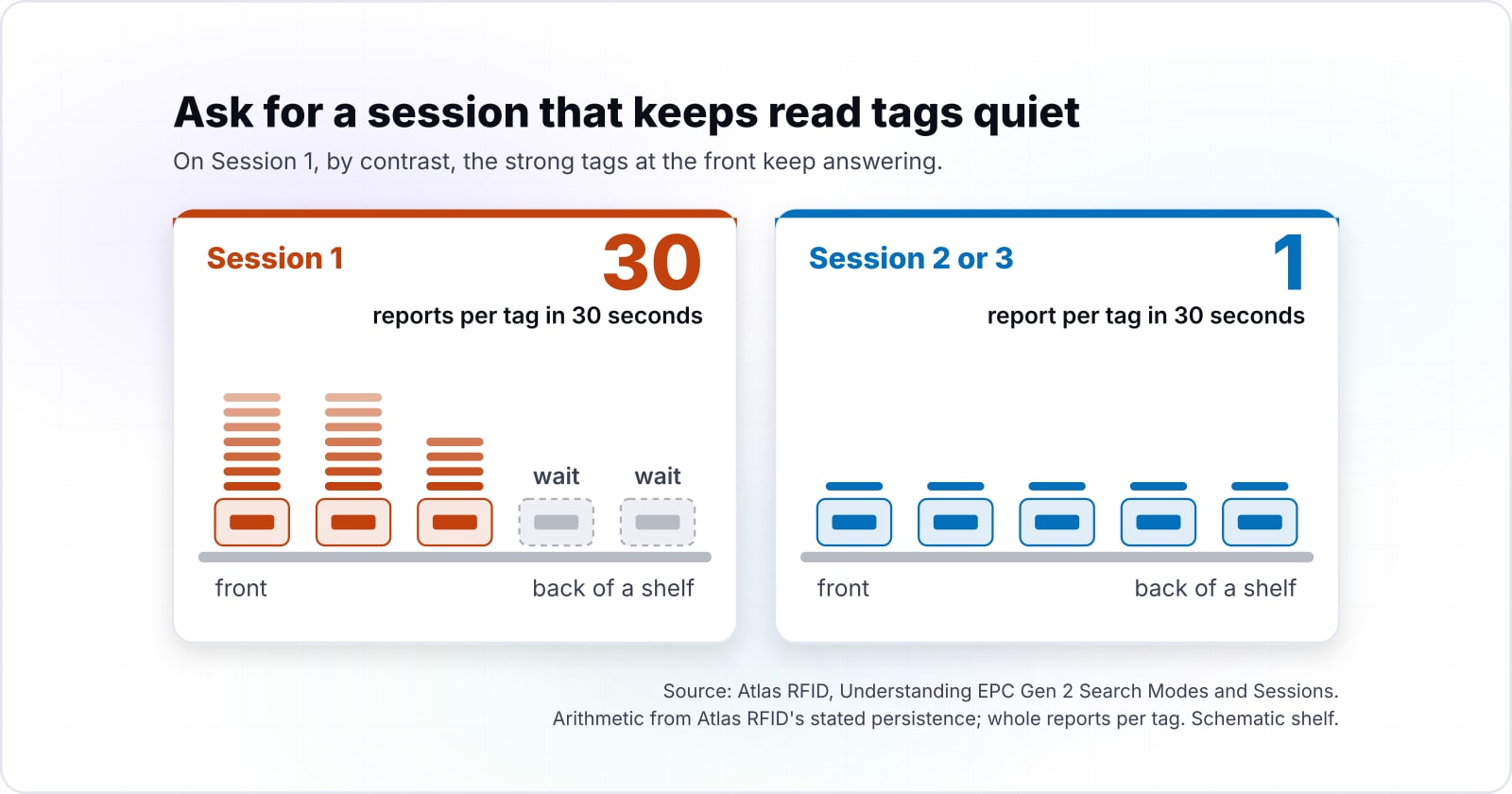
For a full sweep the adapter should ask for a session that keeps read tags quiet, because on Session 1 the same tag keeps coming back while quieter tags wait.
Atlas RFID explains the Single Target case with the Session set to 2 or 3. There, the tag "will be read once then switch to 'B' state and remain quiet the entire time it is in the read field". Weaker tags at the back of a shelf then get their turn. On Session 1, by contrast, the strong tags at the front keep answering.
Show data table
| Dimension | Session 1 at 1 s | Session 1 at 500ms | Session 2 or 3 |
|---|---|---|---|
| 5 seconds | 5 | 10 | 1 |
| 10 seconds | 10 | 20 | 1 |
| 30 seconds | 30 | 60 | 1 |
| 60 seconds | 60 | 120 | 1 |
On Session 2 or 3 a tag reports once however long the sweep, while Session 1 keeps adding reports.
However, Atlas RFID also notes a trap. Tags pushed into B by a fixed portal on Session 2 can be missed by a handheld on that session. So the adapter offers two modes the app understands: quiet sweep, or keep reporting. Then each adapter maps them to its SDK. On Zebra's SDK, the singulation tutorial uses setSession and setInventoryState on an Antennas.SingulationControl object.
How does read power map when each SDK expresses it differently?#
Zebra's RFID SDK for Android sets power as an index into a table the device itself reports, so the adapter takes one level the app understands and translates it per vendor.
Its antenna tutorial reads the supported power levels for a region's rules from reader.. Then its example passes setTransmitPowerIndex a position in that table, not a unit of power. Meanwhile, Honeywell's IH40 SDK quick start covers creating the RfidManager, connecting and reading, with no power call in it.
So the adapter never hard-codes a vendor's number. Instead, it reads the supported levels from the device at connect time. Then it maps the app's level, such as low, medium or full, onto that list. Read range is the setting staff notice first. After all, a shelf sweep that picks up the next aisle looks like a stock error.
| Layer | How read power is expressed |
|---|---|
| The app | One level the app understands, such as low, medium or full |
| Zebra RFID SDK for Android | setTransmitPowerIndex, a position in the table from getTransmitPowerLevelValues(), not a unit of power |
| Honeywell IH40 SDK quick start | Creating the RfidManager, connecting and reading, with no power call in it |
Why does SDK init fail on some Android versions?#
Most init failures are permissions, not the SDK: Android Developers says an app targeting Android 12 (API level 31) or higher must request BLUETOOTH_SCAN and BLUETOOTH_CONNECT before any Bluetooth device connects.
Android Developers is clear that these "are runtime permissions". Because a manifest entry alone is not enough, the app asks the user first. Only then does it scan for a handheld or talk to a paired one. Meanwhile, a wired device has its own rule. Android's USB host guide is plain: "Before communicating with the USB device, your application must have permission from your" user.
Second, each SDK sets a floor of its own. Zebra's About page for SDK 2.0.5.292 lists Android 10 and onwards for its RFD40XX, RFD90XX, MC33XXR and RFD8500 handhelds. For the CC6000 fixed device, that page lists Android 11.
Show data table
| Item | Value |
|---|---|
| RFD40XX handheld | 10 |
| RFD90XX handheld | 10 |
| MC33XXR | 10 |
| RFD8500 | 10 |
| CC6000 fixed reader | 11 |
Start the device matrix at Android 10 for the handhelds and at Android 11 for the fixed reader.
So check three things before blaming the SDK, in this order. First, are the runtime permissions granted? Second, is Bluetooth on, which Android's setup guide checks with isEnabled()? Third, does the handset meet the SDK's minimum Android version?
Which documentation pages do you build the adapter from?#
Build the adapter from four official pages, in order: Android's Bluetooth permissions, then Zebra's inventory, antenna and singulation tutorials for the calls each adapter wraps.
Request the Bluetooth permissions first
Android Bluetooth permissions: the runtime BLUETOOTH_SCAN and BLUETOOTH_CONNECT request, and the neverForLocation flag.
Start and stop an inventory
Inventory tutorial, Zebra: Inventory.perform(), Inventory.stop() and getReadTags in the event callback.
Map read power to the device table
Antenna tutorial, Zebra: setTransmitPowerIndex and the power level table.
Set the session and target
Singulation tutorial, Zebra: setSession and setInventoryState.
The four pages: Android Bluetooth permissions, Inventory tutorial, Zebra, Antenna tutorial, Zebra and Singulation tutorial, Zebra.
For a wired device, add Android's USB host guide for the permission dialog. Also, the GS1 Gen2 standard explains why sessions behave as they do.
What is the smallest adapter that works?#
The smallest working version is one interface, one vendor adapter that wraps start, stop, power and session, and a set keyed by EPC above it.
First, request BLUETOOTH_SCAN and BLUETOOTH_CONNECT at runtime, as the Android permissions page shows. Then the code below is the whole layer for one vendor, using the Zebra calls printed in the tutorials above and in Zebra's Managing Events guide.
// 1. The interface each vendor adapter implements.
public interface TagListener { void onTag(String epc); }

public interface ReaderAdapter {
    void setPowerIndex(int wanted) throws Exception;
    void setQuietSession(boolean quiet) throws Exception;
    void start() throws Exception;
    void stop() throws Exception;
    void setListener(TagListener listener);
}

// 2. One adapter, wrapping the Zebra RFID SDK for Android.
public class ZebraAdapter implements ReaderAdapter, RfidEventsListener {
    private final RFIDReader reader;
    private TagListener listener;

    public ZebraAdapter(RFIDReader reader) throws Exception {
        this.reader = reader;
        reader.Events.addEventsListener(this);
        reader.Events.setTagReadEvent(true);
        reader.Events.setAttachTagDataWithReadEvent(false);
    }

    public void setPowerIndex(int wanted) throws Exception {
        int max = reader.ReaderCapabilities.getTransmitPowerLevelValues().length - 1;
        Antennas.AntennaRfConfig rf = reader.Config.Antennas.getAntennaRfConfig(1);
        rf.setTransmitPowerIndex(Math.min(wanted, max));
        reader.Config.Antennas.setAntennaRfConfig(1, rf);
    }

    public void setQuietSession(boolean quiet) throws Exception {
        Antennas.SingulationControl s = reader.Config.Antennas.getSingulationControl(1);
        s.setSession(quiet ? SESSION.SESSION_S2 : SESSION.SESSION_S1);
        s.Action.setInventoryState(INVENTORY_STATE.INVENTORY_STATE_A);
        reader.Config.Antennas.setSingulationControl(1, s);
    }

    public void start() throws Exception { reader.Actions.Inventory.perform(); }
    public void stop() throws Exception { reader.Actions.Inventory.stop(); }
    public void setListener(TagListener l) { this.listener = l; }

    @Override public void eventReadNotify(RfidReadEvents e) {
        TagData[] tags = reader.Actions.getReadTags(100);
        if (tags == null || listener == null) return;
        for (TagData t : tags) listener.onTag(t.getTagID());
    }

    @Override public void eventStatusNotify(RfidStatusEvents e) { }
}

// 3. Dedupe by EPC in the app, above every adapter.
Set<String> seen = ConcurrentHashMap.newKeySet();
adapter.setListener(epc -> { if (seen.add(epc)) onNewItem(epc); });
A second vendor is a second class that implements ReaderAdapter, while the set in step 3 does not change.
What goes in the device test matrix in week one?#
In our RFID stock tracking build, hardware testing took far more time than planned, so the matrix comes first: every supported device, every target Android version, every connection type.
The case study puts it plainly: "Hardware integration took far more testing than planned. Re-reads and read range differ by device and SDK." Instead, those differences surfaced one device at a time. So its lesson is the plan here: a device lab with every supported handheld goes in during the first week.
Build the matrix as rows of handheld, phone, Android version and connection type. Then run the same five checks on every row:
| Check | Passes when |
|---|---|
| 1. Init | Init succeeds on a fresh install, with permissions denied first and then granted. |
| 2. Unique count | A sweep of the same tagged shelf gives the same unique EPC count on every row. |
| 3. Reads per session | Raw reads per tag on each session match what the session predicts. |
| 4. Power range | The lowest and highest power levels read the shelf and not the next aisle. |
| 5. Reconnect | The handheld reconnects after the phone sleeps. |
Finally, start the Android version column from each SDK's stated floor. For Zebra's handhelds in SDK 2.0.5.292, that is Android 10.
When is one app over several SDKs the wrong fit?#
If every store runs one reader model and will keep it, a thin wrapper over that one SDK is the better tool, because an adapter layer with one adapter is overhead with nothing to share.
Where should you go next?#
Read the RFID case study for the whole build, or the related posts on retail devices and stock systems below.
The RFID stock tracking case study covers the platform behind the scanning app. If you want the same kind of build on your own readers, see custom RFID software. For the inventory product side, see how to add RFID to inventory software. For another vendor device the OS must find before any SDK call works, see troubleshooting Zebra and Printronix USB printers. The store system that scan data flows into is in cloud POS systems for retail. Where reads end up after the handheld is in supply chain management software.
To have the app built, see mobile app development. To wire SDKs into a stock system, see API integrations. Still, the vendor tutorials and the Gen2 standard linked above are enough to build the first adapter on your own.