RFID inventory software: the five builds behind RFID inventory tracking, and what goes wrong
Your customers asked for RFID scanning, and it looks like one scanner integration. It is five pieces of work, and the trouble starts where they meet.
What does building RFID inventory software involve?#
Adding RFID inventory tracking to your software means building five things: an EPC check tied to your SKUs, in-store tag printing, scan reconciliation, one reader adapter layer and tenant separation. We built all five for a software vendor that sells RFID inventory tracking to small multi-store retailers. And the case study of that build holds the measured results.
When building RFID inventory software, the order follows the life of a tag. First the software checks that a tag belongs to a SKU. Then a printer in the store writes it. After that, handhelds read it, the server reconciles the reads, and each tenant sees only its own stock. So when a project slips, the cause is rarely the scanner call. Instead, it sits where one part hands data to the next, so most of the build is work on those joins.
How much time does an RFID count save a store?#
In a 2009 University of Arkansas store study, RFID counted 4,767 items an hour against 209 with a barcode reader. In one run of that study, 10,000 items took two hours with RFID and 53 with barcodes. So the value your customers notice is count time, and it grows with the store.
Show data table
| Dimension | RFID | Barcode |
|---|---|---|
| 2,000 items | 0.4 hours | 9.6 hours |
| 5,000 items | 1 hours | 23.9 hours |
| 10,000 items | 2.1 hours | 47.8 hours |
| 20,000 items | 4.2 hours | 95.7 hours |
At every store size, the barcode count takes far longer than the RFID count.
Say a store holds 10,000 items, an illustrative case. At the 2009 University of Arkansas rates, that count takes about 2.1 hours with RFID and 47.8 with barcodes.
Try your own store size
Set the number of items in a store; the defaults are the illustrative 10,000 items and the 2009 University of Arkansas rates of 4,767 and 209 items an hour.
Hours saved per full count
46 h
- Hours to count with RFID
- 2 h
- Hours to count with barcodes
- 48 h
A worked example from the University of Arkansas RFID Research Center rates, 2009. Modelled, not measured.
So weigh every later cost in the build against that saving, because it is the number your customers will repeat.
What is inside an RFID tag, and how does it map to a SKU?#
An SGTIN-96 tag holds 96 bits: an 8-bit header, a 3-bit filter, a 47-bit GTIN field that opens with a 3-bit partition, and a 38-bit serial, per GS1's Tag Data Standard 2.3. SGTIN means Serialised Global Trade Item Number, and the GTIN is the number your barcodes already print.
Because the GTIN sits inside the tag, the software can check every tag against the SKU it claims to be. The EPC Tag Data Standard (TDS), GS1's Release 2.3 from October 2025, splits those 47 bits between a company prefix and an item reference. Then the partition value says where the split falls.
Show data table
| Segment | Value (bits) | Share |
|---|---|---|
| EPC header | 8 | 8.3% |
| Filter | 3 | 3.1% |
| GTIN field | 47 | 49% |
| Serial | 38 | 39.6% |
The GTIN field takes 47 of the 96 bits, so every tag carries the number your barcodes print.
So one shared master catalog works. Each SKU stores its manufacturer GTIN, and a tag printed for the wrong item is caught before it is counted. Our case study took that route instead of one catalog per store.
How do tags get printed and encoded in the store?#
Zebra's ZPL ^RS command retries a failed tag encode on up to 10 labels, 3 by default, printing VOID across each failed label before its error handling runs. ZPL, the Zebra Programming Language its label printers read, is documented in a guide current in October 2026. Then its ^RF command writes the EPC to the tag while the label prints. The same guide notes that "Gen 2 is the only tag type supported by current RFID printers".
Show data table
| Item | Value |
|---|---|
| minimum | 1 labels |
| default | 3 labels |
| maximum | 10 labels |
At the default, one bad tag can cost 3 labels before the printer's error handling runs, and up to 10 at the maximum.
So in-store printing means the software sends the EPC with each label and expects VOID labels. In short, a VOID label is a serial the system planned but never wrote. If the software marks it as used, the stock record gains an item no scan will find. Instead, treat a printed serial as unconfirmed until a scan sees it, and reissue the serials of VOID labels. Since our case study prints tags in store, this path runs every day.
Why is an RFID scan not a stock count?#
A read proves a tag answered, not that the item is on the shelf, so scans are reconciled against the stock record before anything is reordered. However, the record needs checking too. In Management Science in 2008, DeHoratius and Raman examined nearly 370,000 records across 37 stores and wrote "we find 65% to be inaccurate".
In practice, our case study follows that rule. Its weekly scans flag missing or misplaced stock within 5 working days. Then reorders run on their own or in one click at preset quantities, always from the checked count. The steps for that comparison are in our guide to reconciling a scan with the stock record.
When retailers get this right, the gains are large. For instance, the 2018 ECR Retail Loss study covered ten retailers. Their reported accuracy typically moved from 65% to 75% before tagging to 93% to 99% after. Those figures are self-reported by the companies.
Show data table
| Dimension | Before RFID | After RFID |
|---|---|---|
| Lower end of range | 65 percent | 93 percent |
| Upper end of range | 75 percent | 99 percent |
The self-reported range moved from 65% to 75% before tagging to 93% to 99% after.
How should one app handle several reader SDKs?#
Each reader SDK reports tags its own way, so the app wraps every vendor behind one adapter interface and deduplicates reads before they leave the device. An SDK, or software development kit, is the library a vendor ships for its hardware. For example, in Zebra's RFID SDK for Android, the app holds one RFIDReader object per device and gets tags through a listener method called eventReadNotify.
But other vendors ship other calls. So the app defines one interface for start, stop and tag reads, with one adapter per vendor behind it. Also, deduplication lives there, because handhelds re-read the same tag and each brand does it differently. Meanwhile, fixed readers on a dock door can use GS1's Low Level Reader Protocol, Release 2.0 from January 2021, which sets how readers talk to client software.
Our case study replaced one app per vendor with one native Android app and an adapter per vendor SDK. The client reports that this cut the cost of developing and maintaining the scanning software by 40%, which it credits to one codebase. The adapter interface itself is laid out in our guide to one Android app across several reader SDKs.
How do tenants share one catalog without seeing each other's stock?#
Keep one master catalog of manufacturer SKUs shared by every tenant, and scope every stock row, scan and reorder to a tenant id the query layer always applies. The catalog is shared because a GTIN means the same thing in every store. But stock is not shared, because one retailer's counts are its own business.
| Data | Shared or scoped | Why |
|---|---|---|
| Master catalog of manufacturer SKUs and GTINs | Shared by every tenant | a GTIN means the same thing in every store |
| Stock rows | Scoped to one tenant id | one retailer's counts are its own business |
| Scans | Scoped to one tenant id | reads feed only that tenant's reconciliation |
| Reorders | Scoped to one tenant id | a reorder spends one retailer's money |
So the rule lives in the query layer, not in each screen. No code path can skip the tenant id. Then add a test that runs each query as two tenants and compares the results. It catches the screen that forgot. Our case study runs this way, with a relational database and a document store behind a PHP service layer.
Which documents do you build the RFID features from?#
Build from the GS1 Tag Data Standard for the EPC layout, then Zebra's ZPL guide for printer encoding, then your reader vendor's SDK guide for scanning.
- Document 1
GS1 EPC Tag Data Standard: Table 14-17 for the SGTIN-96 layout and Table 14-16 for the partition split.
- Document 2
Zebra ZPL ^RF: writing the EPC while the label prints.
- Document 3
^RS in the same ZPL guide: encode retries and VOID labels.
- Document 4
Zebra RFID SDK inventory tutorial: starting and stopping an inventory on a handheld.
- Document 5
GS1 EPC Gen2: session flags and how long a tag stays quiet after a read.
The five documents: GS1 EPC Tag Data Standard, Zebra ZPL ^RF, ^RS in the same ZPL guide, Zebra RFID SDK inventory tutorial and GS1 EPC Gen2.
If you support another vendor, swap its guides in for the Zebra pages. The order stays the same, because it follows the tag from decode to print to read.
What is the smallest SKU check worth shipping?#
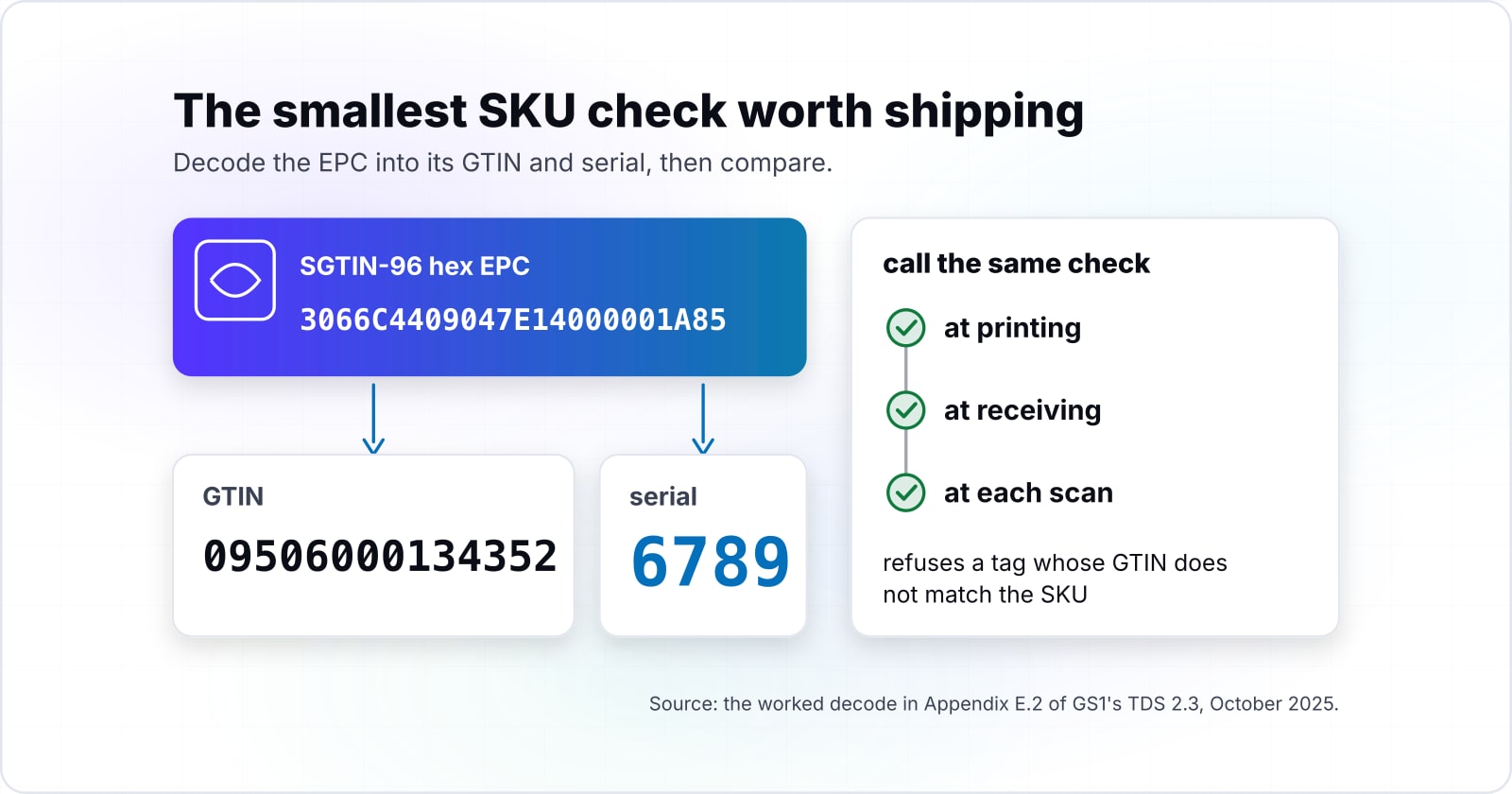
The smallest useful check decodes an SGTIN-96 hex EPC into its GTIN and serial and refuses a tag whose GTIN does not match the SKU it was printed for. It needs no library, only the partition table from GS1's TDS 2.3.
| Partition value | Company prefix bits | Company prefix digits | Item reference bits | Item reference digits |
|---|---|---|---|---|
| Partition 0 | 40 | 12 | 4 | 1 |
| Partition 1 | 37 | 11 | 7 | 2 |
| Partition 2 | 34 | 10 | 10 | 3 |
| Partition 3 | 30 | 9 | 14 | 4 |
| Partition 4 | 27 | 8 | 17 | 5 |
| Partition 5 | 24 | 7 | 20 | 6 |
| Partition 6 | 20 | 6 | 24 | 7 |
// SGTIN-96 partition table, GS1 Tag Data Standard 2.3, Table 14-16:
// [company prefix bits, prefix digits, item reference bits, item digits]
const PARTITIONS: [number, number, number, number][] = [
  [40, 12, 4, 1], [37, 11, 7, 2], [34, 10, 10, 3], [30, 9, 14, 4],
  [27, 8, 17, 5], [24, 7, 20, 6], [20, 6, 24, 7],
];
function checkDigit(first13: string): number {
  let sum = 0;
  for (let i = 0; i < 13; i++) sum += Number(first13[i]) * (i % 2 === 0 ? 3 : 1);
  return (10 - (sum % 10)) % 10;
}
function decodeSgtin96(hex: string): { gtin: string; serial: string } {
  if (!/^[0-9A-Fa-f]{24}$/.test(hex)) throw new Error("EPC must be 24 hex characters");
  const epc = BigInt("0x" + hex);
  const bits = (from: number, len: number): bigint =>
    (epc >> BigInt(96 - from - len)) & ((1n << BigInt(len)) - 1n);
  if (bits(0, 8) !== 0x30n) throw new Error("not SGTIN-96: header must be 00110000");
  const p = Number(bits(11, 3));
  if (p > 6) throw new Error("invalid partition " + p);
  const [pBits, pDigits, iBits, iDigits] = PARTITIONS[p];
  const prefix = bits(14, pBits).toString().padStart(pDigits, "0");
  const item = bits(14 + pBits, iBits).toString().padStart(iDigits, "0");
  const body = item[0] + prefix + item.slice(1); // indicator digit leads the GTIN-14
  return { gtin: body + checkDigit(body), serial: bits(58, 38).toString() };
}
function checkTagAgainstSku(hex: string, skuGtin: string): string {
  const { gtin, serial } = decodeSgtin96(hex);
  if (gtin !== skuGtin.padStart(14, "0")) {
    throw new Error(`tag serial ${serial} carries GTIN ${gtin}, not ${skuGtin}`);
  }
  return serial;
}
console.log(checkTagAgainstSku("3066C4409047E14000001A85", "9506000134352")); // 6789
The test value is the worked decode in Appendix E.2 of GS1's TDS 2.3, October 2025. It yields GTIN 09506000134352 and serial 6789 with any TypeScript runner. Then call the same check wherever a tag enters your system: at printing, at receiving and at each scan.
What goes wrong after the first stores go live?#
Reader vendors differ on re-reads and read range, so hardware testing runs long; plan a device lab with every supported reader in week one. In our case study, each vendor's hardware behaved differently. As a result, testing took far longer than planned, so next time the device lab comes first.
The second failure was guidance. Staff needed more than a manual. So guidance belongs inside the scan screen, at the step where a person gets stuck. After the scanning apps were merged into one, the client reports an 8% increase in sales. However, that figure is the client's own.
Reader vendors behave differently
Re-reads and read range differ by vendor, so hardware testing ran far longer than planned. Fix: a device lab with every supported reader in week one.
A manual is not enough
Staff needed more than a manual. Fix: guidance inside the scan screen, at the step where a person gets stuck.
When is RFID the wrong fit for an inventory product?#
RFID is the wrong fit when customers carry small, slow-moving ranges or will not tag goods at receiving, because barcode scanning already answers their counts. For example, a store with a few hundred items counts in under two hours by barcode at the 2009 University of Arkansas rate, so tagging saves it little.
4,767 an hour
RFID
209 an hour
Barcode
The saving scales with the item count, so a store with a few hundred items gains little.
| Option | items counted per hour |
|---|---|
| RFID | 4,767 an hour |
| Barcode | 209 an hour |
Source: University of Arkansas RFID Research Center (via Newswise), 25 August 2009
First, a small range is better served by barcode cycle counts, since DeHoratius and Raman found in 2008 that auditing practices reduce record errors. Second, if goods are not tagged at receiving every time, fix receiving before buying hardware. Otherwise, the reconciliation works on bad evidence. Third, if customers want to see the shelf face rather than every item, camera checks may fit better, and computer vision in retail covers that route.
Where should you go from here?#
The case study shows the whole build with its measured results, and the posts below cover the parts this one only touched. So start with the case study for the architecture and the numbers. To have the same work done on your own product, see RFID integration services. For the warehouse side, read what to build around a WMS. For the till and stock sync, read cloud POS systems for retail.
If you want the features built into an existing product, see custom software development. For the multi-tenant side, see SaaS development. Otherwise, the GS1 and Zebra pages above are enough to ship the first SKU check on your own.