Spatie activity log best practices for a fast, compliant Laravel audit trail
Logging everything is the anti-pattern. Design an audit trail that stays fast, compliant, and meaningful as activity_log grows into millions of rows.
What should a Spatie activity log record: the event or the model?#
A Spatie activity log should record business events, not every model save. Search this topic and every guide reads the same. First it installs the Spatie activity log package. Then it calls logAll() and moves on. However, that step decides your table's future, and almost no page treats it as a decision. Because logging is framed as a switch you flip, the hard question never gets asked: what is actually worth auditing?
The reframe is simple. An audit trail answers "who changed what, when, and why". Therefore it should record business events, not model saves. Instead of logging every write to a row, log the transitions a human might one day dispute. In short, auditing is domain-event modeling, and the good Spatie activity log best practices all follow from that.
The default every ranking page teaches: logAll() and logFillable()#
Here is the happy path the tutorials ship. It is one trait and two method calls. Because it captures everything, it looks safe and complete. Yet that is exactly the anti-pattern this post argues against.
use Illuminate\Database\Eloquent\Model;
use Spatie\Activitylog\Models\Concerns\LogsActivity;
use Spatie\Activitylog\Support\LogOptions;

class Order extends Model
{
    use LogsActivity;

    // The default nearly every tutorial ships: log the whole model, every save.
    public function getActivitylogOptions(): LogOptions
    {
        return LogOptions::defaults()
            ->logAll()        // every attribute, timestamps included
            ->logFillable();  // and every fillable column too
    }
}

// Result: one activity row on every create, update, and delete, each row
// carrying a full snapshot of ~20 attributes as JSON. Nothing is filtered.
Read what this actually does. Every create, update, and delete writes a row. Each row also stores a full snapshot of around twenty attributes as JSON. In practice most of those saves are churn, and most of those attributes never change. So you pay to store noise, and you pay again every time a query has to read past it.
The reframe: a few business events worth an immutable record#
Now flip the default. Instead of logging every save, name the transitions that matter. For an order, that is placed, paid, and shipped. For a user, that is role granted and account suspended. Because these are the events a customer or a regulator might question, they deserve a durable, indexed, redacted row.
The distinction is not cosmetic. Consequently it drives every later decision in this post: how big the table gets, which indexes it needs, how long you keep each row, and what you must never store in it. The table below turns the line into a rule you can apply change by change.
| The change | Verdict | Why | PII and tamper note |
|---|---|---|---|
| Order status paid to shipped | Audit as event | A real transition someone may dispute | No PII; keep on a retained channel |
| User role user to admin | Audit as event | A security-relevant privilege change | Immutable; consider a hash chain |
| updated_at bumped by a cron touch | Skip | No business meaning, pure churn | dontLogIfAttributesChangedOnly |
| last_seen_at heartbeat | Skip | High-frequency noise, telemetry not audit | logExcept, or send to metrics |
| password or token column changed | Audit the event, redact the value | The fact matters, the secret must not persist | logExcept plus beforeActivityLogged |
How big does activity_log actually get?#
Under logAll() with a year of retention, an app processing 50,000 orders a day settles near 197 GB and 164 million rows in this illustrative model. Numbers make the stakes concrete, so start with that workload. Consider an e-commerce app that processes 50,000 orders a day. Each order row is written about nine times across its lifecycle: one create and eight status or field updates. That write rate is the input to everything that follows.
The worked numbers: 50,000 orders a day, nine writes each#
Under logAll(), every one of those writes becomes an activity row. Therefore you record 450,000 rows a day, each near 1.2 KB because it snapshots twenty attributes. Now compare the pattern: log only three business events per order, and shrink each row with logOnlyDirty(). The felt gap is large.
~197 GB
logAll(), full snapshots, 365-day retention
~4.7 GB
domain events, logOnlyDirty, 90-day retention
Same order volume, two logging strategies. Logging everything settles near 197 GB and 164 million rows; logging the three real events settles near 4.7 GB and 13.5 million rows. These are illustrative, order-of-magnitude figures, not a benchmark.
| Option | steady-state activity_log footprint (illustrative) |
|---|---|
| logAll(), full snapshots, 365-day retention | ~197 GB |
| domain events, logOnlyDirty, 90-day retention | ~4.7 GB |
Read the ratio, not just the totals. Because the anti-pattern reaches roughly 197 GB and 164 million rows at steady state, every unindexed lookup scans that table. Meanwhile the pattern settles near 4.7 GB and 13.5 million rows. So the same audit intent costs about forty times less, purely from three independent levers.
Where the savings come from: three independent levers#
The forty-fold gap is not one trick. Instead it is three multiplying cuts, and you can apply them one at a time. First, log domain events, not churn, which drops the row count from 450,000 to 150,000 a day. Second, logOnlyDirty and logExcept shrink each row about 3.4 times. Third, a 90-day retention window caps the table at steady state.
Show data table
| Step | Change | Running total |
|---|---|---|
| logAll, full rows, 365d | 197 GB | 197 GB |
| logOnlyDirty + logExcept | -139 GB | 58 GB |
| Domain events only | -39 GB | 19 GB |
| 90-day retention | -14.3 GB | 4.7 GB |
| All three levers | 4.7 GB |
Each lever is independent, so you can stop at the footprint your budget allows. Shrinking the row comes first, logging events not churn comes next, and retention caps the steady state. These are illustrative, order-of-magnitude figures, not a benchmark.
Notice that no lever needs a rewrite. Each is a first-party option or a config value. Therefore you keep the Spatie activity log package, keep the API, and simply stop storing what you will never read. Next, put your own numbers through the same model.
How do you model the cost of your own audit trail?#
Put your own workload into the calculator below and read the steady-state footprint it returns. A general curve is not your curve. Set your audited writes a day, pick a row shape, choose a retention window, and mark the share of events that are compliance-relevant. Then read the steady-state footprint, the reduction against logging everything, and the verdict band your numbers land in.
- Steady-state size
- 11.3 GB
- Rows retained
- 23M
- Against logAll for a year
- 8.1x smaller
This table is large enough to feel. Add the composite indexes so queries seek instead of scan, run activitylog:clean daily, and reclaim freed pages with an OPTIMIZE TABLE in a maintenance window. Shorten the operational window if reads slow.
| Retention window | Rows retained | Table size |
|---|---|---|
| 30 days | 15M | 7.35 GB |
| 90 days | 23M | 11.3 GB |
| 180 days | 35M | 17.3 GB |
| 365 days | 60M | 29.5 GB |
An illustrative planning model, not a benchmark. It assumes a full-snapshot row near 1.2 KB, a changed-attributes-only row near 0.35 KB, about 40 percent index overhead, and a separate 730-day channel for compliance events. Real numbers move with your attribute count, JSON payloads, indexes, and MySQL version, so size your own table before you commit to a retention policy.
Watch how the levers interact. Because a full-snapshot row is roughly 3.4 times heavier, flipping the row shape moves the footprint before you touch retention. In contrast, a longer compliance share pulls the steady state back up. This is illustrative planning math, not a quote, so size your own table before you commit to a policy.
How do you log the right thing with LogsActivity, logOnly, logExcept, and logOnlyDirty?#
Use LogOptions to encode signal, not churn: logOnly names the columns that matter, and logOnlyDirty records only what changed. The reframe now becomes mechanical. The goal is a row that captures a real change and nothing else. First, contrast the two configurations directly.
Anti-pattern vs pattern LogOptions, side by side#
The same trait supports both extremes. However, the difference in what they store is enormous. Switch the tab to see the shape the pattern produces.
// Anti-pattern: log everything, every save.
public function getActivitylogOptions(): LogOptions
{
    // The table grows without limit and each row stores a full attribute
    // snapshot you will almost never read back.
    return LogOptions::defaults()
        ->logAll()
        ->logFillable();
}// Pattern: record signal, not churn.
public function getActivitylogOptions(): LogOptions
{
// Log only meaningful columns, only when they actually change, and never
// for noise-only updates. Each row shrinks to the real diff.
return LogOptions::defaults()
->logOnly(['status', 'total', 'shipping_address'])
->logOnlyDirty()
->logExcept(['updated_at', 'last_seen_at', 'remember_token'])
->dontLogIfAttributesChangedOnly(['updated_at'])
->dontSubmitEmptyLogs()
->useLogName('orders');
}The pattern reads longer, yet it does far less work. Because logOnly names the columns that matter and logOnlyDirty records only what changed, each row is the true diff. On top of that, dontLogIfAttributesChangedOnly kills the updated_at-only save that would otherwise write a meaningless row. In short, the configuration is where auditing stops being logging.
Name the event: event('placed') for real transitions#
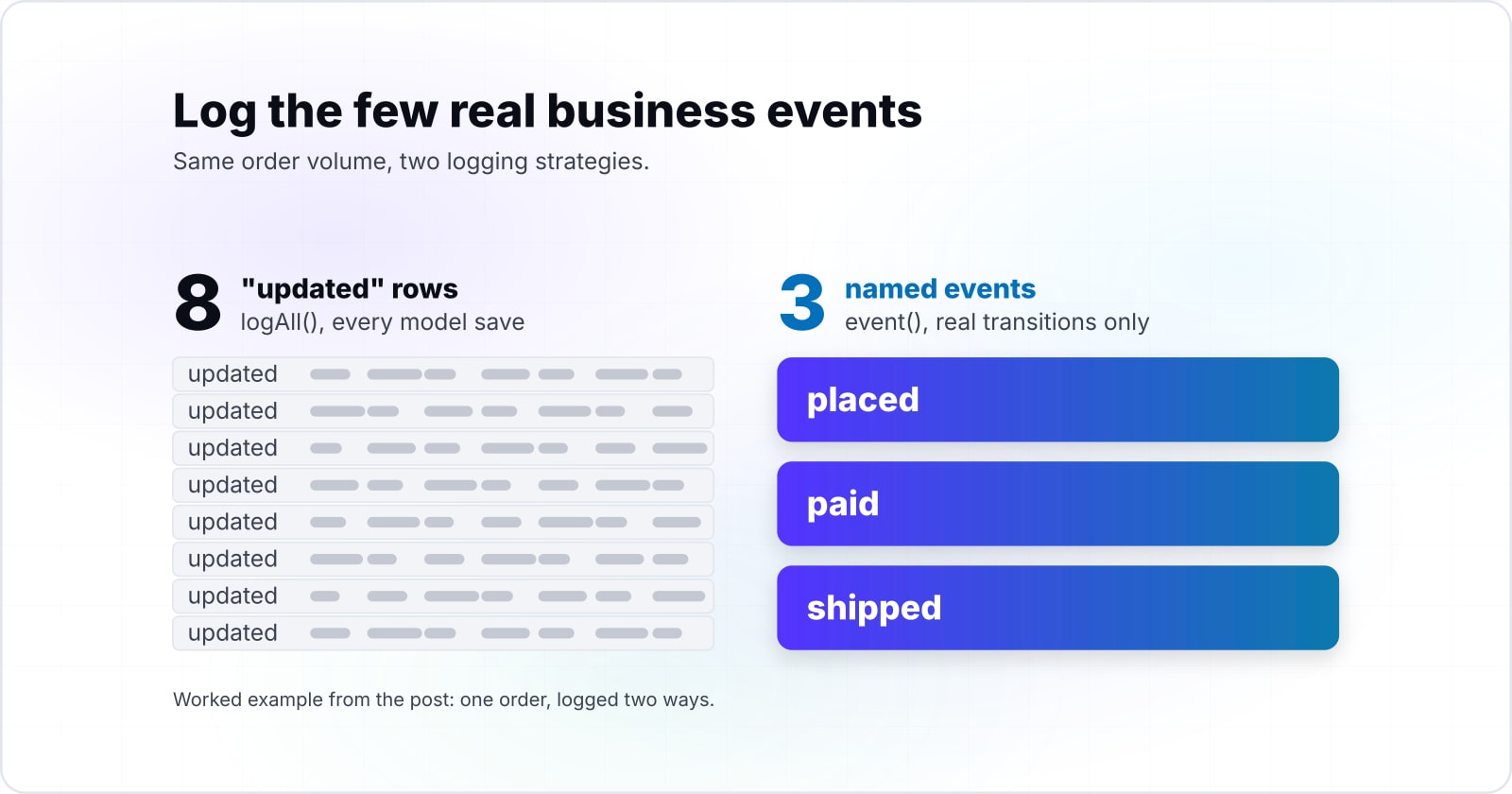
Automatic model events get you created, updated, and deleted. But those names carry no business meaning. Therefore log the important transitions explicitly and give them a real name. A shipped order is not merely "updated".
use Spatie\Activitylog\Contracts\Activity as ActivityContract;

// A real state transition, logged once, named. Not every save() on the model.
public function markShipped(Order $order, User $admin): void
{
    $order->update(['status' => 'shipped']);

    activity('orders')
        ->causedBy($admin)                    // who did it
        ->performedOn($order)                 // what it happened to
        ->event('shipped')                    // the domain event, not "updated"
        ->withProperties(['carrier' => $order->carrier])
        ->log('Order shipped');
}

// Log placed / paid / shipped as three named events. Skip the eight
// intermediate saves that carry no business meaning.
This is the inversion in code. Instead of eight anonymous "updated" rows per order, you write three named ones: placed, paid, shipped. Because the event name is queryable, an auditor can ask for every refund directly. So the trail becomes a record of decisions, not a diff of saves.
Causer and subject resolution, and the null-causer job case#
Every activity has two actors. The causer is who did it, and the subject is what it happened to. Normally causedBy resolves the authenticated user automatically. However, that breaks the moment the write moves off the request.
use Illuminate\Contracts\Queue\ShouldQueue;

// In a queued job there is no authenticated user, so causedBy() has nothing to
// resolve and the causer column lands null. Capture the actor and pass it in.
class SettleRefund implements ShouldQueue
{
    public function __construct(
        public int $orderId,
        public int $actorId,          // captured on the request thread
    ) {}

    public function handle(): void
    {
        $order = Order::findOrFail($this->orderId);
        $actor = User::findOrFail($this->actorId);

        activity('orders')
            ->causedBy($actor)        // explicit, because auth() is empty here
            ->performedOn($order)
            ->event('refunded')
            ->log('Refund settled');
    }
}What does the property diff store in old vs attributes, and what should it NOT store?#
The diff stores the old values under an old key and the new values under an attributes key, and it should never store PII, secrets, or wide JSON payloads. The recorded change is a diff, and its shape has sharp edges. Because the diff is built from Eloquent attributes, casts and JSON columns can distort or bloat it. First, see exactly where the old and new values live.
How old vs attributes is built, and where casts and JSON columns bite#
Spatie stores the change in the properties JSON, under an old key and an attributes key. The changes() helper returns both sides together. Yet the values are post-cast, which is where rows quietly grow fat.
$activity = $order->activities()->latest()->first();

// The recorded diff lives in the properties JSON, under two keys.
$activity->properties['old'];        // ['status' => 'paid']
$activity->properties['attributes']; // ['status' => 'shipped']

// The changes() helper returns both sides at once.
$activity->changes();
// => ['attributes' => ['status' => 'shipped'], 'old' => ['status' => 'paid']]

// Watch the casts. An Eloquent cast is applied before the diff is taken, so a
// JSON column, a money value object, or an encrypted attribute is serialized
// whole. One wide cast attribute can bloat a row from bytes into kilobytes.
Consider a model with a large JSON settings column. Because a cast serializes the whole value, a one-field edit records the entire blob twice, old and new. Consequently a single logical change can write kilobytes. So audit narrow, typed columns, and keep wide JSON payloads out of the diff.
Redacting PII and secrets from the recorded diff#
Here is the risk no ranking page names. Because logAll() and logFillable() serialize full attributes, they write PII and secrets into an unencrypted JSON column. A password hash, a card number, a token: all of it lands in plain properties. Therefore redaction is not optional.
use Spatie\Activitylog\Contracts\Activity as ActivityContract;

class Customer extends Model
{
    use LogsActivity;

    // First defense: never diff these columns at all.
    public function getActivitylogOptions(): LogOptions
    {
        return LogOptions::defaults()
            ->logOnly(['status', 'plan', 'email_verified_at'])
            ->logExcept(['password', 'card_number', 'api_token'])
            ->logOnlyDirty();
    }

    // Second defense: runs before the row is written. Strip any secret that
    // slipped through, so it never reaches the unencrypted JSON column.
    public function beforeActivityLogged(ActivityContract $activity, string $eventName): void
    {
        $redact = ['ssn', 'card_number', 'password', 'api_token'];

        $activity->properties = $activity->properties->map(
            fn ($side) => is_array($side)
                ? collect($side)->except($redact)->all()
                : $side
        );
    }
}How do you turn one business transaction into one audit story with batching and correlation?#
Group every row the transaction writes under one identifier: a LogBatch UUID, plus a correlation_id when you need to join across batches. A single business action often writes several rows. A refund returns stock, issues money, and sends an email. However, those rows scatter unless you tie them together, and an auditor needs the whole story.
The diagram shows both halves of the model. First, the causer and subject attach to each activity. Second, a batch UUID and a correlation_id bind the rows of one transaction. Then each row follows the same lifecycle: write, index, prune, archive. The next snippet wires the grouping.
Grouping writes with a batch UUID and a correlation id#
Spatie ships a LogBatch facade for exactly this. Wrap the transaction, and every activity inside shares one batch UUID. A custom correlation_id property lets you join across batches when you need to.
use Spatie\Activitylog\Facades\LogBatch;
use Illuminate\Support\Facades\DB;
use Illuminate\Support\Str;

// One transaction, one story. Group every row so an audit event reconstructs as
// a single unit instead of scattered, unrelated rows.
$correlationId = (string) Str::uuid();

LogBatch::startBatch();

DB::transaction(function () use ($order, $admin, $correlationId) {
    $order->refund();

    foreach (['refunded', 'stock_returned', 'refund_emailed'] as $event) {
        activity('orders')
            ->causedBy($admin)
            ->performedOn($order)
            ->event($event)
            ->withProperties(['correlation_id' => $correlationId])
            ->log("Order {$event}");
    }
});

LogBatch::endBatch();

// Every row now shares one batch_uuid and one correlation_id. Query either one
// to replay the whole refund as a single audit story.
Now the refund reconstructs as one unit. Because the rows share a batch UUID and a correlation_id, a single query replays the event in order. In short, correlation turns scattered writes into a coherent audit story, which is the whole point of keeping the trail.
How do you keep activity_log fast by indexing the queries you actually run?#
Add one composite index per query pattern, because the default migration indexes only the polymorphic morph columns and other filters fall back to a scan. A big table is fine if the queries seek instead of scan. However, the default migration under-indexes for real audit questions. Because it only indexes the polymorphic morph columns, a filter by time, by causer, or by channel falls back to a scan.
| You run this query | Filters on | Composite index that serves it | Default stub covers it? |
|---|---|---|---|
| Everything that happened to one order | subject_type, subject_id, created_at | (subject_type, subject_id, created_at) | Partly: morph index, no created_at |
| Everything one admin did | causer_type, causer_id | (causer_type, causer_id) | Partly: morph index only |
| The orders channel in a date window | log_name, created_at | (log_name, created_at) | No |
| Find rows by a custom property | properties correlation_id | Generated column plus index | No |
The composite-index migration the default stub omits#
The fix is a short migration, and it is fully reversible. Add one composite index per query pattern, ordered so the equality columns come first and the time column last. Because that order lets a range scan follow the seek, the newest-first query stays fast as the table grows.
use Illuminate\Database\Migrations\Migration;
use Illuminate\Database\Schema\Blueprint;
use Illuminate\Support\Facades\Schema;

// The default create_activity_log_table stub indexes only the morph columns.
// Add the composite indexes that serve the queries you actually run.
return new class extends Migration {
    public function up(): void
    {
        Schema::table('activity_log', function (Blueprint $table) {
            // "Everything that happened to this order, newest first."
            $table->index(['subject_type', 'subject_id', 'created_at'], 'idx_subject_time');
            // "Everything this admin did."
            $table->index(['causer_type', 'causer_id'], 'idx_causer');
            // "The orders channel across a date window."
            $table->index(['log_name', 'created_at'], 'idx_logname_time');
        });
    }
};
These indexes cost write time and disk, so add only the ones your queries need. To confirm each one is used, read the plan. Our guide to diagnosing MySQL performance bottlenecks in production shows how to read an EXPLAIN plan node by node. If you are weighing a dedicated table instead, the same schema-design trade-off applies to activity_log tables.
How do you keep activity_log small with retention, pruning, and cold archival?#
Set a retention window per compliance class on its own log_name channel, then prune each channel on a schedule with activitylog:clean. Indexes keep reads fast, but they do not cap growth. Therefore retention is a separate discipline, not a one-line config note. Because different events carry different obligations, retention should vary by compliance class.
| Compliance class | Example events | Retention window | Storage tier |
|---|---|---|---|
| Operational | status changes, edits, low-risk updates | 30 to 90 days | Hot table, pruned nightly |
| Security | role changes, logins, permission grants | 180 to 365 days | Hot table, separate channel |
| Financial or regulatory | refunds, invoices, ledger entries | 1 to 7 years per obligation | Partitioned, archived to object storage |
Scheduling activitylog:clean per log_name channel#
Spatie ships the activitylog:clean command for pruning. Crucially, it accepts a channel name, so you can prune each log_name on its own cadence. Pass --days to override the config, and --force to run unattended.
// config/activitylog.php
'clean_after_days' => 90, // the operational channel default

// routes/console.php (Laravel 11+) or app/Console/Kernel.php
use Illuminate\Support\Facades\Schedule;
use Illuminate\Support\Facades\DB;

// Prune the noisy operational channel nightly.
Schedule::command('activitylog:clean orders --days=90 --force')->dailyAt('03:00');

// Keep compliance-relevant events far longer, on their own channel.
Schedule::command('activitylog:clean compliance --days=730 --force')->dailyAt('03:15');

// Reclaim freed pages after a large prune. InnoDB does not shrink the file
// on its own, and OPTIMIZE locks the table, so run it off peak.
Schedule::call(fn () => DB::statement('OPTIMIZE TABLE activity_log'))
    ->weeklyOn(7, '04:00');
Two details matter here. First, prune the operational channel hard while keeping compliance events long, which is why the channels are separate. Second, InnoDB does not return freed space to disk after a large delete, so run OPTIMIZE TABLE in a maintenance window to reclaim it. Because OPTIMIZE locks the table, keep it off peak.
What are the security and compliance risks: PII, tamper-evidence, and who can read?#
The three risks are unencrypted PII in the properties column, a mutable table that can be altered without a trace, and open read access to the trail. All three sit almost entirely absent from the search results. The properties column holds PII when you log full attributes, a row can be deleted with no trace, and everyone with a database connection can read the trail unless you restrict it.
None of this means the Spatie activity log package is wrong. Instead it means you must know its limits. Because spatie/laravel-activitylog gives you a readable "who changed what" trail, it is excellent for operational and security auditing. For an immutable ledger, though, it is a starting point, not the finish line.
Should you use activitylog, laravel-auditing, or event sourcing?#
Use activitylog for a readable trail on an existing app, and choose event sourcing when you need an immutable ledger or history as the source of truth. The right tool depends on what "audit" means for you. Because these three approaches solve different problems, tie the choice to a concrete requirement. Do you need a readable trail, a tamper-proof ledger, or a system whose history is its source of truth?
| What you need | activitylog | laravel-auditing | Event sourcing |
|---|---|---|---|
| Readable "who changed what" | Strong | Strong | Indirect: derive from events |
| Immutable, tamper-evident ledger | No: mutable table | No: mutable table | Yes: append-only store |
| Rebuild state from history | No | No | Yes: the whole point |
| Setup cost | Low | Low | High: rearchitect writes |
| Best fit | Audit an existing app | Per-model audit config | History is the source of truth |
Read the ledger row as the deciding line. Because both activitylog and laravel-auditing store to a mutable table, neither is a tamper-proof record on its own. If immutability is a hard requirement, event sourcing earns its cost. Otherwise activitylog is the pragmatic choice, and this post is how you run it well.
When should you NOT use an activity log?#
Skip an activity log for high-frequency telemetry, state reconstruction, legally immutable records without a hash chain, and pure debugging output.
The boundary is the same one the whole post draws. Because an audit trail records business decisions, anything that is not a decision does not belong in it. So if a write is noise, metrics, or a debug line, send it elsewhere and keep activity_log meaningful.
Sources and further reading#
Every API surface above is first-party. For the option methods, read the Spatie guide to LogOptions and logging model events. For pruning, see cleaning up the log, and for the package itself, the spatie/laravel-activitylog listing on Packagist, where version 5.0.0 is dated 25 March 2026 and the latest release, 5.1.1, is dated 8 September 2026. If you are still weighing frameworks, our take on WordPress against Laravel for this kind of build covers the wider choice, and once your Laravel app is deployed via Forge the scheduled prune above runs on the same cron. When the trail has to satisfy an auditor, our security and compliance work covers retention and access rules, and you can hire Laravel developers to build the event model with your team.
Spatie activity log best practices: common questions
What retention period should I set for the activity_log table?
Is buffering the same as batching or correlation?
How do I keep PII out of the recorded diff?
Why is my activity_log query slow, and how do I fix it?
Auditing at scale is a data-modeling problem before it is a package choice. If you want a second set of hands on an audit trail that has to stay fast and hold up to scrutiny, we can help.
Talk to us about an audit trail that scales