Nodejs HTTP2 server setup in Node.js: createSecureServer, allowHTTP1, ALPN and curl tests
A server that listens is not yet a server that speaks HTTP/2. Here is the setup, the one option that decides who gets served, and the three commands that prove it.
How do you set up a Nodejs HTTP2 server that browsers will talk to?#
A Node.js HTTP/2 server for browsers is http2.createSecureServer() with a TLS key and certificate, because the Node.js docs say no known browser supports unencrypted HTTP/2.
The node:http2 reference puts it plainly. "Since there are no browsers known that support" unencrypted HTTP/2, the secure server is "necessary when communicating with browser clients." So the setup has three decisions and no more. First, you need a key and a certificate. Second, you import createSecureServer from node:http2, not createServer. Third, you choose allowHTTP1 on purpose, because its default refuses some clients.
Everything below deepens one of those three. If you want the HTTP/1.1 basics first, the Node.js HTTP/1.1 server walkthrough covers node:http, keep-alive and shutdown. Those basics stay there.
A key and a certificate
First, you need a key and a certificate.
createSecureServer, not createServer
Second, you import createSecureServer from node:http2, not createServer.
allowHTTP1, decided on purpose
Third, you choose allowHTTP1 on purpose, because its default refuses some clients.
What does a Node.js origin gain from HTTP/2, and where is the gain already taken?#
HTTP Archive's Web Almanac, published 11 November 2024, counts 98% of CDN-served mobile HTML requests on HTTP/2 or better, against 71% from origin servers.
In short, the gap sits at origin servers. A CDN (content delivery network) in front has usually closed it already.
Show data table
| Item | Value |
|---|---|
| origin, 2022 | 42 |
| origin, 2024 | 71 |
| CDN, 2024 | 98 |
Origin servers rose from 42% to 71% between 2022 and 2024, while CDN-served HTML already sat at 98%.
The Web Almanac CDN chapter also records origin adoption rising from 42% in 2022 to 71% in 2024. Meanwhile, W3Techs reported in October 2026 that HTTP/2 is used by 34.8% of all websites it surveys. That counts sites, not requests. Therefore the work pays when Node.js faces clients directly. One connection then carries many requests at once, instead of one request per connection at a time. Behind a CDN that already speaks h2 to the browser, the same work moves little.
What does ALPN negotiate before the first HTTP/2 frame is sent?#
ALPN, the TLS extension in RFC 7301, lets the client offer h2 and http/1.1 in its handshake so the server picks one protocol before any request is sent.
The IETF's RFC 7301, from July 2014, describes it as negotiation "within the TLS handshake" for protocols that share one port. Then RFC 9113, the June 2022 HTTP/2 standard, names the identifier: "h2" is HTTP/2 over TLS. It also retires the old cleartext token. A client must not send "h2c" in ALPN, and a server must not select it.
As a result, every HTTP/2 choice in Node.js is a choice about which ALPN offers to accept. In the node:tls reference, the ALPNProtocols option lists what a TLS server will accept. Once the handshake ends, tlsSocket.alpnProtocol holds the protocol that won, or false when no protocol was negotiated. The request walkthrough shows where this handshake sits in a full page load.
What does allowHTTP1 change for a client that cannot speak HTTP/2?#
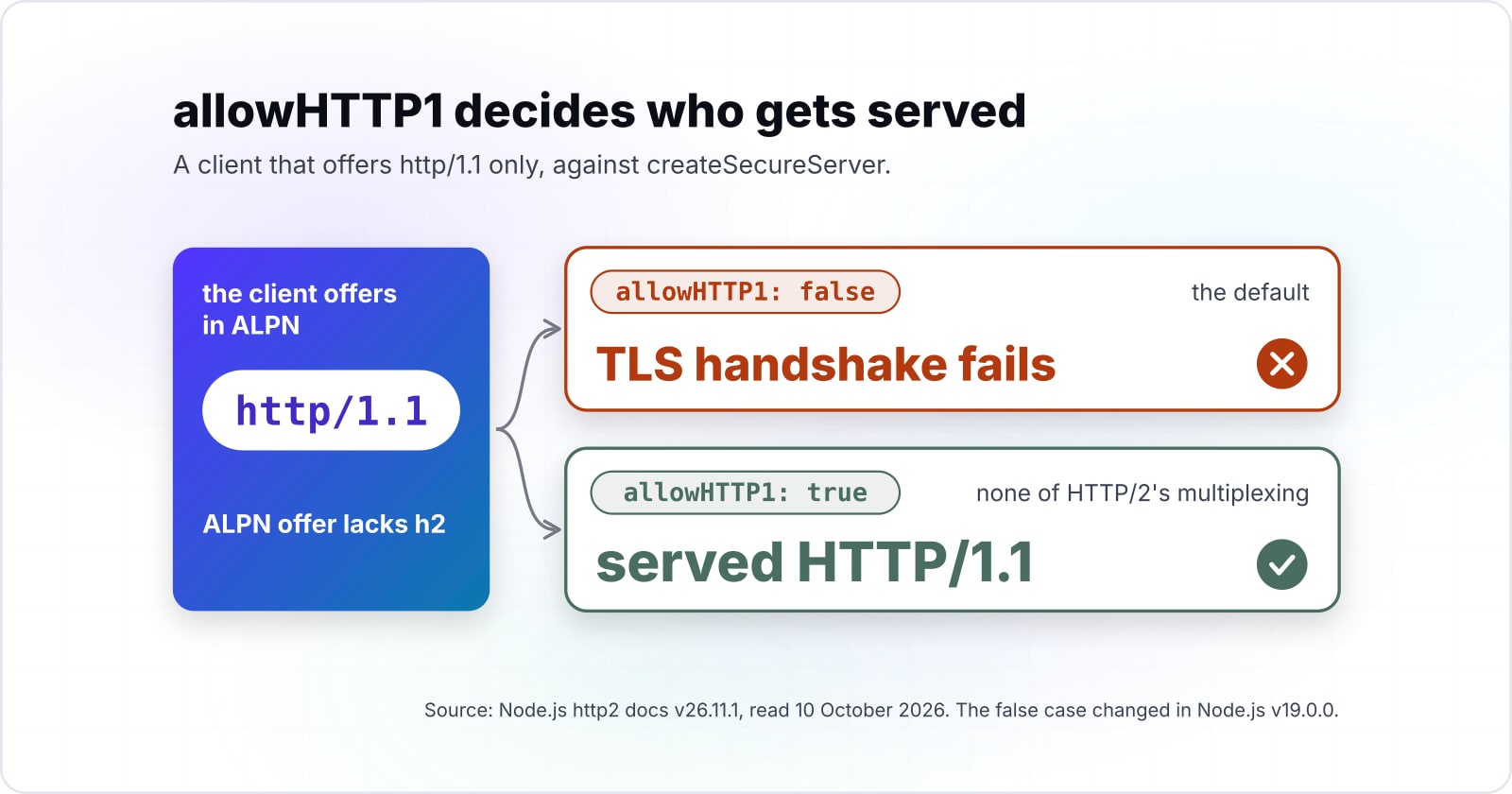
allowHTTP1 defaults to false in the Node.js v26.11.1 docs; set it to true and a client whose ALPN offer lacks h2 is served HTTP/1.1 instead of failing the handshake.
The option's own line is short. It reads: "Incoming client connections that do not support HTTP/2 will be downgraded to HTTP/1.x when set to true." That line is the whole Node.js http2 createSecureServer allowHTTP1 option on the true side. However, the false case changed in Node.js v19.0.0, and most tutorials predate that. Since then, the unknownProtocol event fires only when a client sent no ALPN extension at all. Instead, a client that offers ALPN without h2 now fails the TLS handshake, and no handler ever sees it.
| what the client offers in ALPN | allowHTTP1: false | allowHTTP1: true |
|---|---|---|
| h2 and http/1.1 | served HTTP/2 | served HTTP/2 |
| http/1.1 only | TLS handshake fails | served HTTP/1.1 |
| no ALPN extension | unknownProtocol event | served HTTP/1.1 |
Source: Node.js http2 docs v26.11.1, the allowHTTP1 option and the unknownProtocol event history, read 10 October 2026.
In practice, false suits a private API where you control every client. Meanwhile, true suits anything public, because older clients and some tools still connect over HTTP/1.1. The cost of true is small: those clients simply get none of HTTP/2's multiplexing.
Which Node.js and curl pages do you build this server from?#
Four official pages cover the whole build: the Node.js http2 and tls references, the Node.js releases table for an LTS line, and the curl man page for testing.
- Page 1
Node.js previous releases
pick an LTS line, v24 or v22
- Page 2
node:http2
createSecureServer, the allowHTTP1 option and the session options
- Page 3
node:tls
ALPNProtocols and tlsSocket.alpnProtocol
- Page 4
curl man page
--http1.1, --http2-prior-knowledge and http_version
- Node.js previous releases: pick an LTS line, v24 or v22, since the page says production should run only Active or Maintenance LTS.
- node:http2: createSecureServer, the allowHTTP1 option, the ALPN negotiation example and the session options.
- node:tls: ALPNProtocols and tlsSocket.alpnProtocol, for reading what was negotiated.
- curl man page: --http2, --http1.1, --http2-prior-knowledge and the http_version write-out variable.
The code uses ES modules; the ECMAScript 2026 guide covers the import syntax if it is new to you.
What is the minimum code for a Node.js HTTP/2 server with an HTTP/1.1 fallback?#
The smallest server that serves both protocols reads a key and certificate, passes allowHTTP1: true to createSecureServer, and reports the negotiated protocol on every response.
First, make a localhost key and certificate with the openssl command the node:http2 docs print:
openssl req -x509 -newkey rsa:2048 -nodes -sha256 -subj '/CN=localhost' \
  -keyout localhost-privkey.pem -out localhost-cert.pem
Then save this file as server.mjs and run it with node server.mjs:
import { createSecureServer } from 'node:http2';
import { readFileSync } from 'node:fs';

// Step 2: TLS key, certificate and the HTTP/1.1 fallback.
const server = createSecureServer(
  {
    key: readFileSync('localhost-privkey.pem'),
    cert: readFileSync('localhost-cert.pem'),
    allowHTTP1: true,
  },
  (req, res) => {
    // Step 3: report what ALPN chose and which HTTP version answered.
    const { socket: { alpnProtocol } } =
      req.httpVersion === '2.0' ? req.stream.session : req;
    res.writeHead(200, { 'content-type': 'application/json' });
    res.end(JSON.stringify({ alpnProtocol, httpVersion: req.httpVersion }));
  },
);

// Step 4: log server errors and listen on 8443.
server.on('error', (err) => console.error(err));
server.listen(8443);
The handler uses the Compatibility API, so the same req and res objects work for both protocols. Because of that, an HTTP/1.1 client reads alpnProtocol from req.socket, while an HTTP/2 client reads it from the session. The Core API, built on the stream event, is the other choice. It gives you raw streams, but it serves only HTTP/2.
How do you test a Node.js HTTP/2 server with curl and prove h2 was negotiated?#
curl negotiates HTTP/2 in the TLS handshake by default for HTTPS, so curl -k -w '%{http_version}' prints 2 when the server agreed to h2.
# 1. Default: offers h2 and http/1.1. Expect 2 and "alpnProtocol":"h2".
curl -k -s -w '\n%{http_version}\n' https://localhost:8443/

# 2. HTTP/1.1 only. Expect 1.1 with allowHTTP1: true.
curl -k -s -w '\n%{http_version}\n' --http1.1 https://localhost:8443/

# 3. Offers only h2 (curl 8.10.0 and later). Expect 2.
curl -k -s -w '\n%{http_version}\n' --http2-prior-knowledge https://localhost:8443/
The man page defines http_version as "The http version that was effectively used." So it reports the result, not the request. For example, set allowHTTP1 to false and run the second check again. With --http1.1, curl asks for HTTP/1.1 only. Per the Node.js docs, a client whose ALPN offer lacks h2 then fails the TLS handshake, so curl reports an error. In other words, the second check is the test of your allowHTTP1 choice. Also, since curl 8.10.0, --http2-prior-knowledge over HTTPS offers only h2, so the third check proves h2 works with no fallback.
What is the default of peerMaxConcurrentStreams in http2.createServer()?#
peerMaxConcurrentStreams defaults to 100 in the Node.js v26.11.1 docs, and it holds only until the peer's own SETTINGS frame sets maxConcurrentStreams.
The docs say it sets the limit "as if a SETTINGS frame had been received," and that the peer's own maxConcurrentStreams value overrides it. So 100 is a placeholder for the other side's limit. Your own limit, settings.maxConcurrentStreams, has no default value in the v26.11.1 docs, which leaves it at 4294967295 in theory.
Show data table
| Item | Value |
|---|---|
| maxSettings | 32 |
| peerMaxConcurrentStreams | 100 |
| maxSessionRejectedStreams | 100 |
| maxSessionInvalidFrames | 1,000 |
peerMaxConcurrentStreams starts at 100, beside a limit of 1000 invalid frames and 32 entries in a SETTINGS frame.
The same v26.11.1 option list carries the abuse limits beside it. For instance, a session closes after 1000 invalid frames or 100 rejected streams. Also, a SETTINGS frame may hold 32 entries.
How many rounds does a page of 150 requests take at 100 concurrent streams?#
In this worked example, 150 requests against a cap of 100 concurrent streams run in 2 rounds, with 50 requests waiting for a free stream.
The rule is the request count divided by the cap, rounded up. Say a page sends 80 or 100 requests: both fit in one round. Say it sends 150 instead, for example: that takes two rounds, while 250 takes three and 420 takes five.
The cap here is the documented Node.js default, and the rounds are plain arithmetic rather than a timing. So they show when a page queues, not how long it waits.
Show data table
| Item | Value |
|---|---|
| 80 requests | 1 |
| 100 requests | 1 |
| 150 requests | 2 |
| 250 requests | 3 |
| 420 requests | 5 |
At a cap of 100, 80 and 100 requests fit in one round, while 150 take two and 420 take five.
Rounds of concurrent streams on one connection
Set the requests a page sends over one connection and the stream cap; it divides and rounds up.
Rounds needed
2
- Requests in the last round
- 50
Illustrative arithmetic, modelled, not measured: it shows when a page queues, not how long it waits.
In short, the cap only matters for a page that fires more requests than it at once. Most pages never reach it, and a peer that sends its own SETTINGS replaces it anyway.
What SETTINGS does a Node.js HTTP/2 server start with before tuning?#
Untuned, a Node.js HTTP/2 session starts with a 4096-byte header table, 16384-byte frames and a 65535-byte initial window, per the Node.js v26.11.1 docs.
Show data table
| Item | Value |
|---|---|
| headerTableSize | 4,096 |
| maxFrameSize | 16,384 |
| initialWindowSize | 65,535 |
| maxHeaderListSize | 65,535 |
The two 65535-byte values dwarf the 4096-byte header table before any tuning.
These are the protocol's starting values, so tuning starts from two of them. First, initialWindowSize is a per-stream limit, and the docs say the whole connection's window is set apart with connectionWindowSize. Second, the v26.11.1 docs set a 16,384-byte floor on maxFrameSize, so you can only raise it. Then measure the same requests before and after any change.
Can Express run on node:http2, or should it stay on a node https server?#
Express does not support node:http2: a maintainer said so in 2024, and the request for it was closed as not planned on 28 March 2025.
Express is a web framework for Node.js. A maintainer answered Express issue 5678 on 22 May 2024. The reply was direct: "Express does not currently support http2." Later, on 28 March 2025, the older request in Express issue 2761 was closed as not planned. The discussion moved to issue 5462.
So an Express app has two honest routes. First, keep it on a node https server, which the node:https reference builds with https.createServer and the same TLS options. Then put HTTP/2 in front of it at a proxy. Second, move the routes that need HTTP/2 to the Compatibility API shown above. Either way, the Express app itself keeps speaking HTTP/1.1, so an express http2 setup today means a proxy or a second server.
| Route | What serves h2 | What Express runs on |
|---|---|---|
| Keep Express on a node https server | a proxy in front | https.createServer, speaking HTTP/1.1 |
| Move the routes that need HTTP/2 | createSecureServer with the Compatibility API | HTTP/1.1, for the routes that stay |
When is HTTP/2 in Node.js the wrong tool?#
When a reverse proxy or CDN already terminates TLS in front of Node.js, terminate HTTP/2 there and keep Node.js on HTTP/1.1 behind it.
98%
CDN-served
71%
From origin servers
HTTP Archive's Web Almanac 2024 counts 98% of CDN-served mobile HTML requests on HTTP/2 or better, against 71% from origin servers.
| Option | percent of mobile HTML requests |
|---|---|
| CDN-served | 98% |
| From origin servers | 71% |
Source: HTTP Archive Web Almanac, 2024
Check for that first. The Web Almanac's 2024 figure of 98% for CDN-served HTML shows how often the edge already speaks h2. In that case, a Caddy reverse proxy or your CDN holds the certificates, and Node.js stays simple. The trade is one more process to run and one more hop to watch. Also, HTTP/2 is the wrong fix for a lossy mobile network. RFC 9113 says so directly: "TCP head-of-line blocking is not addressed by this protocol." One lost packet still stalls every stream on the connection. The Web Almanac notes that HTTP/3 runs over QUIC on UDP instead of TCP. So for that problem, look at HTTP/3 at the edge instead. Finally, if the slow part is your handler or your database, a new protocol will not help. Measure the request first.
Where to go from a working Node.js HTTP/2 server#
The HTTP/1.1 server post, the request walkthrough and the Caddy proxy post each pick up one thread this server leaves open.
For the server underneath, read the Node.js HTTP/1.1 server post. Next, what happens when you hit a URL walks the whole path from typed address to rendered page. The Caddy reverse proxy post covers proxy termination, with certificates and routing. Then what belongs at the edge helps decide whether h2 ends at the CDN or the origin.
If a team wants this measured on its own site, there is web performance work, DevOps and CI/CD for certificates and proxies, and Node.js developers to hire. Still, the four official pages above are enough to build and test this server on your own.