Svelte AI streaming UX patterns: build a chat UI where every reply is a small state machine
Most streaming chat bugs come from three flags that disagree about one message. Give each reply a single status instead, and the Stop button, Retry and the screen reader line all follow from it.
How do you build a streaming AI chat UI in Svelte?#
Build it around one Svelte 5 $state class per message that moves through six states, idle, pending, streaming, done, cancelled and error, fed by a fetch stream and stopped by an AbortController. So what is reactive AI in a chat? It is an interface where the reply is data and the screen is a view of that data.
The Svelte 5 migration guide puts the rule in one line: "a variable is reactive when created using the $state rune". Then the $state docs add that a class can use $state in its fields. So a Message class can hold its status, its text and its attempt count. The bubble, the Stop button, Retry and the status line all read that one object.
The browser side is plain Fetch. For example, MDN's Using Fetch guide (20 August 2025) reads a response body as a stream of text. As a result, every Svelte chat UI built this way has three parts. They are a server route, a message class and a component.
What does one status field save a frontend team?#
One status field replaces the loading, error and stopped flags that drift apart, so a Stop press at token 40 of a 120-token reply (worked example) always lands in cancelled. In practice, the bug this removes is the stuck spinner. With three booleans, a stop that races the last chunk can leave two of them true at once. Then the screen shows a spinner beside an error banner, and the two disagree about the same reply.
Because one field holds one value at a time, that mixed state cannot even be written down. A bug report names one status and one event, so the fix starts at one transition.
Here is a worked example. It uses 25 tokens per second, the stream rate fixed in the February 2026 arXiv study.
Say a reply runs to 120 tokens, an illustrative length. Then the full reply takes 4.8 seconds after its first token. Press Stop at token 40, which is 1.6 seconds in. The message lands in cancelled with those 40 tokens kept. Finally, Retry starts attempt 2 from pending with the text cleared.
Status: cancelled
Response stopped
Stop and an error keep the partial text; Retry clears it and starts the next attempt from pending.
- Tokens kept
- 40
- Attempt
- 1
- Seconds into the stream
- 1.6
What are the Svelte AI streaming UX patterns for one message?#
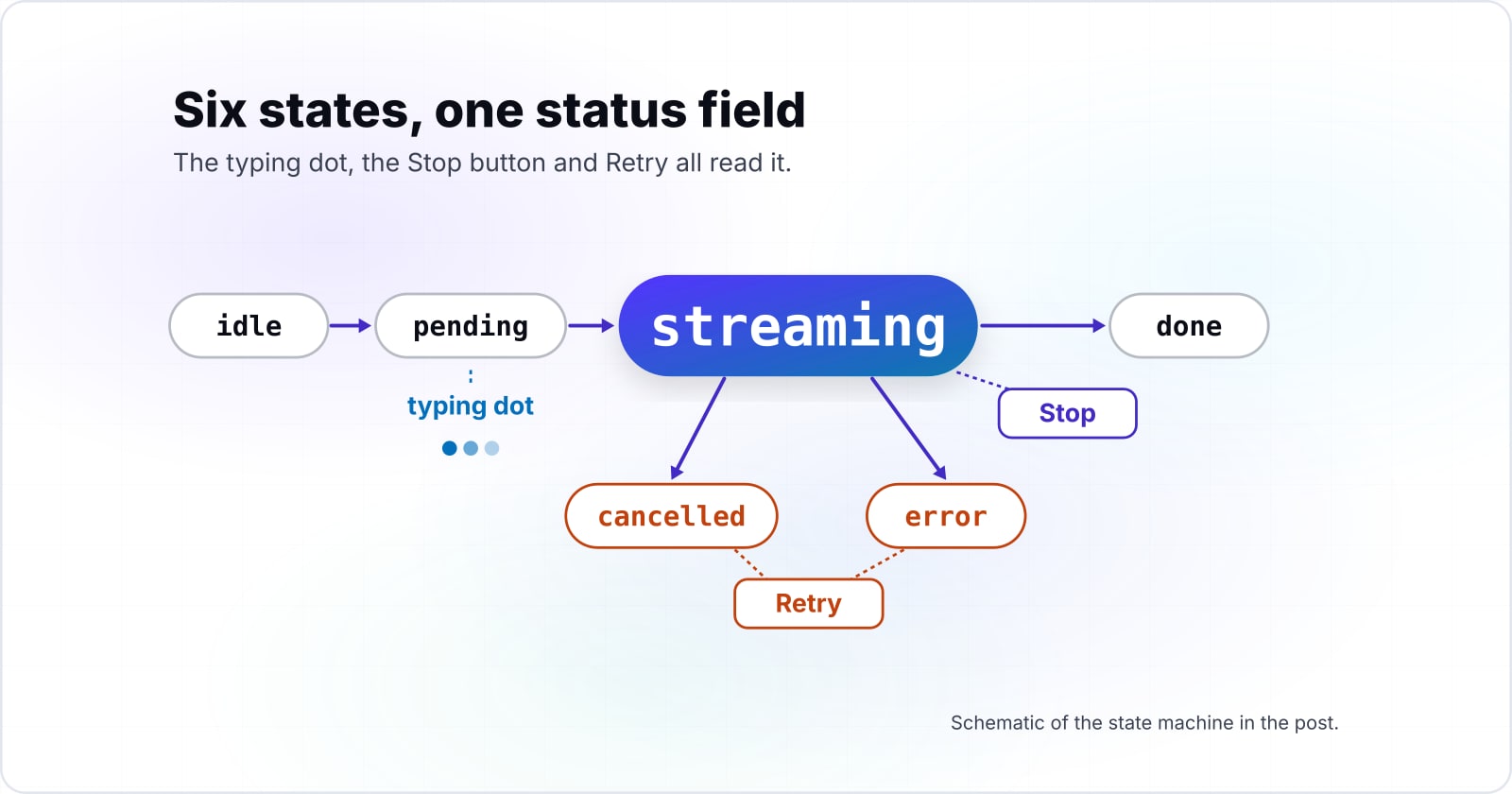
Each message is a small state machine: send moves it from idle to pending, the first token moves it to streaming, and the last token, a stop or an error ends it. Retry is the last move, and it takes cancelled or error back to pending.
So these AI UX patterns are views of states. The typing dot is pending, the growing bubble is streaming, and the error banner is error. Also, a Svelte class diagram for this is short. It has one Message class with status, text and attempt fields, plus send and stop.
Pending is the state most interfaces skip, and it is not short. For example, the arXiv study of 9 February 2026 fixed the time to first token at 2, 9 or 20 seconds.
Show data table
| Item | Value |
|---|---|
| short wait condition | 2 |
| medium wait condition | 9 |
| long wait condition | 20 |
Every condition leaves the reply in pending for seconds, so pending needs a view of its own.
However, a loading state that flashes is worse than none. Cloudscape's generative AI loading guidance (accessed October 2026) says to avoid a loading state under one second, since it can cause flicker in the interface. Therefore a two-second wait earns a visible pending view, and a nine-second wait needs one badly.
How do you stream a model response into Svelte?#
Read the fetch body through a TextDecoderStream and append each decoded chunk to the message's $state text, so Svelte repaints only the bubble that changed. MDN's ReadableStream page (4 July 2026) says Fetch offers a readable stream of byte data through the body of a Response. Then MDN's TextDecoderStream page (21 May 2026) turns those bytes into a stream of strings.
In practice, the loop is three lines. Pipe response.body through a TextDecoderStream, loop over it with for await, and add each chunk to text. The first chunk also moves status from pending to streaming.
The wait before the first token shapes the screen more than the stream rate does. At the arXiv study's 25 tokens per second (February 2026), a 2-second wait shows 250 tokens by second 12. Meanwhile, a 9-second wait shows 75 and a 20-second wait shows none.
Show data table
| Dimension | 2-second wait | 9-second wait | 20-second wait |
|---|---|---|---|
| 0 s | 0 | 0 | 0 |
| 2 s | 0 | 0 | 0 |
| 5 s | 75 | 0 | 0 |
| 9 s | 175 | 0 | 0 |
| 12 s | 250 | 75 | 0 |
| 20 s | 450 | 275 | 0 |
| 24 s | 550 | 375 | 100 |
The shorter wait stays ahead for the whole reply, because every condition streams at the same rate.
How does a SvelteKit server route stream the reply?#
A +server.js POST handler returns a Response whose body is the upstream ReadableStream, which keeps the provider key on the server and passes tokens on as they arrive. The SvelteKit routing docs say it directly: "The first argument to Response can be a ReadableStream". So the route can return the provider's body as its own Response. Then the stream passes through without waiting for the end.
The route reads the prompt, calls the provider from the server and hands back the body untouched. For example, Anthropic's streaming docs describe setting "stream": true to get server-sent events. That is one provider among many, and any provider with a streaming endpoint fits the same route. Because that format wraps text in event lines, parse them into plain text, either in the route or in the client loop.
The transport has a ceiling too. MDN's server-sent events guide (3 September 2026) caps open connections at 6 per browser and domain over HTTP/1.1. However, HTTP/2 negotiates its streams, with a default of 100.
Show data table
| Item | Value |
|---|---|
| HTTP/1.1 per browser and domain | 6 |
| HTTP/2 default simultaneous streams | 100 |
HTTP/2 lifts the per-domain ceiling from a handful of streams to a hundred.
How do you cancel a streaming AI response in Svelte?#
Call abort() on the AbortController whose signal the fetch carries, catch the AbortError it raises, and move the message to cancelled while keeping the partial text. MDN's Using Fetch guide (20 August 2025) states the first half. In its words, "The fetch() call will reject the promise with an AbortError exception." It adds that a body read after an abort also rejects with an AbortError.
So one catch block covers a stop before the first token and a stop in the middle. Check err.name, set cancelled for an AbortError, and set error for anything else. Then the text stays, because nothing cleared it.
Call abort()
Call abort() on the AbortController whose signal the fetch carries.
The fetch rejects
The fetch() call will reject the promise with an AbortError exception.
Catch it
Check err.name, set cancelled for an AbortError, and set error for anything else.
Keep the text
Then the text stays, because nothing cleared it.
Svelte 5 also has a helper for a different case. The getAbortSignal docs say it "Returns an AbortSignal that aborts when the current derived or effect re-runs or is destroyed". That suits a fetch started inside an effect. However, a Stop button is a person's choice, not a re-run, so it needs its own AbortController.
How do you announce a streaming reply to a screen reader?#
Put a short status line in an aria-live polite region and keep the streaming text out of it, so a screen reader hears that a reply started and finished, not every token. MDN's live regions guide (11 September 2026) says "Normally, only aria-live="polite" is used." A polite region speaks when the user is idle.
| aria-live setting | What a screen reader does | Where it belongs in a chat |
|---|---|---|
| off | does not announce changes | the streaming reply text |
| polite | speaks changes when the user is idle | the one-line status |
| assertive | interrupts the current announcement | nothing in a chat status |
Source: MDN Web Docs, ARIA live regions, 11 September 2026.
The failure is easy to hear. For instance, a write-up on accessible streaming chat by the developer azukiazusa shows the bug. Its screen reader "repeats the first few characters every time a new chunk arrives". Its fix is to announce short messages such as "Generating a response" and "Response complete" from a separate element.
Instead of writing those by hand, derive them. Because status already holds the state, a $derived line maps pending, done, cancelled and error to one short sentence each. Also, the W3C's WAI-ARIA 1.2 (6 June 2023) names a chat log as a live region. So the same rule holds for the whole list.
What changed from Svelte 4 to Svelte 5 runes?#
Svelte 5 replaced implicit top-level let reactivity and $: statements with explicit runes, $state, $derived and $effect, so a message store can be a plain class with reactive fields. Because of the old rule, the migration guide says, it "forced you to resort to using stores" outside a component.
| Svelte 4 | Svelte 5 runes | Where it shows in the chat |
|---|---|---|
| a top-level let | $state(...) | the status and text fields |
| $: for a derived value | $derived(...) | the status line |
| $: for a side effect | $effect(...) | scrolling to the newest reply |
| export let | $props() | passing a message to a bubble |
| on:click | onclick | the Stop and Retry buttons |
| a store outside the component | a class with $state fields | the Message class |
Source: Svelte 5 migration guide, svelte.dev.
In short, Svelte 4 needed a store plus reactive statements for this. That shift changes Svelte frontend patterns well beyond chat, because shared state no longer needs a store. Svelte 5 needs one class, and the $derived docs and $effect docs cover the rest.
Which docs do you build this from?#
Build from the SvelteKit routing docs, then the Svelte $state docs, then MDN on using Fetch and on AbortController, in that order. Each page answers one step of the build.
- Step 1
SvelteKit routing
a +server.js POST handler that returns a Response.
- Step 2
Svelte $state
class fields declared with $state.
- Step 3
MDN, Using Fetch
pipeThrough a TextDecoderStream and read it with for await.
- Step 4
MDN, AbortController
abort() and the signal the fetch carries.
Docs: SvelteKit routing, Svelte $state, MDN, Using Fetch, MDN, AbortController.
What is the smallest working version?#
The smallest working version is a SvelteKit route that relays the stream, a Message class with a $state status, and a send function that reads, stops and announces. First, add the route. Then add the page, which holds the class and the markup. The provider URL is a placeholder for an endpoint that streams plain text.
// src/routes/api/chat/+server.js
const PROVIDER_URL = 'https://provider.example/v1/stream'; // your provider's streaming endpoint
export async function POST({ request }) {
  const { prompt } = await request.json();
  const upstream = await fetch(PROVIDER_URL, {
    method: 'POST',
    headers: { 'content-type': 'application/json', ...JSON.parse(process.env.PROVIDER_HEADERS ?? '{}') },
    body: JSON.stringify({ prompt, stream: true })
  });
  return new Response(upstream.body, {
    status: upstream.status,
    headers: { 'content-type': 'text/plain; charset=utf-8' }
  });
}<!-- src/routes/+page.svelte -->
<script>
class Message {
status = $state('idle'); // idle | pending | streaming | done | cancelled | error
text = $state('');
attempt = $state(0);
#controller = null;
async send(prompt) {
this.#controller = new AbortController();
this.status = 'pending';
this.text = '';
this.attempt += 1;
try {
const response = await fetch('/api/chat', {
method: 'POST',
body: JSON.stringify({ prompt }),
signal: this.#controller.signal
});
if (!response.ok) throw new Error(`HTTP ${response.status}`);
const stream = response.body.pipeThrough(new TextDecoderStream());
for await (const chunk of stream) {
this.status = 'streaming';
this.text += chunk;
}
this.status = 'done';
} catch (err) {
this.status = err.name === 'AbortError' ? 'cancelled' : 'error';
}
}
stop() {
this.#controller?.abort();
}
}
let prompt = $state('');
const reply = new Message();
const busy = $derived(reply.status === 'pending' || reply.status === 'streaming');
const announcement = $derived(
{ pending: 'Generating a response', done: 'Response complete', cancelled: 'Response stopped', error: 'Response failed' }[reply.status] ?? ''
);
</script>
<form onsubmit={(e) => { e.preventDefault(); reply.send(prompt); }}>
<input bind:value={prompt} />
<button disabled={busy}>Send</button>
</form>
{#if busy}<button onclick={() => reply.stop()}>Stop</button>{/if}
{#if reply.status === 'cancelled' || reply.status === 'error'}
<button onclick={() => reply.send(prompt)}>Retry</button>
{/if}
<p>{reply.text}</p>
<p role="status" aria-live="polite">{announcement}</p>Retry is send again, so it clears the text and starts the next attempt from pending.
When is a hand-built stream the wrong tool?#
Use a chat SDK when you need branching threads or tool calls, and avoid one stream per tab over HTTP/1.1, which MDN (3 September 2026) caps at 6 per browser and domain. A hand-built machine fits one linear conversation per tab, and three cases call for something else.
First, tool calls and threads. The AI SDK's Svelte lessons have a chapter on tools and agents, and TanStack AI documents tools for function calling. Those are two examples, and others exist, so pick the one whose docs match your stack. However, the trade is a dependency whose updates you follow, against one small class that you maintain yourself.
Second, many tabs over HTTP/1.1. With MDN's cap of 6 (September 2026), ten open tabs connect only 6 streams. Meanwhile, HTTP/2 connects all ten under its default of 100. So serve the route over HTTP/2 before you add a queue.
Show data table
| Dimension | HTTP/1.1 | HTTP/2 |
|---|---|---|
| 1 tab | 1 | 1 |
| 2 tabs | 2 | 2 |
| 4 tabs | 4 | 4 |
| 6 tabs | 6 | 6 |
| 7 tabs | 6 | 7 |
| 8 tabs | 6 | 8 |
| 10 tabs | 6 | 10 |
Past 6 tabs, HTTP/1.1 connects no new stream while HTTP/2 connects every tab.
Third, a host that buffers. The SvelteKit routing docs note that streaming fails on "platforms that buffer responses, like AWS Lambda". In that case, move the route to a host that streams. Otherwise, send the reply whole and drop the streaming state.
Where to go from here#
Start with the statechart, then the read loop, then stop and the live region; the related posts below cover the language, offline and edge pieces. The ECMAScript 2026 guide covers the async iteration the read loop uses. Then the React progressive web app post shows the same kind of interface offline and installable. Finally, React rendering on Cloudflare covers where a streaming route runs at the edge.
If a team wants an AI feature built into its product with these states handled, see AI-augmented development. If the states need designing before anyone writes code, see UI and UX design. Still, the four docs pages above are enough on their own to build all of it.