SSO single point of failure: what breaks when your identity provider goes down or is breached
As a CTO or IT head, you will be asked what happens to every app when sign-in fails. The honest answer depends on which failure you mean, because a down provider and a breached one break different things and need different fixes.
Where does the SSO single point of failure actually sit?#
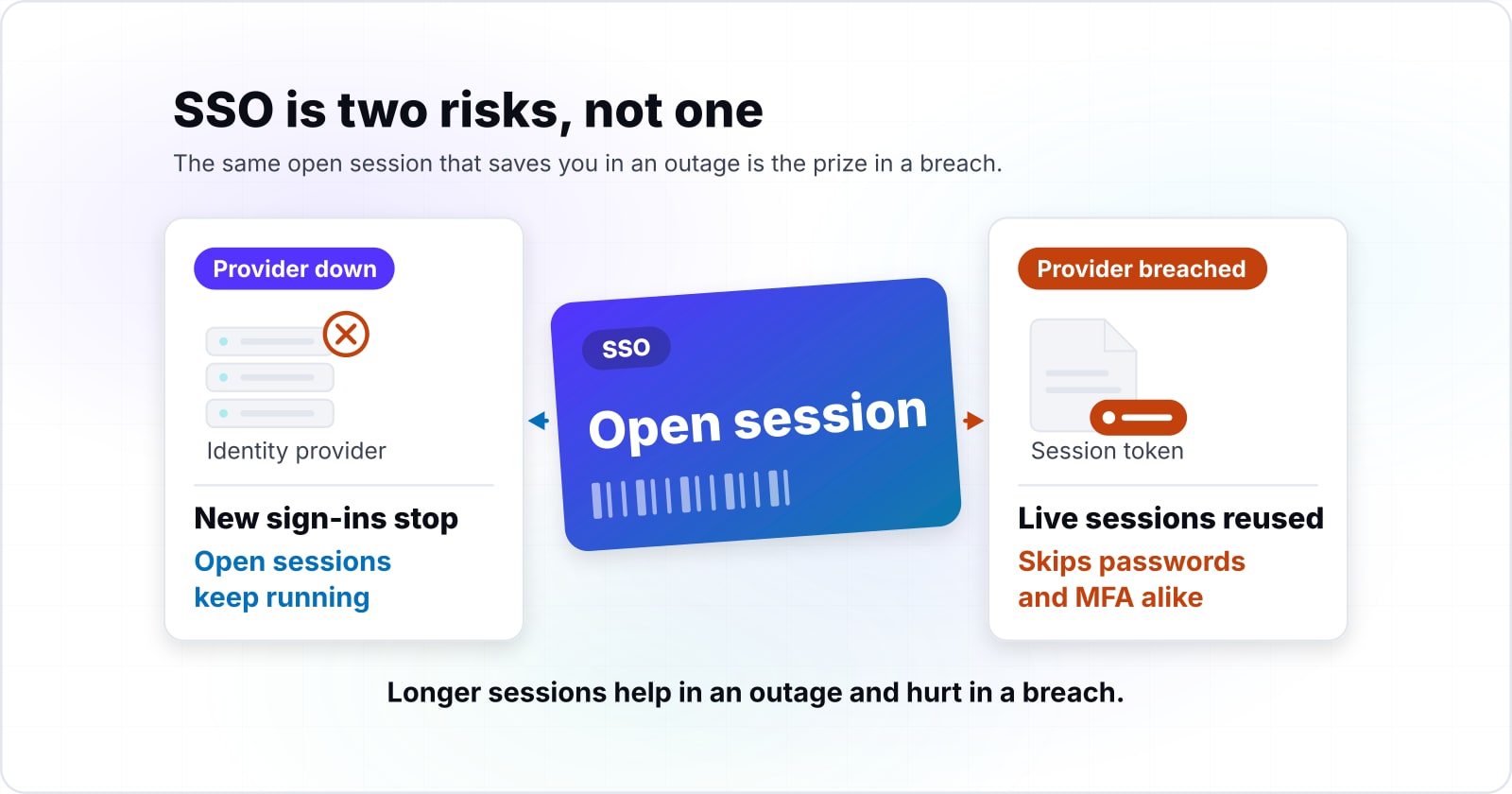
SSO concentrates two failures in one place: an outage that stops new sign-ins while open sessions keep running, and a breach that lets an attacker reuse live sessions. The SSO single point of failure is real, but it is two risks, not one. However, most talk about it blurs them together, and that leads to the wrong fix.
Take the outage first. Microsoft's backup authentication page, read November 2026, says users keep working during an outage "as long as they accessed them in the last three days from the same device". So an outage mostly hurts people who were not already signed in.
Then take the breach. Okta's root-cause report of 3 November 2023 says the stolen support files "contained session tokens which could in turn be used for session hijacking attacks". In other words, the same open session that saves you in an outage is the prize in a breach.
That tension runs through every choice below. Longer sessions help in an outage and hurt in a breach. Therefore you cannot set one dial and walk away. Instead, you pick a lever for each risk and test both.
Does SSO still reduce risk overall? For most teams, yes. Multi-factor authentication (MFA), a second proof such as a security key, gets turned on in one place. Also, a leaver is cut off in one place, and there is one log to watch. So the point is not to avoid SSO. It is to plan for the two ways it can fail.
What stops, and what keeps working, when the identity provider goes down?#
New sign-ins stop first while issued sessions run until they expire; Microsoft's Entra documentation, read November 2026, covers users seen in the last three days on the same device. An identity provider outage blocks new sign-ins and token refreshes, while sessions an app already issued keep working until their own lifetime ends.
For example, think of each app as holding its own pass. When you sign in through SSO, the app checks the provider once and then sets its own session. Until that session ends, the app does not need the provider at all. As a result, the blast radius of an outage is set by how long each app's own session lasts.
Also, Microsoft adds a safety net on top. Its resilience defaults page, updated 24 March 2026, says the backup service "automatically issues access tokens to applications for existing sessions". The same page says reauthentications for existing sessions make up more than 90% of authentications to Entra ID. So most of the daily traffic is already covered.
But the net has holes. Microsoft's app guidance, read November 2026, says the backup system "doesn't currently support web applications and services that are configured as confidential clients". A confidential client is a server-side app that holds its own secret. In practice, those apps lean entirely on their own session length during an outage.
Then policy checks change too. Microsoft's resilience defaults page, updated 24 March 2026, says that during an outage the service cannot judge every Conditional Access rule in real time. Conditional Access is the Entra feature that sets rules for who may sign in and from where. With the default left on, the service uses data from the start of the session. But turn it off for a policy, and sign-ins under that policy are blocked until the outage ends.
First, list which apps hold their own sessions and for how long. Then list which ones call the provider on every request. The second list is your real outage exposure.
| During an outage | What happens |
|---|---|
| New sign-ins and token refreshes | Stop until the provider is back |
| Sessions an app already issued | Keep working until their own lifetime ends |
| Existing Entra sessions | The backup service issues access tokens; reauthentications are more than 90% of authentications |
| Confidential client web apps | Not supported by the backup system; they lean on their own session length |
| Conditional Access with the default turned off | Sign-ins under that policy are blocked until the outage ends |
How often does a hosted identity provider actually fail?#
Microsoft's Entra SLA page, read November 2026, shows most months at 99.999% since 2021, with March 2021 the low point at 99.568%. A large hosted identity provider meets its availability promise almost every month, and its rare misses are concentrated and severe. An SLA (service level agreement) is the availability a vendor commits to in its contract.
Microsoft publishes this record month by month. An SLA (service level agreement) is the vendor's written uptime promise. Its SLA performance page, updated 6 January 2026, counts each user who fails to sign in within a minute as a failed user minute. Also, the figures are cut off at three decimal places, not rounded up.
Show data table
| Measure | Value | Target | Range |
|---|---|---|---|
| Mar 2021 | 99.568% | 99.99% | 99.5% to 100% |
| Dec 2021 | 99.978% | 99.99% | 99.5% to 100% |
| Mar 2025 | 99.996% | 99.99% | 99.5% to 100% |
| Jul 2026 | 99.999% | 99.99% | 99.5% to 100% |
A large hosted identity provider meets its availability promise almost every month, and its rare misses are concentrated and severe.
In practice, the shape matters more than the average. A provider can post years of near-perfect months and still have one month that wrecks a quarter. For that reason, a vendor's headline promise tells you little about the bad day you must plan for.
Because it is a global total across every tenant, your own tenant could fare better or worse. So ask your own vendor for its past monthly figures before you sign.
What does an availability percentage mean in minutes of lockout?#
A 99.99% availability promise allows 4.3 minutes of failed sign-ins in a 30-day month, while a 99.568% month allows about 186.6 minutes. Converting an availability percentage into minutes a month shows that one bad month outweighs years of good ones.
Take the share that failed, which is 100 minus the percentage, and apply it to the 43,200 minutes in a 30-day month. Microsoft's backup system page, read November 2026, promises 99.99%. Applied to that promise, the sum gives about 4.3 minutes. Then take the March 2021 figure of 99.568% from the SLA page updated 6 January 2026, and the same sum gives about 186.6 minutes.
Show data table
| Item | Value |
|---|---|
| 99.999% | 0.4 |
| 99.99% promise | 4.3 |
| 99.978% | 9.5 |
| 99.568% | 186.6 |
One bad month outweighs years of good ones.
Because Microsoft counts failed user minutes, these are minutes spread across all users, not one clean block of downtime. In the SLA record updated 6 January 2026, a typical month at 99.999% costs under half a minute, while the worst month, March 2021, cost over three hours.
Minutes of failed sign-ins
Enter your own provider's promise or its worst month. The sum is (100 minus the percentage) divided by 100, times the minutes in the month.
Minutes of failed sign-ins per month
4.3
- The same figure per year
- 51.8
Arithmetic on the percentage you enter. Modelled, not measured.
Put your own number in the risk register this way. Use the vendor's promise for the normal month and its worst published month for the bad one. Then ask which of your apps would stop for those minutes, and which would carry on.
What does a breached identity provider look like in practice?#
Okta's root-cause report, read November 2026, says an attacker reached support files for 134 customers between September 28 and October 17, 2023, and hijacked sessions at 5. In the Okta 2023 incident the attacker never broke sign-in; it reused session tokens left in support files, which skips passwords and MFA alike.
The route was ordinary. Okta's report of 3 November 2023 says the attacker used a service account stored in the support system itself. An employee had signed in to a personal Google profile on a work laptop, and the account's details were saved there. From that foothold, the attacker opened files that customers had uploaded for support.
Then some of those files turned out to be HAR files. A HAR file is a browser recording of a session, often sent to support to show a bug. Because it records the traffic, it can hold a live session token. So anyone who holds that token can act as the user without a password or an MFA prompt.
Show data table
| Stage | Count (customers) | Share of first stage |
|---|---|---|
| Files accessed | 134 | 100% |
| Sessions hijacked | 5 | 3.7% |
| Own response | 3 | 2.2% |
The attacker reached files for 134 customers and hijacked sessions at 5.
Okta's report of 3 November 2023 says the attacker used those tokens "to hijack the legitimate Okta sessions of 5 customers". Then Okta's guidance on HAR files, read November 2026, tells customers to restrict API tokens to an allowed network range. An API (application programming interface) token lets a script act for an account. That fix targets the token, not the password.
MFA protects the moment of sign-in, but a stolen session skips that moment. So breach defence for SSO is about how long a session lives and how fast you notice odd use of it.
How long can a stolen session stay useful before anyone notices?#
Okta's dated timeline, read November 2026, puts the first customer report on 29 September 2023 and the compromised service account's discovery on 16 October. Detection at the provider can take weeks, so your own session limits and sign-in monitoring are the controls that work during that gap.
Show data table
| Item | Value |
|---|---|
| Second report | 3 |
| Third report | 13 |
| Account found | 17 |
| All alerted | 20 |
Detection at the provider can take weeks.
The timeline in Okta's report of 3 November 2023 is worth reading slowly. On 29 September 2023, the first customer, the password manager 1Password, flagged odd activity. A second customer, the security vendor BeyondTrust, reported on 2 October, and a third on 12 October. Then on 13 October, BeyondTrust handed over the network (IP) address the attacker used, and that clue led to the account three days later.
In short, customers saw the attack before the provider did. However, that is not a failure unique to one vendor. Since every provider finds a breach in its own time, you cannot shorten that time from outside.
What you can shorten is your own exposure. First, watch your sign-in logs for sessions that jump between networks or countries. Second, copy Okta's own fix from the same report: it now binds admin session tokens to a network location. As a result, with that feature on, an Okta admin must sign in again when the network changes. Finally, keep admin sessions short, because an admin token is the one an attacker wants most.
How long should sessions last when outages and breaches pull in opposite directions?#
Longer sessions ride out an outage and shorter ones cut a stolen token's value; NIST SP 800-63B-4, read November 2026, caps AAL2 reauthentication at 24 hours. Set session lifetimes by assurance level, short for admins and long enough for everyone else to ride out a short outage.
The National Institute of Standards and Technology (NIST) sets this ceiling for US federal systems. Its SP 800-63B-4 guide, read November 2026, says the overall timeout "SHOULD be no more than 24 hours at AAL2". An authentication assurance level (AAL) says how strong a sign-in is, and AAL2 requires two factors. At AAL3, the higher level, the same guide sets 12 hours.
Show data table
| Item | Value |
|---|---|
| AAL2 overall | 24 |
| AAL3 overall | 12 |
| AAL2 inactivity | 1 |
Longer sessions ride out an outage and shorter ones cut a stolen token's value.
Read that ceiling as a trade. At the NIST ceiling, a 24-hour session means a short outage passes before most staff notice. However, it also means a stolen token works for up to a day. Meanwhile, an idle timeout narrows the gap, since an unused token dies sooner.
So split by role. Admins get the short end: a few hours at most, with the idle timeout on. Everyone else gets a session long enough to cover a typical outage, inside the ceiling your auditor accepts.
Also, every major provider lets you set this. Okta's global session policy, read November 2026, sets a maximum session lifetime and a maximum idle time. It also notes the Admin Console can have its own timeout. Keycloak, the open-source identity server, calls its two dials SSO Session Idle and SSO Session Max. Then Microsoft Entra ID sets the same thing through its sign-in frequency control.
How do you build a break-glass account that survives the identity provider?#
Microsoft's Entra guidance, read November 2026, says to create two or more cloud-only emergency access accounts, keep them out of federation, and test them every 90 days. A break-glass account works only if it shares no dependency with the identity provider it is meant to bypass, and only if someone has tested it.
A break-glass account is an emergency admin login that does not go through SSO. You use it when SSO itself is broken, or when a bad policy locks every admin out. Microsoft's emergency access page, updated 5 June 2026, gives the plain step: "Create two or more emergency access accounts."
Also, the same page lists what makes those accounts safe to rely on. Here is the checklist it supports, from the June 2026 text:
- Check 1
Make them cloud-only, not federated or synced from an on-premises directory.
- Check 2
Protect them with a passkey, a sign-in key held on a device, or a security key, using a method your normal admins do not use.
- Check 3
Exclude them from any Conditional Access policy that could block sign-in.
- Check 4
Tie them to no single person, and store the credentials where several admins can reach them.
- Check 5
Alert other admins whenever one of them signs in.
- Check 6
Test sign-in and an admin task at least every 90 days.
Atlassian takes the same view for Isolated Cloud, its product where sign-in runs only through your own identity provider. Its break-glass page, read November 2026, defines the account as one that "bypasses SSO and is governed by an immutable authentication policy". The account uses a password plus a hardware key. In particular, it can only change identity and SSO settings.
In practice, the test is where most plans fail. An account left untried for a year may have an expired key, a removed role or a policy that now blocks it. Therefore put the drill Microsoft's June 2026 page asks for, every 90 days, in a calendar with an owner's name beside it.
Does self-hosting the identity provider remove the concentration risk?#
Self-hosting moves the single point of failure into your own operations rather than removing it, and Keycloak's multi-site guide, read November 2026, supports only two sites. Hosted and self-hosted identity providers both concentrate risk; the choice decides whether recovery is a vendor's job under contract or your own team's job on call.
With a hosted provider, the vendor runs the failover. Microsoft's backup system page, read November 2026, promises 99.99% for Entra sign-in. Behind that promise sits a backup system you never see. So you carry the contract and the vendor review, not the pager.
With a self-hosted server such as Keycloak, the pager is yours. Keycloak's high availability overview, read November 2026, says deployers "are responsible for designing, validating, and operating" their own setup. That covers the database, the network and the load balancer as well as Keycloak.
However, even the strongest setup has limits. Keycloak's multi-site guide, read November 2026, is plain about it. "This setup is tested and supported only with two sites." It also says manual steps are needed to bring the sites back in sync after a link failure. So someone on your team has to know those steps in the middle of the night.
So the real question is who you want holding recovery. Self-hosting can make sense when you need the data in your own region or a fixed bill. If you weigh that route, the cost side is in Keycloak vs Auth0 cost. Moving users across is in migrating Laravel users to Keycloak.
Which SOC 2 and ISO 27001 controls cover an identity provider failure?#
SOC 2 covers identity provider risk under CC9.2 for vendors and A1.2 and A1.3 for recovery, and ISO/IEC 27001:2022 under A.5.19 to A.5.23 and A.5.30. An auditor reads the identity provider as a critical supplier and a continuity dependency, so the evidence is a vendor review, a tested break-glass path and a recovery test.
SOC 2 (System and Organization Controls 2) is the audit built on the trust services criteria of the AICPA, the American Institute of Certified Public Accountants. The AICPA text is the 2017 criteria with March 2020 updates. Its criterion CC9.2 reads: "The entity assesses and manages risks associated with vendors and business partners." Also, A1.3 in the same text says the entity "tests recovery plan procedures". So an identity provider sits under both.
ISO/IEC 27001:2022 is the third edition of the information security standard, published by ISO and IEC, the two international standards bodies behind it, in October 2022. Its supplier controls run from A.5.19, information security in supplier relationships, to A.5.23, information security for use of cloud services. Then A.5.30 covers ICT readiness for business continuity, where ICT means information and communication technology.
Here is the evidence each lever gives an auditor:
| Lever | What it answers | Evidence to keep |
|---|---|---|
| Vendor review of the provider | SOC 2 CC9.2; ISO A.5.19 to A.5.23 | the provider's SLA, its past record, your review notes |
| Break-glass accounts | SOC 2 A1.2; ISO A.5.30 | the account list and the dated 90-day drill log |
| Session lifetimes by role | SOC 2 CC9.2; ISO A.5.23 | the policy settings and the reason for each value |
| Outage drill | SOC 2 A1.3; ISO A.5.30 | the test date, what stopped, what kept working |
Source: AICPA trust services criteria, 2017 criteria with March 2020 updates; ISO/IEC 27001:2022.
One change is coming. Schellman, an audit firm, wrote on 6 November 2026 that the AICPA has revised criteria out for comment. In that note, the new text applies to reports issued after December 31, 2027. Because criterion numbers may shift, map your evidence to each control's meaning as well as its number.
When is a second identity provider the wrong tool?#
A second identity provider doubles the attack surface and the policy drift, so without a dedicated identity team a tested break-glass path and shorter admin sessions protect more. For a company without a dedicated identity team, a full failover identity provider adds more breach surface than outage protection, and the better tool is break-glass plus session design.
At first, a second provider sounds like insurance. In practice, it is a second place to be breached, with a second set of admins and policies to keep in step. Since the Okta 2023 case turned on stolen sessions, not on downtime, doubling the places that issue sessions doubles that risk.
Here are three cases where it is the wrong tool, and what to use instead:
- You have under a few hundred staff and no identity team. Use two tested break-glass accounts and a written outage runbook. They cover the lockout case at a fraction of the effort.
- Your apps hold their own sessions for a working day. A short outage passes unnoticed already, so spend the effort on session limits and sign-in alerts.
- Your worry is a breach, not downtime. A failover provider does nothing for a stolen token. Short admin sessions, token binding and log alerts do.
A second provider earns its place in a narrower case. You run a large estate with a full-time identity team. Also, you owe strict uptime terms to your own customers, and you can keep two sets of policy in step.
What should you write down before the next outage?#
First, start with the outage half. List each app, how long its own session lasts, and whether it needs the provider on every call. Then name the two break-glass accounts, where their keys live and the next drill date.
Then write the breach half. Write the session lifetime for admins and for everyone else, with the reason. Name who watches sign-in logs and what alert they act on.
If you are still choosing a provider, the licence side is in what SSO and identity and access management (IAM) licences cost. The go-live side, including fallback login during cutover, is in what SSO implementation costs. For setup help, see enterprise SSO. For audit preparation, see security and compliance.
Still, you may not need any of that. The vendor pages cited above, from Microsoft, Okta, Keycloak and NIST, are enough on their own to write the page this week.