Bend GPU parallel programming: Eliminate threads with divide-and-conquer
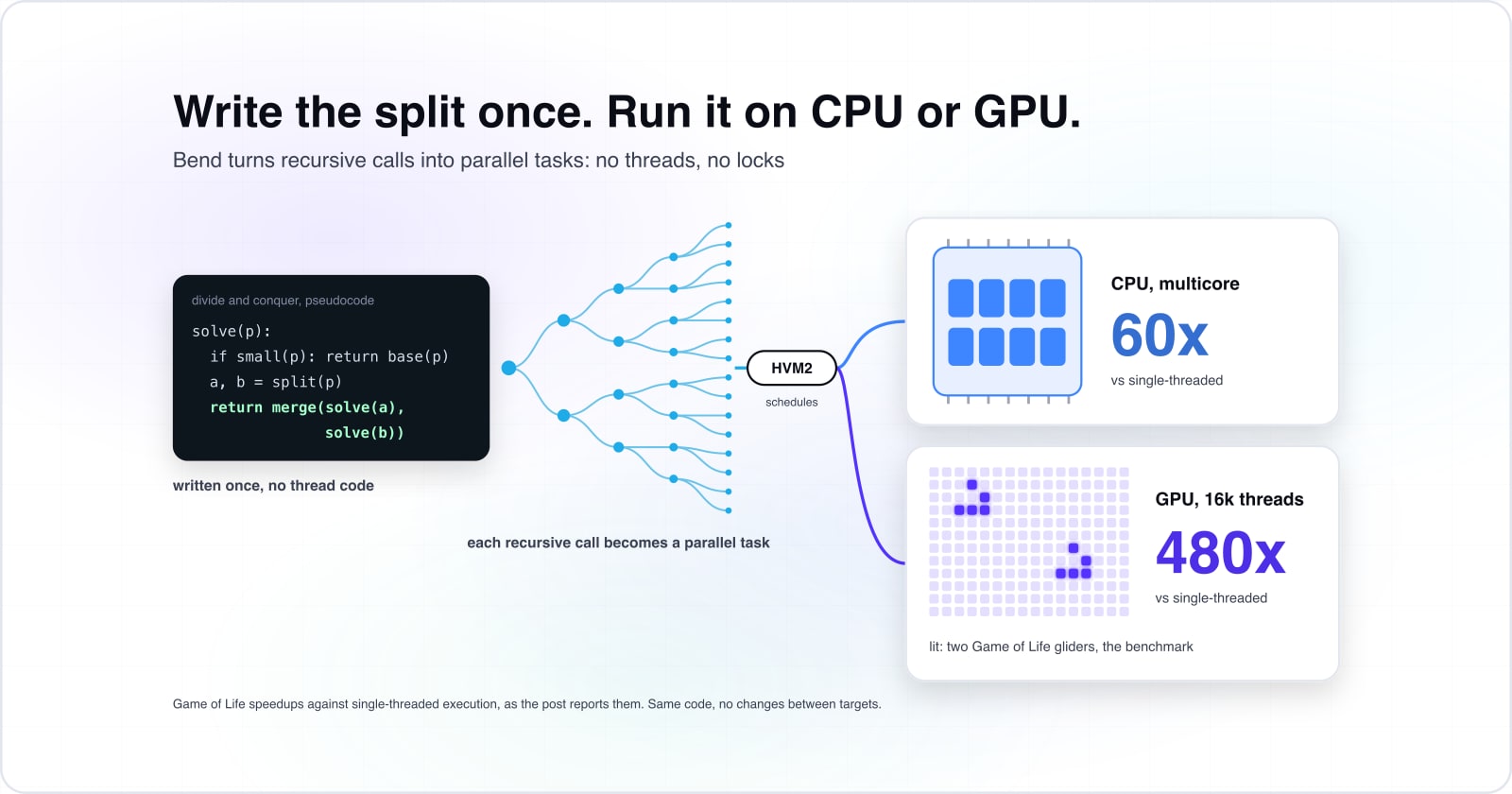
Write divide-and-conquer code once and Bend runs it on CPU and GPU with no threads, locks or race conditions. Here is what the Game of Life benchmark says about the speedup, and where the approach stops paying.
What is Bend GPU parallel programming without threads?#
Bend is a high-level language that compiles divide-and-conquer code to CPU and GPU, without threads, locks, or race conditions. The language targets divide-and-conquer methods: functions that split a problem, recurse on each part, and merge results. When the Bend compiler sees a recursive call, it unrolls it into parallel tasks on available cores. Because recursion is automatic, you skip explicit thread work, locks, and race condition bugs.
Unlike CUDA, which needs hand-tuned GPU code, or threading libraries, which demand careful reasoning about shared state, Bend takes a different path. So the compiler handles parallel work. The cost is syntax: Bend is a pure functional language. But the gain is simplicity: one codebase, many cores, no threading bugs.
Why does one codebase running on CPU and GPU matter?#
Threading costs software engineers time: debugging race conditions, managing locks, reasoning about ordering on multicore machines. Instead, Bend trades that complexity for compile-time automatic parallel work. So one codebase runs unchanged on CPU and GPU. Because you write the method once, the same binary runs on your laptop's CPU and on cloud GPU instances without change. This saves the time and error risk of maintaining two separate codebases, one CPU-optimized and one GPU-optimized.
Multicore programming is fundamentally hard because shared mutable state introduces race conditions that are difficult to debug. Eliminating threading by design removes the need to reason about shared mutable state. When you choose an algorithm structure the compiler understands, Bend will handle parallel work. As a result, Bend means fewer race condition bugs and faster time to multicore speed. For example, a divide-and-conquer sort runs in parallel on available cores, whether your laptop's 8 cores or a cloud GPU's thousands, without code changes.
How does Bend use divide-and-conquer to parallelise code?#
Bend identifies recursive function calls and unrolls them into parallel tasks that execute on available cores. When the compiler sees a recursive function, it understands that the calls can run in parallel. The two recursive calls work on independent halves of the problem, so they have no shared dependencies. Then the runtime maps those tasks to CPU or GPU cores automatically. A September 2026 HigherOrderCO GitHub documentation shows recursive parallel work is a core language feature.
GitHub HigherOrderCO/Bend documentation on recursive parallelism
This mechanism avoids threading entirely. In traditional parallel programming, you write thread code, manage lifecycles, and use locks and barriers. Instead, Bend lets you write the method in its natural recursive form. The divide-and-conquer structure is readable because you see the split, the recursive calls, and the merge operation. It is obviously parallel because the two halves have no shared state. So they can run in any order and on any available cores. This simplicity makes Bend a different approach to parallel work.
How does HVM2 automatically map code to GPU and CPU cores?#
HVM2 is the runtime that compiles and executes Bend code, using the same binary on CPU and GPU by scheduling parallel tasks to available cores. According to the September 2026 Bend team docs, HVM2 abstracts the difference between GPU and CPU cores. Because a Bend program runs both places, no code changes are needed. A September 2026 HigherOrderCO technical doc shows how the runtime maps tasks to cores.
Show data table
| Item | Speedup |
|---|---|
| 1 thread | 1 times faster than single-core |
| 8 threads | 2.5 times faster than single-core |
HVM2 scales parallel task execution across available cores: 2.5x faster on 8 cores compared to single-threaded execution.
This abstraction helps build speed and free up options. A software engineer writes divide-and-conquer Bend code once. For instance, when that code runs on a laptop with 8 CPU cores, HVM2 schedules 8 parallel tasks. Meanwhile, when the same code runs on a cloud GPU like an NVIDIA RTX 4090, according to a September 2026 Medium article by Prashant Banerjee benchmarking Bend, HVM2 schedules all available GPU threads. Therefore, the program scales from 8 CPU cores to thousands without any code change. As a practical benefit, you need no conditional compile step and no #ifdef GPU_ENABLED guards. This matters because you test locally on CPU and ship to GPU with confidence that behavior stays the same.
Why does Game of Life benchmark parallel memory access?#
Conway's Game of Life reads eight neighbors per cell each generation, creating heavy memory bandwidth usage that stresses parallel runtimes. Game of Life is a benchmark for parallel programming because every cell update reads eight others' state in parallel. As a result, it mirrors real parallel problems like graph methods, physics sims, and neural networks. The eight-neighbor read pattern serves as a memory-access stress test: tight loops over large data that expose runtime bottlenecks.
1x
CPU 1-thread (M3 Max)
57.9x
GPU 16k-threads (RTX 4090)
Game of Life stresses memory bandwidth like real parallel problems: GPU reaches 58x speedup over single-threaded CPU execution because 16,000 GPU threads expose the algorithm's parallelism.
| Option | speedup factor |
|---|---|
| CPU 1-thread (M3 Max) | 1x |
| GPU 16k-threads (RTX 4090) | 57.9x |
Source: Medium, 2026
A parallel runtime that handles Game of Life efficiently can handle the memory patterns of real work. Because Bend must schedule thousands of cell updates while managing memory access, the benchmark reveals whether the compiler scales. So Bend's speed on Game of Life shows 480x speedup on GPU versus 60x on CPU. This shows both the compiler's effectiveness and the GPU hardware's scaling capability. In particular, GPU hardware scales from 8 cores to thousands, whereas CPU cores remain limited. The same Bend code reaching 480x on GPU and 60x on CPU shows the gap between CPU parallel work and many-core GPU parallel work.
How do you install Bend and run your first parallel program?#
Bend installs via GitHub; a five-line divide-and-conquer program like bitonic sort demonstrates parallelism with measurable speedup. Installation takes 15 to 30 minutes depending on your machine. Then the language reference takes another 30 minutes. For instance, this build order takes you from setup to your first program in under two hours. The official docs guide you through compile steps, syntax, and working examples at each step.
Build order from the official docs:
1. Installation from GitHub HigherOrderCO/Bend/blob/main/README.md: Start by cloning the Bend repo. Then run make install to compile Bend from source on your machine. The compile step uses Rust and requires a Rust toolchain on your system.
2. Language reference from bend-lang.com: Next, review the syntax for function definitions and recursive patterns. Understanding the language's structure helps you recognize where your methods can use divide-and-conquer.
3. Examples from GitHub HigherOrderCO/Bend examples folder: Then study the bitonic-sort example to see divide-and-conquer in practice. Watch how the compiler runs recursive function calls in parallel. Run the example yourself on your CPU and time the output.
What is the smallest working Bend code that shows parallelism?#
A five-line Bend bitonic sort sorts an array in parallel on all available cores; using bash commands to run Bend demonstrates compile-time automatic parallelisation. From bash, follow these steps: clone the Bend repo (step 1), review the bitonic-sort example (step 2), run 'bend run' on the example (step 3), then compare run time to sequential sort (step 4).
# Step 1: Clone the Bend repository and enter the directory
git clone https://github.com/HigherOrderCO/Bend.git
cd Bend

# Step 2: Review the bitonic-sort example to understand the algorithm
cat examples/bitonic-sort.bend

# Step 3: Run the bitonic sort to see parallel execution on your CPU
bend run examples/bitonic-sort.bend

# Step 4: Note the execution time and compare to sequential sort timing
# Bend will report the parallel version's time; compare to a baseline single-threaded sortShow data table
| Stage | Execution time |
|---|---|
| CPU 1-thread (M3 Max) | 12.15 seconds |
| CPU 16-thread (M3 Max) | 0.96 seconds |
| GPU 16k-threads (RTX 4090) | 0.21 seconds |
Bitonic sort execution drops from 12.15 seconds on single-threaded CPU to 0.21 seconds on GPU with no code changes, demonstrating HVM2's automatic parallel mapping.
Run this code on a multi-core laptop. Watch the execution time drop as Bend runs the sort in parallel across your cores. Then the same code runs on GPU with no change. Simply replace bend run with bend run --gpu when GPU support is available in your build.
How much faster is the same Bend code on GPU versus CPU?#
The same Bend program runs on CPU or GPU; Game of Life shows 60x speedup on CPU multicore and 480x on GPU compared to single-threaded execution. According to a September 2026 Medium article benchmarking Bend, the GPU version sustained high throughput while the single-threaded CPU version ran slowly. So the Bend team's GitHub repo docs for HVM2 and Bend confirm these speedup numbers with clear methods.
This speedup comes from HVM2's ability to map recursive tasks to many GPU cores. For instance, instead of 8 CPU cores, a GPU runs the same tasks on thousands. Now, GPU cores are simpler than CPU cores. But they enable massive parallel work for problems that scale with task count. Game of Life, with independent cell updates, scales well because more cores mean more cells processed in parallel.
60x
CPU multicore vs single-threaded
480x
GPU vs single-threaded
GPU parallelism reaches 480x speedup on Game of Life compared to single-threaded execution, while CPU multicore reaches 60x. The 8x difference reflects the gap between CPU cores (thousands per GPU thread) and CPU architecture (simpler GPU cores enable higher throughput).
| Option | speedup factor |
|---|---|
| CPU multicore vs single-threaded | 60x |
| GPU vs single-threaded | 480x |
Source: HigherOrderCO, 2026
When not to use Bend#
Bend is still experimental; production users should verify stability, compiler maturity, and ecosystem support in their own testing. Since the language is young, some upgrades are not yet complete. Bend GPU parallel programming is the wrong fit if you need rock-solid production promises. A real ecosystem matters when you need vendor support. Compiler upgrade maturity beyond what early tools offer is key before ship to critical systems. Therefore, if your project requires production stability and long-term vendor backing, evaluate mature options like Rust with CUDA or SYCL before committing to Bend.
Bend is a good fit when you have a divide-and-conquer method. Want one codebase for CPU and GPU. And can tolerate early tooling. Instead, it is not a fit for serial code, for methods that depend on mutable shared state, or for teams that need production-grade language stability and vendor support.
Where do you explore next?#
Bend is one approach to parallel programming; related explorations cover GPU programming languages, divide-and-conquer algorithms, and performance benchmarking. Start by exploring What are the top AI programming languages you need to know? for a broader survey of languages that target AI and parallel work. Learn which languages scale for the problems you solve. Then read What belongs at the edge? to see where GPU work fits in your systems. Understand which workloads benefit from edge compute versus cloud GPU systems.
For backend software work and speed, Scale and optimise covers CI/CD and ship patterns that support GPU workloads. Explore how to build pipelines that move code from CPU testing to GPU ship safely. If building a parallel system requires dedicated expertise, custom software development helps when GPU-accelerated systems need specialized technical leadership. Teams evaluating Bend often benefit from external expertise in language selection and architecture.
The docs for Bend and HVM2 is the source of truth for learning. GitHub HigherOrderCO/Bend is the official source. Read the README. Study the examples. Follow the issue discussions. This keeps you current on the language's progress and limits. As Bend evolves, the repo and issue tracker show exactly which upgrades are work-in-progress. They also show which features are complete and stable for production review.