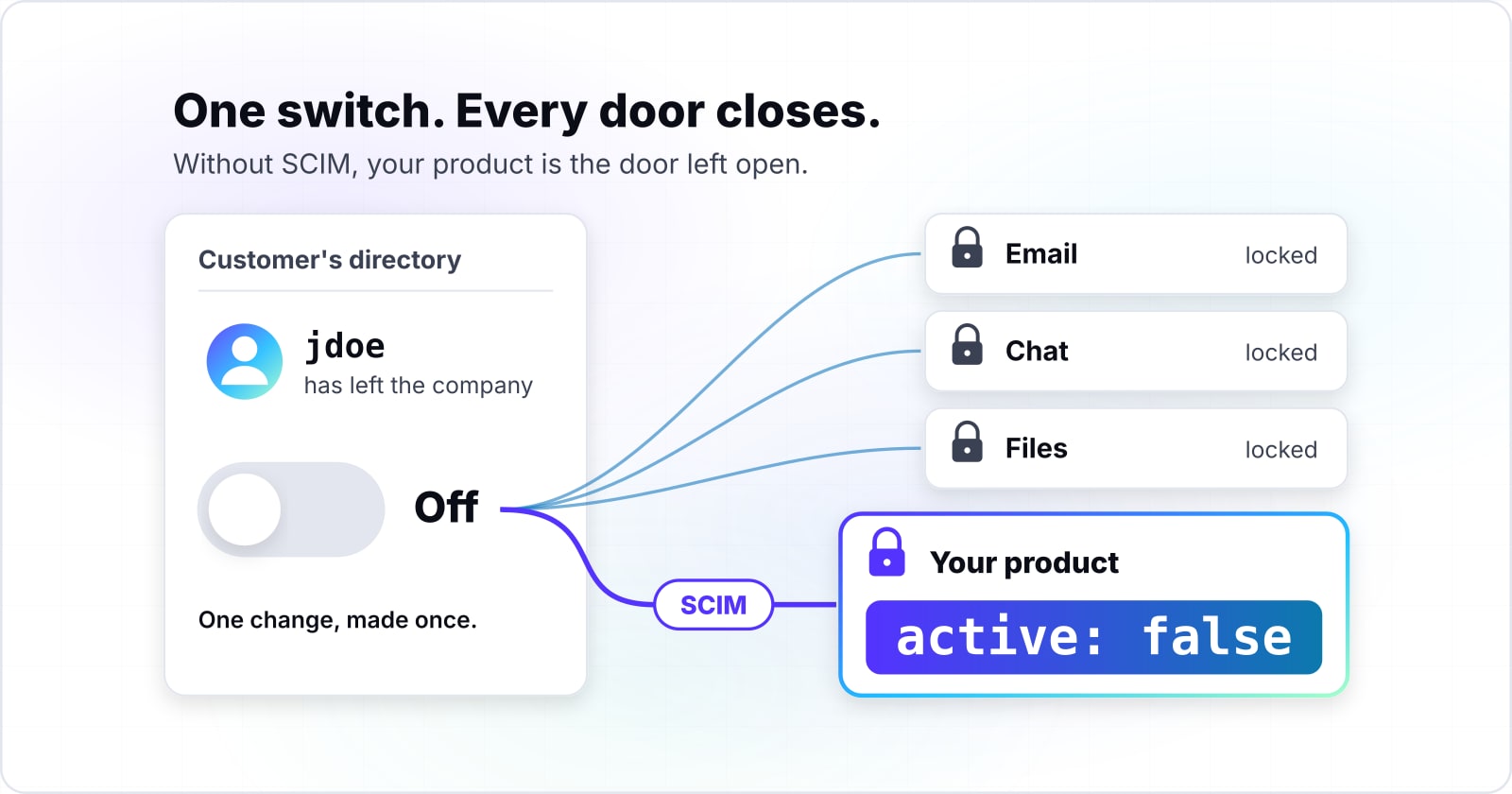
SCIM provisioning for B2B SaaS: what your enterprise customer is actually asking for
As the chief technology officer of a growing software company, you can watch your first enterprise deal stall on one security review row: Do you support SCIM? That row is about removing people, and the endpoint behind it is smaller than it sounds.
What does SCIM provisioning for B2B SaaS actually give your enterprise customer?#
SCIM provisioning for B2B SaaS lets your customer's identity provider create, update and deactivate accounts in your product, so a departed employee loses access without a ticket. A B2B SaaS product sells to companies, and each company keeps its staff in a directory. That directory is the identity provider, such as Okta or Microsoft Entra ID, Microsoft's cloud directory. With SCIM, the directory calls your app instead of a person typing changes into it.
The standard is short and public. In September 2015, the internet's standards body published it as two Requests for Comments (RFCs). RFC 7643 defines the user and group records. Then RFC 7644 defines the calls. Microsoft's guide sums up the shape: the protocol "defines core resource endpoints, including a /Users endpoint and a /Groups endpoint."
Each call is a REST request, the usual style of web call: a plain web request on an address such as /Users. The body is JSON (JavaScript Object Notation), a simple text format. Within that body, one field carries most of the weight. RFC 7643 defines the user's active attribute as "A Boolean value indicating the user's administrative status." In other words, it is true or false. So when the directory sets it to false, the person should be locked out.
Why does the security review ask about SCIM at all?#
The row is about offboarding: the customer's IT team wants proof that removing someone from Okta or Entra ID removes them from your product too. Microsoft's provisioning overview names the goal in plain words: "Automatically deactivate accounts in the right systems when people leave the team or organization."
For that team, the stakes are simple. Without SCIM, every leaver means a ticket to every app. Then one missed ticket leaves a live account for someone who no longer works there. With SCIM, one change in the directory reaches your product at the next sync. So the questionnaire row is really asking whether your product joins that one change.
Meanwhile, the market prices it as a per-customer feature. WorkOS, an identity vendor, lists Directory Sync at 125 dollars per connection for the first 15 connections. On the same page, read 21 November 2026, the price falls to 65 dollars at 51 to 100 connections.
Show data table
| Item | Value |
|---|---|
| 1 to 15 connections | 125 |
| 16 to 30 connections | 100 |
| 31 to 50 connections | 80 |
| 51 to 100 connections | 65 |
The price per connection falls from 125 dollars to 65 dollars as the connection count grows.
A connection here is one customer's directory linked to your app. In short, each enterprise deal brings its own SCIM link to run.
How is SCIM different from SAML SSO and JIT provisioning?#
SAML signs a user in, JIT provisioning creates the account at first sign-in, and only SCIM tells your product when that user has left. SAML (Security Assertion Markup Language) is the sign-in standard behind most enterprise single sign-on (SSO). Then JIT (just-in-time) provisioning means your app builds the account from the details in that first SAML sign-in.
Both of those act only when a person shows up. However, the person offboarding is about never shows up again. As a result, their account in your app stays active until someone removes it by hand. SCIM closes that gap because the directory calls you. Microsoft's provisioning guide puts the leaver case in one line: "For SCIM applications, a disable is a request to set the active property to false on a user."
So the SCIM vs SAML question has a short answer. They are partners, not rivals. SAML answers "who is this person right now", while SCIM answers "who still works here". Most enterprise questionnaires list both rows. But JIT provisioning answers neither the second row nor the offboarding question behind it.
If your product has no SSO yet, that comes first. Our guide to what an SSO retrofit costs, phase by phase sizes it. For a sign-in project already done, our case study of a Keycloak sign-on migration shows one. Keycloak is an open-source identity server.
| Mechanism | When it acts | What it does | Removes a leaver |
|---|---|---|---|
| SAML single sign-on | At sign-in | Signs the person in | No |
| JIT provisioning | At first sign-in | Creates the account | No |
| SCIM | When the directory changes | Creates, updates and deactivates | Yes, active set to false |
What do Okta and Microsoft Entra ID actually send to your SCIM endpoint?#
Both send REST calls to /Users and /Groups with a token in the Authorization header, and both start by asking whether the user already exists with a userName filter. The userName is the unique login, often the work email. Okta's prepare guide allows an OAuth 2.0 token or basic authentication, where OAuth is the common standard for issuing access tokens. Meanwhile, Microsoft asks the endpoint to accept a single token for authentication and authorization.
Okta's SCIM 2.0 reference, updated 18 September 2026, starts every push the same way. First, Okta checks that the user exists "through a GET method request with the filter=userName eq" query. GET, POST, PUT, PATCH and DELETE are the standard web methods to read, create, replace, change and remove. Then, if the filter finds no match, Okta sends a POST to /Users and expects 201 Created back.
Updates depend on how the customer installed your app. For an app in the Okta Integration Network (OIN), Okta's public app catalog, activating and deactivating go by PATCH. Other OIN updates go by PUT. But for a custom app built with the App Integration Wizard (AIW), every update is a PUT of the whole user. Also, Okta reads lists in pages of 100. It needs the paging fields startIndex and totalResults "as integers, not as strings."
Microsoft's SCIM endpoint guide describes a similar loop. Entra ID queries users by userName or work email, and it queries groups by their display name, displayName. After the first run, later syncs run "approximately every 40 minutes" while the service is on. Groups are your choice: "Group provisioning and deprovisioning are optional." But Microsoft adds that groups are "only supported if the SCIM implementation supports PATCH requests."
Where do Okta and Entra ID disagree on deactivate, delete and groups?#
Okta never sends DELETE for a user and only sets active to false, while Entra ID disables first and sends DELETE 30 days after a user is soft-deleted. Okta's reference is blunt: "Okta doesn't perform DELETE operations on user objects in your SCIM app." Groups differ, though. When an admin unlinks a pushed group and picks delete, Okta sends DELETE to /Groups.
Microsoft documents the other path. A soft delete in Entra ID, which moves the user to the recycle bin, sends active false first. Then "Thirty days after a user is deleted in Microsoft Entra ID, they're permanently deleted from the tenant," and the service sends DELETE. As a result, an endpoint built only for Okta never handles the DELETE that Entra ID sends.
The deactivate message differs too. Okta sends a PatchOp, the SCIM change message, with "op": "replace" and a value of active false. Without a compliance flag, Entra ID sends "op": "Replace" with a path of active and the string "False". With the aadOptscim062020 flag, it sends a real boolean false. Microsoft's compatibility page, read 21 November 2026, says the fixed form "is currently only available when using the flag." So accept both shapes.
Groups and edge cases split further. For example, Entra ID asks for groups with the members attribute excluded. So never assume a group read carries its members. Also, Entra ID cannot provision nested groups beyond the first level. On the Okta side, "There's no deprovisioning event sent for users that are suspended inside Okta." Finally, reactivation is the same field set back to true. Because Microsoft says a user "should be returned in a request whether or not the user is active," deactivate never means delete.
| Behaviour | Okta | Microsoft Entra ID |
|---|---|---|
| DELETE for a user | Never | 30 days after a soft delete |
| DELETE for a group | When an admin unlinks a pushed group and picks delete | Not covered here |
| Deactivate message | op replace, value active false | op Replace, path active, string False; boolean false with the aadOptscim062020 flag |
| Group reads | Not covered here | members attribute excluded |
| Nested groups | Not covered here | First level only |
| Suspended users | No deprovisioning event sent | Not covered here |
What happens when your SCIM endpoint rate-limits Okta or Entra ID?#
Okta pauses the task on a 429, waits for the Retry-After value, then doubles the wait on each retry for up to 10 attempts. A 429 is the web status for "Too Many Requests", and Retry-After is the header that says how long to wait. Okta's SCIM concepts page, read 21 November 2026, says "Okta immediately pauses the provisioning task" when it gets one. When the Retry-After header is missing, Okta waits five minutes instead. After a tenth failure, "the task fails permanently and requires manual intervention."
That retry clock is slow. Take Okta's own example of a 120-second Retry-After. Our arithmetic from Okta's doubling rule puts the cumulative wait at 2,046 minutes, about 34 hours, by the tenth retry.
Show data table
| Stage | Value |
|---|---|
| retry 1 | 2 |
| retry 2 | 6 |
| retry 3 | 14 |
| retry 4 | 30 |
| retry 5 | 62 |
| retry 6 | 126 |
| retry 7 | 254 |
| retry 8 | 510 |
| retry 9 | 1,022 |
| retry 10 | 2,046 |
With a 120-second Retry-After, the cumulative wait reaches 2,046 minutes, about 34 hours, by the tenth retry.
In practice, a leaver's deactivation can sit unapplied for more than a day. Entra ID fails in a different way. Microsoft says failed calls are retried in later cycles, "gradually scaling back the frequency of retries." Then, if most calls keep failing, the job goes into quarantine. In quarantine, Microsoft says cycles drop "to once per day." After more than four weeks there, the job is disabled.
Therefore, give provisioning traffic its own rate-limit budget, apart from your product's normal limits. And when you must return a 429, send Retry-After as whole seconds, since Okta falls back to its default wait when it gets a date.
Which documentation do you build a SCIM endpoint from?#
Build from four pages in order: RFC 7644 for the protocol, Okta's SCIM 2.0 reference, Microsoft's Entra SCIM endpoint guide, then Entra's SCIM compliance known issues. Read them in that order, because each one narrows the one before it.
the endpoints, the PATCH format, the ListResponse wrapper for lists, and the status codes 201, 200, 204 and 409.
the userName filter, PATCH for OIN apps against PUT for AIW apps, and no DELETE for users.
Microsoft's SCIM endpoint guide for Entra ID
the token, the required attributes and the sync cycle.
Microsoft's SCIM compliance known issues
the aadOptscim062020 flag and the string "False".
What is the smallest SCIM exchange your endpoint must handle?#
Four exchanges cover a first enterprise customer: the userName filter, create, deactivate by PATCH or PUT, and a ListResponse for lists. A ListResponse is the SCIM wrapper for any list of results. The calls below replay what each identity provider sends, so you can test before a customer connects. First, set SCIM_BASE to your endpoint's base address. Then set SCIM_AUTH to the full Authorization header value it expects.
# 1. Lookup. Expect 200 and a ListResponse; totalResults 0 means "create".
curl -s "$SCIM_BASE/Users?filter=userName%20eq%20%22jdoe%22&startIndex=1&count=100" \
  -H "Authorization: $SCIM_AUTH"

# 2. Create. Expect 201 Created and the new user with its id.
curl -s -X POST "$SCIM_BASE/Users" \
  -H "Authorization: $SCIM_AUTH" -H "Content-Type: application/scim+json" \
  -d '{"schemas":["urn:ietf:params:scim:schemas:core:2.0:User"],"userName":"jdoe","name":{"givenName":"Jane","familyName":"Doe"},"active":true}'

# 3. Deactivate as Okta sends it for an OIN app. Expect 200 with the user, or 204.
curl -s -X PATCH "$SCIM_BASE/Users/$USER_ID" \
  -H "Authorization: $SCIM_AUTH" -H "Content-Type: application/scim+json" \
  -d '{"schemas":["urn:ietf:params:scim:api:messages:2.0:PatchOp"],"Operations":[{"op":"replace","value":{"active":false}}]}'

# 4. Deactivate as Entra ID sends it without the compliance flag.
curl -s -X PATCH "$SCIM_BASE/Users/$USER_ID" \
  -H "Authorization: $SCIM_AUTH" -H "Content-Type: application/scim+json" \
  -d '{"schemas":["urn:ietf:params:scim:api:messages:2.0:PatchOp"],"Operations":[{"op":"Replace","path":"active","value":"False"}]}'

# 5. Deactivate as Okta sends it for an AIW app: a PUT of the whole user.
curl -s -X PUT "$SCIM_BASE/Users/$USER_ID" \
  -H "Authorization: $SCIM_AUTH" -H "Content-Type: application/scim+json" \
  -d '{"schemas":["urn:ietf:params:scim:schemas:core:2.0:User"],"id":"'"$USER_ID"'","userName":"jdoe","name":{"givenName":"Jane","familyName":"Doe"},"active":false}'
After steps 3, 4 and 5, run step 1 again. The user should still come back, now with active false. That one check proves deactivate does not mean delete. In practice, this script is the first ticket a software engineer can pick up.
What does buying SCIM cost as you add enterprise customers?#
WorkOS lists Directory Sync at 125 dollars per connection for 1 to 15 connections, read 21 November 2026, so the bought cost grows with every enterprise customer. Take one connection per customer. Then, on that WorkOS list price, the bill for 10 enterprise customers on SCIM is 1,250 dollars a month.
Show data table
| Item | Value |
|---|---|
| 1 customer | 125 |
| 5 customers | 625 |
| 10 customers | 1,250 |
| 15 customers | 1,875 |
At one connection per customer, 10 enterprise customers cost 1,250 dollars a month on the WorkOS list price.
Bought SCIM cost for your enterprise customers
Enter the number of enterprise customers on SCIM and the price per connection; it assumes one connection per customer.
Bought cost per month
$1,250
- Bought cost per year
- $15,000
An estimate from a public list price, not financial advice or a quote. Modelled, not measured.
The chart stops at 15 because the WorkOS page does not say how a count above 15 is billed across tiers. Other vendors price it in the same unit. For instance, PropelAuth's pricing page, read 21 November 2026, lists SCIM/Directory Sync at 100 dollars per connection on its Growth Plus plan. Since plans and terms differ, compare each vendor's whole bill rather than one line.
Many more identity platforms sell SCIM too. Our guide to SSO and identity platform pricing lists their units side by side.
Should you build SCIM yourself, buy it, or have it built?#
Compare a year of the bought bill against the work in the four exchanges plus testing with both identity providers, then decide who maintains it. For example, on the WorkOS list price read 21 November 2026, a year for 15 enterprise customers is 22,500 dollars.
Show data table
| Item | Value |
|---|---|
| 1 customer | 1,500 |
| 5 customers | 7,500 |
| 10 customers | 15,000 |
| 15 customers | 22,500 |
A year for 15 enterprise customers is 22,500 dollars on the WorkOS list price.
Build it when SCIM sits close to your own user model and your team will own it. You keep the code and pay no per-customer charge. But the work is real: five calls, two deactivate shapes, groups, paging, retries and a test run per identity provider. Also, every new quirk lands on your team.
Buy it when time to the first deal matters more than the recurring charge. Since a vendor has already met the Okta and Entra ID shapes, your first customer can connect sooner. However, the bill grows per customer, and you add another service to your sign-in path. Moving off it later is its own project. Our post on Keycloak against Auth0 costs walks through the same self-hosted against managed choice, where Auth0 is a managed identity service.
Have it built when you want the code in your own codebase without pulling your team off the roadmap. You get a working endpoint and no per-customer charge. However, you still need someone on your side to own it after handover, and you depend on a partner's schedule. We deliver SCIM provisioning for clients, so a customer's directory creates and removes users in their product. Our enterprise SSO service page describes that work.
When is SCIM not a fit for the deal in front of you?#
SCIM is not a fit when the customer's identity provider cannot push to your app, or their seat count is small enough that a documented offboarding procedure satisfies their reviewer. Three cases come up, and each has a better answer.
First, the customer's directory may have no SCIM client for your app. Then SSO with short sessions does the work. When they remove the person from the directory, the next sign-in fails and the session runs out soon after.
Second, the customer may have only a few dozen seats. In that case, a written offboarding procedure often satisfies their reviewer. It says who removes the user in your admin screen, within what time, and where the audit log shows it. Say SCIM is on your roadmap only if it truly is.
Third, the customer may run Okta without deactivation switched on. Okta's reference says "To deactivate users, you need to enable the functionality in the Admin Console". So your SCIM endpoint can be perfect and still never get the leaver. Put that switch in your onboarding notes. Likewise, Microsoft lists nested groups beyond the first level as unsupported. So ask Entra ID customers to assign groups directly.
For the rest of the questionnaire, our security and compliance page covers the other rows.
| Case | Better answer |
|---|---|
| The directory has no SCIM client for your app | SSO with short sessions |
| A few dozen seats | A written offboarding procedure with an audit log |
| Okta with deactivation not switched on | The switch in your onboarding notes |
Where should you go next?#
Size the SSO work first, then the identity platform cost, then decide whether SCIM is built in-house or with a partner. If you want the wider enterprise readiness work done with you, our SaaS development page describes it. Otherwise, the four documents in the build order are enough on their own. With them, you can build and test an Okta SCIM integration and an Entra ID one.