Exploratory testing Rapid Reporter tool: a session-based test management guide
Exploratory testing finds the bugs nobody scripted, then often leaves nothing a lead can review. A charter, a time box and one small note-taking window change that, one session at a time.
What is Rapid Reporter, and what is session-based test management?#
Rapid Reporter is a small note-taking tool by Shmuel Gershon that records an exploratory testing session as typed, timestamped notes in a CSV file. Its own page says it "aids in the reporting process of SBTM". Its readme calls it "A non-intrusive exploration note-taking tool."
Session-based test management is the method behind the tool, and it came first. Jonathan and James Bach developed it, and Jonathan Bach set it out in a 2000 article, Session-Based Test Management. There, a session is "an uninterrupted block of reviewable, chartered test effort". Each session has a mission, runs without email or meetings, and ends in a report called a session sheet.
The ISTQB Foundation syllabus, CTFL v4.0.1 from November 2024, gives the same idea in exam language. In exploratory testing, it says, tests are "simultaneously designed, executed, and evaluated while the tester learns" about the product. It then adds that exploratory testing "is sometimes performed using session-based testing to structure the testing."
In short, SBTM is the discipline and Rapid Reporter is the pen. You can run SBTM with paper, and you can use Rapid Reporter outside SBTM. However, the two were built to fit, because Gershon wrote the tool while running real sessions and debriefs.
Why does a session record matter to a QA lead?#
Jonathan Bach's work breakdown in STQE magazine, November 2000, puts testing inside sessions at 28% of tester time and non-session work at 61%. Those two numbers come from Bach's own test team. They were only visible because every session left a sheet behind.
Show data table
| Item | Value |
|---|---|
| Non-session time | 61 |
| Testing inside sessions | 28 |
Non-session work took more than twice the tester time that testing inside sessions did.
A lead without session records tends to assume testers test most of the day. Instead, the Bach figure shows meetings, email and support work taking the larger share. Because the testers logged sessions, Bach's team could see that loss and talk about it with numbers rather than impressions.
That is the business value of the method for a QA lead. A session count tells a lead how much testing capacity the team really has this week. Then the session sheets show where that time went. They list the areas covered, the bugs found and the questions still open. As a result, test status stops being a feeling and becomes a list of sessions anyone can read.
For example, Bach's 2000 article reports that his team expected about three sessions per tester per day and saw closer to two. Because the gap is measured, a lead can act on it with fewer meetings, a protected morning or a smaller charter list. Since each sheet also names its charter, the lead can see which product areas no session has touched yet.
What is a session charter, and how do you write one?#
A session charter is the mission of one session: the area to explore, the risk to look for and the oracle that says what correct means. The ISTQB CTFL v4.0.1 syllabus of November 2024 has the tester use "a test charter containing test objectives to guide the testing."
Rapid Reporter makes the charter hard to skip. The Rapid Reporter readme of 16 December 2012 says the tester first enters two special notes. One is a name ("Reporter:") and one is the exploration charter or mission ("Charter:"). Only after those two does the session timer start.
Also, the working folder can only change before the charter is entered. So the charter marks the real start of the session, on the clock and on disk.
Three habits keep charters useful in practice. First, name one area of the product, not the whole product. Second, name a risk you can recognise when you see it. Then name the oracle, because a bug without an oracle is an opinion. For instance, an accessibility charter might be: explore the signup form by keyboard only, to find focus traps.
How long is a test session in Rapid Reporter?#
The Rapid Reporter readme of 16 December 2012 sets the session timer to 90 minutes by default, and the timer only shows progress without ending the session. In the readme's words, the session "does not really ends when the timer is over". Testers may stop before or after time is up.
That default matches the method as its authors ran it. In his 2000 article, Jonathan Bach writes that his team's sessions last ninety minutes, give or take. A session close to forty-five minutes is a short session, and one close to two hours is a long session. Because of meetings and email, they expected each tester to complete about three sessions on a typical day.
Meanwhile, the readme describes a progress bar with "no noisy alarms", so testers own their session time. In practice, the bar is a nudge to wrap up notes, not a hard stop.
Therefore, InfoQ's 2021 split of 80%, 10% and 10%, applied to the 90-minute default, gives 72 minutes of testing. It leaves 9 minutes of bug work and 9 of setup.
Show data table
| Item | Value |
|---|---|
| Test design and execution (T) | 72 |
| Bug investigation and reporting (B) | 9 |
| Session setup (S) | 9 |
About 72 of 90 minutes go to hands-on testing, with 9 each for bug work and setup.
So a full session leaves roughly an hour and a quarter of hands-on testing. Since the split is one practitioner's estimate, treat those minutes as a starting point for your own sheet.
Which parts of SBTM does the exploratory testing Rapid Reporter tool record?#
Rapid Reporter records the charter, the time box and the session sheet directly, through the Reporter and Charter notes, its timer, and typed, timestamped notes saved to CSV. The readme puts it plainly: "Every note has a type, a timestamp". A note may also carry a screenshot or an extended note.
Here is the mapping, element by element.
| SBTM element | What Rapid Reporter records it with |
|---|---|
| Tester and charter | The "Reporter:" and "Charter:" notes entered first |
| Time box | The session timer, 90 minutes by default, shown as a progress bar |
| Session sheet | One CSV file per session, every note typed and timestamped |
| Evidence | Screenshot and extended rich-text note attachments |
| Debrief | Not recorded by the tool; the CSV or an HTML report is read with the lead |
Source: Rapid Reporter readme, document version 2.3, 16 December 2012.
The note types do most of the work. By default, the readme lists seven: "Setup / Note / Test / Check / Bug / Question / Next Time". You change the type with the up and down arrow keys, even mid-note, and the enter key saves it.
However, the debrief stays with people, as the method intends. The tool gives the lead a file to read, then the conversation decides what the session meant. Therefore the CSV is the agenda for the debrief, not its replacement.
What does a 90-minute Rapid Reporter session look like?#
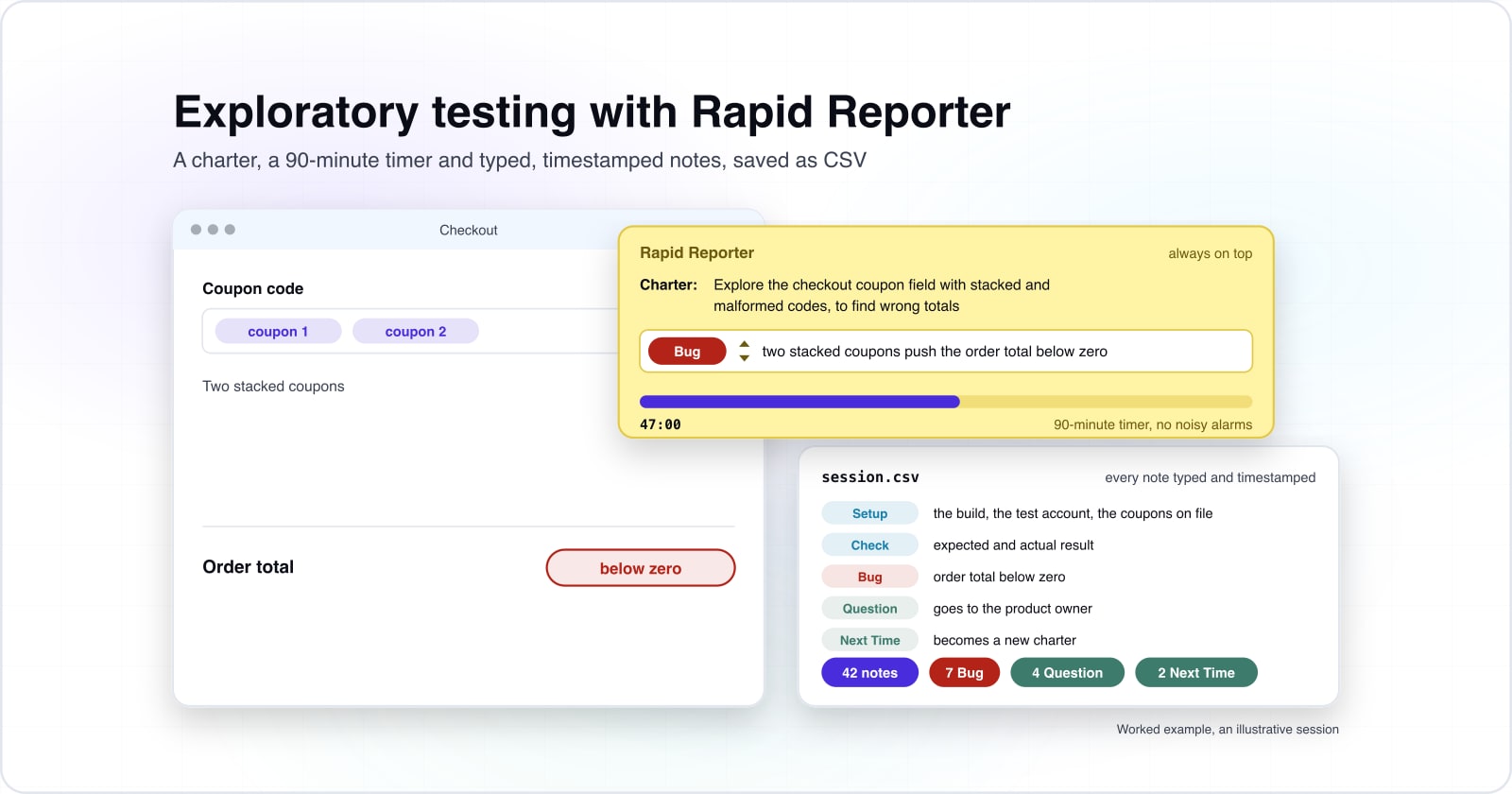
This worked example, an assumption built for illustration, runs one 90-minute charter against a checkout coupon-code flow and ends as a sheet of typed notes. The charter is the one from the charter section: stacked and malformed coupon codes, judged against the pricing rules.
The illustrative sheet holds 42 notes from start to finish. Setup notes record the build, the test account and the coupons on file. Test and Check notes pair an action with its expected and actual result. In this example session, 7 notes are Bug notes. The most serious one lands at 47:00, when two stacked coupons push the order total below zero.
Explore the checkout coupon field with stacked and malformed codes, to find wrong totals. Oracle: the price rules document.
- SetupBuild: the staging build under test, seeded catalogue
- SetupTest account: an existing customer with order history
- SetupCoupons on file: SAVE, FLAT, FREESHIP, WELCOME (new customers only), BULK (per item)
- SetupOracle: the price rules document plus the coupon admin settings
- SetupBrowser network panel open on the apply-coupon request
- TestApply SAVE to a three-item cart; expect the percentage off the goods
- CheckTotal matches the price rules document
- TestRemove SAVE; expect the original total back
- TestApply FLAT; expect a flat amount off the order
- CheckFlat amount applied once, total correct
- TestApply an expired code; expect a rejection
- CheckRejected with a clear "coupon has expired" message
- TestApply WELCOME on the existing account; expect a new-customer rejection
- BugWELCOME accepted for an existing account; the new-customer rule is not enforced
- TestEnter save in lowercase; expect the same result as SAVE
- CheckAccepted, case-insensitive as intended
- TestPaste a code with spaces around it; expect a trim and accept
- BugSpaces around a code are rejected as invalid; the input is not trimmed
- QuestionShould codes be trimmed on paste, or is an exact match intended?
- TestApply SAVE then FLAT; expect the one-coupon rule to block the second
- BugSAVE and FLAT both apply; the price rules allow one coupon per order
- TestApply BULK across the cart; expect the per-item discount
- CheckPer-item discount correct
- TestChange a quantity after a coupon is applied; expect a recalculation
- BugDiscount not recalculated after a quantity change; the old amount is kept
- TestStack two percentage coupons on a large cart; expect a block
- BugTwo stacked coupons push the order total below zero, and checkout stays enabled
- TestContinue to the test payment gateway with the total below zero
- BugPayment accepts the total below zero and the order is created
- TestApply FREESHIP; expect free shipping
- CheckShipping removed, goods unchanged, correct
- TestApply FREESHIP with SAVE; expect free shipping and the percentage off goods
- TestApply a coupon to an item already on sale; expect a precedence rule
- BugCoupon stacks on the sale price with no precedence; a double discount results
- TestApply a coupon, leave, return to the cart; expect a defined behaviour
- QuestionIs an applied coupon meant to survive a session timeout?
- TestSubmit a very long code; expect a graceful rejection
- TestApply a coupon through the API, skipping the form checks
- QuestionCan the API apply a coupon the form would reject?
- QuestionShould payment hold the order total at zero or above before it charges?
- Next TimeNew charter: the coupon API, its access rules and request limits
- Next TimeNew charter: retest stacking and the total below zero once fixes land
An illustrative, representative session, not Atyantik client data. Each note you add lands one minute after the last, and the export writes the whole sheet as CSV.
The roll-up is what the debrief reads first. In this example, 7 bugs go to triage, 4 questions go to the product owner, and 2 Next Time notes become new charters. Because Setup notes come first, the lead can also tell how long the environment took before testing began. Because every note carries a timestamp, the lead can also see where the session slowed down.
Then try adding a note of your own to the sheet. Pick a type, type one line, and watch the roll-up and the CSV change. That is the whole interaction Rapid Reporter asks of a tester during a session.
What is the TBS split of a test session?#
InfoQ's session-based test management article of 2 August 2021 puts one session at 80% test design and execution, 10% bug investigation and 10% setup. The writer estimated that split after one long session of their own, without timing each minute.
Show data table
| Segment | Value (percent) | Share |
|---|---|---|
| Test design and execution (T) | 80 | 80% |
| Bug investigation and reporting (B) | 10 | 10% |
| Session setup (S) | 10 | 10% |
Most of one session went to test design and execution, with a tenth each for bug work and setup.
Jonathan Bach's 2000 article defines the three tasks behind those letters. T is test design and execution, and B is bug investigation and reporting. S is session setup, which is anything else that makes the first two possible. It asks testers to estimate the share of each at the end of a session.
In practice, the TBS split is a debrief prompt, not a stopwatch. When a session shows high B time, it found trouble, so the lead asks what slowed the testing down. A session with high S time points at the environment, the data or the build. As a result, the split shows where testing time goes before anyone asks for more testers.
Rapid Reporter does not compute the split for you. Instead, its Setup, Test and Bug note types and their timestamps give you the evidence to estimate it honestly.
How is Rapid Reporter different from a plain notes file?#
A plain notes file holds whatever the tester types, while Rapid Reporter stamps every line with a time and a type, so a debrief can filter bugs or questions in a spreadsheet. The readme says the CSV can be opened and filtered in a spreadsheet. So a lead can look at one note type at a time.
In practice, three differences matter in a debrief. First, notes cannot be edited during the session, so the sheet tells the story in the order it happened. Second, the yellow window stays always on top, so the tester never hunts for the notes app. Finally, the CSV can be turned into an HTML report or combined with other sessions from the command line.
Because the CSV is plain text, any desktop search can also find a phrase across every past session. A text file can still work for one tester. However, you then invent the types, the timestamps and the export yourself, then keep every tester to that format. Rapid Reporter simply makes that format the default.
Which pages do you set up Rapid Reporter from?#
Set up Rapid Reporter from two pages by Shmuel Gershon: the tool page for the Windows and Mac downloads, then the readme for note types and reports.
- Step 1
Download
Rapid Reporter's tool page: version 1.22.02.28 for Windows needs .NET 3.5. Its Mac build needs OS X 10.10 or above.
- Step 2
Read
The Rapid Reporter readme, version 2.3 of 16 December 2012: the Charter note, custom note types and the HTML report.
- Step 3
Compare
A sample session report linked from the tool page: what a finished session report looks like.
Links: Rapid Reporter's tool page, The Rapid Reporter readme, A sample session report.
Since the program is one standalone file, the readme says it needs no installation and can run from a USB stick. Read the readme's Basic Usage section before your first session. It takes a few minutes and covers everything the window does.
Which Rapid Reporter commands set note types and build an HTML report?#
Two Rapid Reporter commands cover most needs: start the program with your own note types, then turn a finished session CSV into an HTML report. Both run from a Windows command prompt, as the readme shows.
# 1. Start a session with your team's own note types; every word after the program name becomes a type
RapidReporter.exe Setup Test Check Defect Question Lookup

# 2. Enter Reporter and Charter, test, then close the window.
#    The session is saved in the working folder as a CSV named by its start date and time.

# 3. Turn that finished session CSV into an HTML report with screenshots embedded
RapidReporter.exe -tohtml NAMEOFSESSIONFILE.CSV
The readme's own example renames Bug to Defect in the same way, to match workplace terms. Because the HTML report embeds screenshots, the readme suggests it for quick debriefs and for sessions shown to managers. Also, a file named style.css in the report's folder changes the report's look, for example to add a team logo.
When is Rapid Reporter the wrong tool?#
Rapid Reporter is the wrong tool when several testers must share live notes or roll metrics across sessions, where a test-management product with a session module fits better. It writes one CSV per session on one machine. Also, the readme's only way to combine sessions is a command that joins the files.
The first case is a team that pairs on live notes. A shared document or a test-management tool with exploratory sessions lets several people write at once.
The second case is a tester on a Linux desktop. The tool page offers Windows and Mac downloads only. Therefore a plain text file with agreed prefixes is the simpler choice there.
The third case is a lead who needs TBS and coverage numbers across dozens of testers. A test-management tool that stores sessions in a database will roll those up without a spreadsheet step. In return, it takes setup time, and every tester has to log notes inside it rather than in a window beside the product.
For a solo tester or a small team that debriefs in person, though, the small tool is usually enough.
Where does a session sheet go after the debrief?#
After the debrief, bug notes move to triage, repeatable checks move toward automation, and next-time notes become the charters for the following sessions.
Bug notes go to a triage meeting, where severity and priority get decided. See why bug triage discussions matter for how it works. Check notes that pass every time are candidates for scripts. Then how manual testing improves automation quality says which to move first.
While you are still choosing a stack, choosing the right testing tools for your project helps decide if a note tool belongs. For a view of the daily work a session sheet makes visible, read behind the scenes with software quality analysts. An accessibility charter is a common session, and this accessibility testing guide shows what to look for.
For chartered sessions run beside your own testers, Atyantik's QA analysts and accessibility testing service are two routes. Still, the readme and one honest charter are enough to start your first session today.